The Easiest Way To Dive In To ARM Programming

[Brad] has been very excited about an ARM Cortex-M0 chip released by NXP; it’s a fully featured ARM microcontroller, and is, quite amazingly, stuffed into a hobbyist and breadboard-friendly DIP-28 package. After finding a supplier for this chip, [Brad] dove in and put together a great tutorial for programming an ARM on the breadboard using open source tools.

The chip in question is NXP’s LPC1114FN28, a 28-pin breadboard friendly chip we’ve posted about before. After finding a single supplier for this microcontroller (only $1.26 for one chip!), [Brad] pulled out his breadboard and started wiring things up.

Because this microcontroller has an on-board oscillator, wiring up a breadboard and putting in a breakout for an FTDI cable was a snap. After configuring a toolchain and writing a bit of code, the only issue was uploading the code to the chip. This was handled by the lpc21isp programming tool, slightly modified and configured by [Brad] to support his favorite microcontroller.

The LPC1114FN28 is an impressive bit of kit, and with free tools to program the damn thing, we can’t wait for a homebrew ARM dev board to show up.
Wireless Upgrade For A Heathkit HERO 1 Robot

F3DDY

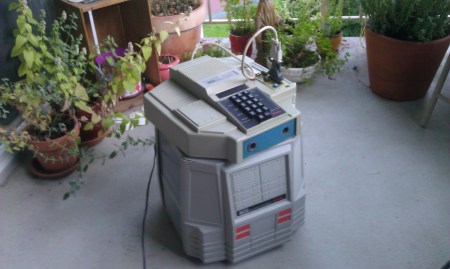
For those of you that don’t know, the Heathkit HERO (Heathkit Educational Robot) was a ‘bot built in the early 1980s. [Rick] wasn’t satisfied with his model ETW-18’s programming interface, so decided to upgrade it to be able to run Python using a hacked wireless router. We’d agree that things have advanced since then, since this little guy was originally programmed in machine code using an onboard keypad.  As [Rick] points out, it’s “exactly as awful” as it sounds!

To begin restoring and upgrading his robot, a kit was obtained from [hero-1] to allow for a serial programming interface. Although an improvement, the desire was to be able to program this robot using Python, and to not have to have a cable running across the floor all the time. A router with a serial port was obtained from a thrift store, then hacked using [OpenWrt]. After fitting the components into the robot, [FR3DDY] was born, “A ~30 year old robot, accessible through wifi, capable of running Python.”

Be sure to check out his site, which has some videos we weren’t able to embed. He’s also included some Python code that he used to program it. If this has made you curious about the Python language, why not check out this recent post about learning it the hard way?

Building A Very Low Power, Full Featured Desktop

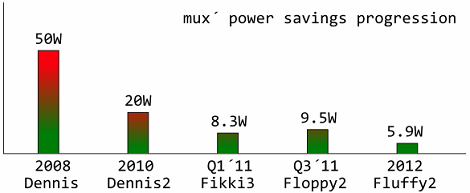
For a few years now, [mux] has been playing around with extremely efficient computation. In 2010, he built a fully featured MiniITX / Core 2 duo computer that only consumed 20 watts. Last year, [mux] managed to build an Intel i3-powered desktop that was able to sip a mere 8.3 watts at idle. He’s back at it again, and now his sights are set on a fully featured Intel i5-powered build with a built-in monitor that will draw less than 6 watts of power.

Like his previous 8 watt i3 build, [mux] reduces the power requirement of his build by carefully measuring the power draw of every component on his board. The power savings come from a simple fact of any power supply; when converting from AC to DC, or from one DC voltage to another, there’s always a little bit of power lost in the process.

[mux] reduces these power losses by removing a few voltage regulators and re-routing power lines across his motherboard. So far, the power draw on [mux]’s computer is more than half of what it was when the parts were stock, and we can’t wait for the finished build that includes a built-in monitor, UPS, and a proper case.

Hacking A Floating RGB LED Decorative Ball

Knowing that I’m always happy to get something new and glowy, my wife brought home a cheap “floating pool light” that she found on sale for roughly $10. This is a large white floating ball that has LEDs inside and cycles through different colors. Meant to be put into a pool for neat effects, we found it to be much more interesting just used around the house.

However, it was a bit too bright and cycled colors too quickly for our taste. It was actually somewhat distracting when we were just trying to sit and have a few beers late at night on our patio. This gave me a perfect excuse to tear it apart and start hacking… like I wasn’t going to do that anyway.

What I found inside was extremely simple. There’s a single un-marked chip that holds the different display modes (there were 3 display modes: warm, cool, and white). The LEDs were arranged in an array of Reds, Blues, Greens, and Whites (half marked yellow).

Continue reading “Hacking A Floating RGB LED Decorative Ball”

Le-GoKART; A GoKart Built Entirely From Lego

[Eric Steenstra], from the Netherlands, decided to build a GoKart entirely from LEGO Mindstorm parts. Tested at being able to carry just over 100Kg in weight, a 16 stone man(224 lbs). This GoKart can easily carry a child and propel him along. Eric used 48 stock Mindstorm motors, geared down,  and 16 battery packs to provide a balance between torque and speed.

This vehicle doesn’t expect to win any races in the speed department. From the point of view of being something different this wins hands down. The Karts first test drive was only two weeks ago so drivability and durability are still under development at this stage.  See the video after the break on this monstrous Mindstorms creation.

via[Make]

Continue reading “Le-GoKART; A GoKart Built Entirely From Lego”

A Fifty-dollar Projection Screen You Can Be Proud Of

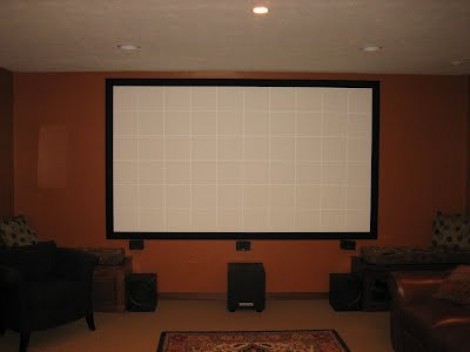
[Lou] wrote in to share the fifty-dollar projection screen he built in his home. We’ve seen several of these projects lately. Unlike the one used at a lake cabin, or the other that fills an awkward alcove, this version doesn’t use fabric for the screen. He actually painted it right on the wall.

The key to achieving a great end product is to make sure your wall is flat. [Lou’s] instructional video (embedded after the break) shows how to patch holes in the wall, and repair high spots. Before beginning the process he uses his projector’s grid feature to map out the portion of the wall that will be used as a viewing area (that’s the grid seen on the screen above). Once the area has been marked with masking tape and carefully repaired he paints it with bright white or silver paint. You might also consider a paint additive for better results. We’ve seen sand blasting beads used for this purpose.

A frame is added to the area to make it look like a proper screen. This is nothing more than molding covered in black fabric. [Lou] stretches the fabric around the molding, using duct tape to hold it in place until it can be stapled down.

Continue reading “A Fifty-dollar Projection Screen You Can Be Proud Of”

Building The Best Homebrew Computer Ever

A few days ago when I posted a homebrew Motorola 68000 computer spectacular, I briefly mentioned a truly spectacular homebrew computer built by [Simon Ferber]. When I posted a link to a Youtube demo of his 68k board, he was working on a website to document the architecture  design, hardware, and software. That website is now up (cache if you need it) and now we can all get a good look at the best homebrew computer ever built.

Built around the 68008 CPU – slightly less capable than the 68000 found in the original Macs, Amigas, and the TI-89 – [Simon]’s Kiwi computer has peripherals out the wazoo. A Yamaha V9990 Video Display Processor provides a 640×480 display with 32k colors. Two SID chips taken from a Commodore 64 provide stereo chiptune audio, and a floppy disk controller, IDE/ATA bus, and CS8900A Ethernet controller provide all the practical functionality you’d expect from an awesome computer.

On the software side of things, [Simon] is running Enhanced Basic 68k, but of course he can’t just use BASIC to fiddle around with all the cool chips on the Kiwi. With that in mind, he came up with a C-based toolchain that included porting libc to the Kiwi.

Like any good homebrew computer project, all the schematics, a bit of code, and a BOM are provided. [Simon] is currently working on (slightly) redesigning the PCB layout of the Kiwi, and we’ll be happy to see those files released. Anyone up for a Kiwi PCB group buy?