WiFi Experiments With ATtiny Microcontrollers

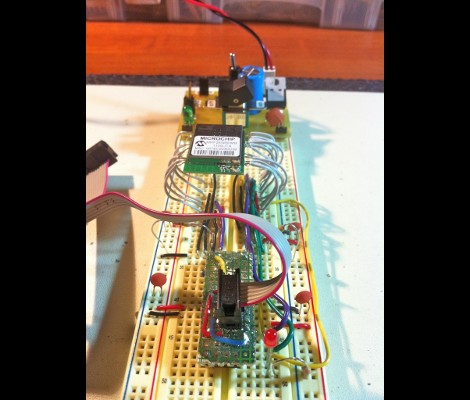
[Quinn Dunki] got some free stuff from Element14 to evaluate, including this Mircrochip WiFi module. It’s been used as the centerpiece of an Arduino shield in the past, and she grabbed a copy of that library to see if it would play nicely with an ATtiny chip. What follows is a struggle to de-Arduino the code so that it’s portable for all AVR controllers.

This module is one of the least expensive ways to add WiFi to a project, coming in at around $23. But it’s not really an all-in-one solution as there’s still a huge software hurdle to cross. The hardware provides access to to radio functions needed to communicate with the network, but you need to supply the TCP/IP stack and everything that supports it. Hence the re-use of the Arduino library.

Battling adversity [Quinn] fought the good fight with this one. Switching from an ATtiny to the ATmega168, compiling more code, and troubleshooting the process. She used a single LED as feedback, and can get some connectivity with her hotspot. But to this point she hasn’t gotten everything up and running.

We’re hot for an AVR WiFi solution that is cheap and easy to use. But as we see here, the software is complex and perhaps best left up to beefier hardware like the ARM controllers. What do you think?
Build Your Own 4-channel Logic Analyzer

If you’re just getting into hobby electronics chances are there are lots of tools you’d like to get you hands on but can’t yet justify the purchases. Why not build some of the simpler ones? Here’s a great example of a 4-channel logic analyzer that can be your next project and will add to your arsenal for future endeavors.

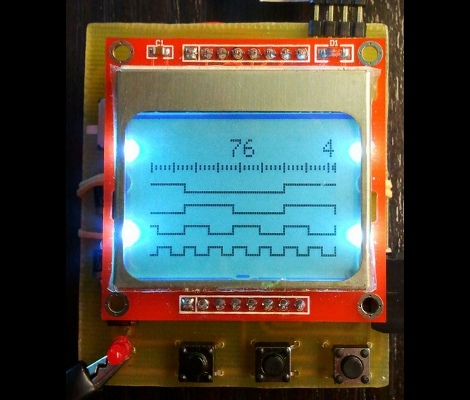
As you can see, [Vassilis’] creation uses a cellphone-sized LCD screen as the output. It is powered by four rechargeable batteries and driven by an ATmega8 microcontroller. He’s designed the tool without power regulation, relying on the ATmega’s rather wide range of operating voltages, and a few diodes to step down that voltage for the LCD screen.

As you can see in the clip after the break, alligator leads can be used to connect the test circuit to the inputs (don’t forget the ground reference!). Thee buttons at the bottom let you navigate the captured data by panning and zooming. Perhaps the best design feature is the single-sided circuit board which should be quite easy to reproduce at home.

Continue reading “Build Your Own 4-channel Logic Analyzer”

Web Game Bot Coded With Python

We find the programming challenge of game-playing bots to be fascinating. Take a look at this Python bot which plays Burrito Bison all the way through (video after the break). This is a totally pedantic exercise which has no purpose, other than to hone your mastery of a certain programming problem. And to that we say Bravo!

We looked in on a similar project which used some C# code to dominate the game Bejeweled Blitz. We’re not fantastic at C# and that code was never made public. But [Audionatics] has released this code through Github, and it’s written in Python which is a language in which we’re well versed.

The script monitors pixel locations to use as an input, which [Audionautics] admits is very error-prone. But if everything is setup just right it works like a charm. He’s also using the PyWin package which we believe is what lets the script move the cursor and register button clicks. We think this is really fun, but it make us wonder about the black-hat possibilities. What are the chances this could be turned into a gambling bot? Scary thought, huh?

Continue reading “Web Game Bot Coded With Python”

Circuit Playground – An Electronics Reference App From Adafruit

It’s not everyday that we review software around here, but the folks at Adafruit recently put together an iOS app that I figured might be of interest. Their iPad/iPhone compatible application is called “Circuit Playground”, and it includes all sorts of handy electronics reference tools. For the context of this review, it should be noted that I paid for the application myself, and that I have had no communication with the Adafruit team regarding my assessment of the app.

Continue reading “Circuit Playground – An Electronics Reference App From Adafruit”

Tweets Send Your Balls Flying (on TV)

Members from the London Hackerspace recently got a little on-air time with a ping pong ball launcher. They were invited to build something for the Click show on BBC. The launcher that they built responds to hash tags on Twitter by barraging the audience with balls.

The hardware was built in two parts. The first is a dispenser that responds to incoming Tweets by releasing one ball onto a set of staging ramps. The other portion is the launcher itself. Building it like this makes it a rapid fire device, as the spinning wheels of the launcher make quick work of several dozen balls just waiting to be let loose. Check out some footage from the show after the jump.

We like this one just as much as that remote controlled launcher. We’re glad to have seen these both because we happen to have a surplus of the balls lying around since we built that clock and we’re not about to undertake some of the more dangerous ping pong based projects we’ve seen. Continue reading “Tweets Send Your Balls Flying (on TV)”

Color Sensor Gives The RGB Values Of Anything

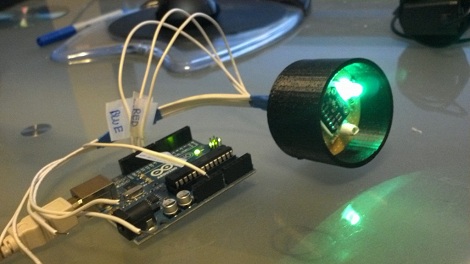
[Rick Osgood] wanted to build a color sensor that could be held up to any object to get RGB color values. He originally started with a photoresistor and a few LEDs, but couldn’t get that to work reliably. [Rick] finally completed his color sensor after finding a digital luminosity sensor on Adafruit, ending up with a pretty accurate piece of hardware to judge the color of something.

The idea behind the color sensor is to light up red, green, and blue LEDs and see how much light is reflected back from the object with a luminosity sensor. [Rick] chose an Arduino to do all the heavy lifting for the light sensor and activating the LEDs.

After a few tests [Rick] got his color sensor working, but it’s not up to par with what he had expected. This isn’t really a problem: the LEDs probably don’t have the same brightness and the luminosity sensor doesn’t respond evenly across the entire rainbow. Those things can always be fixed in software, though. It’s a nice project that could serve as part of a prototype for this color picker pen.

Beer Mini-kegs Turned Into A Cyclonic Dust Collector

[Darrell] made his own cyclonic dust separator which connects to a shop vac. We’re amused by his poke at Dyson’s marketing machine where he mentions that the ads say it took years to perfect those vacuum cleaners and he managed to put his together in a few hours…. from trash/recyclables no less!

Two mini-kegs are used as the separating vessel. The only other parts are some PVC plumbing fittings which help to direct the air and give him a way to attach the collector to the shop vac. The top keg is where all of the magic happens. Air and debris is sucked in through the hose coming in the side wall. A 45 degree elbow directs it downward and to the side, which starts the cyclonic action. The shop vac is attached to the tube in the top, with a cylinder extending into the keg. The spinning air must make a sharp turn to get into that cylinder; it’s at this point the debris drops out into the lower keg. See for yourself in the clip after the break.

This isn’t the first time we’ve seen dust collectors that use this concept. [Darrell] pointed out this one made out of plastic cups, and this other made from a 5-gallon bucket.

Continue reading “Beer Mini-kegs Turned Into A Cyclonic Dust Collector”