Be A Part Of The Best Hardware Conference Ever

The 2016 Hackaday SuperConference is on. If you haven’t had time to submit your proposal for a talk or workshop at the world’s greatest conference for hardware, now is the time to do it. We’re looking for everything – war stories from deep in the trenches or next to the pick and place, the problem of having your board house 5,000 miles from your lab, and that time you accidentally discovered P=NP in the firmware of a reflow toaster oven.

2016SuperconTeaser-cfpThe Hackaday Supercon will be in Pasadena, California on November 5th and 6th, and will be the host of hundreds of hackers, designers, engineers, and the only makers that you want to meet. We’re going to have several venues with talks, workshops, and other various activities.

Talks will be scheduled for 20-40 minutes, and workshops will be scheduled for 1-4 hours. In both cases, topics can range from rapid prototyping, new and interesting techniques, creativity in technical design, and stories of product development and manufacturing.

Last year’s SuperConference was the greatest hardware conference we’ve ever seen. That success was due entirely to the talented engineers, speakers, and presenters of the Hackaday community who put together their stories to share for the benefit of all. If you couldn’t make it, you can still check out all the talks from last year.

If you’re reading this and think you should propose a talk, do it!. Submit your proposal. This conference is only a success because of the awesome Hackaday community and the efforts of readers just like you.

If you’re wondering what the usual talk at the Hackaday Supercon is like, I present (below) the greatest talk I have ever seen. It’s [Jeroen Domburg] a.k.a. [sprite_tm]’s efforts to create a Matrix of Tamagotchis. It’s thirteen Tamagotchis, fully virtualized, emulated, and running on a server, going about their lives without any awareness they’re inside a computer.

Continue reading “Be A Part Of The Best Hardware Conference Ever”

Google Unveils Their Experimental Plan For Wireless Broadband Service

Two years ago, the FCC, with interested parties in Microsoft, Google, and many startups, created the Citizens Band Radio Service (CBRS), a rule that would open up the 3550-3650 MHz band  to anyone, or any company, to create their own wireless backbone between WiFi access points. It is the wireless solution to the last-mile problem, and last year the FCC enthusiastically endorsed the creation of the CBRS.

In a recently released FCC filing, Google has announced their experimental protocol for testing the new CBRS. This isn’t fast Internet to a lamp pole on the corner of the street yet, but it lays the groundwork for how the CBRS will function, and how well it will perform.

Google will be testing the propagation and interference of transmissions in the 3.5 GHz band in places around the US. Most of the Bay Area will be covered in the tests, as well as Boulder, CO, Kansas City, Omaha, Raleigh, NC, Provo, UT, and Reston, VA. Tests will consist of a simple CW tone broadcast in the 3.5 GHz band.

The 3.5 GHz band is already allocated to shipborne navigation and military radar systems, posing an obvious problem to any wireless broadband system using this spectrum. To this end, the FCC is proposing a novel solution to the problem of coexistence between the CBRS and the military. Instead of simply banning transmissions in the spectrum, FCC Chairman Wheeler proposes, “computer systems can act like spectrum traffic cops.” A computer is able to direct the wireless traffic much more effectively than a blanket ban, and will allow better utilization of limited spectrum.

Google’s FCC filing is just for testing propagation and interference, and we have yet to hear anything about how a network built on 3.5 GHz spectrum will be laid out. One thing is for certain, though: you will not have a 3.5 GHz USB networking dongle for the same reason you don’t have a Google Fiber input on your desktop.

Laser Sequencer Uses Arduino To Enable Super-Microscope!

pcb
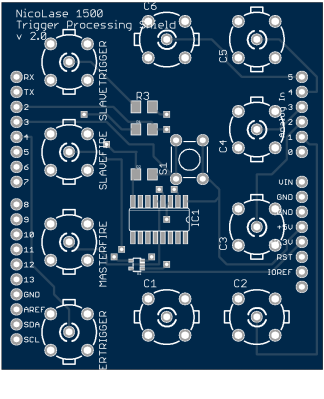
[Philip]’s Laser control Arduino shield.

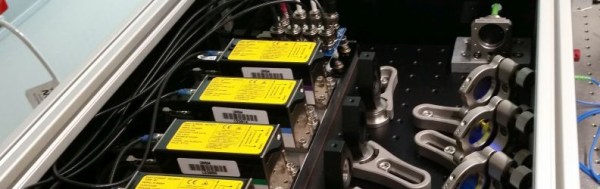
[Philip Nicovich] has been building laser sequencers over at the University of New South Wales. His platform is used to sequence laser excitation on his fluorescence microscopy systems. In [Philip]’s case, these systems are used for super-resolution microscopy, that is breaking the diffraction limit allowing the imaging of structures of only a few nanometers (1 millionth of a millimeter) in size.

Using an Arduino shield he designed in Eagle, [Philip] was able to build the system for less than half the cost of a commercial platform.

The control system is build around the simple Arduino shield shown to the right, which uses simple 74 series logic to send TTL control signals to the laser diodes used in his rig. The Arduino runs code which allows laser firing sequences to be programmed and executed.

[Philip] also provides scripts which show how the Arduino can be interfaced with the open source micro manager control software.

NicoLase1500EnclosureRender

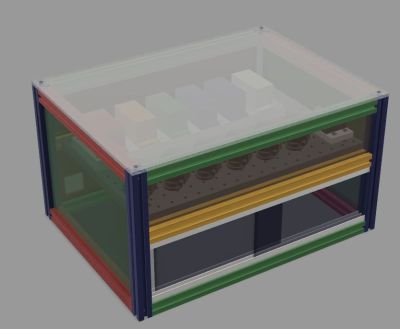
As well as the schematics [Philip] has provided STEP files and drawings for the enclosure and mounts used in the system and a detailed BOM.

More useful than all this perhaps is the comprehensive write-up he provides. This describes the motivation for decisions such as the use of aluminum over steel due to its ability to transfer heat more effectively, and not to use thermal paste due to out-gassing.

While I can almost hear the cries of “not a hack”, the growing use of open source platforms and tool in academia fills us with joy. Thanks for the write-up [Philip] we look forward to hearing more about your laser systems in the future!

Hackaday Prize Entry: A Cheap STM32 Dev Board

Dev boards sporting a powerful ARM microcontroller are the future, despite what a gaggle of Arduino clones from China will tell you. Being the future doesn’t mean there’s not plenty of these boards around, though. The LeafLabs Maple has been around since 2009, and is a fine board if you want all that Processing/Wiring/Arduino goodies in a in an ARM dev board. The Maple has been EOL’d, and that means it’s time for a few new boards that build on what LeafLabs left behind.

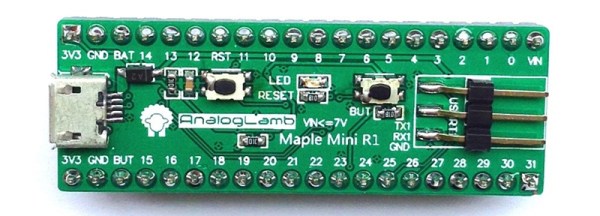
This Hackaday Prize entry is for an almost-clone of the Leaflabs Maple Mini. It sports a newer microcontroller, but still has the same bootloader and pinout. The best part? It costs less than four dollars.

The microcontroller inside this Maple Mini clone is the STM32F103, a 32-bit ARM Cortex-M3 running at 72 MHz with 128K of Flash and 20K of SRAM. That’s enough for just about everything you would want to throw at it. It also follows the pinout of the original Maple Mini, and the team also has a version that’s a slight improvement of the original Maple.

The big deal is, of course, the price of the board. It’s four bucks, or about the same price as an Arduino clone from the usual online retailers. Now, finally, there’s a reason for you to wash your hands of the Arduino too.

Secret Riddle Retro Radio

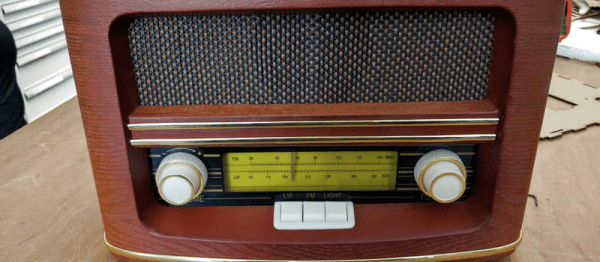
When [the-rene] was building an escape room, he decided to have a clue delivered by radio. Well, not exactly radio, but rather an old-fashioned radio that lets you tune to a faux radio station that asks a riddle. When you solve the riddle, a secret compartment opens up. [the-rene] says you could have the compartment contain a key or a clue or even a cookie.

The outer case is actually an old radio gutted for this purpose. In addition, a laser cut box and a servo motor form the secret compartment.

Continue reading “Secret Riddle Retro Radio”

Hackaday Links: August 14, 2016

Hey London peeps! Hackaday and Tindie are doing a London meetup! It’s this Wednesday, the 17th.

What do you do if you need Gigabytes of storages in the 80s? You get tape drives. What do you do if you need Terabytes of storage in the year 2000? You get tape. The IBM Totalstorage 3584 is an automated tape storage unit made sometime around the year 2000. It held Terabytes of data, and [Stephen] picked up two of them from a local university. Here’s the teardown. Unfortunately, there’s no footage from a GoPro stuck inside the machine when it’s changing tapes, but the teardown was respectable, netting two drives, the power supplies, and huge motors, fans, relays, and breakers.

A few years ago Motorola released the Lapdock, a CPU-less laptop with inputs for HDMI and USB. This was, and still is, a great idea – we’re all carrying powerful computers in our pocket, and carrying around a smartphone and a laptop is effort duplication. As you would expect, the best use for the Lapdock was with a Raspberry Pi, and prices of Lapdocks have gone through the roof in the last few years. The Superbook is the latest evolution of this Lapdock idea. It’s a small, thin, CPU-less laptop that connects to a phone using a special app and a USB cable. It also works with the Raspberry Pi. Very interesting, even if they didn’t swap the CTRL and Caps Lock keys as God intended.

Did you know we have a store? Yes! It’s true! Right now we need to get rid of some stuff, so we’re having a clearance sale. We got FPGA Arduino shields! Buy a cordwood puzzle! SUPERLIMINAL ADVERTISING.

The computers aboard Federation vessels in the 24th century were based on isolinear chips. Each chip plugged into a backplane, apparently giving certain sections of the ship different functions. Think of it as a reconfigurable PDP Straight-8. This is canon, from TNG, and doesn’t make any sense. [Bohrdasaplank] over on Thingiverse has a few different models of isolinear chips. After close examination of these chips, we can only come to one conclusion.

How do you get a pilot bearing out of a motor? The normal way is using grease (or caulk, or some other gooey substance) as a hydraulic ram, but a slice of bread works much better. This is a weird one, but it works perfectly, with hardly any cleanup whatsoever.

542-page PDF warning here. Here’s the operations manual for the Apollo 15, including operation of the AGC, how to fly the LM, the planned traverses and EVAs, and a nice glossary of handy equations. If anyone’s looking for a LaTeX, InDesign, or bookbinding project that would make the perfect bathroom reader, this is it.

Here’s something I’ve been having trouble with. This is an mATX computer case with a screen on the side and a cover for the screen that includes a keyboard and trackpad. Yes, it’s a modern version of the luggable, ‘portable’, plasma-screen monsters of the 80s. I don’t know where I can buy just the case, so I’m turning to the Hackaday community. There’s an entire line of modern luggable computers made by some factory in Taiwan, but as far as I can tell, they only sell to resellers who put their own mobo and CPU in the machine. I just want the case. Where can I buy something like this? If you’re asking why anyone would want something like this, you can put two 1080s in SLI and still have a reasonably portable computer. That’s a VR machine, right there.

Nuka-Cola PC Case Really Glows

It’s hard to imagine a video game series with more potential for cool prop projects than Fallout. The Fallout series has a beautiful and unique art style that is chock full of potential for real-world builds. Pip-Boys, Fat Mans, and power armor projects abound. But, most of these projects are purely aesthetic: something to stick on a shelf and show off to your fellow geeks.

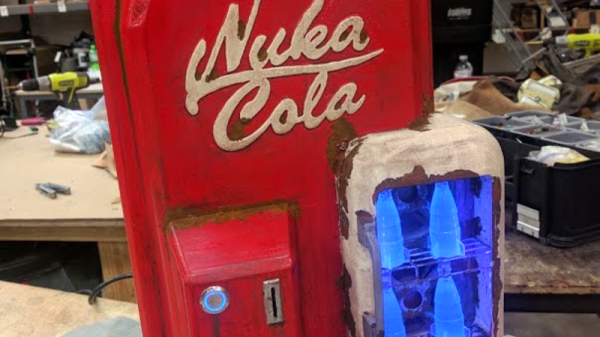
[themitch22] wanted something he could actually use, and what does a geek use more than their computer? Thus, he set out to create a Fallout-themed PC case, and a Nuka-Cola vending machine was the perfect choice for inspiration.

The attention to detail on the build is astounding, with a functional display (powered by a Raspberry Pi), glowing Nuka-Cola Quantum bottles, and weathering to make it feel like it has survived a nuclear apocalypse. He was also kind enough to post pictures of the entire process, which shows how all of the parts were 3D-printed and assembled.

Need some more Fallout goodness to inspire you next build? Check out this amazing Pip-Boy replica we featured last year.

[thanks to Nils Hitze for the tip]