Make Your Own Tires For RC Cars

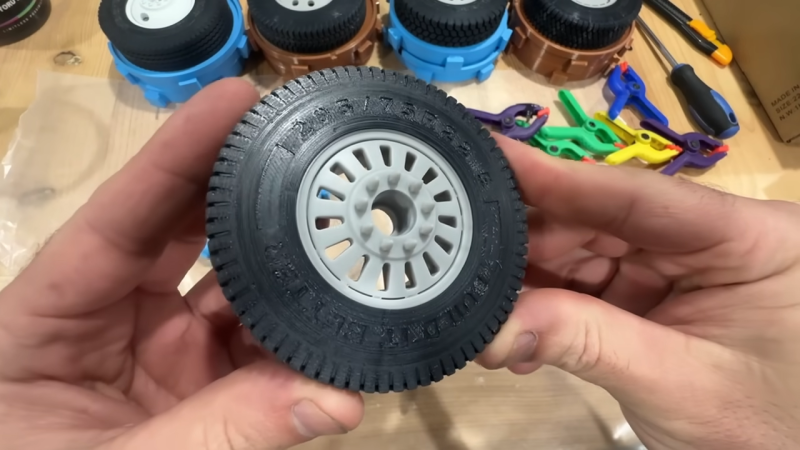
You can buy a wide range of RC car tires off the shelf. Still, sometimes it can be hard to find exactly what you’re looking for, particularly if you want weird sizes, strange treads, or something that is very specifically scale-accurate. In any of these cases, you might like to make your own tires. [Build It Better] shows us how to do just that!

Making your own tires is fairly straightforward once you know how. You start out by producing a 3D model of your desired tire. You then create a two-piece negative mold of the tire, which can then be printed out on a 3D printer; [Build It Better] provides several designs online. From there, it’s simply a matter of filling the tire molds with silicone rubber, degassing, and waiting for them to set. All you have to do then is demold the parts, do a little trimming and post-processing, and you’ve got a fresh set of boots for your favorite RC machine.

[Build It Better] does a great job of demonstrating the process, including the basic steps required to get satisfactory results. We’ve featured some other great molding tutorials before, too. Video after the break.
Continue reading “Make Your Own Tires For RC Cars”

Memory At The Speed Of Light

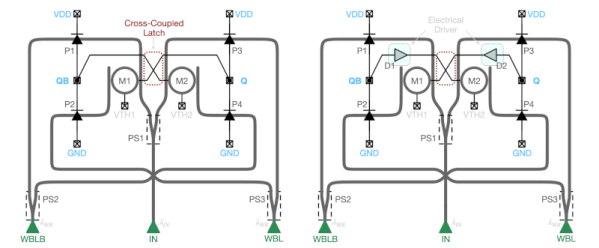
Look inside a science fiction computer, and you’ll probably see tubes and cubes that emit light. Of course, it’s for effect, but the truth is, people do think light computing may be the final frontier of classical computing power. Engineers at the University of Southern California Information Sciences Institute and the University of Wisconsin-Madison are showing off a workable photonic latch — a memory element that uses light.

The device uses a commercial process (GlobalFoundries (GF) Fotonix Silicon Photonics platform) and, like a DRAM, regenerates periodically to prevent loss of the memory contents.

Continue reading “Memory At The Speed Of Light”

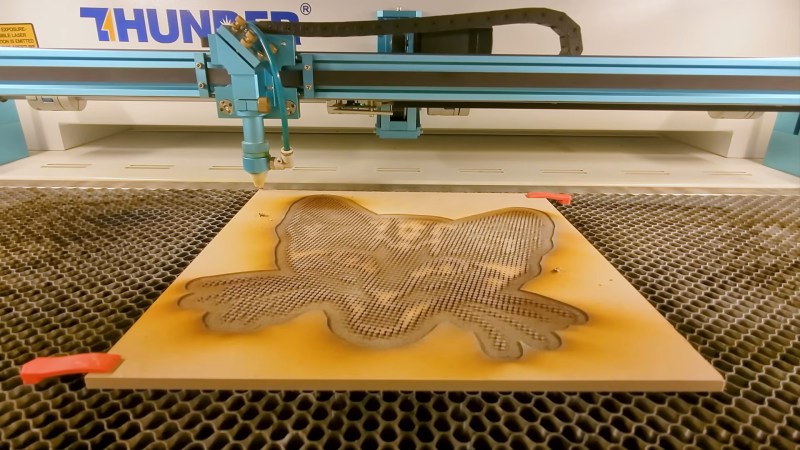
One of four MDF half-tone blocks coming off the laser cutter.

Laser Cutter Plus CYMK Spraypaint Equals Full-Color Prints

This is one of those fun hacks that come about from finding a product and going “I wonder if I could…” — in this case, artist/YouTuber [Wesley Treat] found out his favourite vendor makes spray cans in CYMK colours– that is the Cyan, Yellow, Magenta and blacK required for subtractive printing. Which got him wondering: can I make full-colour prints with this paint?

MDF block print
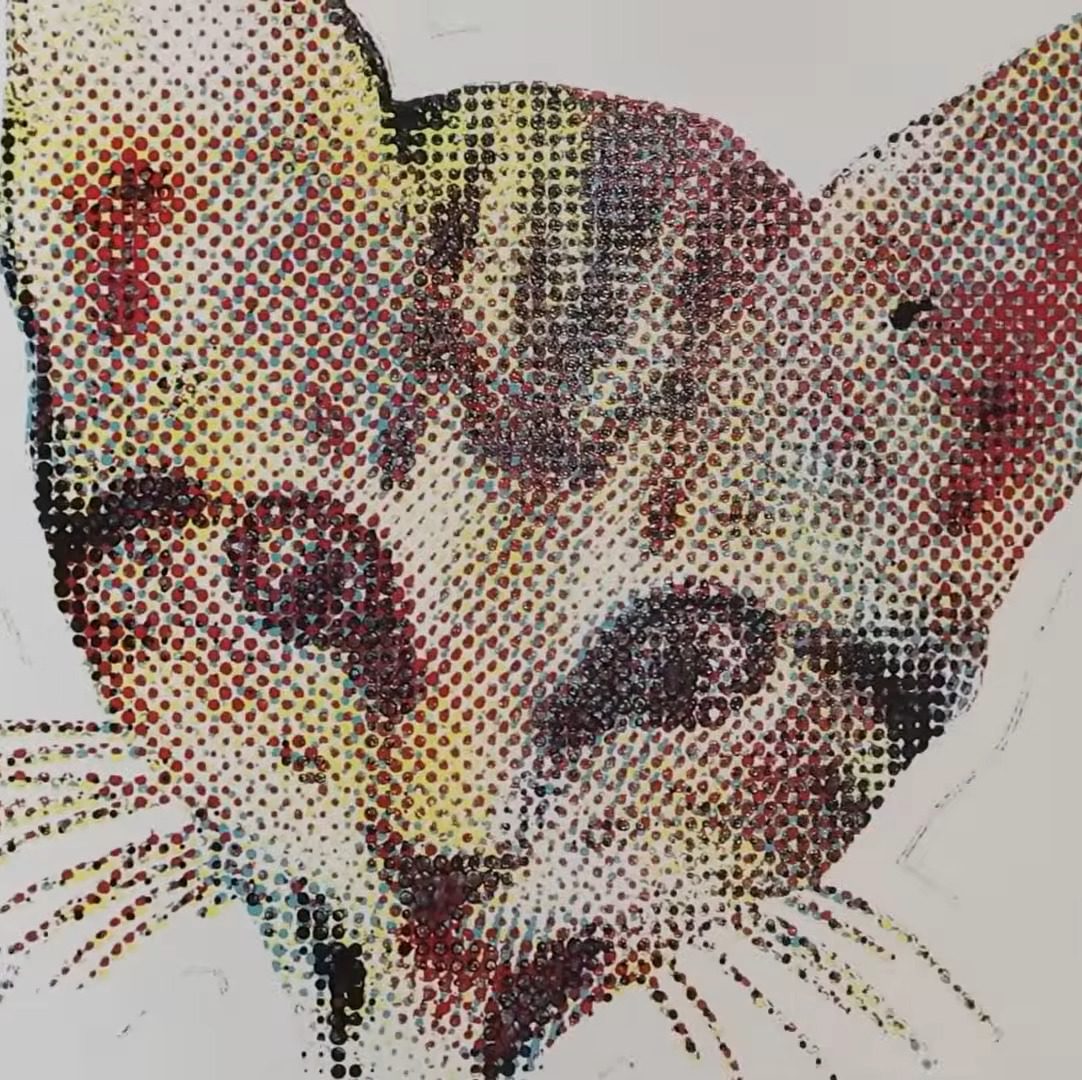
The MDF-based print, with naive half-tone dots.

His answer was “yes”, and the process to do so is fairly simple. First, split the image into colour channels, generate a half-tone pattern for each one, and carve it out of MDF on the laser. Then spray the MDF with the appropriate colour spray paint. Press the page against each block in turn, and voila! A full colour print block print, albeit at very low DPI compared to your average inkjet.

Now, you might be wondering, why half-tone instead of mixing? Well, it turns out that these CYMK paints are too opaque for that to work in a block-printing process. At least with a naive spray technique; [Weseley] does admit a very fine mist might be able to make that work. The second question is why not just hook the rattle cans into a CNC machine for a paint-based mega inkjet? That’s a great question and we hope someone tries it, but [Weseley] evidently likes block-printing so he tried that first.

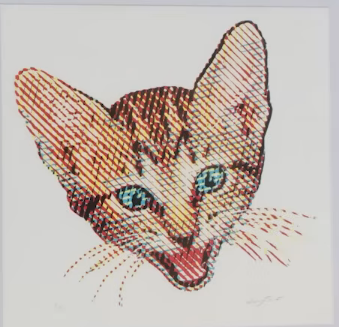
The Mylar stencil print, with a more artistic half-tone pattern.

Laser-ablating enough MDF away to make decent print blocks took too long for [Weseley]’s tastes, however, so he switched to using mylar stencils. Instead of spraying a block and pressing onto it, the paint is sprayed through the stencil. The 10 mil Mylar not only cuts faster, but can support finer detail. Though the resulting prints lose some of the artistic flair the inconsistencies block printing brings, it probably looks better.

If you prefer to skip the manual paint-can-handling, perhaps we can interest you in a spray-can plotter. If you do like manually flinging paint, perhaps you could try this dot-painting spray can attachment, for a more self-directed half-tone.

Thanks to [Keith Olson] for the tip.

Continue reading “Laser Cutter Plus CYMK Spraypaint Equals Full-Color Prints”

Building A Granular Sampler Synth

Synthesizing sounds from scratch is all well and good, you just use a bit of maths. However, the latest build from [Daisy] eschews such boring concepts as additive or subtractive synthesis, instead going for a sample-based approach.

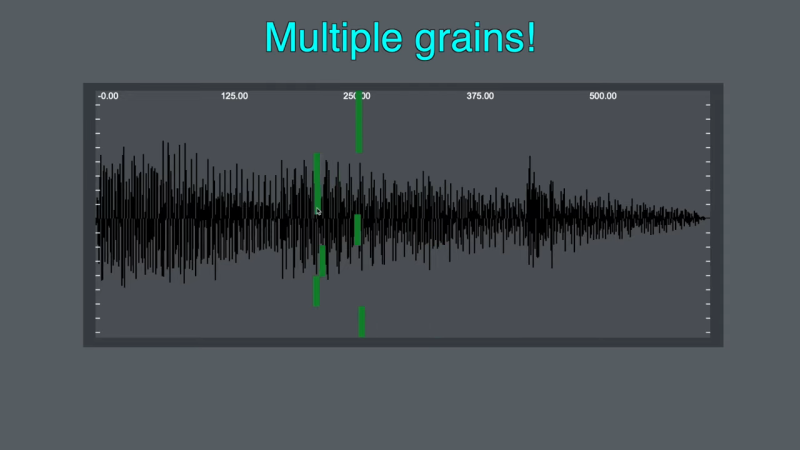
This build is based around the Daisy Seed microcontroller platform. It was actually inspired by an earlier project to create a ribbon synth, which we covered previously. In this case, the ribbon potentiometer has been repurposed, being used to control the playback position of a lengthy recorded sample. In this build, the Daisy Seed is running its audio playback system at a rate of 48,000 samples per second. It’s capable of storing up to 192,000 samples in memory, so it has a total of 4 seconds of sample storage. The Daisy Seed uses an analog-to-digital input to record two seconds of audio into the sample buffer. It can then be replayed by placing a finger on the ribbon at various points. Playback is via granular synthesis, where small sections of the overall sample buffer are used to synthesize a new tone. The video explains how the granular synthesis algorithm is implemented using the Plugdata framework. Design files are available for those eager to replicate the build.

Once you start tinkering in the world of synthesis, it’s easy to fall down the rabbit hole. Video after the break.

Continue reading “Building A Granular Sampler Synth”

Debugging The AMD GPU

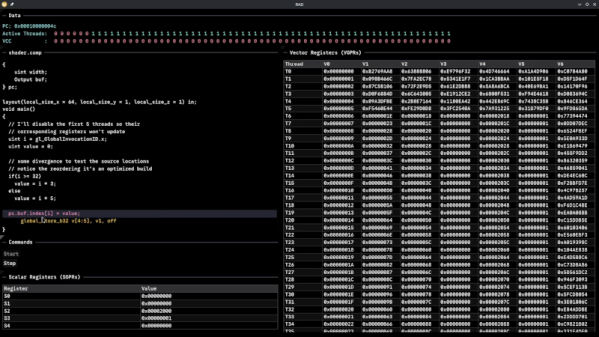
Although Robert F. Kennedy gets the credit for popularizing it, George Bernard Shaw said: “Some men see things as they are and say, ‘Why?’ I dream of things that never were and say, ‘Why not?'” Well, [Hadz] didn’t wonder why there weren’t many GPU debuggers. Instead, [Hadz] decided to create one.

It wasn’t the first; he found some blog posts by [Marcell Kiss] that helped, and that led to a series of experiments you’ll enjoy reading about. Plus, don’t miss the video below that shows off a live demo.

It seems that if you don’t have an AMD GPU, this may not be directly useful. But it is still a fascinating peek under the covers of a modern graphics card. Ever wonder how to interact with a video card without using something like Vulkan? This post will tell you how.

Writing a debugger is usually a tricky business anyway. Working with the strange GPU architecture makes it even stranger. Traps let you gain control, but implementing features like breakpoints and single-stepping isn’t simple.

We’ve used things like CUDA and OpenCL, but we haven’t been this far down in the weeds. At least, not yet. CUDA, of course, is specific to NVIDIA cards, isn’t it?

Continue reading “Debugging The AMD GPU”

Illustrated Kristina with an IBM Model M keyboard floating between her hands.

Keebin’ With Kristina: The One With The Curious Keyboards

I love first builds! They say so much about a person, because you see what’s paramount to them in a keyboard. You can almost feel their frustration at other keyboards come through their design choices. And the Lobo by [no-restarts] is no exception to any of this.

There’s just something about this Corne-like object with its custom case and highly-tappable and variously tilted keycaps. The list of reasons for being begins innocently enough with [no-restarts] wanting a picture of their dog on the case.

A nicely-tented split keyboard with really interesting, 3D-printed keycap profiles.
Image by [no-restarts] via reddit
From there, things get really personal. You may notice the thumb cluster is slightly different — [no-restarts] doesn’t like the thumb tuck required by the Corne to reach the innermost keys. I really dig the homing bumps on the middle thumb keys. Another difference is the splayed layout, as [no-restarts] is especially prone to pinky splay. Finally, there are a pair of OLEDs hiding on the inner sides of the case, which are designed to be visible when tented.

Overall, [no-restarts] is happy with it, but has some ideas for revision. Yep, that sounds about right. The Lobo is all hand-wired, and there’s a PCB with hot swap sockets in its future. If you’re interested in the case files, GitHub is your friend.

Continue reading “Keebin’ With Kristina: The One With The Curious Keyboards”

Virtual Pet Responds To WiFi

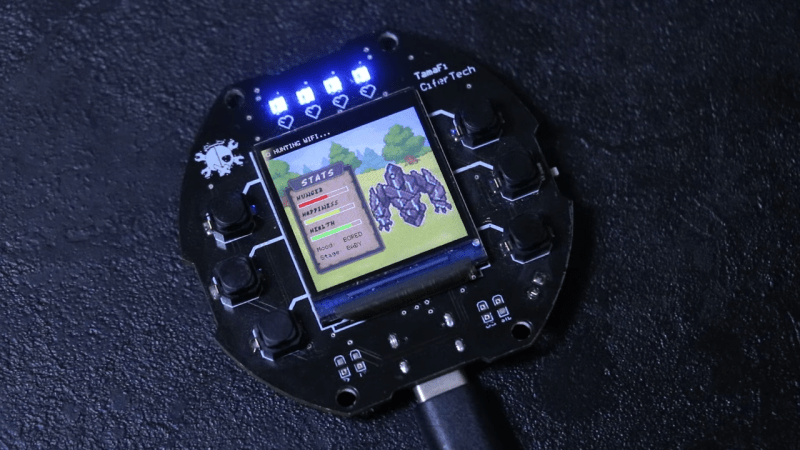
When the Tamagotchi first launched all those decades ago, it took the world by storm. It was just a bunch of simple animations on a monochrome LCD, but it had heart, and people responded to that. Modern technology is capable of so much more, so [CiferTech] set out to build a virtual pet that can sniff out WiFi networks.

The build employs an ESP32-S3, perhaps the world’s favorite microcontroller that has WiFi baked right in from the factory. It’s paired with a 240×240 TFT LCD that delivers bright, vivid colors to show the digital pet living inside. Addressable WS2812B LEDs and a simple sound engine provide further feedback on the pet’s status.

The pet has various behaviors coded in, like hunting, exploring, and resting, and moods such as “happy,” “curious,” and “bored.” For a bit of environmental reactivity, [CiferTech] also made the local WiFi environment play a role. Nearby networks can influence the “hunger, happiness, and health” of the pet.

Incidentally, if you’ve ever wondered what made the Tamagotchi tick, we’ve explored that before, too.

Continue reading “Virtual Pet Responds To WiFi”