34C3: North Korea’s Consumer Technology

[Will Scott] and [Gabe Edwards] shed some light on the current state of consumer computing technology at 34C3 in their talk DPRK Consumer Technology. The pair has also created a website to act as a clearinghouse for this information — including smartphone OS images up at koreaComputerCenter.org.

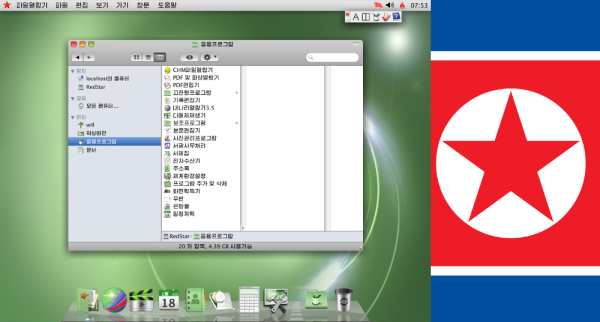
Not a whole lot is known about what technology North Korean citizens have available to them. We have seen Red Star OS, the Mac-like Linux based operating system used on PC based desktops. But what about other systems like smartphones?

[Will] and [Gabe] found that cell phones in North Korea are typically manufactured by Chinese companies, running a custom version of the Android Operating system. The phone hardware is common — the phone sold as the Pyongyang 2407 in North Korea is also sold in India as the Genie v5. If you can get your hands on the Genie, you can run the Korean version of the Android OS on that hardware.

Continue reading “34C3: North Korea’s Consumer Technology” →

Sound Isolated Server Rack

Servers are most often found in climate controlled data centers. This means they aren’t exactly built for creature comforts like quiet operation. Quite the contrary — many server chassis include fans which absolutely scream when the machine is under load. [Whiskykilo] needed to set up a 12 U rack in his basement for working from home. He knew the sound would get on anyone’s nerves, but especially on those of his wife.

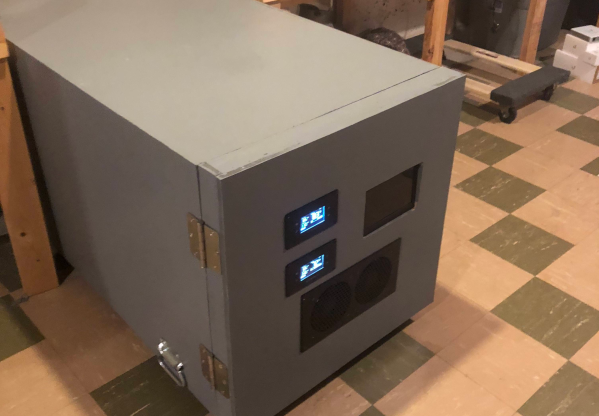
To solve this problem, he built a sound isolated rack. The build started with a standard 12 U metal rack frame. This is wrapped in 1/2″ MDF coated with automotive sound deadening material. An outer frame built of 1×4 lumber and another layer of 1/2″ MDF. Isolating the inner and outer boxes made the biggest contribution to quieting down the noisy servers.

Computers need to breathe, so the front and back doors of the rack enclosure include banks of intake and exhaust fans to keep air flowing through the servers. Two AC Infinity controllers keep the fans operating and monitor temperature. These machines do generate some heat – so 64 °F (18C) intake and 81 °F (27C) exhaust is not unheard of. The servers don’t seem to mind running at these temperatures. A Raspberry Pi 3 keeps an eye on UPS operation and displays the data on a 7″ HDMI LCD.

Interested in running a server at home? You don’t have to go to the lumberyard – check out this server made with Ikea components, or this server built from 96 MacBook Pros.

Rubik’s Cube Table Has A Hidden Surprise

[Nothorwitzer] built a pretty incredible Rubik’s Cube table with hidden storage. The coolest feature of this table is the way it opens. Twisting the top section of the cube causes two drawers to pop out from the sides. The further you turn the top, the more the drawers extend. As the top hits its rotational limit, the lid of the cube lifts up, revealing the entire top section is hollow.

[Nothorwitzer] built the table from plywood, hardboard, and MDF. Hiding inside the base is an old car wheel hub and bearing. The entire rotating system spins on this assembly. The drawers are actuated by an ingenious set of plywood cams which push the two opposing drawers out as the top assembly rotates. Two levers pop the top open.

The attention to detail here is amazing. [Nothorwitzer] build a set of hidden hinges that make the lid invisible, yet allows it to lift up and over the edge of the cube. A spring ensures that the heavy lid will pop open neatly. The lid fit is so close that air pressure ensures the top doesn’t slam down when it is dropped.

While the internal parts of the table are left in bare wood, that the external parts had to match a real Rubik’s Cube. [Nothorwitzer] scrambled a cube, then copied the colors. The panels are made of cut hardboard. Each panel is spray painted, then hot glued to the cube. The body is plywood which [Nothorwitzer] grooved with a router to match the profile of a real Rubick’s Cube.

The project doesn’t end here. [Nothorwitzer] has created a second cube, which is even more tricky. The lid pops by pressing in one section. The drawers operate in a similar way, but there is a lever to engage or disengage the drawer opening. This may be the perfect place to hide your retro gaming systems!

Continue reading “Rubik’s Cube Table Has A Hidden Surprise” →

3D Printed Key Saves The Day

When [Odin917’s] parents went away on vacation, they took the apartment mailbox key with them. With the mail quickly piling up in the mailbox, he needed to get in there. He could have had the building super replace the lock, for a fee of course. Instead he had his parents email a photo of the key, which he used to 3D print his own copy.

Using a photograph as a template for a 3D printed copy is nothing new. We’ve covered it in-depth right here. However, this is the first time we’ve seen the technique put to use for good – in this case avoiding a hefty lock replacement fee.

He did his modeling in Autodesk’s free Fusion 360 CAD software. He then printed it out, and the box didn’t open. It took three revisions before the perfect key popped out of the printer. This particular mailbox uses a 4 pin tumbler, which makes it a bit less forgiving than other mailbox locks we’ve seen.

Admittedly this isn’t [Odin917’s] first time working with locks. Back in 2013, he submitted a parametric bump key model to Thingiverse.

Picking locks isn’t just for getting the mail. Locksport is a popular pastime for hardware hackers.

Brute Forcing Passwords With A 3D Printer

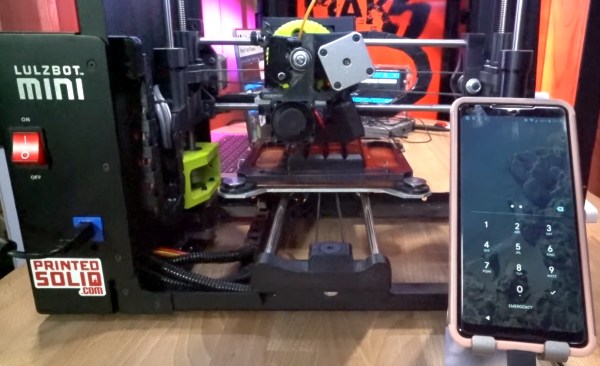
Many of us use a 4 digit pin code to lock our phones. [David Randolph] over at Hak5 has come up a simple way to use a 3D printer to brute force these passwords. Just about every 3D printer out there speaks the same language, G-code. The same language used in CAD and CNC machines for decades.

[David] placed a numeric keypad on the bed of his printer. He then mapped out the height and positions of each key. Once he knew the absolute positions of the keys, it was easy to tell the printer to move to a key, then press and release. He even created a G-code file which would press every one of the 10,000 4 key pin combinations.

A file this large was a bit unwieldy though, so [David] also created a python script which will do the same thing — outputting the G-code and coordinates to brute force any 4 pin keypad. While a printer is quite a bit slower than Hak5’s own USB Rubber Ducky device (which acts as an automated keyboard), it will successfully brute force a password. Although most phones these days do limit the number of password attempts a user gets.

[David] admits this is probably useless in a clandestine/hacking application, but the video is still a great introduction to G-code and using 3D printers for non-printing functions.

Continue reading “Brute Forcing Passwords With A 3D Printer” →

AsciiCam: Make ASCII Art With Your Phone

We admit it, we have a nostalgic soft spot for ASCII Art. Pictures made form characters, printed on an old-fashioned line printer. They’ve been a hacker standby since the 1960’s. Times have moved on though. These days we’re all carrying supercomputers in our pockets.  Why not use them to create more great ASCII art? That’s exactly what [Brian Nenninger] did with AsciiCam. AsciiCam lets you use your Android phone’s camera to create ASCII images.

Using the software is simple. Just launch it and you’re greeted with an ASCII preview of the camera image. Users can select from a 16 color palette and full 24 bit color. Monochrome modes are also available. You can also choose from black text on a white background or white text on black.

The great thing about AsciiCam is the fact that it is open source. You can download the full source code from Github. If you just want to run the software, it’s available through the Google Play Store. This is a labor of love. The first Github commits were six years ago, and [Bran] is still working — the most recent commits were made only a few days back. AsciiCam is also a good example for neophyte Android programmers.

Want to know more about ASCII art? Check out Al’s history of ASCII art, or this talk about both ASCII and ANSI creations.

This Power Strip Is A Fire Starter

A few weeks ago I needed a power strip in my home office. The outlet in question is located behind a filing cabinet so it would need a low profile plug. I jumped on Amazon to buy a surge suppressor strip. That’s when I noticed strips with rotating plugs. I’ve always had some apprehensions about plugs like that, though I could never quite put my finger on why. Looking at the reviews on this particular plug, I found some scary issues. Photos of melted plugs, melted outlets, and cries of “fire hazard”. So I did what any crazy hacker would do – bought two power strips. One with a fixed right angle plug to use in my office, and one with a rotating plug to tear down.

Failed plug – from Amazon reviews

Surge suppressors, power strips, outlet strips, they have many names. Underwriter’s Laboratories (UL) calls them “Relocatable power taps”. They all have several outlets, most have a circuit breaker of some sort inside, and some have circuits for surge suppression. These are some of the most common devices to find in the modern home. Many of our houses were designed and built before surround sound, cable boxes, computers, modems, cell phone chargers, tablet chargers, and all our other modern conveniences. There weren’t as many electrical loads, so the houses didn’t have many outlets. Power strips solve this problem.

After a couple of days, I had my strips in hand. I expected the plug to rotate once – maybe 270 degrees. That would indicate there were wires connecting the rotating head to rest of the plug. Not so – this plug would spin round and round all day long.

Continue reading “This Power Strip Is A Fire Starter” →