Tube Headphones Rock Out While Keeping The Family Peace

tubeHeadphones

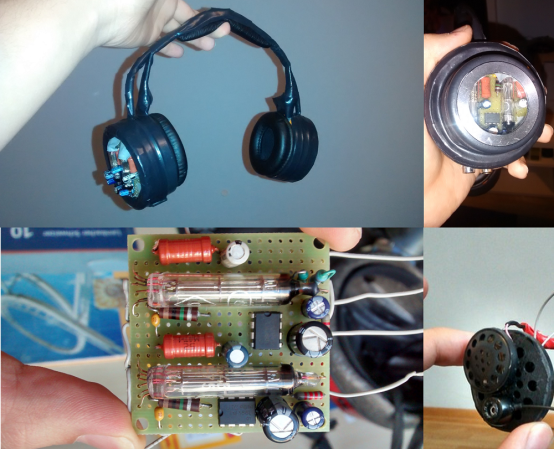
It’s hard being a kid sometimes. [Young] likes his music, but his dad is an overnight trucker. With his dad sleeping during the day, [Young] has to keep the volume down to a reasonable level. He could have bought some commercial headphones, but he wanted something a bit more customized. Rather than give up on his tunes, he built a pair of headphones with an internal tube preamp amplifier. [German language link — Google translate doesn’t want to work with this one but Chrome’s translate feature works].

Two 1SH24B preamp tubes feed two LM386 amplifier chips, creating a hybrid amplifier. The 1SH24B tubes are designed to work on battery voltage, so a step up circuit wasn’t necessary. However, [Young] still needed to provide an 8 cell battery pack to run his amp. Speakers were a 3 way coaxial of [Young’s] own design. He built the headphone frame using candy tins and cups from commercial headphones. A final touch was a window so everyone can see all that vacuum state goodness.  Considering that [Young] is only 16, we’re looking for some great things from him in the future.

If you don’t want to strap the tubes to your skull there are other options. But you have to admit it makes for a cool look. Starbucks here we come.

[Thanks Patrick]

Portable SMT Lab For Hacker On The Go

smt-lab2

We admit it, we’re suckers for workbenches and toolboxes. [Jon] must feel the same way, because he built this portable surface mount electronics lab. It’s a beast of a project, which might be why it’s project #666 on Hackaday.io. [Jon] spends a lot of time working off site, and keeps finding himself without proper surface mount soldering tools. Ever tried to stack an 0603 resistor with a 40 watt pistol grip iron? Take our word for it, the results are not pretty.

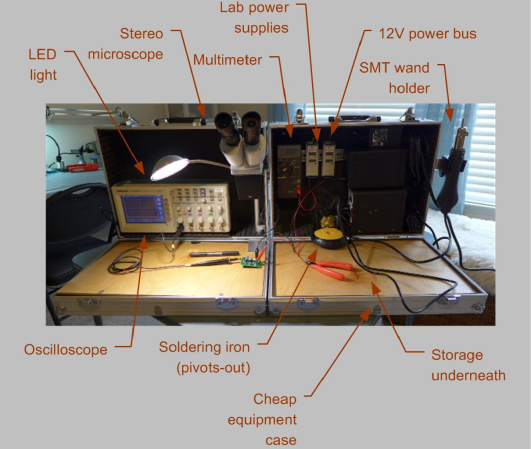
[Jon] started with two cheap aluminum cases from Harbor Freight. He loaded them up with the typical lab supplies: soldering iron, oscilloscope, multimeter, dual lab supplies, and a good assortment of hand tools. He then added a few choice SMT tools: A hot air tool, a good LED light, and a stereo magnifier. Many of the tools are mounted on DIN rail along the rear of the cases.  All the low voltage equipment runs on  a common 12V bus.

We really like what [Jon] did with the tops of the cases. Each lid contains a plywood sheet. When the cases are opened, the plywood becomes a work surface. As an added bonus, the wood really strengthens the originally flimsy tool cases. The only thing we would add is a good portable anti-static mat.

The final build is really slick. Once the cases are open, four bolts act as feet. The microscope swings out, and the hot air gun hangs on the right side. Plug in power and you’ve gone from zero to SMT hero in under 1 minute.

MC Escher Inspires A Reptilian Floor

reptile-floor

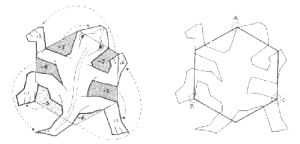
A simple room refinishing project lead [Kris] to his biggest hack yet, a floor inspired by MC Escher’s Reptiles printMaurits Cornelis Escher is well known for his reality defying artwork. His lifelong passion was tessellation, large planes covered identical interlocking shapes. Triangles, squares, hexagons all EscherExampleinterlock naturally. Escher discovered that if he cut out part of a shape and replaced it on the opposite side, the new shape will still interlock. In Reptiles, Escher created a lizard shape by modifying a hexagon. One side flipped over to become the nose, 4 others to become the feet, and so on. If the cuts are all made perfectly, the final shape would still interlock.

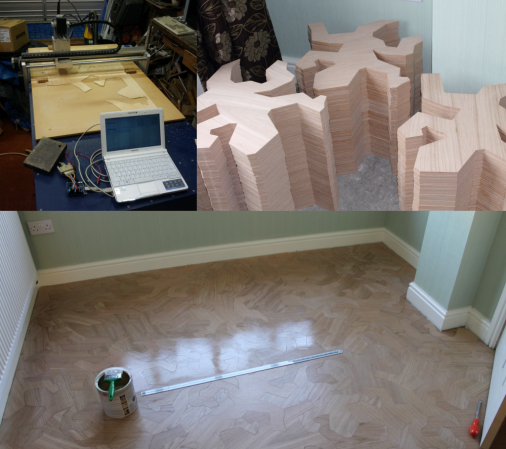
[Kris] was inspired by a photo of a commercial flooring project using small wooden reptiles as the tiles. He wanted to go with larger wooden tiles for his room. He knew his shapes had to be perfect, so he wrote a computer program to split the hexagon perfectly. Armed with art in DXF format, he went looking for a flooring company to help him. The silence was deafening. Even with artwork ready to go, none of the local custom flooring shops would take his job. Undaunted, [Kris] bought an older CNC machine. The machine was designed to be driven from MS-DOS via the parallel port of a Pentium II era PC. [Kris] substituted an Arduino running GRBL. After some GCode generation, he was cutting tiles.

The real fun started when it was time to glue the tiles down. With all the interlocking parts, it’s impossible to just glue one tile and have it in the perfect position for the next. In [Kris’] own words, “You have to do it all in one go”. Thanks to some family support and muscle, the flooring project was a success.  Great work, [Kris]!

Droning On: Resources And First Steps

droning-on-logo

It’s been quiet these last few weeks in drone news. Some members of the commercial community are performing missions, while others are waiting on the results of the FAA’s appeal to the NTSB. There is no denying that drones are getting larger as an industry though. Even Facebook has jumped into the fray, not for drones to deliver real world pokes, but to provide internet access in remote areas.

gotaerial-octo

One of the high points in the news was an octocopter operator’s discovery of 2500 year old rock drawings, or petroglyphs in the Utah desert. While exploring a known archeological site, Bill Clary of GotAerial LLC flew his octocopter up to a cliff face. The rock formation would have made rappelling down the face difficult at best. He found an amazing collection of petroglyphs which he documented in this video. While the authenticity of the petroglyphs hasn’t been proven yet, they appear to date back to the Basketmaker people who lived in the area from approximately 500 BC through 860AD.

Maybe you’re asking yourself how you can get in on some of these sweet drone adventures? Whether you’re considering your very first flight, or already own multiple aircraft, you’ll want to read our discussion of getting started (specifically: acquiring your first drone) and discovering drone-related communities. Hit that “read more” link to stay with us.

Continue reading “Droning On: Resources And First Steps”

Hacking A Laser Tape Measure In 3 Easy Steps

uni-t-laser-distance

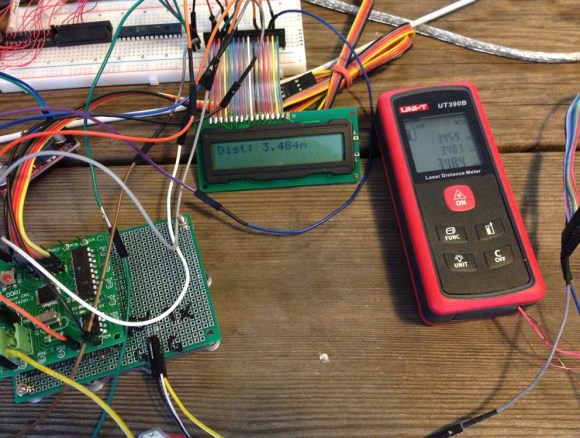
[Andrew] got a little help from his friends to hack a laser distance meter. Using laser distance meters as sensors is one of the great quests of hackers – with good reason. Accurate distance readings are invaluable for applications including robots, printers, and manufacturing. We’ve seen people try and fail to hack similar units before, while others built their own from scratch. [Andrew] started experimenting with the UNI-T 390B, a relatively cheap ($60 USD) device from China. He found the 390B has a serial port accessible through its battery compartment. Even better, the serial port is still enabled and outputs distance data. While data could be read, [Andrew] couldn’t command the 390B to start a measurement. The only option seemed to be using the Arduino to simulate button presses on the 390B’s front panel.

In an update to his original blog,  he described an Arduino sketch which would decode the distance measurements. That’s when [speleomaniac] jumped in with the discovery that the Uni-T would respond to commands in the form “*xxxxx#”. Armed with this information, [Andrew] posted a second update with a basic command breakdown. Command *00004# will take a single measurement and output the data via serial. Command *00002# will take 3 measurements, outputting them in a C style array format. There are several other commands which output debug information and what appear to be stored measurement dumps. Although he didn’t explore every nuance of the data output,  [Andrew] now has enough information to initiate a measurement and read the result. Nice work!

[Thanks James!]

Rock Out With Your Ribbon Controller Bass

Ribbon-Bass

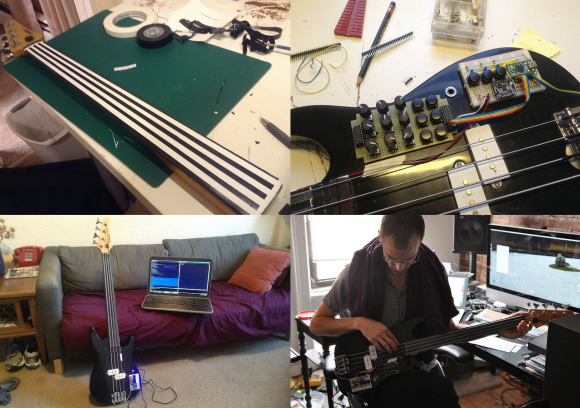
[Brendan Byrne] stripped this instrument down to basics and built himself a ribbon controller bass guitar. Details are still a bit sparse  on his website, but there are plenty of detailed pictures on his flickr stream. [Brendan] built his bass as part the Future of Guitar Design Course at Parsons the New School for Design. His goal was to create an experience in which playing the instrument and altering parameters of effects are triggered by the same gestures. He’s definitely succeeded in that effort.

Basically, the bass is a four channel ribbon controller. The frets were removed to make way for four graphite strips. [Brendan] followed [Iain’s] excellent tutorial to create his own graphite strips using soft artist’s pencils. The ribbons essentially become potentiometers, which are then read by a teensy. [Brendan] expanded the instrument’s sonic palette by adding several buttons and potentiometers mapped to MIDI control codes. He even included a triple axis accelerometer so every movement of the bass can be mapped. The MIDI data is sent to a PC running commercial music software. Analog sound comes from a piezo pickup placed under the bridge of the bass.

The results are pretty awesome. While we can’t say [Brendan’s] demo was music to our ears, we definitely see the musical possibilities of this kind of instrument.

Continue reading “Rock Out With Your Ribbon Controller Bass”

Telepresence Robot Proves It’s A Small World After All

jolvoy[Chris] works as part of a small team of developers in Cambridge, Massachusetts in the US. [Timo], one of their core members, works remotely from Heidelberg, Germany. In order to make [Timo] feel closer to the rest of the group, they built him a telepresence robot.

It was a link to DoubleRobotics that got the creative juices flowing. [Chris] and his team wanted to bring [Timo] into the room, but they didn’t have a spare $2499 USD in their budget. Instead they mated a standard motorized pan/tilt camera base with an RFduino Bluetooth kit. An application running on [Timo’s] phone sends gyroscope status through the internet to the iPad on the robot. The robot’s iPad then sends that data via Bluetooth to the RFduino. The RFduino commands pan and tilt movements corresponding with those sensed by the gyroscope.  A video chat application runs on top of all this, allowing [Timo] to look around the room and converse with his coworkers.

All the source code is available via GitHub. The design didn’t work perfectly at first. [Chris] mentions the RFduino’s Bluetooth API is rather flaky when it comes to pairing operations. In the end the team was able to complete the robot and present it to [Timo] as a Valentine’s Day gift. For [Chris’] sake we hope [Timo] doesn’t spend too much of his time doing what his homepage URL would suggest: “screamingatmyscreen.com”

[Thanks Parker]