Very, Very Low Power Consumption

We’re pretty far away from a world full of wall-warts at this point, and the default power supply for your consumer electronics is either a microUSB cable or lithium batteries. USB ports are ubiquitous enough, and lithium cells hold enough power that these devices can work for a very long time.

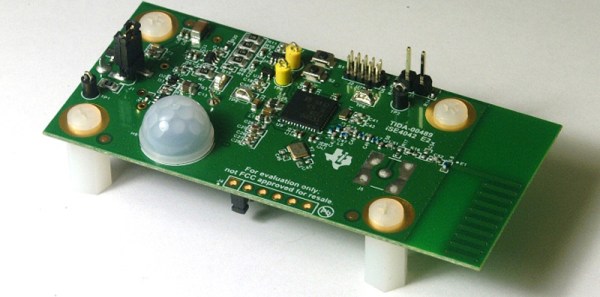
USB devices are common, and batteries are good enough for most devices, not all of them. There is still a niche where& extremely long battery lifetimes are needed and tapping into mains power is impractical. Think smoke detectors and security systems here. How do power supplies work for these devices? In one of the most recent TI application notes, TI showed off their extremely low power microcontrollers with a motion detector that runs for ten years with a standard coin cell battery. This is one of those small engineering marvels that comes by every few years, astonishing us for a few minutes, and then becomes par for the course a few years down the road.

The first thing anyone should think about when designing a battery-powered device that lasts for years is battery self-discharge. You’re not going to run a battery-powered device for ten years with a AA cell; the shelf life for an Energizer AA cell is just 10 years. Add in a few nanoAmps of drain, and you’ll be lucky to make it to 2020. The difference here is a CR2032 lithium-ion coin cell. Look at the datasheet for one of these cells, and they can easily sit on a shelf for 10 years, with 90% of the rated capacity remaining.

With the correct battery in the device, you’ll need a microcontroller that runs at a sufficiently low power for it to be useful in the mid-2020s. The product for this is the CC1310, a very, very low power ARM Cortex-M3 and sub 1GHz transmitter in one package.

Once that’s settled, it’s simply a matter of putting a sensor on the board – in this case a PIR sensor – and a few analog bits triggering an interrupt occasionally. Have the microcontroller in sleep mode most of the time, and that’s how you get a low-power device with a battery that will last a decade.
A Geek’s Revenge For Loud Neighbors

It seems [Kevin] has particularly bad luck with neighbors. His first apartment had upstairs neighbors who were apparently a dance troupe specializing in tap. His second apartment was a town house, which had a TV mounted on the opposite wall blaring American Idol with someone singing along very loudly. The people next to [Kevin]’s third apartment liked music, usually with a lot of bass, and frequently at seven in the morning. This happened every day until [Kevin] found a solution (Patreon, but only people who have adblock disabled may complain).

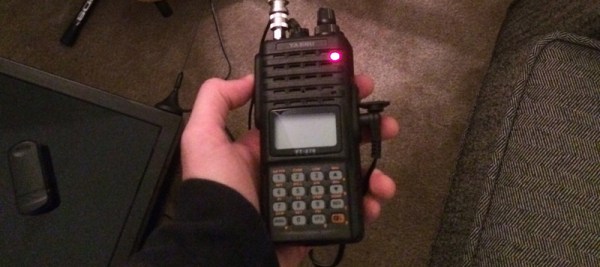
In a hangover-induced rage that began with thumping bass at 7AM on a Sunday, [Kevin] tore through his box of electronic scrap for every capacitor and inductor in his collection. An EMP was the only way to find any amount of peace in his life, and the electronics in his own apartment would be sacrificed for the greater good. In his fury, [Kevin] saw a Yaesu handheld radio sitting on his desk. Maybe, just maybe, if he pressed the transmit button on the right frequency, the speakers would click. The results turned out even better than expected.

With a car mount antenna pointed directly at the neighbor’s stereo, [Kevin] could transmit on a specific, obscure frequency and silence the speakers. How? At seven in the morning on a Sunday, you don’t ask questions. That’s a matter for when you tell everyone on the Internet.

Needless to say, using a radio to kill your neighbor’s electronics is illegal, and it might be a good idea for [Kevin] to take any references to this escapade off of the Internet. It would be an even better idea to not put his call sign online in the future.

That said, this is a wonderful tale of revenge. It’s not an uncommon occurrence, either. Wikihow, Yahoo Answers and Quora – the web pages ‘normies’ use for the questions troubling their soul – are sometimes unbelievably literate when it comes to unintentional electromagnetic interference, and some of the answers correctly point out grounding a stereo and putting a few ferrite beads on the speaker cables is the way to go. Getting this answer relies entirely on asking the right question, something I suspect 90% of the population is completely incapable of doing.

While [Kevin]’s tale is a grin-inducing two-minute read, You shouldn’t, under any circumstances, do anything like this. Polluting the airwaves is much worse than polluting your neighbor’s eardrums; one of them violates municipal noise codes and another is breaking federal law. It’s a good story, but don’t do it yourself.

Editor’s Note: Soon after publishing our article [Kevin] took down his post and sent us an email. He realized that what he had done wasn’t a good idea. People make mistakes and sometimes do things without thinking. But talking about why this was a bad idea is one way to help educate more people about responsible behavior. Knowing you shouldn’t do something even though you know how is one paving stone on the path to wisdom.
–Mike Szczys

Replacing The IPhone 6 Button Bricks The Phone

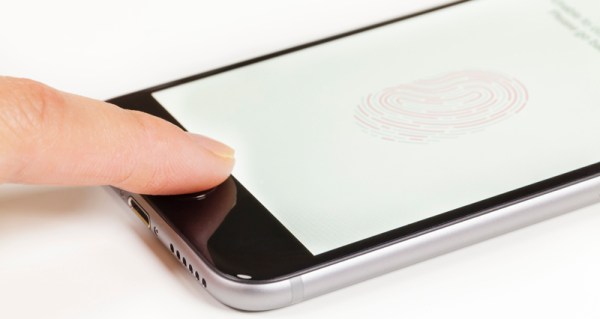
News comes from The Guardian that the iPhone 6 will break because of software updates due to non-authorized hardware replacements. Several thousand iPhone 6 users are claiming their phones have been bricked thanks to software updates if the home button – and the integrated TouchID fingerprint sensor – were replaced by non-Apple technicians.

For the last few iPhone generations, the TouchID fingerprint sensor has been integrated into the home button of every iPhone. This fingerprint sensor provides an additional layer of security for the iPhone, and like everything on smartphones, there is a thriving market of companies who will fix broken phones. If you walk into an Apple store, replacing the TouchID sensor will cost about $300. This part is available on Amazon for about $10, and anyone with a pentalobe screwdriver, spudger, and fine motor control can easily replace it. Doing so, however, will eventually brick the phone, as software updates render the device inoperable if the TouchID sensor is not authorized by Apple.

According to an Apple spokeswoman, the reason for the error 53 is because the fingerprint data is uniquely paired to the touch ID sensor found in the home button. If the TouchID sensor was substituted with a malicious TouchID sensor, complete and total access to the phone would be easy, providing a forehead-slapping security hole. Error 53 is just Apple’s way of detecting devices that were tampered with.

In fairness to Apple, not checking the authenticity of the touch ID would mean a huge security hole; if fingerprint data is the only thing keeping evil balaclava-wearing hackers out of your phone, simply replacing this sensor would grant them access. While this line of reasoning is valid, it’s also incredibly stupid: anyone can get around the TouchID fingerprint sensor with a laser printer and a bit of glue. If you ever get ahold of the German Defense Minister’s iPhone, the fingerprint sensor isn’t going to stop you.

This is a rare case where Apple are damned if they do, damned if they don’t. By not disabling the phone when the TouchID sensor is replaced, all iPhones are open to a gaping security hole that would send the Internet into a tizzy. By bricking each and every iPhone with a replacement TouchID sensor, Apple gets a customer support nightmare. That said, the $300 replacement cost for the TouchID sensor will get you a very nice Android phone that doesn’t have this problem.

Building The World’s Smallest RGB LED Cube

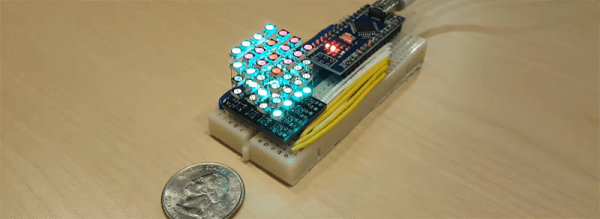
What’s the smallest RGB LED cube? A 1x1x1 cube is easy, but it’s a stupid joke and we’ve heard it before. No, to build the smallest LED cube, you’ll have to stuff 64 RGB LEDs into a cubic inch, like [Hari] did with his miniscule LED cube.

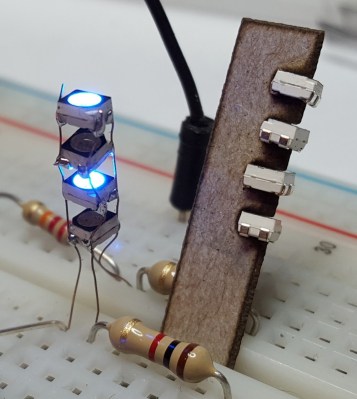
A single column of Charlieplexed LEDs. Note the resistor for scale.

One might think that individually addressable RGB LEDs are the way to go with an LED cube this small. Anything else would hide the LEDs behind a mess of wires. This isn’t the case with [Hari]’s LED cube – he’s using standard surface mount RGB LEDs for this build. But how is he connecting the things?

The entire build was inspired by the a much earlier project, the Charliecube. This LED cube, like [Hari]’s uses Charlieplexing to condense all the connections for a column of LEDs to only four wires. Repeat that sixteen times, and [Hari] built himself a tiny, one-inch cube of glowey goodness.

The cube itself was built with a PCB backplane designed in Eagle and fabbed at OSHPark. The LEDs are driven by an Arduino Nano. If you’d like to build your own, or you’re a masochist for dead bug soldering, you can grab all the design files over on [Hari]’s hackaday.io project page.

Continue reading “Building The World’s Smallest RGB LED Cube”

Adding Position Control To An Open Source Brushless Motor Driver

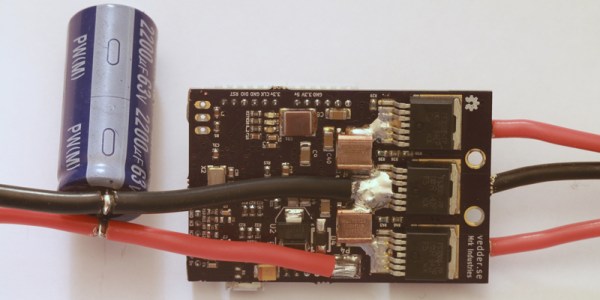
Brushless motors are everywhere now. From RC planes to CNC machines, if you need a lot of power to spin something really fast, you’re probably going to use a brushless motor. A brushless motor requires a motor controller, and for most of us, this means cheap Electronic Speed Controllers (ESC) from a warehouse in China. [Ben] had a better idea: build his own ESC. He’s been working on this project for a while, and he’s polishing the design to implement a very cool feature – position control.

We’ve seen [Ben]’s work on his custom, homebrew ESC before. It is, by any measure, a work of art. It’s capable of driving brushless and brushed motors with a powerful STM32F4 microcontroller running ChibiOS that’s able to communicate with other microcontrollers through I2C, UART, and CAN bus. If you want to build anything with a motor – from a CNC machine to an RC helicopter to an electric long board – this is the motor controller for you.

[Ben]’s latest update considers position encoders. Knowing how fast a motor is turning is very important to knowing how fast a wheel is turning, how much torque the motor is generating, and an awesome step in building the finest motor controller ever made.

Like the last update, [Ben] demonstrates the great control program written for this ESC. This GUI programs the microcontroller on the controller, with protection from high and low voltages and currents, high RPMs, duty cycle changes, and support for regenerative braking.

Thanks [Dudelbert] for sending this one in.

Continue reading “Adding Position Control To An Open Source Brushless Motor Driver”

The USB Type-C Cable That Will Break Your Computer

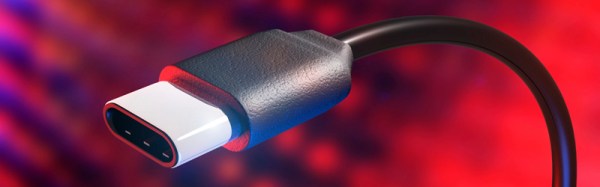
USB has been on our desktops and laptops since about 1997 or so, and since then it has been the mainstay of computer peripherals. No other connector is as useful for connecting mice, keyboards, webcams, microcontroller development boards, and everything else; it’s even the standard power connector for phones. The latest advance to come out of the USB Implementers Forum is the USB Type-C connector, a device with gigabits of bandwidth and can handle enough current to power a laptop. It’s the future, even if Apple’s one-port wonder isn’t.

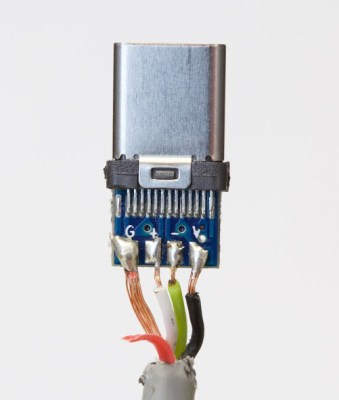
Ground is red, V is Black. Photo: Benson Leung
Ground is red, V is black. Photo: Benson Leung

The cable of the future is, by default, new. This means manufacturers are still figuring out the port, and how to wire it up. You would think remembering ‘red = power, black = ground’ is easy, but some manufacturers get it so terribly wrong.

[Benson Leung] is a Google engineer who works on the Chromebook Pixel products, a huge proponent of the USB Type-C connector, and a very prolific reviewer of USB Type-C connectors on Amazon. The latest cable he tested destroyed his test equipment, including a $1500 Chromebook Pixel 2 (link dead, try Internet Archive). How did a cable manage to do this? The manufacturer switched black and red.

The cable in question was a SurjTech 3M cable that has thankfully been taken down from Amazon. Swapping GND and Vbus weren’t the only problem – the SuperSpeed wires were missing, meaning this was effectively only a USB 2 cable with a Type-C connector. The resistor required by USB spec was the wrong value, and was configured as a pull-down instead of a pull-up.

This isn’t an issue of a cable not meeting a design spec. Ethernet cables, specifically Cat6 cables, have been shown to work but fail to meet the specs for Cat6 cables. That’s shady manufacturing, but it won’t break a computer. This is a new low in the world of computer cables, but at least the cable has disappeared from Amazon.

Sparklecon: Crappy Robots, Better Robots, Hammer Jenga, Tesla Coils

Last weekend was Sparklecon, the premier meetup in Southern California of dorks dorking around, fire, electricity, welding, and general mischief. Just imagine a party of a hundred or so like-minded individuals at a hackerspace. Now imagine the entire party is the after party. That’s a pretty good idea of what happened.

The event was held at the 23b shop in Fullerton, a true hackerspace tucked away in a small industrial park. The people at 23b are using their location to their advantage: no one in the neighborhood really cares what happens after 5pm on a Friday. This allows for some very loud, very bright, and very dangerous hijinks.

IMG_4358

There weren’t many pages missing from the Hackaday Omnibus donated to the 23b shop. Oddly, the only pages missing were the articles written by Benchoff.

There was something for everyone at Sparklecon, including:

  • Electric Pickle. Take a stick welder, and put a few hundred amps through a pickle. First, the pickle turns into a sodium light. Then, it turns into a carbon arc light. Best done after dark.
  • FPV drone racing. Flying around and crashing into trees in an abandoned lot. FPV from a few quads were projected onto the side of a building
  • Live music! Analog synths and Game Boys!
  • Tesla coils! This was a 300 amp monster, and completely analog. The spark gap was impressive by itself, but it gets really cool when you steal a fluorescent light from a fixture and stand 20 feet away from the Tesla coil.
  • Hammer Jenga! Cut some 2x4s up and make a tower of Jenga. Get a hammer, some colorful commentators,  a dozen people, and make some competition brackets. Hackaday’s own [Jasmine] was the first champion of the night.
  • Sparklebot Death Battle! It’s like BattleBots, only things break more often and we don’t have [Bil Dwyer].
  • Hebocon! Battling robots, but much crappier than the Sparklebot Death Battle. These robots broke more often.

The main event was, of course, Sparklecon’s own version of Battlebots. There were only four competitors the entire night, but the competition was fierce.

Three of the bots were wedge designs, in keeping with the ramp-ification of battling robots. The lone exception to this was [Charlie]’s Slow Bot, a cube design equipped with a spinning steel blade. The blade moves fast, but Slow Bot doesn’t. It’s a purely defensive design, meant to destroy bots trying for an easy kill. The test video of Slow Bot can be seen here:

The first fight of Slow Bot did not live up to the hype, unfortunately. After Slow Bot’s primary weapon got up to speed, the opposing bot moved in for the kill. The bolts on Slow Bot‘s blade sheared, ending the match, and leaving five or six people looking around the 23b shop for M5 bolts, or some larger bolts and a tap.

Is it all hilarously unsafe? Well, there were some plexiglas shields in front of the crowd, and most people viewed the fights on the projector beaming against the wall, anyway.

Is it worth it to go to Sparklecon? If you like dangerous experiments, soldering wires directly onto AA batteries, fire, electricity, electromagnetic fields, broken robots, and hanging out by a fire, yes. It’s a party at a proper hackerspace, making it the best kind of party ever. If history repeats itself, there will also be an afterparty at 23b following the LayerOne conference in May.