FCC Clears The Air With Wi-Fi Software Updates

A few months ago, the Internet resounded with news that the FCC would ban open source router firmware. This threat came from proposed rules to devices operating in the U-NII bands – 5GHz WiFi, basically. These rules would have required all devices operating in this band to prevent modification to the radio inside these devices. Thanks to the highly integrated architecture of these devices, Systems-on-Chips, and other cost cutting measures from router manufacturers, the fear was these regulations would ultimately prevent modifications to these devices. It’s a legitimate argument, and a number of the keepers of the Open Source flame aired their concerns on the matter.

Now, the FCC has decided to clear the air on firmware upgrades to wireless routers. There was a fair bit of confusion in the original document, given the wording, “how [its] device is protected from ‘flashing’ and the installation of third-party firmware such as DD-WRT.” This appeared to mandate wholesale blocking of Open Source firmware on devices, with no suggestion as to how manufacturers would accomplish this impossible task.

[Julias Knapp], chief of the FCC’s Office of Engineering and Technology has since clarified the Commission’s position. In response to the deluge of comments to the FCC’s Notice of Proposed Rulemaking, the phrase, ‘protected from flashing… Open Source firmware” has been removed from the upcoming regulation. There’s new, narrow wording (PDF) in this version that better completes the Commission’s goal of stopping overpowered radios without encroching on the Open Source firmware scene. The people spoke, and the FCC listened — democracy at work.

A Better, Open Hardware Keyboard

A keyboard is the most important tool in the modern desk jockey’s arsenal but, despite this fact, millions of people suffer the $10 membrane keyboards that shipped with the computer they got a decade ago. It’s a terrible way to live your life, but for those of us who are enlightened, there’s another way: mechanical keyboards. [Mário] over at the Bit Bang Theory just built his own mechanical keyboard with his own homebrew firmware and a few interesting features that aren’t found in other open hardware keyboard projects.

The ‘from scratch’ aspect of this build is somewhat of a misnomer; the key switches used in this build were taken from a Monterey K108, and the key caps were taken from a keyboard with a Portuguese layout. Once the switches were in place and soldered up, it was time for the electronics.

While most homebrew keyboards these days use a Teensy 2 thanks to some amazing firmware and development tools that have grown up around this device, there’s not a Teensy to be found inside this keyboard. The keyboard controller is built around a PIC18F4550 and uses the USB available on the chip. Naturally, there are more than a few WS2812b RGB LEDs around the edge of the keyboard that “breathe”, run a KITT-style LED chaser, or simply display a single chosen color.

There are a few neat features in this keyboard controller that aren’t readily available with other open source keyboard firmwares. There’s a keylogger, macro recorder, and a toggle macro that will activate or deactivate a (secret) internal 8GB USB storage key. Settings are saved in the internal EEPROM.

It’s a great looking build, and something we don’t see enough of around here. In any event, it’s just one step further towards eliminating the menace of cheap keyboards, and something we hope to see more of soon.

Physical Security For Desktop Computers

There’s a truism in the security circles that says physical security is security. It doesn’t matter how many bits you’ve encrypted your password with, which elliptic curve you’ve used in your algorithm, or if you use a fingerprint, retina scan, or face print for a second factor of authentication. If someone has physical access to a device, all these protections are just road bumps in the way of getting your data. Physical access to a machine means all that data is out in the open, and until now there’s nothing you could do to stop it.

This week at Black Hat Europe, Design-Shift introduced ORWL, a computer that provides the physical security to all the data sitting on your computer.

The first line of protection for the data stuffed into the ORWL is unique key fob radio. This electronic key fob is simply a means of authentication for the ORWL – without it, ORWL simply stays in its sleep mode. If the user walks away from the computer, the USB ports are shut down, and the HDMI output is disabled. While this isn’t a revolutionary feature – something like this can be installed on any computer – that’s not the biggest trick ORWL has up its sleeve.

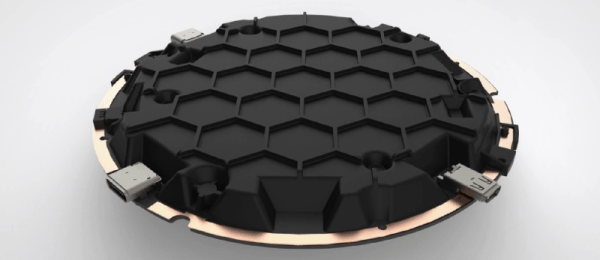
ORWL2The big draw to the ORWL is a ‘honeycomb mesh’ that completely covers every square inch of circuit board. This honeycomb mesh is simply a bit of plastic that screws on to the ORWL PCB and connects dozens of electronic traces embedded in this board to a secure microcontroller. If these traces are broken – either through taking the honeycomb shell off or by breaking it wide open, the digital keys that unlock the computer are erased.

The ORWL specs are what you would expect from a bare-bones desktop computer: Intel Skylake mobile processors, Intel graphics, a choice of 4 or 8GB of RAM, 64 to 512GB SSD. WiFi, two USB C ports, and an HDMI port provide all the connections to the outside world.

While this isn’t a computer for everyone, and it may not even a very large deployment, it is an interesting challenge. Physical security rules over all, and it would be very interesting to see what sort of attack can be performed on the ORWL to extract all the data hidden away behind an electronic mesh. Short of breaking the digital key hidden on a key fob, the best attack might just be desoldering the chips for the SSD and transplanting them into a platform more amenable to reading them.

In any event, ORWL is an interesting device if only for being one of the few desktop computers to tackle the problem of physical security. As with any computer, if you have physical access to a device, you have access to all the data on the device; we just don’t know how to get the data off one of these tiny computers.

Video below.

Continue reading “Physical Security For Desktop Computers”

Frank Makes A CNC Table

[Frank Howarth] is one of the big guns when it comes to woodworking on YouTube, and now he’s doing something completely unlike his other builds. He’s building a gigantic CNC machine. Yes, we’ve seen dozens of CNC router builds, but this one adds a few nifty features we’ve never seen before.

The plans for [Frank]’s CNC machine call for a 4 foot by 8 foot table, over which a router on a gantry gnaws away at wood. This is the standard size for shop-sized CNC router, but [Frank] is adding in his own twist: he’s building a 12 foot long table, by way of a four foot extension. This one small addition allows [Frank] to put tenons in tree trunks, engravings on the side of furniture, or just to make one part of a very large piece flat.

Right now, the build is just about the base, constructed out of 2″ square steel tube. While the welding is by all accounts an amateur job, everything is square, straight, and true. Now, with a metal base scooting around on hockey puck feet, [Frank] is ready to start on the robotic part of the build, something we’re all interested to see.

It’s going to be really big, but still not the biggest.

Raspberry Pi-Powered Back To The Future Time Circuits

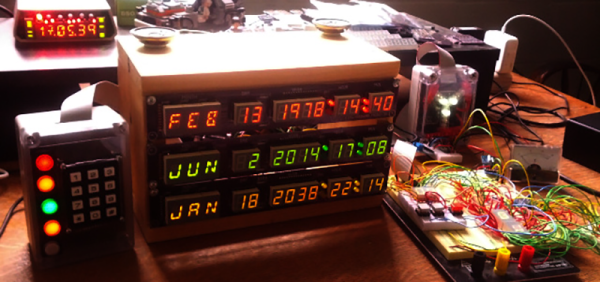
Here’s something that’s a little late to celebrate the fact that all the events in Back to the Future have happened in the past, but that’s what time machines are for, right? [Deater] created Pi-powered time circuits and a flux capacitor. He might not have a DeLorean, but he does have the equipment to turn a DeLorean into a cool car.

The ‘time circuits’ shown on-screen in Back to the Future actually weren’t very complex; the times were just cutouts with lights and gels; no real electronics wizardry necessary. Of course the BttF DeLorean has since been remodeled and refurbished with time circuits that look and act the part, and [Deater]’s time circuits have everything you would expect: a display of the destination, current, and last time, sound effects, numeric keypad, flux capacitor, and a speedometer.

While it doesn’t simulate the time circuits from the movie exactly, that’s not necessarily a bad thing. The movie time circuits were colored gels, and wouldn’t exactly be practical for a Raspberry Pi-based prop. It’s a great build, and one that would look great in either a ’98 Nissan Altima or a DeLorean

Continue reading “Raspberry Pi-Powered Back To The Future Time Circuits”

Nvidia Brings Computer Vision And Deep Learning To The Embedded World

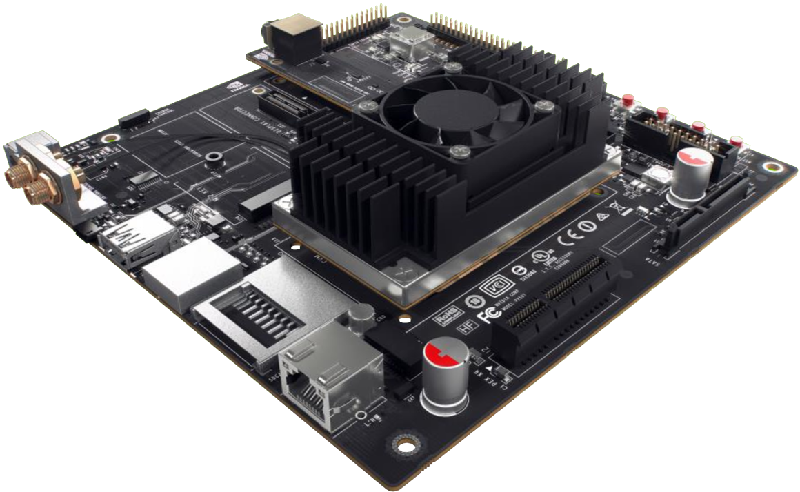
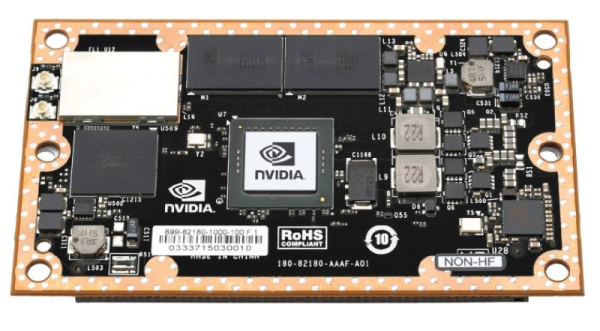
Today, Nvidia announced their latest platform for advanced technology in autonomous machines. They’re calling it the Jetson TX1, and it puts modern GPU hardware in a small and power efficient module. Why would anyone want GPUs in an embedded format? It’s not about frames per second; instead, Nvidia is focusing on high performance computing tasks – specifically computer vision and classification – in a platform that uses under 10 Watts.

For the last several years, tiny credit card sized ARM computers have flooded the market. While these Raspberry Pis, BeagleBones, and router-based dev boards are great for running Linux, they’re not exactly very powerful.  x86 boards also exist, but again, these are lowly Atoms and other Intel embedded processors. These aren’t the boards you want for computationally heavy tasks. There simply aren’t many options out there for high performance computing on low-power hardware.

Nvidia
The Jetson TX1 and Developer Kit. Image Credit: Nvidia

Tiny ARM computers the size of a credit card have served us all well for general computing tasks, and this leads to the obvious question – what is the purpose of putting so much horsepower on such a small board. The answer, at least according to Nvidia, is drones, autonomous vehicles, and image classification.

Image classification is one of the most computationally intense tasks out there, but for autonomous robots, there’s no other way to tell the difference between a cyclist and a mailbox. To do this on an embedded platform, you either need to bring a powerful general purpose CPU that sucks down 60 or so Watts, or build a smaller, more efficient GPU-based solution that sips a meager 10 Watts.

Continue reading “Nvidia Brings Computer Vision And Deep Learning To The Embedded World”

Replacing The CRT In A Vectrex

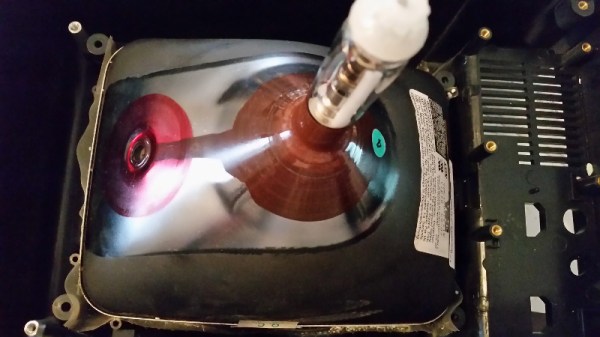
The Vectrex is a rare beast in the world of retro video games. Introduced in 1982, this was the only video game system to put a monitor right in the console, and it did so for good reason. This was a games system with vector graphics and rotating 3D objects, something that just couldn’t happen on the TV in the family room. A while ago, [John] dug his old Vectrex out of his basement and replaced a faulty logic board. The CRT was still broken, but with a little bit of research and a not-so-ugly kludge, he managed to replace the CRT in a Vectrex.

[John] found someone willing to part with an old CRT online, and after whipping out his credit card, the tube was on his way to his front door. This new tube wasn’t a direct drop in; The original Vectrex had small ears around the edges of the screen that served as mounting points. The new tube had no such ears. Now, a bit of plastic strapping holds the CRT in the chassis. It’s a bit of a kludge, but at least now [John] has a source of Vectrex CRTs.

While the rest of [John]’s repair work didn’t go as well – the Vectrex in question still has all the logic board problems it had when it was taken out of storage. This Vectrex does have a new CRT, and with a bit more work on rehabbing this old machine, it should keep on working for another thirty years.

Whenever you come cross an interesting CRT, make sure you snatch it up. Here’s another offering that uses a tiny screen for some classic MAME action.