Where We’re Going, We Don’t Need Keycaps

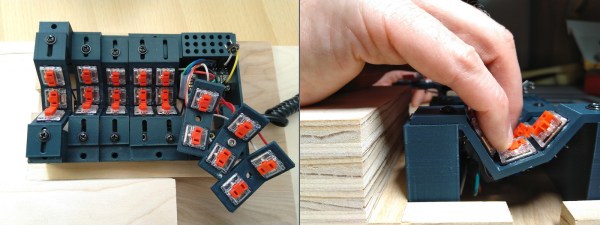
Just when we thought we’d seen the peak of ergonomic, split keyboards, along comes [Peter Lyons] with the Squeezebox — an adjustable, column-staggered, streamlined beauty with 21 keys per hand. Much like the Kinesis Advantage and the Dactyl, the user’s fingers are allowed to dangle comfortably and stay in their naturally curled position, moving as little as possible between keys, rows, and columns. But the Squeezebox goes a few steps farther to reduce finger travel.
For starters, each column of keys is adjustable on the fly in the Y-direction by loosening the screw and sliding it until it’s just right. The columns are also adjustable in the Z-direction, but for now, this requires reprinting a few parts. In case you didn’t notice, the grid is pretty tightly packed, and those low-profile Kailh choc switches are naked to the world, mostly because keycaps wouldn’t fit anyway.

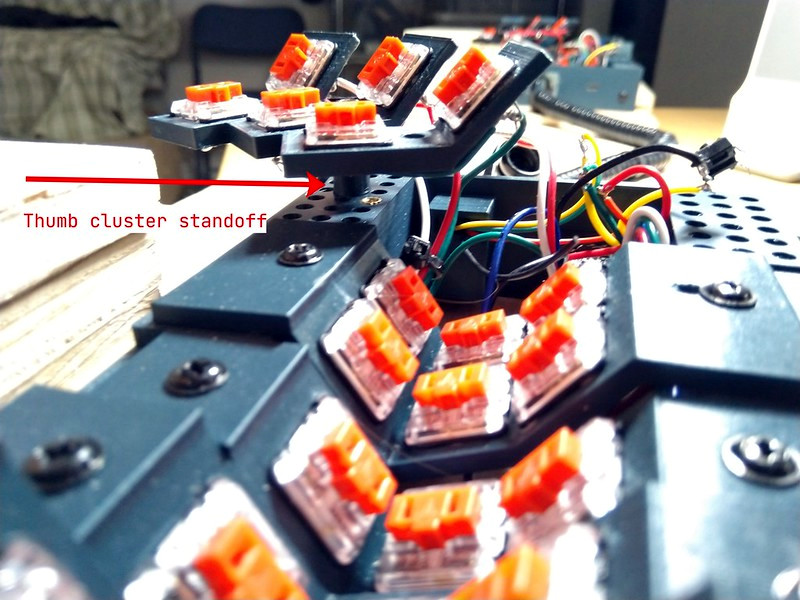
At that angle, there’s no reaching required at all between the middle and bottom rows. The 100° corner that they form both invites and supports chording — that’s pressing multiple keys simultaneously to do some action. There’s no real need to reach for the top row, either, because [Peter] merely moves his finger upward in the Z-direction a little bit to hit those. The similarly-angled thumb clusters are chord-able as well, and their position relative to the mainland is adjustable thanks to a grid of holes that are meant for threaded inserts. Genius!

For the next version, [Peter] plans to bring the three sets of thumb cluster switches closer together, and arrange them like a tri-fold science fair display board. Be sure to check out the super cool but somewhat impossible-to-solder prototypes in the build log, and stay for more stuff in the huge build gallery. Typing demo is after the break.

Still too much travel for your taste? How about a 5-way for each finger?

Continue reading “Where We’re Going, We Don’t Need Keycaps”

Woofer-Based Parts Cleaner Bounces To The Beat

Is there anything more satisfying than building a useful machine from mostly junk? We think not. [ke4mcl] is a big fan of reusing and repurposing things before settling for the recycle bin, and was in the market for a vibratory parts tumbler to quickly clean off old, rusty bits and bobs in the course of repairing old electronics. For just $10, most of which went into a new tube of RTV silicone, [ke4mcl] built their own tumbler and came away with a reusable amplifier setup in the process.

We’ve all seen speaker cones dance, and they are definitely our favorite way to observe non-Newtonian fluids. This old woofer can still move, so it’s got a second life shaking sand and screws around until they’re somewhat shiny. The ideal woofer for this purpose has a rubber surround — that’s the ring that connects the speaker cone to the frame. [ke4mcl]’s foam-surrounded woofer works just as well, though it may not last as long.

After scrounging a container with a screw-top lid that fits the woofer perfectly, [ke4mcl] joined them together with a bead of RTV silicone. Since there weren’t any amplifiers lying around, [ke4mcl] spent a few bucks on a class D amplifier board and found a spare laptop brick to power it. An old phone with a tone generator app gets the sand churning with a friendly sine wave, which you can see in the videos after the break.

We think it’s particularly nice to keep things like fire extinguishers out of the landfill. If you don’t need a parts tumbler, why not use one to make your own refillable, re-pressurizable solvent container?

Continue reading “Woofer-Based Parts Cleaner Bounces To The Beat”

The Fascinating World Of Fasciation

The other day, I saw this gigantic mutant strawberry on reddit that looked like it had either been growing in a radiation zone, hitting the gym regularly, or sprinkled with magic dust. I immediately felt more than mildly interested in this phenomenon, which is called fasciation.

As it turns out, fasciation is fairly rare occurrence that nonetheless occurs in a wide variety of vascular plants. These mutant strawberries may be a bit unnerving to look at, but they are totally safe to eat. The only problem is that you’re more likely to come across a fasciated dandelion or daisy out in the wild than a strawberry or pineapple at the grocery store because the so-called ugly produce tends to be weeded out.

Fasciation is essentially unregulated tissue growth that occurs when the apical meristem, better known as the growing tip of the plant strays from shooting upward in cylindrical fashion and instead splays out flat, resulting in ribbon-like plant stems, elongated or multiple flower heads, and semi-circular strawberries.

Regular and fasciated mule’s ears from Wikipedia

Although fasciation tends to present as a flattened main stem, the phenomenon can occur nearly anywhere in the plant — the root, stem, leaves, flower heads, or fruit. It can be localized to just one area, or it affect the entire plant.

Fasciation gets compared to cancer because it has a number of causes and ways of expression, but it’s not quite as harmful or scary. Some races of plants exhibit extreme expression of fasciation. While it’s not fatal, it’s also not ideal, because the condition can result in broken tissues, distorted organization, and a decrease in fertility.

Fasciation: How does it work?

One absolute unit of dandelion. Image via Wild Yorkshire

Fasciation has many causes both internal and external. Internally, it happens because of a hormonal imbalance in the growth cells, a bacterial or viral infection, or a random genetic mutation. There are also environmental causes, like chemical exposure, cold and frost exposure, or fungi, mite, and insect attacks.

The wonder of fasciation knows no geographical, climatic, ecological, or taxonomical bounds among vascular plants. It equally affects annuals, biennials, and perennials; woody and herbaceous plants; shrubs, trees, and vines. Although fasciation can occur in any vascular plant, it is quite common in the rose (includes strawberries), legume, sunflower, and cactus families, and is often found among dandelions and snapdragons.

Some vascular plants are prone to fasciation and prized for it, like the cockscomb (Celosia cristata) flower. A few fasciated flora have even become objects of reverence, like the Virgin Mary appearing on a slice of toast. There was once a fasciated pumpkin vine growing in South India. The twenty-foot-long fasciated portion drew huge crowds of people to worship it, believing the vine to be an incarnation of King Cobra or Naga Sarpa, messenger of the god Vishnu.

This spring, I’ll be looking high and low for abnormal dandelions and daisies. I’ve already started scouting the produce at the grocery store for giant strawberries and found these two in the same box. Won’t you join me? We’re probably more likely to find fasciated fruits or flowers than four-leaf clovers.

Auto Ball Launcher Will Be Your Dog’s New Best Friend

If there’s one bright spot on the blight that is this pandemic, it’s got to be all the extra time we’re spending with our pets. Dogs especially love that we’re home all the time and want to spend it playing, but sometimes you need to get stuff done. Why not head outside with your laptop and keep the dog happy with an automatic ball launcher?

This is a work in progress, and [Connor] plans to publish a BOM and the STL files once it’s all finished. For now, it’s a working prototype that shoots a ball into the air and about 25 feet away, from the looks of it. Far enough to be fun, but not so far that it goes over the fence.

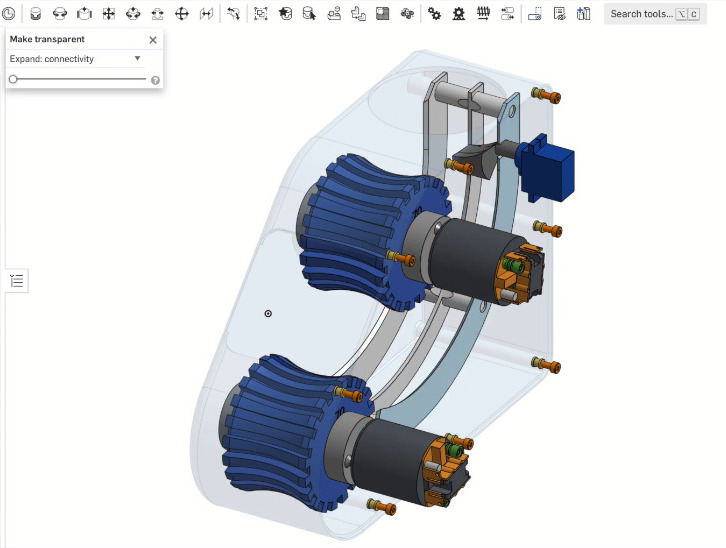
All [Connor] has to do is drop the ball in the top, which you know is going to lead to training the dog to do it himself. A proximity sensor detects the ball and starts up a pair of 540 R/C motors, then a servo drops the ball down the internal chute. The motors spit the ball out with great force with a pair of profiled, 3D-printed wheels that are controlled by a Turnigy ESC and an Arduino Nano.

In the future, [Connor] plans to print a cover for the electronics and enlarge the funnel so it’s easier for the dog to drop in the ball. Check out the brief demo and build video after the break.

All dogs should be able to get in a good game of fetch as often as they want, even if they happen to be blind.

Continue reading “Auto Ball Launcher Will Be Your Dog’s New Best Friend”

You Won’t Believe How Much Tech Is Hiding In This Desk

Say what you will about office life: there were definitely some productivity perks, but the coffee is much better at home. Like many of us, [Pierre] has been working from home for the last year or so. And as much as he might enjoy spending so much time in his small Parisian apartment, it lacks many of the amenities of the office such as a scanner, printer, and, you know, a reasonable amount of space in which to work.

Inspired by another build, [Pierre] set out to build his dream desk that is maximum PC power in minimum space. It is chock full of easily-accessible cavities that hide everything you’d expect, plus a few things you don’t, like a flatbed scanner, a printer, a router, and a wireless charging pad. One cavity is dedicated to I/O, and another has three international power sockets. The only thing it doesn’t hide is the 22″ pen display that [Pierre] uses for sketching, signing documents, and occasionally as a second monitor.

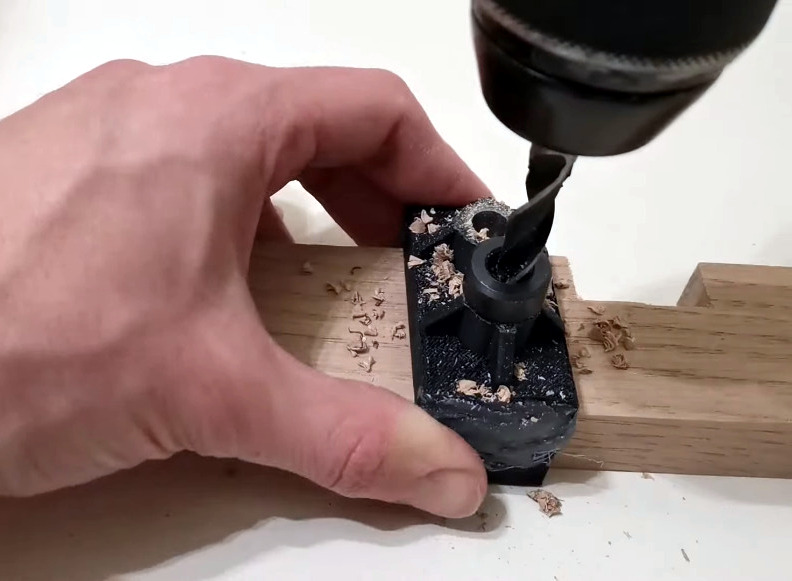
A home-brew jig makes consistent dowel drilling much easier.

This desk may look like solid wood, but the top is a veneer that’s glued on to a custom-cut 1mm steel sheet. The inside frame is made of hardwood and so are the legs — one of them has a hidden channel for the only two cords that are even somewhat visible — the power and Ethernet cables. He joined all the frame pieces with dowel rods, and made a 3D-printed and metal-reinforced drilling jig to get the holes just right.

[Pierre] started this build by planning out the components and making meticulous notes about the dimensions of every piece. Then he sketched it and modelled it in FreeCAD to get all the cavities and cable runs correct and ensure good airflow through the desk. After that it was on to woodworking, metalworking, and PCB fab for relocated and hidden display controls and a custom-built amplifier.

It’s obvious that a lot of thought went in to this, and there’s a ton of work appreciate here, so clear off that inferior desk of yours and check out the build video after the break. Wish you had a PC desk? [Pierre] is seriously considering a Kickstarter if enough people show interest.

Are you into minimalism, but don’t want to build something of this magnitude? There’s more than one way to get there.

Continue reading “You Won’t Believe How Much Tech Is Hiding In This Desk”

This Pineapple Keyboard Is The Bomb

Now why didn’t we think of this? While building a dactyl manuform — a semi-ergonomic split keyboard — [dapperrogue] had the life-changing epiphany that keyboards can be any shape or size, as long as there is room for wiring and a microcontroller inside. [dapperrogue]’s first foray into the world of fictional ordnance came in the form of an F-bomb — a round macro keeb made in the classic round explosive shape and covered with function keys. Building on the explosive feedback from that, [dapperrogue] built this bomb of a pineapple keeb, the only anti-personnel factor being the clickiness of the key switches.

This groovy grenade has 25 keys total, 24 of which are in a 4×6 grid around the body. The 25th key, the best one, is hiding under the lever and you bet it can only be actuated by pulling the pin first. We love the use of the lever because it makes us think of Morse code keyers, which might be what we would use that switch for.

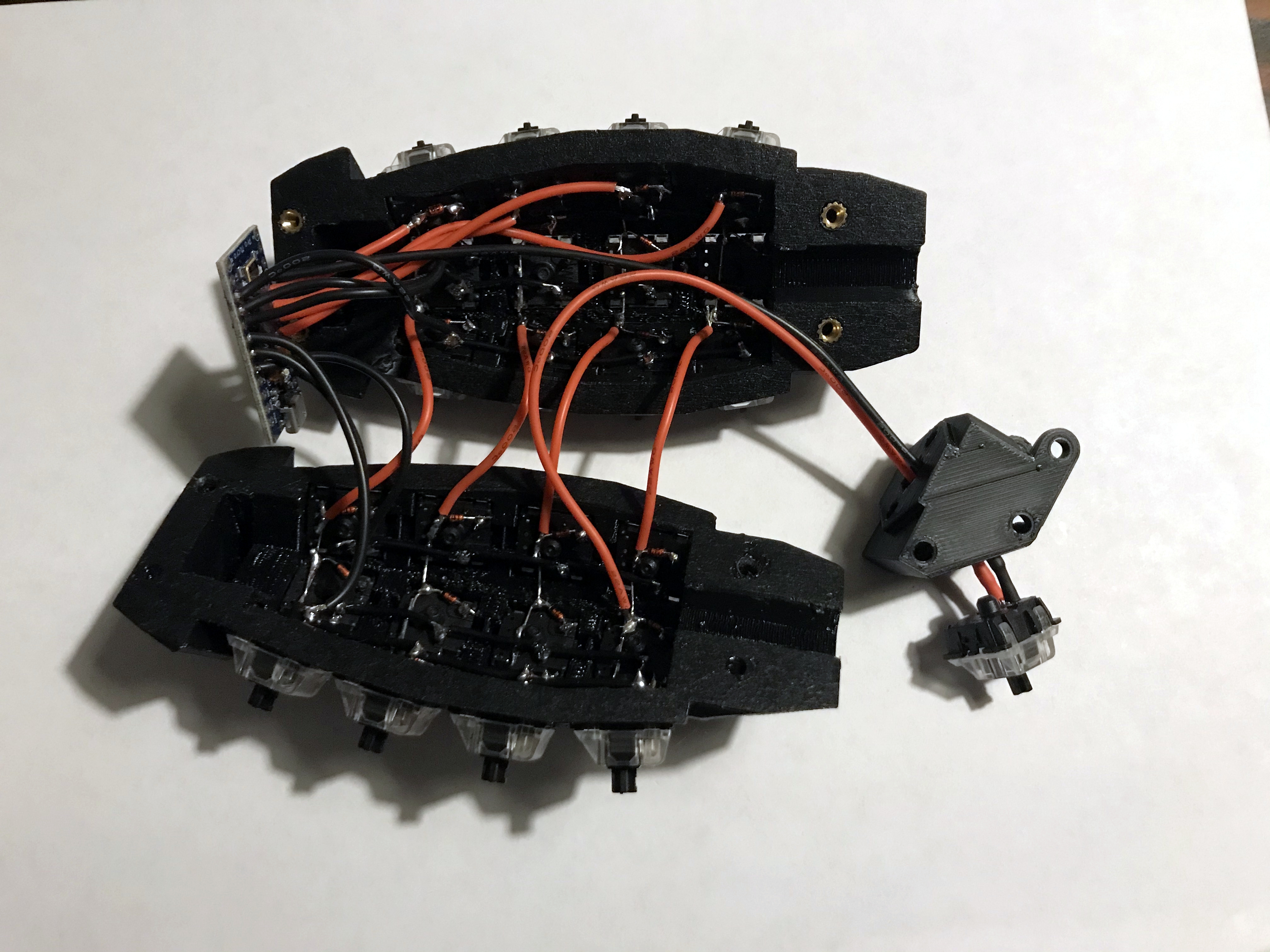
Inside is an Arduino Pro Micro running QMK and some skillful wiring. The entirely 3D-printed enclosure is in two main pieces that are connected with M3 screws, plus the top. If you want to pack one of your own, the STLs and firmware are out on GitHub. Just don’t take it to the airport.

Be sure to check out the demos after the break — in the stock firmware, every key types out a different onomatopoeic boom-type sound. Are you more of a pacifist when it comes to macro pad design? That’s understandable. We have plenty of different builds to admire.

Continue reading “This Pineapple Keyboard Is The Bomb”

Toggle Switch Puzzle Boggles The Mind, Opens The Box

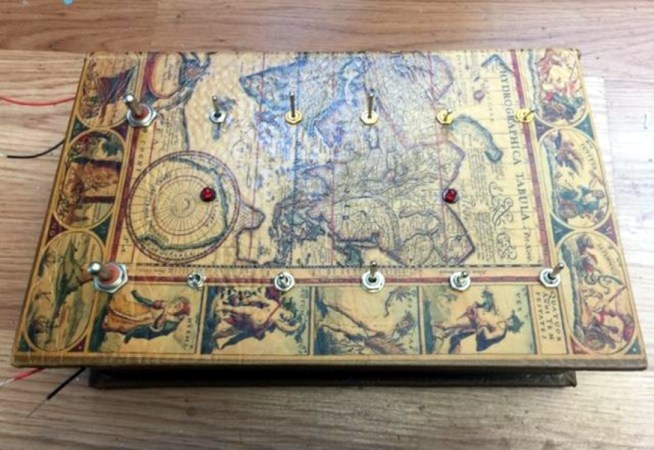
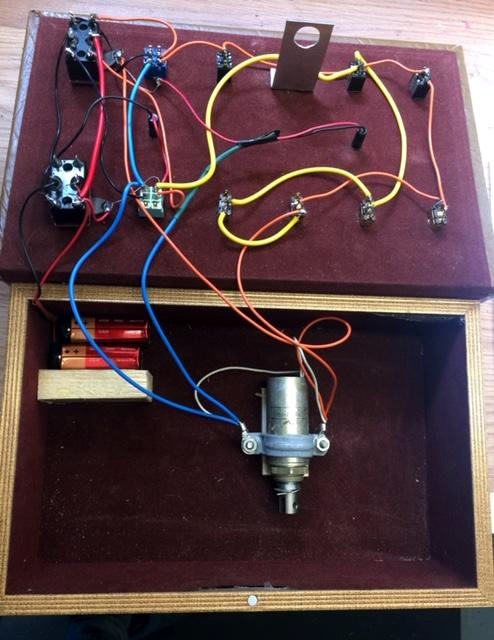
We all have too much stock of one component or another. Maybe you have more audio pots than you know what to do with, or maybe it’s zener diodes. For [technologyguy], that thing is a pile of toggle switches.  Fortunately he’s always wanted to build a locking box with a binary code that’s laid out in switches — as in, find the right code, and a solenoid unlatches the box. This lovely parts bin special only responds to two combinations out of a possible 4,000+, so anyone who tries to open it should probably block out the afternoon.

Inside you’ll find two 9 V batteries, a home-brew metal latch, a solenoid, and the undersides of four DPDT and eight SPDT toggle switches. If you just picked this thing up and had no idea what was going on, you’d be so screwed as to what to do first. The box needs power, so you’d have to figure out which switch is which. But it’s so much harder than that, because the bottom left switch selects between the two paths that result in an unlocked book-box.

The next two toggles in from the left are on/off selectors for code A and code B, so not only do you have to have the right path chosen, you have to power it, too. The only progress indicators are the LEDs — there’s one for main power, and the other lets you know that the box is unlatched. What a fun conversation piece for the coffee table Zoom-viewable area!

Want to do something far less useful with your throng of toggles? How about a complicated useless machine?