Launching A Custom Kerbal Panel

[Matthew Peverill] is a busy PhD student who loves to make time for a little Kerbal Space Program. He was tired of using such pedestrian controls as a keyboard and mouse for such important work, and wanted something a little more like they have down in Houston.

For this project, he’s focusing on the inputs more than anything else. The intent is not to play solely from this control panel, but to strike a balance between fun inputs and accurate control without screwing up favorite game play modes. It’s based on an Arduino Due, and uses some custom I²C multiplexer boards to wrangle all the various inputs.

We love the look of this panel, especially the appropriately Futura-fonted labels and all the toggle switches. Matthew took inspiration and guidance for this project from a couple of sources, so he’s definitely following in the Hackaday spirit of standing on the shoulders of giants. He’s moved through two prototypes and is working out the bugs before making the next one. The final version will be made of backlit transparent acrylic, and you know we can’t wait to see that.

What, you don’t have access to a laser cutter? Just build a control panel into an old Heathkit trainer or something.

DIY Geiger Counter Is Sure To Generate Clicks

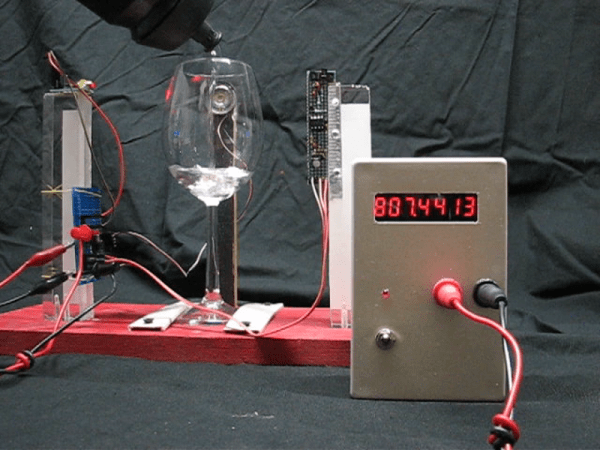
On the outside, a Geiger counter seems like a complicated thing. And you might think a device that detects a dangerous, mostly invisible threat like radiation should be complicated. But they’re actually pretty simple. The Geiger-Muller tube does most of the work, which boils down to detecting brief moments of conductivity caused by chain reactions of charged particles in radioactive materials.

[Prabhat_] wanted to build a unique-looking Geiger counter, and we’d say that this slick, Star Trek-esque result succeeds. A well-organized display shows the effective dose rate, counts per minute, and cumulative dose, which can be displayed in either microsieverts or millirems. We dig the 3D printed case design, because we like to see form follow function.

The counter is powered by an 18650 cell that’s DC-to-DC boosted to 400+ volts. A NodeMCU processes the signal coming in from the G-M tube and expresses it in both clicks and LED blinks, both of which can be toggled on or off from the home screen. The alert threshold can be customized in the settings, which means the point at which green changes to red.

Click-click-click past the break for [prabhat_]’s great walk-through video, where he tests it with uranium ore and a thoriated gas lantern mantle.

If you want to take the opposite approach and get to clicking ASAP, well, fire up your hot glue gun and dump out your scrap bin.

Continue reading “DIY Geiger Counter Is Sure To Generate Clicks”

Suntracker Optimizes Solar Panels While Visualizing Sun’s Path

If you have solar panels, you want soak up as much sunshine as you can to get your money’s worth. If you don’t have space for a lot of panels, the next best thing is repositioning the panels to catch the most rays. For his entry into the Hackaday Prize, [Frank] built a gorgeous solar tracker prototype to both validate his theories and to serve as a learning platform.

A solar tracker’s purpose is — you guessed it — tracking the Sun’s location to determine optimal positioning for solar panels and other sun-seeking payloads. In the latest revision, [Frank]’s tracker follows the Sun’s azimuth angle, aka its horizontal movement.

The Sun’s path is represented along a ring of 32 red/green LEDs. It moves around the ring as a green LED, according to a real-time clock and a set of pre-determined solar positions stored on an SD card.

Two red LEDs show the sunrise and sunset azimuth angles, and a third LED indicates North as detected with a magnetometer and adjusted for local magnetic declination. In the center of the ring, a stepper motor drives an arrow that always points at the Sun LED. As the tracker is moved around, all the LEDs shift around the ring to follow their targets.

Though it already shines, we think this ongoing project has a bright future. Be sure to check out the demo video after the break.

Continue reading “Suntracker Optimizes Solar Panels While Visualizing Sun’s Path”

Square Laser Harp Is Hip

You know, we hadn’t realized how tired we were of vertical laser harps until we saw [Jonathan Bumstead]’s entry into the 2019 Hackaday Prize. It’s all well and good to imitate the design of the inspiring instrument. But the neat thing about synths is that they aren’t confined to the physics of the acoustic instruments they mimic. This project elevates the laser harp into functional sculpture territory. It’s a piece of art that produces art.

And this art harp is entirely self-contained, with built-in MIDI, amplifier, and speakers. The brains of this beauty are an Arduino Mega and an Adafruit music maker shield, which give it twenty different instrument voices. Each of the six layers has two lasers, two mirrors, and two photo-resistors mounted in the corners of the plywood skeleton. The lasers and photo-resistors are mounted back to back in opposite corners, with mirrors in the other two corners to complete the paths. [Jonathan] cleverly diffused the laser light with milky slivers of film canister plastic.

This isn’t [Jonathan]’s first optical rodeo. Previous experience taught him the importance of being able to readjust the lasers on the fly, because every time he moved it, the laser modules would go out of alignment. This time, he built kinematic mounts that let him reposition the lasers using four screws that each push a corner.

There are a lot of nice touches here, especially the instrument selector wheel. [Jonathan] explains it and the rest of the harp in a fantastic demo/build video that’s just burning a hole in the space after the break.

Continue reading “Square Laser Harp Is Hip”

MIDI Harp Looks Pretty Sharp

[Julien] is one of those cool dads who shows his love with time invested rather than money spent. His daughter plays the harp, and you would not believe the price of concert harps. Even the cheap ones are several thousand USD. So naturally, he decided he would build her a MIDI concert harp from the ground up.

This plucky work in progress uses a strain gauge and an AD620 amplifier on every string to detect the tension when plucked. These amplifiers are connected to Arduinos, with an Arduino every nine strings. The Arduinos send MIDI events via USB to a Raspberry Pi, which is running the open synth platform Zynthian along with Pianoteq.

The harp is strung with guitar strings painted with silver, because he wanted capacitive touch support as well. But he scrapped that plan due to speed and reliability issues. Strain past the break to check out a brief demo video.

[Julien] used strings because he wanted to anchor the harpist in tactility. But you’re right; many if not most MIDI harps use lasers.

Continue reading “MIDI Harp Looks Pretty Sharp”

Itty Bitty MIDI Piano Sings With Solenoids

Toy pianos are fun to plink around on for a minute, but their small keyboards and even smaller sound make them musically uninteresting pretty quickly. [Måns Jonasson] found a way to jazz up a two-octave toy piano almost beyond recognition. All it took was thirty solenoids, a few Arduinos, a MIDI shield, and a lot of time and patience.

This particular piano’s keys use lever action to strike thin steel tines. These tines are spaced just wide enough for tiny 5V solenoids to fit over them. Once [Måns] got a single solenoid striking away via MIDI input, he began designing 3D printed holders to affix them to the soundboard.

Everything worked with all thirty solenoids in place, but the wiring was a bird’s nest of spaghetti until he upgraded to motor driver shields. Then he designed a new bracket to hold eight solenoids at once, with a channel for each pair of wires. Every eight solenoids, there’s an Arduino and a motor shield.

The resulting junior player piano sounds like someone playing wind chimes like a xylophone, or a tiny Caribbean steel drum. Check out the build video after the break.

Hate the sound of toy pianos, but dig the convenient form factor? Turn one into a synth.

Continue reading “Itty Bitty MIDI Piano Sings With Solenoids”

KVM Foot Switch In A Few Steps

[Radishmouse], despite the handle, is not a mouse guy. Give him a keyboard and he will get around just fine in any OS or program. As it is, he’s got a handful of ThinkPads, each running a different OS. He wanted to be able to switch his nice mechanical keyboard between two laptops without the hassle of unplugging and replugging the thing. His solution: a DIY KVM foot switch.

He’s been learning about electronics and 3D design, and this problem was the perfect opportunity to dig in and get his hands dirty. After learning enough about the USB protocol and switches to figure out what had to happen, he made a prototype from a pâte tub. Though undeniably classy, this vessel would never survive the rigors of foot-stomping in feline territory. Fortunately, [radishmouse] has also been learning about 3D design. After some trial and error, he came up with a sturdy, curvy 3D-printed two-piece enclosure. We particularly like the blocks built into the bottom piece that shore up the USB ports.

There are lots of reasons to build input controls for those under-utilized appendages at the ends of your legs. You could control your ‘scope with a probe in each hand, or use a foot switch to relocate an inconvenient power button.

Via [r/functionalprint]