Macro-popsicle

Macropopsicle Melts On Your Desk, Not In Your Mouth

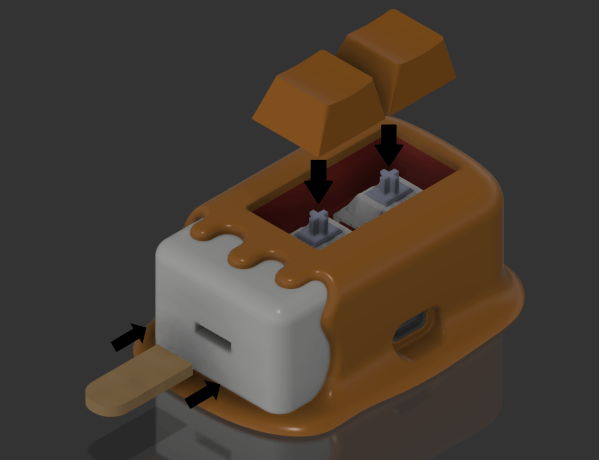
We all know by now that macropads are super cool shortcut machines. And what’s cooler than a popsicle? Well, this cute little thing, which goes by the name of Macropopsicle.

The freezer’s open if you want your own Macropopsicle. There’s not much more to this tasty and practical desktop treat than an adafruit QT Py, a couple of Cherry MX-style switches, some wires, and a handful of printed parts. One cool thing about this design is that all the pieces print with little to no supports, and many of them snap together.

We say there’s a lot to like about Macropopsicle — it’s cute, it’s useful, and there’s even a little bite taken out of it that you can see in some of the renders. [oxisidia] even shoved a real popsicle stick in there to complete the look.

Keyboard aficionados will no doubt recognize Macropopsicle as a great companion to Milk, a 2% keyboard.

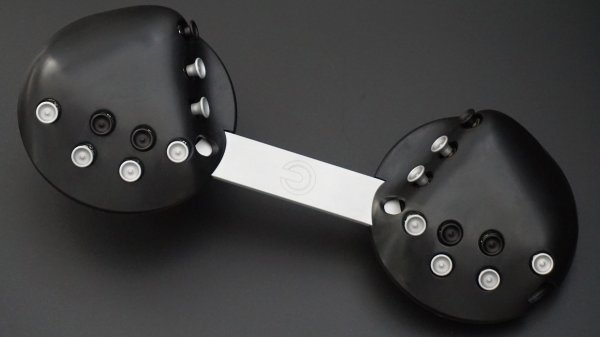
Segments light up as a person's step goal is achieved.

Slither: A Visual Pedometer That Sheds Light

Have you already broken that New Year’s resolution to get more exercise? Yeah, us too. Maybe the problem is simply that we didn’t gamify the goal. A simple visual aid that shows your progress can help make a goal more achievable and easier to stick to, day after January day. That’s the idea behind [skhackett]’s Slither, the visual pedometer.

Slither's backssssideAlthough Slither uses the Fit Bit app, no actual Fit Bit is required — great news for those of us who don’t like to wear accessories. But you will have to carry your phone everywhere if you want your steps to count. By tracking the steps taken each day, the sum of Slither’s segments signifies a weekly total goal of 50,000 steps.

Around back is a Feather Huzzah that receives step data from the phone and drives a strand of side-lit LED strips. There’s a Hall effect sensor in the tail, and Slither is powered on and off with a small, separate piece of wood and acrylic with a magnet embedded inside. Isn’t that a classy way to switch a snake?

We really like the look of the plywood here, though [skhackett] recommends using MDF instead because they experienced a fair amount of chipping. If you just want to watch the snake light up, it shouldn’t be too hard to cheat the pedometer.

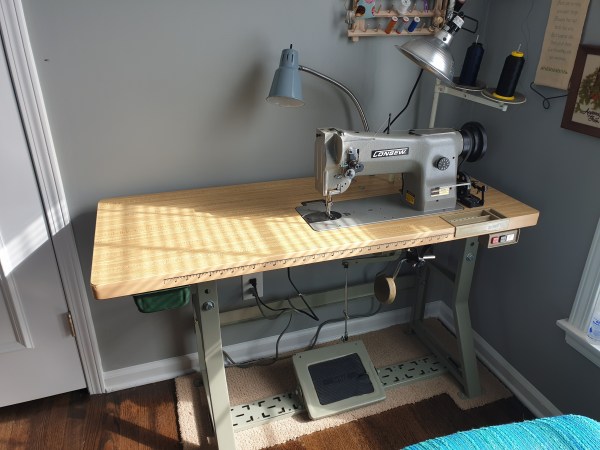
What You Should Know Before Buying An Industrial Sewing Machine

I’ve been sewing off and on since I was a kid, and I really started to get into it about ten years ago. Even though I technically outgrew my little 3/4 size domestic machine pretty quickly, I kept using it because it always did whatever I asked it to. I even made my first backpack on it before deciding it was time for something bigger. Don’t ask me how I managed to not kill that machine, because I have no idea.

Left: a 3/4 size Janome 11706. Right: a full-size Singer Heavy Duty 4452.

Last year, I got a so-called heavy duty Singer that claims to have 50% more power than a standard domestic machine. This bad boy will make purses and backpacks with ease, I thought. And it does. Well, most of the time.

I found its limits when I tried to make a bag out of thick upholstery material. And honestly, when it comes down to finishing most bags — sewing the thickest and most difficult seams — the machine often lifts up from the table on the end opposite the needle.

What I really need is an industrial sewing machine. Not to replace the Singer at all, but to complement it. I can totally justify this purchase. Let me tell you why.

Continue reading “What You Should Know Before Buying An Industrial Sewing Machine”

This film projecter is hiding an Arduino Uno that controls a water-based cooling system.

Cool The Shop With A Thermal Battery-Based System

Having any kind of shop is pretty great, no matter how large it may be or where it’s located. If the shop is in an outbuilding, you get to make more noise. On the other hand, it will probably get pretty darn hot in the summer without some kind of cooling system, especially if you don’t have a window for a breeze (or a window A/C unit).

Five 55-gallon tanks of tap water are buried just outside the shop.[Curtis in Seattle] built an awesome thermal battery-based cooling system for his shop. The battery part consists of five 55-gallon drums full of tap water that are connected in series and buried a foot underground, about two feet out from the wall. There are two radiators filled with water and strapped to 20″ box fans  — one inside the shop, which sends heat from the shop into the water, and another outside that transfers heat out of the water and into the cool night air. Most summer days, the 800-square-foot shop stays at a cool 71°F (21.7°C).

We love that the controls are housed in an old film projector. Inside there’s an Arduino Uno running the show and taking input from four DS18B20 one-wire temperature sensors for measuring indoor, outdoor, battery, and ground temperatures. There are four modes accessible through the LCD menu — idle, cool the shop, recharge mode, and a freeze mode in case the outside temperature plummets. Why didn’t [Curtis in Seattle] use anti-freeze? It’s too expensive, plus it doesn’t usually get that cold. (Although we hear that Seattle got several inches of snow for Christmas.) Check it out after the break.

If you can’t just go burying a bunch of 55-gallon drums in the ground where you live, consider building a swamp cooler out of LEGO.

Continue reading “Cool The Shop With A Thermal Battery-Based System”

Blackberry Will Run Out Of Juice On January 4th

Happy New Year, though it may not be for Blackberry fans. The company that has so often had their products compared to a certain addictive substance recently announced that they are ending support for Blackberry OS and Blackberry 10 devices.

What does this mean? While they won’t be bricking phones outright, they might as well be. On January 4th, Blackberry will be shutting off all the key services — data, SMS, phone calls, and 911 support. In official terms, they are ending network provisioning for these older devices, meaning that they won’t be able to join any cellular or WiFi networks.

Unless you’re old enough to remember, it may seem strange that these half-screen, half-keyboard machines once dominated the mobile market. But back then, the people who used them were texting wizards who had broken free from the chains of the T9 keyboard.

Though this news may not mean much except to a select few, it’s still sad to see the Blackberry era come to a true end. We never had one ourselves during the heyday, though we did pick up a cheap used model to carry around as a tiny mobile writing device and calendar. We sure do miss phones with real keyboards though, and would love to see them come back. At least the keyboards themselves get love in the hacker community.

[Main and thumbnail images via Digital Trends]

A 3D-printed macropad that needs no solder or screws.

Snap-Together Macropad Does It Without Solder

Maybe we’re biased, but we think everyone has a use for a macropad. It’s just a matter of time before a highly personalized set of speed controls starts to sound like a great time-saving device to have around.

The column wire is red, and the row wire is blue. A printed clip snaps on to separate the two.Trouble is, macropads are usually kind of expensive to buy outright, and not everyone feels comfortable building keyboards. Okay, so what if you didn’t even have to solder anything? That’s the idea behind [Jan Lunge]’s hand-wired macropad.

You will still want to open a window for ventilation if you build this one, because this macropad requires a lot of 3D printing. What it doesn’t require is glue or screws, because everything snaps together.

Of course, the star of this build is [Jan]’s hot swap socket design. We especially love the little clip that holds the column wires in place while also providing a spacer between those and the row wires. Everything is connected up to a Pro Micro with non-insulated wire and held in place with bends at the ends and the magic of tension. Be sure to check out the build video after the break.

Thirsty for more than a six pack of switches? This design is easy to scale up until you run out of microcontroller inputs. At that point, you might want to add screens to keep track of all your macros.

Continue reading “Snap-Together Macropad Does It Without Solder”

Astronaut Food Is Light Years Beyond Tang And Freeze-Dried Ice Cream

When it comes down to it, we humans have two major concerns when venturing away from home for an extended period of time: what we’ll eat, and where we will sleep. Depending on the mode of travel, you might take some snacks along, or else rely on restaurants and/or the pantry of your possible hosts. Until the day we can reliably grow many types of food in space, or that Milliways, that five-star eatery at the end of the universe is operational, astronauts and other space-bound travelers will have to bring most of their food with them.

Cubes and Tubes

Space food has its roots in military rations, which in the United States were devised during the Revolutionary War. Both the variety and delivery methods of food have changed significantly since the beginning of the space program. While the menu may have at first been limited to tubes of nutrient-rich goo, bite-sized cubes and freeze-dried powdered beverages, the fare is more far-out these days. Astronauts on the ISS even enjoy tortillas, fresh fruits, and vegetables thanks to resupply missions, though they have to eat some of these types of foods quickly.

The average astronaut has also changed quite a bit, too. At first, they were all young and super-fit ex-military men, but nowadays they are more likely to be middle-aged science-y types and women. All three of these groups have different nutritional needs when faced with the rigors of living and working in space.

Continue reading “Astronaut Food Is Light Years Beyond Tang And Freeze-Dried Ice Cream”