HDMI Extender Reverse Engineered

[danman] has been playing around with various HDMI video streaming options, and he’s hit on a great low-cost solution. A $40 “HDMI extender” turns out to actually be an HDMI-to-RTP converter under the hood.

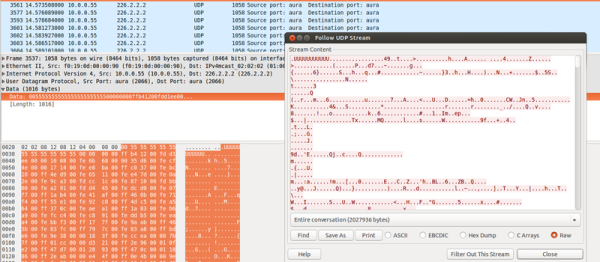
He’d done work previously on a similar extender that turned out to use a quirky method to send the video, which he naturally reversed and made to do his bidding. But non-standard formats are a pain. So when he was given a newer version of the same device, and started peeking into the packets with Wireshark, he was pleasantly surprised to find that the output was just MPEG-encoded video over RTP. No hacking necessary.

Until now, streaming video over an IP network from an arbitrary HDMI output has been tricky, [danman] has been more than a little obsessed with getting it working on the cheap. In addition to the previous version of this extender, he also managed to get a stream out of a rooted Android set-top box. That costs a bit more, but can also record at the same time, should you need to.

None of this solves the HDMI HDCP encryption problem, though. You’re on your own for that one.

(Those of you Wireshark wizards out there will note that we just swiped the headline image from the previous version of the project. There were no good images for this one. Sorry about that.)

Continuous Delivery For Your ESP8266

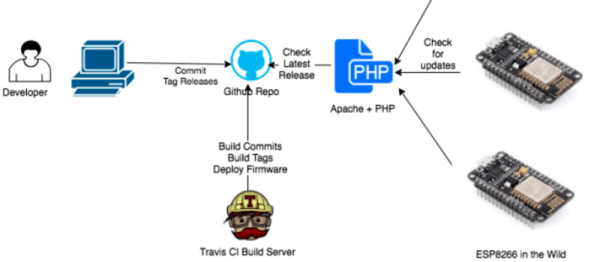
There’s nothing to be ashamed of. It’s a problem we all have. You change your code a lot — you can’t help it, you just need to tweak one last little bit. And then you have to go downstairs, fetch your ESP8266 module, plug it in to your computer, flash the new firmware in, and then run back down and re-install your wine-cellar temperature monitor. If only there were a way to continuously update your ESP8266 over the air, pulling new code down from your GitHub repository, automatically running your test suite on it, and then pushing it off to the ESP.

OK, it’s ridiculous overkill, but [squix] strung together a bunch of open-source continuous integration tools and made them work with the ESP8266. A simple PHP script connects the ESP to the rest of the web infrastructure.

[squix] says the word “security” in the same way that gin aficionados whisper “vermouth” over their Martinis. Which is to say, there is none. But for a home solution, or if you want to play around with continuous development, it’s a good start.

And this is a cool project because it makes use of the ESP8266 OTA (over-the-air) programming library to push the code across. And we do hate having to run around the house to update firmware.

So check it out if you want to push code to your ESP8266s without physically going to fetch them, or if you want to integrate your web development with your home deployment.

FPGA-and-Pi Colossus Smashes Your Codes!

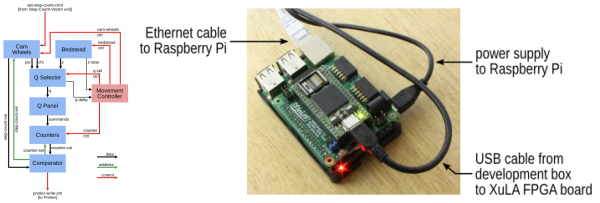
If it were sixty years ago, and you were trying to keep a secret, you’d be justifiably glad that [Ben North] hadn’t traveled back in time with his Raspberry-Pi-and-FPGA code-breaking machine.

We’ve seen a lot of Enigma builds here at Hackaday — the World War II era encryption machine captured our readers’ imaginations. But perhaps the more important machines to come out of cryptanalysis during that era were Turing’s electromechanical Bombe, because it cracked Enigma, and the vacuum-tube-based Colossus, because it is one of the first programmable electronic digital computers.

[Ben]’s build combines his explorations into old-school cryptanalysis with a practical learning project for FPGAs. If you’re interested in either of the above, give it a look. You can start out with his Python implementations of Colossus to get your foot in the door, and then move on to his GitHub repository for the FPGA nitty-gritty.

It’s also a cool example of a use for the XuLA2 FPGA board and its companion StickIt board that plug straight into a Raspberry Pi for programming and support. We haven’t seen many projects using these since we first heard about them in 2012. This VirtualBoy hack jumped out at us, however. It looks like a nice platform. Anyone else out there using one?

Poetic SSIDs

Artists see the same world that the rest of us do. They just see it from a little bit off to the left. Where you see picking an ESSID for your router as being a hassle, or an opportunity to insult your neighbors, [Dmitry], alias [::vtol::] sees a poetry-delivery mechanism.

Based on ESP8266 units, each “poet” has a battery and a switch. Turn it on and it changes its SSID once every ten seconds, feeding everyone who’s listening the next line of a poem. You can’t connect to the network, but you can occasionally hit refresh on your WiFi scanner and read along.

Since they’re so cheap to build, [::vtol::] sees them almost as if they were poetry-throwies. You could easily afford to leave a few around the city, guerilla-style, broadcasting your (slow) message one SSID at a time. We love the video clips (inlined below) of him riding the subway with the device on.

Continue reading “Poetic SSIDs”

Hackaday Prize Entry: Dave Thomas’ Desert Dryer

It seemed utter madness — people living in hot desert climates paying to heat air. At least it seemed that way to [David Thomas] before he modified his tumble dryer to take advantage of Arizona’s arid environment.

Hanging the wash out to dry is a time-honored solution, and should be a no-brainer in the desert. But hanging the wash takes a lot of human effort, your laundry comes back stiff, and if there’s a risk of dust storms ruining your laundry, we can see why people run the dryer indoors. But there’s no reason to waste further energy heating up your air-conditioned interior air when hot air is plentiful just a few meters away.

[David]’s modification includes removing the gas heating components of the dryer and adding an in-line filter. He explains it all in a series of videos, which at least for his model, leave no screw unturned. It’s not an expensive modification either, consisting mostly of rigid dryer hose and copious amounts of aluminum duct tape. He mentions the small fire that resulted from failing to remove the gas igniter, so consider yourself warned. The intake filter and box were originally intended for a house air-conditioning system, and required only minimal modifications.

This is a great build, being both cheap and easy to implement as well as being environmentally friendly without requiring a drastic change to [David]’s lifestyle. It makes us wish we had a similar endless supply of hot air.

The HackadayPrize2016 is Sponsored by:

In Soviet Russia, DIY Laser Rangefinder Scan YOU!!

Yakov Smirnoff used to say, “In America, you can always find a party. In Soviet Russia, Party finds YOU!!” Only here, it’s a laser rangefinder.

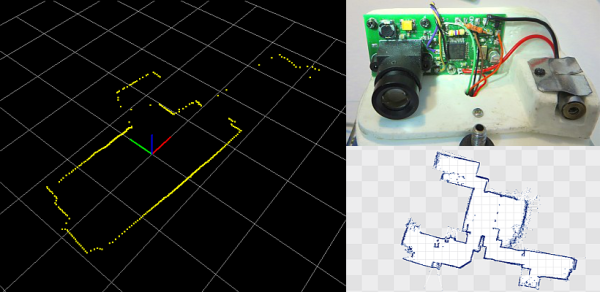
In this project (automatic translation), [iliasam] makes his own scanning laser rangefinder, like the ones that we’ve seen in fancy vacuum cleaners. But he does it from scratch.

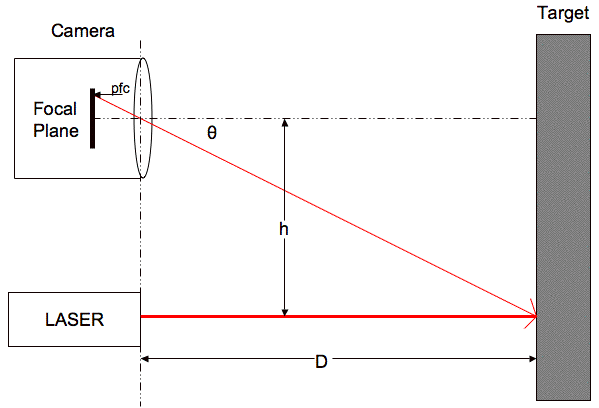
b91e3927436e885627e52179a5ed6c70While this sort of thing is easy if you have a webcam and a ton of processing power to throw at it, [iliasam] takes the hard way out — measuring the parallax of the reflected spot through a lens on a linear image sensor (which renders as “photodetector line” in translated Russian).

Linear image sensors are a lot like the elements in your CMOS digital camera, with the exception that the elements are arranged in a line instead of a plane, and they’re a lot easier to interface with a microcontroller. Hold a data line high to take an exposure, and then clock out the (analog) voltage values that correspond to the amount of light that hit each cell in the line array. While [iliasam] paid an estimated $18 for his, we’ve found them much cheaper on eBay. And there’s usually a linear sensor, often RGB and complete with driver circuitry, in a scanner if you take one apart. This could be done for just a few bucks if you were thrifty.

Continue reading “In Soviet Russia, DIY Laser Rangefinder Scan YOU!!”

Learning ARM Without Dev Board

There’s a tremendous amount of value in using pre-built, known-good development environments. It saves you hours of potential headaches when things aren’t working. Is the bug in the hardware or the software? If you bought a dev kit, you can be pretty sure it’s your software. But sometimes using a dev kit also feels like there’s a black box in the system. [Kevin] wanted to peer inside the black box, so he ordered a tray of cheap STM32F103 chips on eBay, and did the rest himself.

“The rest” isn’t all that much, but figuring that out is half the battle. [Kevin] soldered the TQFP chip onto a breakout board, added some decoupling capacitors, and connected four pins up to a dirt-cheap ST-Link programmer clone. The rest of the article describes the toolchain he used to compile for and program the chip. The end result is, natch, a blinking LED.

If you’re a bit experienced with microcontrollers and want to dive head-first into an ARM chip, [Kevin]’s writeup is just the ticket. In a single (long) blog post, he walks you through all the steps. If this is your first rodeo, you might be tempted to cheese out and buy a pre-built board on eBay (search “STM32F103” and you’ll find many options to choose from) and we don’t think that’s a bad idea either. Still, there’s just something to be said for the confidence that you’ll have once you’ve built the whole system from scratch.