VHS-Tape-Plasma Mirror Drives Tiny Particle Accelerator

When you think of a particle accelerator, you’re probably thinking of tens of kilometers of tube buried underground, at high vacuum, that uses precisely timed electromagnetic fields to push charged particles like electrons up to amazing speeds (and energies). However, it’s also possible to accelerate electrons in other ways, and lasers are a good bet. Although a laser-based particle accelerator can push electrons very effectively for a few centimeters, they top out at a relatively low maximum “speed” of a couple billion electron-volts, as opposed to the trillions of eV that you can get out of a really big traditional accelerator.

If only you could repeat the laser trick again, “hitting” the already-moving electrons from behind with another beam, you could boost them up to even higher energies. Doing so would take something like a one-way mirror that lets the electrons pass through, but that you could then bounce a laser beam off of. In a fantastic mixture of science and mother-of-invention-style hacking, these scientists from Lawrence Berkeley National Labs use plain-old VHS tape to make plasma mirrors to do just that. Why VHS tape? Because it’s cheap, flexible, and easy to move through the apparatus at high speeds.

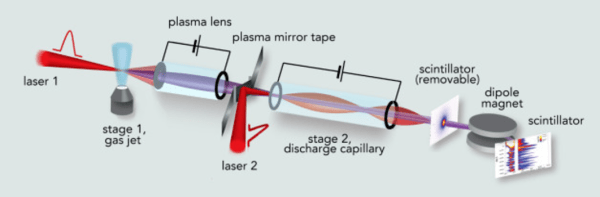
The device works like this: a first laser beam passes through a jet of ionized gas and pulls some electrons with it. These electrons are then focused into a beam and pass through some (moving) VHS tape. The electrons punch a hole through the tape. In their wake they leave a hot plasma of mid-90s TV shows you never got around to watching. The second laser beam is then bounced off this plasma mirror and further accelerates the electron beam from behind. In principle, you could repeat this second stage enough times to build up the energy you needed, but for now the crew is working to characterize their single-stage beam. Getting the timing right on the second-stage beam is, naturally, non-trivial.

Anyone who has spent some time in a science lab knows that there are millions of these tiny get-it-done-quick hacks behind the scenes, but it’s nice to see one take center stage as well. If you’ve got stories of great lab hacks that you’d like to see us cover, post up in the comments!

Thanks [Bruce] for the tip, via Science Daily.

Another Use For Old Hard Drive Parts: Anemometer

So you’ve just taken apart a hard drive, and you’re looking at all the pieces on your desktop. You’re somehow compelled to use them all in different projects. Why not pull out that very high quality bearing that keeps the platters spinning at high RPMs and build this simple anemometer with it? That’s what [Sergei Bezrukov] did, and it looks like a perfect el cheapo project.

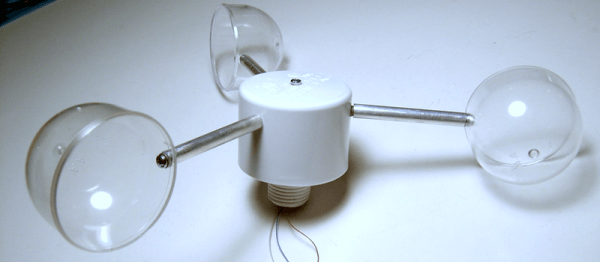
The build is fairly low-tech and entirely sufficient. The cups are made from plastic containers that used to contain pantyhose. A Hall-effect sensor and a magnet take care of measuring the rotations, feeding its signal into a PIC that calculates the wind speed from the revolution rate. The rest of the housing is PVC, with some other miscellaneous parts found at the hardware store.

To calibrate the device, [Sergei] made a second hand-held unit that he could (presumably) drive around in a car to get a baseline wind speed, and then note down the revolution rate. Once you’ve got a good reference, holding the portable unit up to the permanent one transfers the calibration.

But the star of the show, that lets the anemometer spin effortlessly, is the sweet bearing that used to spin a hard-drive platter. If you haven’t played with one of these bearings before, you absolutely should. We just ran a post on taking apart a hard drive for its spare-parts goodness so you have no excuse. If you’re feeling goofy, you can mount one onto a board, step on it with the ball of your foot, and spin. They’re quality bearings, and you’ll be surprised how quickly you can spin as you pull your arms in.

Thank [Matt] for the tip!

Ancient Fonts Are Fontastic!

Doing some 8-bit ASCII art, but can’t remember where you left your copy of MicroKnight for the Amiga? Or maybe you just need some low-res-but-high-style bitmap fonts to go with your LED pixel array. No fear! Maze.io is cataloguing old text-mode fonts for you.

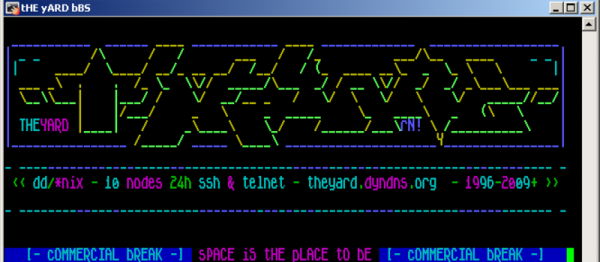
Textmode.es has a slew of new and old text art from both the Amiga and PC scenes. Rendering some of these correctly really relies on having the right font, so the parser piece reads many different art file formats and renders them with the requested fonts. There’s ASCII, sure, but also ICE Draw, PCBoard, Artworx, and many more. But piece needs the right fonts to do its work, which brings us back to Maze.io.

So whether you’re interested in new or old text-mode art, or just in need of some pixels to push around, have a look at Maze.io. And if you see any ROMs out there with interesting fonts, let them know.

Title image credit trueschool.se

Build Yourself An Awesome Modular Power Supply

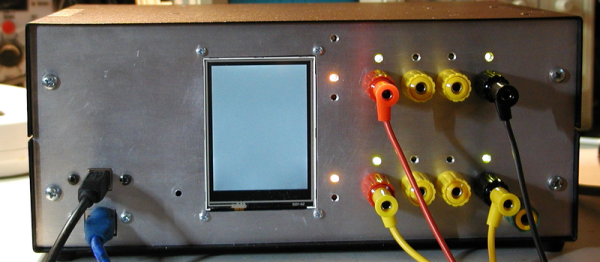
You may think you’ve built a power supply for your bench. Heck, we all do. But until you check out [Denis]’s bench power supply build, you may not even know what you’re missing.

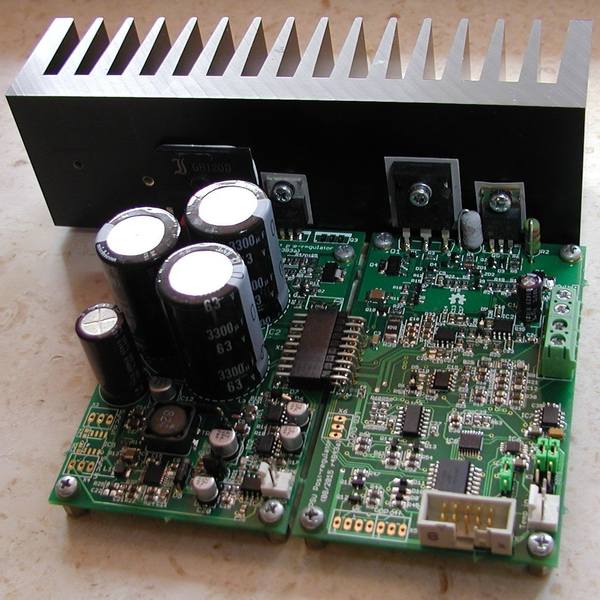
[Denis]’s design is nearly entirely modular and targeted to the intermediate builder. It’s built on easily available parts and through-hole components. It’s got an Arduino running as the brains, so you’re going to be able to hack on the code when you feel like tweaking it. But easy doesn’t mean light on features. Let’s walk through the build together.

6203871454520455862_thumbnail

It starts off with a pre-regulator: a switching MOSFET that gets the voltage down to just a couple volts above the target value. Then it’s off to the post-regulator that includes all of the fine adjustments, the DAC and ADC interfacing to the microcontroller, and some fancy features like a “down-programmer” that turns the output off extra quickly.

On the user end of things, [Denis] made a very sleek board that incorporates a TFT touchscreen for the controls, Arduino connections, and the obligatory banana plug outputs. There’s opto-isolation on the SPI bus, a real-time clock, and a bunch more goodies on board. He’s in his third revision of this module, and that level of refinement shows. It’s even SCPI compliant, meaning you can control remotely using an industry-standard protocol.

So what would you do with a ridiculously fancy power supply under microcontroller control? Test out battery charging algorithms? Program test routines to see how your devices will work as their batteries drain out? We have no idea, but we know we want one!

Learn Bluetooth Or Die Tryin

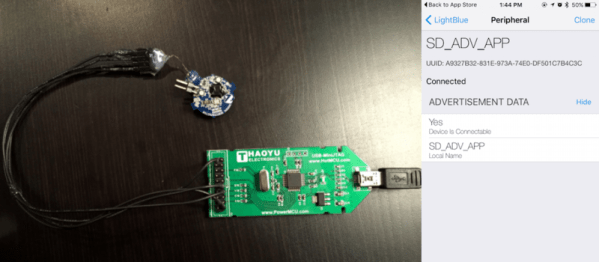
Implementing a Bluetooth Low Energy (BLE) device from scratch can be a daunting task. If you’re looking for an incredibly detailed walkthrough of developing a BLE project from essentially the ground up, you’ve now got a lot of reading to do: [Jocelyn Masserot] takes you through all the steps using the ARM-Cortex-M0-plus-BLE nRF51822 chip.

The blog does what blogs do: stacks up in reverse-chronological order. So it’s best that you roll on down to the first post at the bottom and start there. [Jocelyn] walks you through everything from setting up the ARM compiler toolchain through building up a linker script, blinking an LED, flashing the chip, and finally to advertising your device to your cell phone. It’s a lot of detail, but if you’re doing something like this yourself, you’re sure to appreciate it.

Of course, all the code is available for you to crib peruse on [Jocelyn]’s GitHub. And for yet more background reading on BLE, check out the Hackaday Dictionary.

Anti-Drone Mania Reaches Panic Levels For Superbowl

According to this report at FOX News Technology, the FAA may use “deadly force” against your remote-controlled quadcopter, ahem, “drone” if you’re flying within a 36-mile radius of the Super Bowl this weekend. We call shenanigans on using “deadly” for things that aren’t alive to begin with, but we have no doubt that they intend to take your toys away if you break the rules. We are curious to see how they’re going to do it, though.

sect_6_6446The actual Notice to Airmen (NOTAM) has the details, and seems pretty comprehensive. You can’t fly your sea plane or go crop dusting either. Model rocketry is off the table within the circle on Sunday afternoon. It tickles our superiority-bone to note that only “drones” made the headlines.

But we also see our loophole! The ban only extends from the ground’s surface up to 18,000 ft (5,500 m) above sea level. (No, we’re not thinking of flying quadcopters in tunnels under the stadium.) They didn’t rule out high-altitude balloon flight over the Super Bowl? Don’t even think about it.

On the other hand, those of you near the game should count your blessings that you don’t live within 30 miles of the US Capitol and spend the day drone racing.

Continue reading “Anti-Drone Mania Reaches Panic Levels For Superbowl”

Pimp My Scope: Touchscreen Edition

Do you have a touch-screen oscilloscope? Neither do we. But how cool would that be to pan left and right or expand either axis just like you do on your cellphone screen? [Igor] did just that, and the results (in the video below the break) look fantastic.

We’ve covered [Igor]’s previous round of hacking on his Siglent scope, where he bricked it by flashing the wrong firmware, and then fixed it by Frankensteining the screen into the box that the firmware wanted. But once he’d gotten the scope-hacking bug, he couldn’t quit.

A brief overview: an Arduino Nano reads the touchscreen and sends the commands to the scope to act accordingly. [Igor] initially wanted to simply use the COM port on the back to control, but his previous mis-flashing of the firmware had rendered that moot. Instead, he went after the data bus that interfaces with the keyboard unit, reverse engineered its protocol, and spoofed keypresses with custom code in the AVR.

As a side effect of all this, [Igor] could also write a script that controls the scope from his computer, and he ended up re-housing it all in the nice wooden front panel that you see now. It’s more than a step up from the previous covered-in-electrical-tape look, and the new functionality is very very cool. Kudos.

Continue reading “Pimp My Scope: Touchscreen Edition”