Add A Microscope To Your 3D Printer

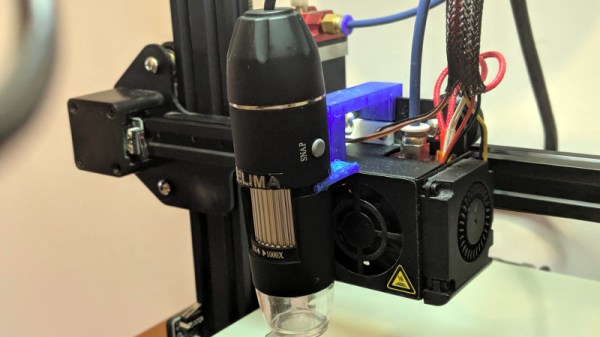
There are many ways to keep an eye on your 3D printer as it churns out the layers of your print. Most of us take a peek every now and then to ensure we’re not making plastic vermicelli, and some of us will go further with a Raspberry Pi camera or similar. [Uri Shaked] has taken this a step further, by adding a USB microscope on a custom bracket next to the hot end of his Creality Ender 3.

The bracket is not in itself anything other than a run-of-the-mill piece of 3D printing, but the interest comes in what can be done with it. The Ender 3 has a resolution of 12.5μm on X/Y axes, and 2.5μm on Z axes, meaning that the ‘scope can be positioned to within a hair’s-breadth of any minute object. Of course this achieves the primary aim of examining the integrity of 3D prints, but it also allows any object to be tracked or scanned with the microscope.

For example while examining a basil leaf, [Uri] noticed a tiny insect on its surface and was able to follow it with some hastily entered G-code. Better still, he took a video of the chase, which you can see below the break. From automated PCB quality control to artistic endeavours, we’re absolutely fascinated by the possibilities of a low-cost robotic microscope platform.

[Uri] is a perennial among Hackaday-featured projects, and has produced some excellent work over the years. Most recently we followed him through the production of an event badge.

Continue reading “Add A Microscope To Your 3D Printer”

Raspberry Pi Helps Vintage Psion Find Its Voice

Ask a hacker to imagine computing in the 1980s, and they might think of the classic 8-bit all-in-one machines from the likes of Commodore and Atari, or perhaps the early PCs and Macs. No matter the flavor, they’ll likely have one thing in common: a lack of mobility thanks to being anchored down by a bulky CRT screen in the form of either a television or a dedicated monitor. Mobile computing at the time was something of an expensive rarity, consisting of various quirky handhelds that today have been all but forgotten.

Looking to see if one of these so-called “pocket computers” could still be of use in 2019, [James Fossey] set out to get his circa 1986 Psion Organiser II connected to the Internet. With a Hitachi CPU, two-line text-only LCD and ABCD keyboard it’s a world away from the modern smartphone, yet as an early stab at a PDA as well as general purpose computer it’s visibly an ancestor of the devices we carry today. Of course, as the Psion was produced before the advent of affordable mobile data and before even the invention of the Web, it needed a bit of help connecting to a modern network.

Psion sold an RS-232 cable accessory which came with both serial terminal and file transfer in ROM, so with one of these sourced and a little bit of hackery involving an RS-232 to TTL converter and a DB-25 connector, he was able to hook it up to a Raspberry Pi. That means it’s reduced to being a dumb terminal for a more powerful machine that can do the heavy lifting, but those with long memories will tell you that’s exactly what would have been done with the help of a modem to connect to a BBS back in 1986. So far he’s got a terminal on the Pi and a Twitter client, but he’s declined to show us the Hackaday Retro Edition.

Psion has rarely featured directly on these pages, but despite being forgotten by many today they were a groundbreaking company whose influence on portable computing stretched beyond their own line of devices. One we have shown you is an effort to put more recent hardware into a Psion Series 5 clamshell.

An All-Iron Battery Isn’t Light, But It’s Cheap

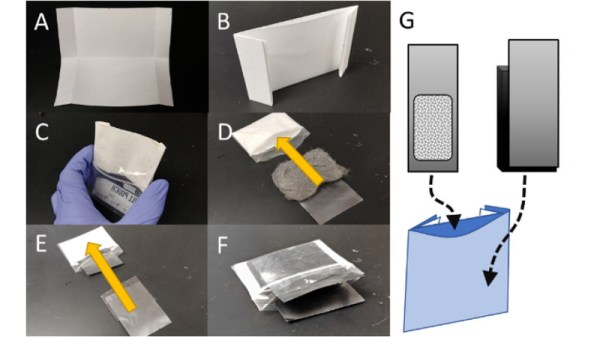
Rechargeable batteries are a technology that has been with us for well over a century, and which is undergoing a huge quantity of research into improved energy density for both mobile and alternative energy projects. But the commonly used chemistries all come with their own hazards, be they chemical contamination, fire risk, or even cost due to finite resources. A HardwareX paper from a team at the University of Idaho attempts to address some of those concerns, with an open-source rechargeable battery featuring electrode chemistry involving iron on both of its sides. This has the promise of a much cheaper construction without the poisonous heavy metal of a lead-acid cell or the expense and fire hazard of a lithium one.

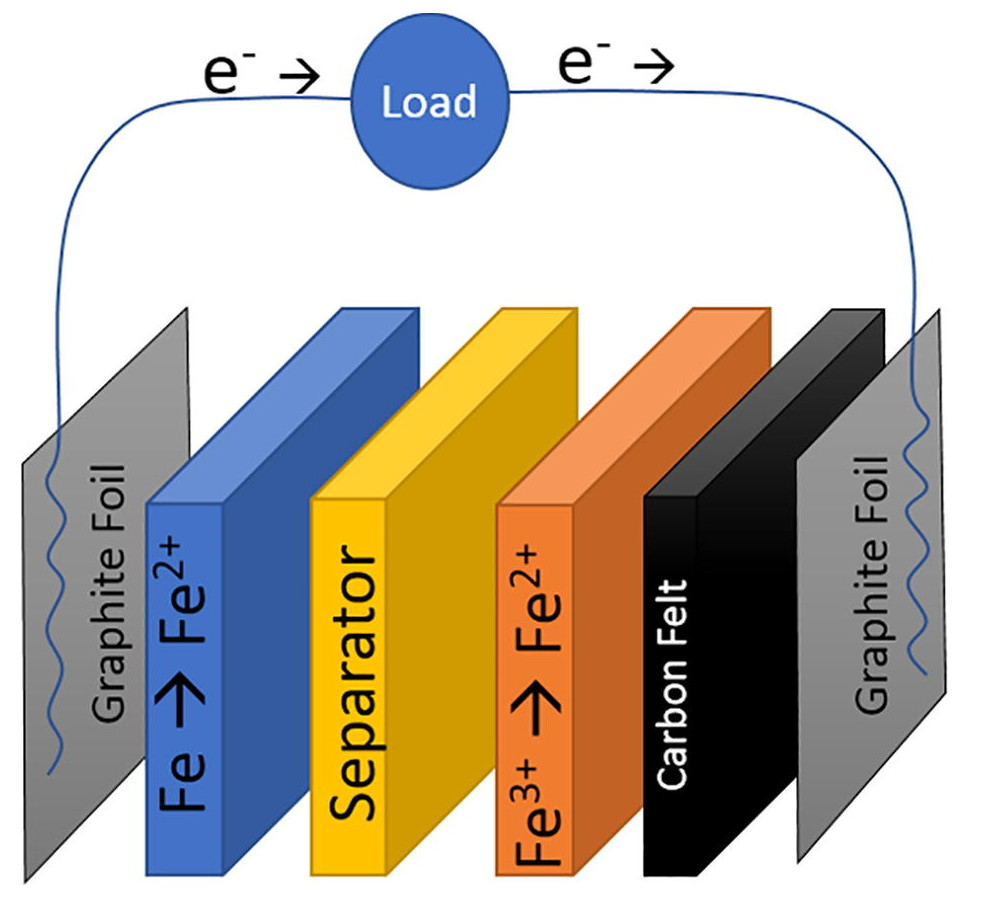
A diagram of the all-iron cell.

The chemistry of this cell is split into two by an ion-exchange membrane, iron (II) chloride is the electrolyte on the anode side where iron is oxidised to iron 2+ ions, and Iron (III) chloride on the cathode where iron is reduced to iron hydroxide. The result is a cell with a low potential of only abut 0.6V, but at a claimed material cost of only $0.10 per kWh Wh of stored energy. The cells will never compete on storage capacity or weight, but this cost makes them attractive for fixed installations.

It’s encouraging to see open-source projects coming through from HardwareX, we noted its launch back in 2016.

Thanks [Julien] for the tip.

Antenna Tuning For GHz Frequencies

Antenna tuning at HF frequencies is something that radio amateurs learn as part of their licence exam, and then hone over their time operating. A few basic instruments and an LC network antenna tuner in a box are all that is required, and everything from a bit of wet string to ten thousand dollars worth of commercial antenna can be loaded up and used to work the world. When a move is made into the gigahertz range though it becomes a little more difficult. The same principles apply, but the variables of antenna design are much harder to get right and a par of wire snippers and an antenna tuner is no longer enough. With a plethora of GHz-range electronic devices surrounding us there has been more than one engineer sucked into a well of doom by imagining that their antenna design would be an easy task.

An article from Baseapp then makes for very interesting reading. Titled “Antenna tuning for beginners“, it approaches the subject from the perspective of miniature GHz antennas for IoT devices and the like. We’re taken through the basics and have a look at different types of antennas and connectors, before being introduced to a Vector Network Analyser, or VNA. Here is where some of the Black Art of high frequency RF design is laid bare, with everything explained through a series of use cases.

Though many of you will at some time or other work with these frequencies it’s very likely that few of you will do this kind of design exercise. It’s hard work, and there are so many ready-made RF modules upon which an engineer has already done the difficult part for you. But it does no harm to know something about it, so it’s very much worth taking a look at this piece.

It’s an area we’ve ventured into before, at a Superconference a few years ago [Michael Ossmann] gave us a fundamental introduction to RF design.

An Exoskeleton Arm For A Hacker On A Budget

Whether it is motivated by a dream of superhuman strength courtesy of a mech suit or of mobility for those with impaired muscle function, the powered exoskeleton exerts a curious fascination among engineers. The idea of a machine-augmented human body achieving great things is thwarted though by the difficulty of the task, actuators and power sources small enough to be worn comfortably represent a significant challenge that is not easily overcome. It’s a subject that has captivated [Kristjan Berce] since at a young age seeing his grandmother struggling with lifting, and he presents a working powered exoskeleton arm as a proof of his ideas.

It’s a wonderful exercise in low-tech construction with hand tools and a drill press on pieces of aluminium and wood. Motive power comes from an automotive windscreen wiper motor, and electrical power comes from a hefty LiPo attached to the device’s harness. There is a feedback potentiometer incorporated into the elbow joint, and an Arduino oversees the operation under the direction of a pair of glove-mounted buttons. It’s certainly impressive to see it in the video below lifting a bicycle, though we wonder how its weight might affect someone with less muscle function than average.

Projects like this one are very good to see, because there’s a chance that somebody out there may be helped by building one of these. However there is always a note of caution to be struck, as the best solutions come from those who need them and not those who merely think they have the solution. We have written about the Engineer Saviour Trap here in years past.

This isn’t the first prosthetic arm we’ve seen though, we covered a hackerspace in England printing one for a local youngster.

Continue reading “An Exoskeleton Arm For A Hacker On A Budget”

Retrotechtacular: The OSCAR 7 Satellite Died And Was Reborn 20 Years Later

If I were to ask you what is the oldest man-made orbiting satellite still in use, I’d expect to hear a variety of answers. Space geeks might mention the passive radar calibration spheres, or possibly one of the early weather satellites. But what about the oldest communication satellite still in use?

The answer is a complicated one. Oscar 7 is an amateur radio satellite launched on November 5th 1974, carrying two transponders and four beacons, all of which operate on bands available to amateur radio operators. Nearly 45 years later it still provides radio amateurs with contacts just as it did in the 1970s. But this bird’s history is anything but ordinary. It’s the satellite that came back from the dead after being thought lost forever. And just as it was fading from view it played an unexpected role in the resistance to the communist government in Poland.

Continue reading “Retrotechtacular: The OSCAR 7 Satellite Died And Was Reborn 20 Years Later”

Apple Lightning Video Adaptors Run IOS, Dynamically Loaded

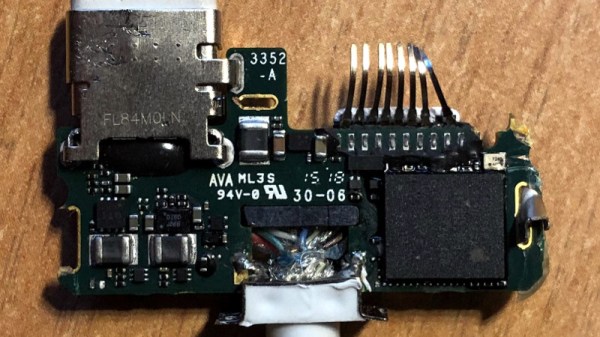
Apple has for a very long time been a company that ploughs its own furrow when it comes to peripherals, with expensive proprietary hardware being the order of the day over successive generations of its products. One of its current line of proprietary interfaces is the Lightning connector, best thought of as an Apple-only take on the same ideas that the rest of the world knows as USB-C. There are a whole host of white dangly peripherals that can be hung from your iDevice’s Lightning port, including a pair of display adaptors that allow them to drive an HDMI or VGA monitor.  [Lisa Braun] has subjected one that had failed to a teardown, and her analysis gives some insight into the way Apple creates its peripherals.

Where you might expect these to contain mostly the equivalent of a graphics card, in fact they have a fully-fledged SoC of their own that runs its own OS with the same Darwin kernel as its host. Unexpectedly this is not held upon the adapter itself, instead it is shipped with iOS and loaded dynamically. Thus the file containing it can be retrieved from iOS and unpacked, leading to some interesting analysis. In a fascinating twist for those of us unused to Lightning’s internals, it’s revealed that the device can be driven from a USB port with the appropriate cobbled-together adapter, allowing a full-size MacOS device to interrogate it. This many not be news to readers with a long memory though, we’ve told you in the past about reverse engineering the Lightning connector.