Different Differentials & The Pitfalls Of The Easy Swap

I dig cars, and I do car stuff. I started fairly late in life, though, and I’m only just starting to get into the whole modification thing. Now, as far as automobiles go, you can pretty much do anything you set your mind to – engine swaps, drivetrain conversions, you name it – it’s been done. But such jobs require a high level of fabrication skill, automotive knowledge, and often a fully stocked machine shop to match. Those of us new to the scene tend to start a little bit smaller.

So where does one begin? Well, there’s a huge realm of mods that can be done that are generally referred to as “bolt-ons”. This centers around the idea that the install process of the modification is as simple as following a basic set of instructions to unbolt the old hardware and bolt in the upgraded parts. Those that have tread this ground before me will be chuckling at this point – so rarely is a bolt-on ever just a bolt-on. As follows, the journey of my Mazda’s differential upgrade will bear this out.

The car in question, currently known as the “Junkbox MX-5” until it starts running well enough to earn a real name. It somehow looks passable here, but in person I promise you, it looks awful. Credit: Lewin Day

It all started when I bought the car, back in December 2016. I’d just started writing for Hackaday and my humble Daihatsu had, unbeknownst to me, just breathed its last. I’d recently come to the realisation that I wasn’t getting any younger, and despite being obsessed with cars, I’d never actually owned a sports car or driven one in anger. It was time to change. Continue reading “Different Differentials & The Pitfalls Of The Easy Swap”

Hackaday Prize Entry: Portable LED Flash For Photography

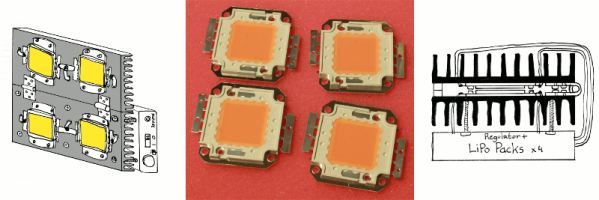
Photography is all about light. It’s literally right there in the name – stemming from the Greek word, photos. This is why photographers obsess over the time of day of a shoot, why Instagrammers coalesce around landmarks at sunset, and why a flash helps you take photos in darkness. Historically, flashes have worked in all manner of ways – using burning magnesium or xenon lamps for example. For this Hackaday Prize entry, [Yann Guidon] is developing a portable flash using LEDs instead.

By this point in time, you might be familiar with LEDs as flash units from your cellphone. However, [Yann] is taking this up a notch. The build is based around 100W LED modules, which obviously can pump out a lot of light. The interesting part of the build is its dual nature. The LEDs are intended to operate in one of two ways. The first is in a continuous lighting mode, running the modules well below their rated power to reduce the stress on the LEDs and power supply, and to enable the flash to run on the order of an hour. In this mode, temperature feedback will be used to control the LEDs to manage power use. The other is a pulsed mode, where the LED will be overvolted for a period of milliseconds to create a much more powerful flash.

It’s this dual nature which gives the LED-based flash a potential advantage over less versatile xenon-based units, which are limited to pulsed operation only. We can see the continuous lighting mode being particularly useful for videographers needing a compact, cheap lighting solution that can also work as a pulsed unit as well.We’re excited to see how [Yann] tackles the packaging, thermal and control issues as this project develops!

Learn A Language, One Moment At A Time

There’s a lot of times in an average day when you’ll find yourself waiting. Waiting for your morning brew at the cafe, or for an email to show up — it’s often just a few minutes, many times a day. It’s far too short a time to get any real work done, but it adds up at the end of the week.

Enter WaitSuite, a language learning tool developed by MIT’s CSAIL. It’s a language learning tool, which aims to teach users words in a foreign language in these “micromoments” — the short periods of time spent waiting each day. The trick to WaitSuite here is in its ultralightweight design which integrates into other tasks and software on your computer and smartphone. Rather then having to launch a separate app, which takes time and effort, WaitSuite hovers in the background, ready to go when it detects a short period of wait time. Examples given are hitting refresh in Gmail, or waiting for a connection to a WiFi network.

The team behind the project calls this concept wait-learning; you can read the paper here. If you’d like to try it out, use the Chrome extension called WaitChatter. It quizzes you while you’re waiting on a response in GChat. We’d love to see the rest of the WaitSuite released publicly soon.

It’s a tidy piece of software that’s great for those looking for an alternative to compulsively refreshing social media while loitering. It probably won’t help you learn French overnight, but it could be a useful way to pick up some extra vocab without having to carve more time out of your schedule.

We don’t see a whole lot of language learning hacks here, but you might like to check out Adafruit’s take on the Babel Fish.

Upgrading RAM On A Nexus 5X

A screenshot of the status screen indicating the phone has detected the extended RAM.

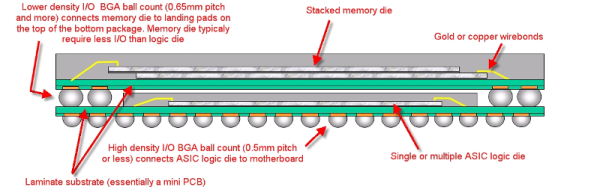
A denizen of the venerable XDA forums reports that it is possible to upgrade the RAM of the Nexus 5X from 2GB to 4GB.  Having suffered the dreaded bootloop, [Cathair2906] decided to send their phone off to China for repair. The technician advised that since reflow of the CPU was necessary anyway, it makes sense to upgrade the RAM as well. This is due to the RAM actually being fitted directly on top of the CPU, a method amusingly known as Package on Package (SFW).

Upgrading RAM in the average computer is a relatively trivial task. Pop the case open, and you slide the new sticks into the extra slots. It’s not the same case for smartphones and tablets — in the endless quest for the slimmest form factor, all parts are permanently soldered. In addition, every device is essentially bespoke hardware; there’s no single overarching hardware standard for RAM in portable devices. You could find yourself searching high and low for the right chips, and if you do track them down, the minimum order quantity may very well be in the thousands.

Unless, of course, you had access to the Shenzhen markets where it’s possible to buy sample quantities of almost anything. Given access to the right parts, and the ability to solder BGA packages, it’s a simple enough job to swap a bigger RAM chip on top of the CPU during the repair.

It’s the sort of thing that’s trivial in Shenzhen, and almost mind-bogglingly impossible in the West. The price of the repair? About $60 USD. [Cathair2906] was even nice enough to share the address of the shop that did the work.

We’ve seen similar antics before – like this Nexus 5 storage upgrade to 64GB.

[via XDA Developers, thanks to Jack for the tip!]

Photochromic Eggs: Not For Breakfast

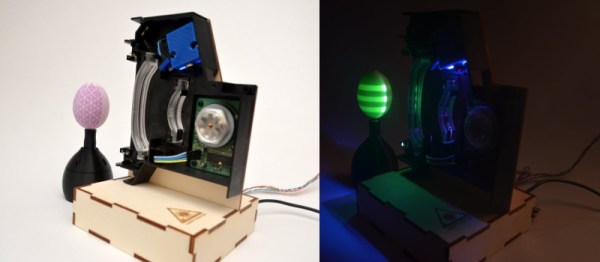
Photochromic paint is pretty nifty – under exposure to light of the right wavelength, it’ll change colour. This gives it all kinds of applications for temporary displays.  [Jiri Zemanek] decided to apply photochromic paint to an egg, utilising it to create stroboscopic patterns with the help of a laser.

Patterns for the egg are generated in MATLAB. A Discovery STM32 board acts as a controller, looking after the laser scanner and a stepper motor which rotates the egg. A phototransistor is used to sync the position of the laser and the egg as it rotates.

The photochromic paint used in this project is activated by UV light. To energize the paint, [Jiri] harvested a violet laser from a Blu-ray player, fitting it to a scanning assembly from a laser printer. Instead of scanning the laser across an imaging drum, it is instead scanned vertically on a rotating egg. Patterns can then be drawn on the egg, which fade over time as the paint gives up its stored energy.

[Jiri] exploits this by writing a variety of patterns onto the egg, which then animate in a manner similar to a zoetrope – when visualised under strobing light, the patterns appear to move. There are also a few holiday messages shown for Easter, making the egg all the more appropriate as a billboard.

If you like the idea of drawing on eggs but are put off by their non-uniform geometry, check out the Egg-bot. Video below the break.

Continue reading “Photochromic Eggs: Not For Breakfast”

Fix-A-Brick 2: Nexus 5X Rises From The Ashes

It was but two weeks ago when I told my story of woe —  the tale of an LG Nexus 5X that fell ill, seemingly due to a manufacturing fault at birth. I managed to disassemble it and made my way through a semi-successful attempt at repair, relying on a freezer and hairdryer to coax it back to life long enough to backup my data. Try as I might, however, I simply couldn’t get the phone running for more than ten minutes at a time.

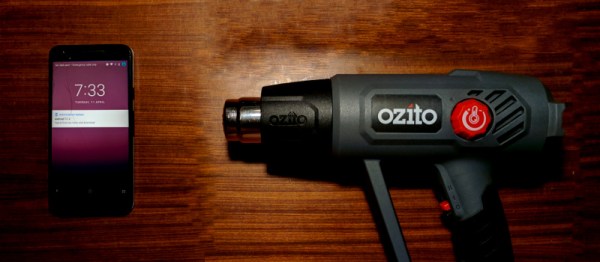
All was not in vain, however! I was rewarded for documenting my struggles with the vast experience and knowledge of the wider Internet: “Hairdryers don’t get as hot as heatguns!”

It turned out I had just assumed that two similar devices, both relying on a hot bit of metal and a fan as their primary components, must be virtually identical if rated at a similar power draw. I was wrong! Apparently the average hairdryer stays well cooler than 150 degrees Celsius to avoid melting one’s silky locks or burning the skin. I even learned that apparently, wet hair melts at a lower temperature than dry hair. Who knew?

Armed with this knowledge, I rushed out and bought the cheapest heat gun I could find — around $50. Rated up to 600 degrees C, this was definitely going to be hotter than the hairdryer. With the prevailing opinion being that I had not applied enough heat in general, I decided to also increase the heating period to 90 seconds, up from a quick 30 second pass originally.

Continue reading “Fix-A-Brick 2: Nexus 5X Rises From The Ashes”

File Format Posters

It’s not uncommon for hackers to have a particular delectation for unusual interior decoration. Maybe it’s a Nixie tube clock, or a vacuum fluorescent display reading out the latest tweets from a favorite chatbot. If this sounds like your living room already, perhaps you’d like some of these file format posters to adorn your walls.

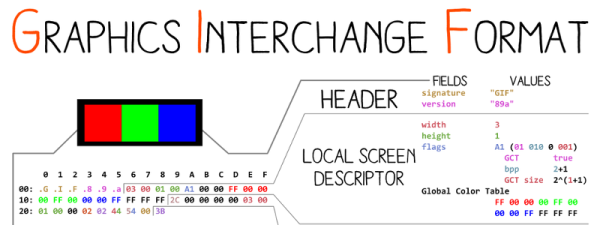
The collection of images includes all kinds of formats — GIF, ZIP and WAV are all represented, but it even gets into some real esoterica — DOLphin format executables are here if you’re a total GameCube fanatic. Each poster breaks down the format into parts, such as the header, metadata and descriptor sections, and come in a variety of formats themselves — most available in SVG, PDF and PNG.

If we’re totally honest, these aren’t all designed for hanging on your wall as-is — we’d consider putting some work into to optimize the color palettes and layouts before putting these to print. But regardless, they’re an excellent visual representation of data structures that you might find particularly useful if you need to do some reverse engineering down the track.

If you still have wall space available after seeing this, here’s the electronic reference poster that should fill it.

[Thanks to JD for the tip!]