Scratch-built 3D Printer Shows Rock-solid Performance

scratch-built-3d-printer

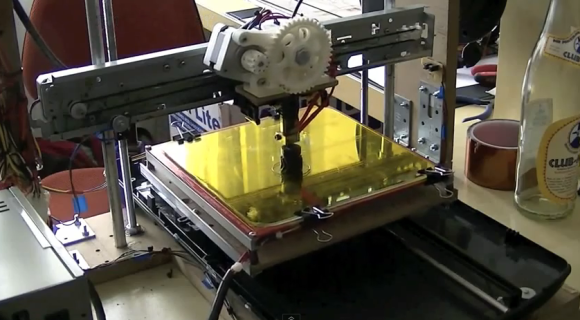
These days it’s super-easy (not super-cheap) to go out and buy a 3D printer. But if you’ve got the mad skills like [Mario Lukas] maybe you can build a 3D print using a bunch of scavenged parts (translated). He’s published six posts on the build, and put together an overview video which you can watch after the break.

A pile of salvaged parts were found in a scanner and four different printers. He’s also powering the thing with an old PC PSU. The hot bed and extruder are brand new, which is a wise investment. We’re not sure about the threaded rod and bearings but we’d bet those are new as well. When it came time to work on the electronics he chose an Arduino board as the go-between for the printer and computer. It uses four stepper motor driver boards to drive the axes. Connections can be a bit complicated and he actually ‘smoked’ one of the boards during the development phase.

One of the mechanical build posts shows a belt routed in a T-shape. We wonder if it’s function is similar to what this H-bot style printer uses?

Continue reading “Scratch-built 3D Printer Shows Rock-solid Performance”
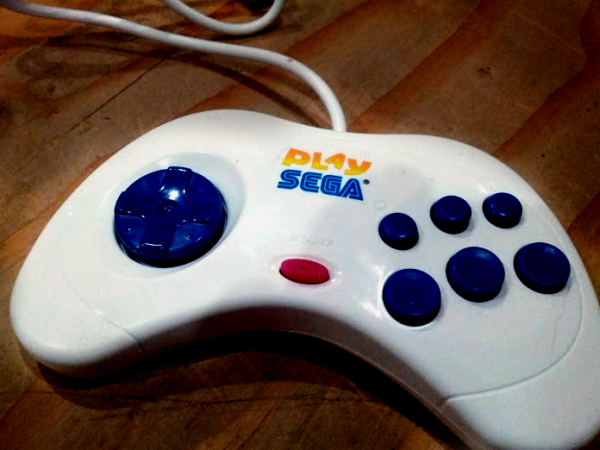
Sega Controller Houses Auto-launch Emulator

[Joe’s] wife grew up playing Sega games and he wanted to help her unwind by reliving the experience. Since the work computer she uses when travelling isn’t a good place to install emulators he built this plug-and-play emulator inside of a Sega controller.

We’ve seen this type of thing a few times before (even with XBMC in a SNES controller) but there is one thing we hadn’t thought of lately. Newer versions of Windows have auto-launch disabled for USB drives. But [Joe] knew that there were still some USB sticks that manage to auto-launch anyway so he researched how those work. It turns out that they have two partitions, one is formatted as a CDFS which looks like a CD-ROM to Windows and allows auto-launch. He used this method of partitioning a USB stick, storing the ROMs on the mass storage partition and the emulator and the CDFS partition. To finish the hack he cracked open the controller and found room for a USB hub and the PCB from the thumb drive.

If you still have cartridges lying around you can pull the ROMs off of them over USB.

Wifi Pineapple Project Uses Updated Hardware For Man-in-the-middle Attacks

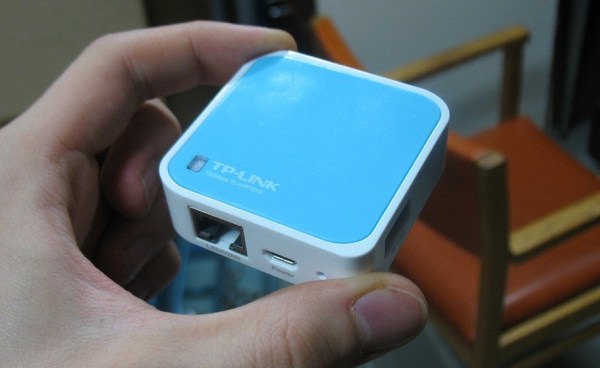
We’ve seen this small, cheap, and powerful WiFi router before. But this time it’s up to no good. [Andy] used a TP-Link WR703N to build an upgraded WiFi Pineapple hacking tool.

A WiFi Pineapple is a device spawned years ago by the Hak5 team (here’s a clip showing off the device). It uses a WiFi router that will answer to any SSID request. Basically if your computer or smart phone has an AP SSID saved and broadcasts a request to connect the pineapple will pretend to be that device and start the handshake. This provides the chance to sniff all the data passing through in a classic man-in-the-middle attack.

[Andy] is recreating the device but at a rock bottom price. He picked up this router for about $20 and added an $8 USB drive to it. The only other thing you would need is a power source and a way to hide the hardware. The code used in the Hak5 version is available for download and that’s what he worked on after flashing OpenWrt to the device.

[Thanks Midnite]

Chromebook Hack Controls Your Television

chromebook_remote_control1

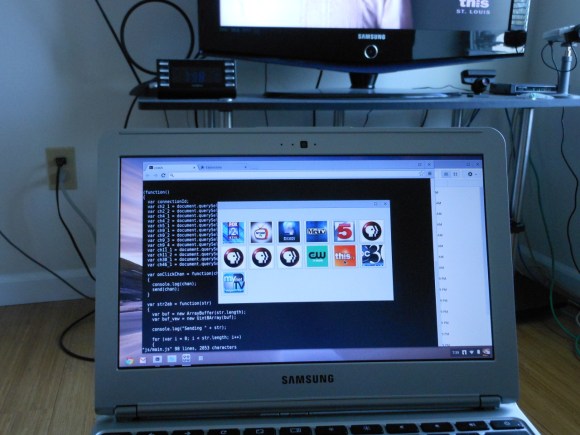
[Michael Kohn] only accomplished about half of what he set out to, but we still think his TV channel switcher from a Chromebook turned out nicely. When starting the project he wanted to include a grid of listing so that he could choose a specific program, but decided that scraping the data was too much work for this go-round.

The Chromebook doesn’t include an IR transmitter so he built one using an MSP430 chip. He had previously built a little transmitter around an AVR chip and was surprised to find that the internal oscillator on that was quite a bit more accurate than on the MSP430. Timing is everything with the Manchester encoded signals used for IR remote controls so he used his oscilloscope to tune the DCO as accurately as possible.

The app shown on the screen was written in Javascript. Google published some example code on using RS232 with the computer; [Michael] used this resource to provide communications between the computer and the microcontroller.

Continue reading “Chromebook Hack Controls Your Television”

Hackaday Links: Sunday, April 28th, 2013

hackaday-links-chain

Another week has gone by and we hope you’ve been happily hacking away in your underground lairs. If not, here’s some inspiration that didn’t quite make it to the front page this week:

[Razr] used a CFL ballast to replace the mechanical one in his fluorescent tube light fixture.

To make the drawers of his workbench more awesome [Rhys] used the faceplates from some servers.

This week saw some changes in the hobby PCB market. Looks like BatchPCB is being sold to OSH Park starting May 1st. [Thanks Brad]

[Rich Olson] shouldn’t have any trouble getting out of bed now that his alarm clock literally shreds cash if he doesn’t shut it off.

We faced the same problem as [Kremmel] when we first got a Raspberry Pi, no USB keyboard. We bought one but he simply hacked his laptop to work. [Thanks Roth]

You may remember that post about a self-propelled snowboard. Here’s a similar project that uses a screw-drive system.

And finally, if you need help reading a quadrature encoder from a microcontroller this lengthy technical post is the place to look.

Wristwatch Made Of Sandwiched PCBs

wristwatch-from-sandwitched-pcbs

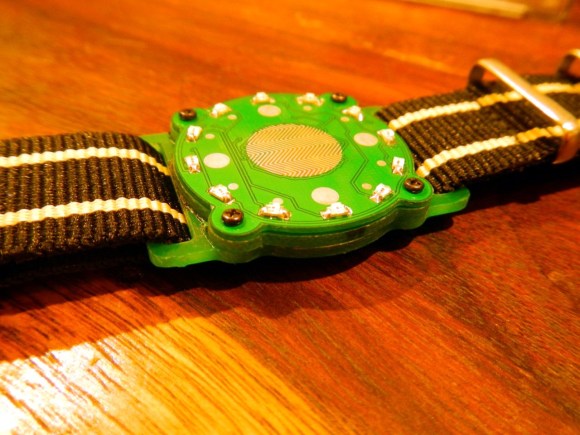
Here’s a wristwatch concept we haven’t seen before. Instead of trying to sandwich everything inside of a case it uses a stack of PCBs as the body of the watch.

[Mats Engstrom] wrote in to tip us off about his build. The design goes with LEDs which is nothing new. But unlike previous offerings [Mats] didn’t go with one LED for each minute. When the touch sensor in the middle of the watch is activated the twelve LEDs on the face will let you know the hour and the nearest five minutes. A video of this is embedded after the break.

The design uses three different circuit boards. The bottom board is the largest and provides slots through which the wrist bands can connect. It also serves as one of the two battery connectors. The second PCB is a spacer with a cutout for the coin cell that powers the device. The top board is where all the magic happens. It’s dual sided to host the LEDs and touch senor, with the PIC microcontroller and support circuitry on the other side.

Continue reading “Wristwatch Made Of Sandwiched PCBs”

ODB-II Hacking Using An Android Tablet

What a strange message to read on the digital dashboard display of your car. This is proof that [Kristoffer Smith] was able to control the ODB-II bus on his Eagle Grand Cherokee.

He’s not just doing this for the heck of it. It stems from his goal of adding an Android tablet on the dashboard which has been a popular hack as of late. This left [Kristoffer] with steering wheel controls that did nothing. They originally operated the radio, so he set out to make them control the tablet.

He had seen an Arduino used to control the CAN bus, but decided to go a different route. He grabbed a USB CAN bus interface for around $25. The first order of business was to use it with his computer to sniff the data available. From there he was able to decode the traffic and figure out the commands he needed to monitor. The last piece of the puzzle was to write his own Android code to watch for and react to the steering wheel buttons. You can check out the code at his repository and see the demo after the break.

Continue reading “ODB-II Hacking Using An Android Tablet”