Building A Computer With Discrete Transistors

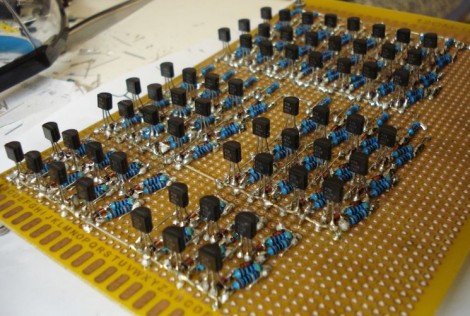
You’re going to want to do some stretching before undertaking a soldering project like this one. We’re betting that the physical toll of assembling this 4-bit discrete processor project is starting to drive [SV3ORA] just a bit crazy. This small piece of electronic real estate is playing host to 62 transistors so far, and he’s not done yet.

It’s one thing to build some logic gates in Minecraft (and then turn then into a huge 16-bit ALU). But it’s another thing to actually commit to a physical build. [SV3ORA] does a great job of showing the scope of the project by posting a tight shot of one inverter, then three in a row, then the entire 8-bit address and display system. These gates are built on the copper side of the board, with the power feed, LEDs for displays, and jumpers for control on the opposite side. We’re excited to see where he goes with this project!

But hey, if you don’t want to do that much soldering there’s a lot you can do on a few breadboards.
Building An Arduino Chiptunes Project Inside An FPGA

From time to time we find ourselves in the mood for some Chiptunes. You know, the music that accompanied all of the best 8-bit console games? These days there are a lot of projects that use the audio chips of yore to recreate the sounds, but you’re always faced with the issue of sourcing those parts. [Jack Gassett] took some inspiration from one of those projects, but solved the rare hardware dilemma by building his own Chiptunes MIDI device in an FPGA.

He saw one of our features on an Arduino controlled YM2149 programmable sound generator. He realized that you can already find FPGA libraries out there that mimic this sound generation hardware, and he’s already done extensive work with an Arduino soft processor. Why not combine the two?

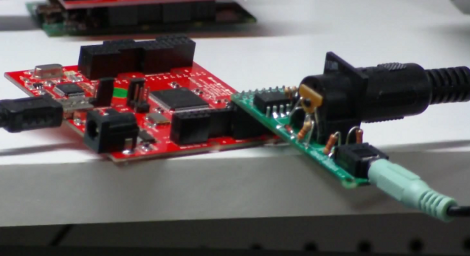
He’s using a Papilio FPGA with a wing that includes a MIDI connector and audio-out jack. As you can hear in the clip after the break this sounds just like the real thing. And he’s got plans to roll as many different types of sound generating chips into the mix as possible. You know, one FPGA synth to rule them all.

Continue reading “Building An Arduino Chiptunes Project Inside An FPGA”

Ethernet Over Telephone Wire

When [Bobo1on1] upgraded his Internet connection from ADSL to Fiber he ran into an issue of actually getting that speed to his desktop computer though his LAN setup. Before he had been using a telephone extension wire which ran from where the DSL entered the house, through a splitter, to his computer where the modem was located. Now that the router used by the fiber system is located at teh entry point, he has no easy way to run Ethernet cable to his computer room. Wifi is predictably slower than the 50mbit WAN connection, and he was unable to use the telephone cable as Ethernet directly.

The solution turns out to be a pair of TP-Link home plug adapters. These are designed to use your home’s mains wiring for data transfer. But [Bob] rigged it up so that they can push 224 mbits/sec over the telephone wire. Since you can’t run mains voltage through the telephone wire he had to hack a method to separate power for the devices from the data I/O. This was done with an external power supply and some passive components for filtering. The drawback is that this is half-duplex so up/down communications cannot happen at the same time.

Steam Fife

This auto-flute does it with steam. Well, electricity gets its piece of the action too as the tone holes are opened and closed using a set of solenoids.

We’re at a loss on how the sound is actually produced. We would think that a penny whistle has been used here, except if that were the case the solenoid nearest the kettle would have no use. Then again, after watching the demo after the break we’re not sure that it does have much of an effect. It may be meant to stop the sound but it doesn’t really work all that well.

At any rate we’d love to see some spin-off hacks. Assuming the plastic can stand up to the steam heat this would be a perfect robot controller for recorder controlled snake. You can get a recorder for a buck at the right dollar store, and solenoids can be made out of simple materials. If you know of a way to produce the sound yourself, all it takes are a few careful calculations to place the tone holes.

Continue reading “Steam Fife”

Robotic Whiteboard Writes Your Wall On The Wall

[Dave’s] drawbot writes his Facebook wall messages on a whiteboard. The setup is pretty simple, depending on a pair of stepper motors and common household goods. As you can see in the image, the stylus is a plain old dry-erase marker held by a big spring clip (the kind that holds a stack of papers together). What you can’t see is that there’s a kick stand to hold the writing head away from the board when moving to the next plot point.

In this example a cursive font is being used, but [Dave] included two other fonts in the code. Those require the felt tip to be frequently lifted from the board, and a servo motor does this by pressing a cotton swab against the surface. This does erase any marker lines it slides past, but it’s a pretty small area that is lost. To control the motors [Dave] is using the EiBotBoard which was originally designed for the EggBot. It’s got a USB mini-b connector which lets a computer push messages scraped from the Internet. Don’t miss the video demonstration embedded after the break.

A small modification would make this into a pretty nifty light painting rig.

Continue reading “Robotic Whiteboard Writes Your Wall On The Wall”

Fifty Dollars To Make Your Car Audio Bluetooth Compatible

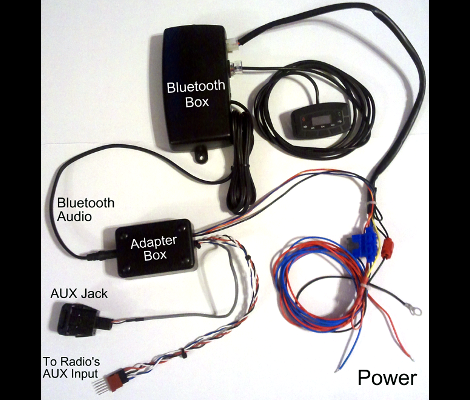
We’re rather impressed with the work [Aaron] did to add Bluetooth connectivity to his 2008 Honda. He used an aftermarket kit, but rolled in his own revisions to make it look and feel like an original feature.

After being disappointed by an expensive docking system he grabbed a Jensen BT360 kit for about $35. It comes with an external speaker which would look horrid mounted on the dash. That speaker is meant to play your telephone audio via Bluetooth, while music from the phone is sent to the car stereo using an FM transmitter. Since he planned on hiding the control unit under the dash anyway, it wasn’t too hard to add some wires which intercept the audio being fed to that FM transmitter. From there he added a couple of relays to automatically route the audio signals (when present) and patched the whole thing into the Aux input. This way he doesn’t need the extra speaker, and all sound is feed to the head unit via wire instead of radio transmissions.

The final setup works pretty well. If a phone call comes in it automatically mutes the volume, or pauses the iPod if that’s what’s currently playing through the Aux port. [Aaron] thinks the bass from music played via Bluetooth is not quite as rich as when using the Aux port, but if you don’t mind the cables that’s still an option too.

Tinkering With ODB II And The CAN Bus

[Debrah] is taking his next project out to the garage. He built his own CAN bus reader using a dsPIC.

The nice thing about working with Control Area Network is that it’s a universal standard found on every modern production line automobile. And because of this, the chip you need in order to communicate using that protocol will cost just over a dollar. [Debraj] chose the MCP2551, which comes in several different 8-pin packages. There is even an application note tailored for use with the dsPIC33F family.

The project is running on both 5V and 3.3V rails. This complicates things just a bit, but a level converter makes sure that there’s no communications problems between the chips. A four line character LCD acts as the output during the tests (you can see this in the clip after the break) but he’s already got a second version which looks quite a bit better on the dashboard.

What else can be done with this hack? Well, we’ve seen a method used to read control buttons from the steering wheel before. It all depends on what data your vehicle is transmitting and one way to find that out is to build some hardware and start logging the packets. Continue reading “Tinkering With ODB II And The CAN Bus”