
Spherical And Stereoscopic Photography

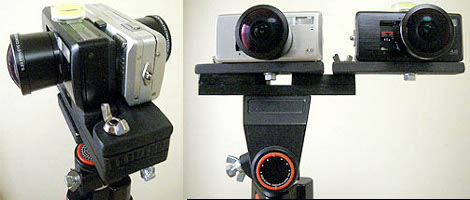
[Ryubin’s] experiments with spherical video continue. This time around he’s using two cameras, both with fisheye lenses, to capture 360 degree by 360 degree video. The two cameras mount back to back and each record a 360 degree vertical view in a 180 degree horizontal range. By stitching the two recordings together and synchronizing them by comparing moving objects a seamless spherical video is produced.

He’s got one more trick up his sleeve with this setup. The tripod mount has a pivot point that allows the two cameras to shoot side-by-side instead of back-to-back. This produces a hemispherical video that is stereoscopic. That’s a pretty cheap way to make this type of 3D imaging compared to some of the CES offerings.

There are a few example videos up on his webpage. If you missed it earlier this month, he’s the guy that build a spherical video setup using a light bulb.

Start The Car With A Wave Of Your Hand

[Jair2K4] likes his RFID almost as much as he likes his chaw. Ever since his car was stolen he’s had to start it using a screwdriver. Obviously this is not a good way to leave things so he decided to convert his starter to read an RFID tag. He installed an RFID transponder he picked up on eBay, wiring it to the ignition switch. He’s removed the clutch-check sensor and wired a rocker switch to enable the RFID reader. We presume the rocker switch will eventually be used to shut the car off as well.

While most would have purchased a key-chain RFID tag, [Jair2k4] went far beyond that and had the tag implanted in his hand. This is an honor usually reserved for pets and until he adds RFID functionality to the door locks maybe a key fob would have been a better answer. But, to each his own. See his short demonstration video after the break.

Continue reading “Start The Car With A Wave Of Your Hand”

Engineering With Magnetic Spheres

We would imagine these experiments were spawned by a devastatingly boring day at the office. [Sparr] found himself the proud owner of one thousand rare-earth magnets and decided to see what geometric shapes he could build with the spheres. These are gold-plated N35 Neodymium magnets that measure just 6mm across. He discovered that every structure is built from rings of magnets with shapes dependent upon what sequence of increasing or decreasing members are used. What he’s done is visually pleasing but we’d like to try it ourselves to see how resilient each structure ends up being.

[Sparr’s] post is from the Freeside Atlanta blog, a hacker space collective. [Curbob], a regular with the group, tipped us off that a few hacker conventions are coming up in their area and they’re looking for speakers for one-hour talks about projects. If you’re near Raleigh or Atlanta this is your chance to show off that ridiculously complicated project you’ve been risking your marriage to complete.

AVR Tetris

Tetris, the timeless classic, is one of those concepts that someone will try to run on every conceivable hardware platform. I took on the challenge of programming a Tetris clone from the ground up using hardware I had on hand. At the heart of the build is an ATmega168 microcontroller. The game displays on a KS0108 128×64 LCD module with five momentary push switches to provide directional, rotational, and input controls. You can see the resulting monochrome action embedded after the break.

I had several goals in mind while writing the code for the game.  I wanted the code to be portable so that the size of the board and type of screen used could be easily changed. With that in mind I developed the trunk for a Nokia 3595 cellphone screen and a parallel branch for the graphic LCD. Originally I was working with an ATmega8 but upgraded so that I could operate at the 3.3v the cell phone screen required.

The firmware for the graphic LCD branch compiles to just over 6 kB which means it can still be run on a mega8. Also, the ATmega168 is the same processor used in the Arduino Duemilanove so another Tetris port is not out of the question. I just got a hold of my first Arduino so we’ll see if I find time to start a new branch in the code.

Continue reading “AVR Tetris”

Tricking An IPod Into Trusting Your Dock

[Thijs] has an iPod dock with an LCD display in it that allows you to watch videos without having to squint quite as much. Unfortunately, the iPod classic wouldn’t play videos on it because it’s not an Apple approved product. He figured out that an authentication chip is included in docks and cables that Apple has approved and set out to retrofit his device with one. He pulled the PCB, authentication chip included, out of a $5 cable from Deal Extreme and wired it up to the PCB on his dock. Voila, the dock now plays video.

This is a nice hack but it’s also just silly. You paid for the iPod, you paid for the music and videos (right?), and you paid for the dock. Why can’t they all talk to each other without authentication?

MythNetVision To Cure Borked MythTV Hacks

Another group of developers has stepped up to the plate in the never-ending attempt to integrate online streaming video with MythTV. The new plugin is called MythNetVision and aims to bring streaming and downloading video functionality both easily and legally. That means without violating the terms of service of the providing website.

We’ve seen so many attempts that fell short it’s easy to be skeptical about the chances of this plugin actually working. Plugins like MythStream and MythVodka worked only temporarily before breaking and never seemed to provide a reliable option. Many people have tried adding Boxee, Hulu Desktop, or XBMC integration by launching these separate packages via the MythTV UI but that’s far from a clean solution.

It looks like MythNetVision is taking a slightly different approach. Although not yet available, the designers have built the plugin in two parts. The frontend is a fully skinnable user interface that parses RSS feeds to provide the hooks needed to browse, search, and view video. Depending on the content, a browser may be spawned to play the video, it may be played within MythTV’s normal player, or a separate download thread can be launch with video following after the appropriate buffer level is reached. The RSS feeds come either directly from the provider, such as the Revision3 feeds, or a scraper can be written to provide custom RSS feeds from sites that don’t have them.

We’ve seen a glimpse of the progress and we’re optimistic that we’ll see a reliable plugin. Early adoption and user script contribution are the best way to help ensure this so keep an eye out for the public release of this package.

Bike Controller For Xbox 360

ProjectExciteBike is on its second iteration of an exercise bike controller for Xbox 360. The controller takes pedal input from the cranks of the exercise bike. The sensing is handled by a ring of five hall effect sensors that detect a passing magnet attached to the crank. The sensor data is collected and processed by an Arduino which connects to a wireless Xbox 360 controller for output.

This version of the gaming device includes a fine adjustment widget. It uses a row of LEDs to represent the speed of the pedals and has a slider to adjust how much of an effect this has on the game. This is what we envisioned for the trainer computer we saw yesterday. Take a look at some game play video after the break and dig through the code if you have an exercise bike waiting to be recommissioned.

Continue reading “Bike Controller For Xbox 360”









