Fonera-based Quadcopter Can Be Controlled From A Web Browser

fonera_html_controlled_quadcopter

[Tiakson] just wrapped up the construction of a quadcopter which piqued our interest due to the unexpected mix of hardware he used.

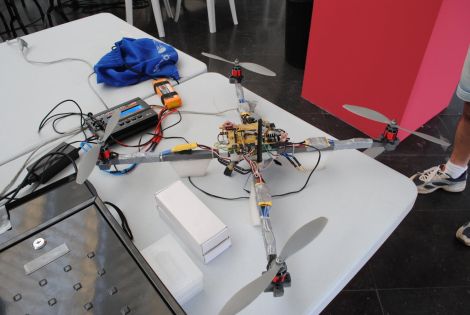
A good portion of the copter is made up of the essential bits we have come to expect from a quad rotor system. Instead of using an Xbee or hobby wireless controller however, [Tiakson] opted to use an old Fonera router running OpenWRT to control the system. He wrote special software that allows him to direct the quadcopter using an HTML 5 interface, adding a few kernel tweaks along the way that enabled him to emulate I2C ports over GPIO pins.

The Fonera takes in data from Wii nunchuck and Motion+ sensors, relaying commands to the on-board PIC 16F976 microcontroller. The PIC is used to manage the electronic speed controller modules using PWM, which the Fonera could not handle on its own.

This is a great use for a old router, and the cost is obviously far cheaper than buying off the shelf wireless control modules. We would love to hear how much extra weight the Fonera adds, as well as if there is any controller lag introduced by the web-based interface.

Continue reading to see a quick demo video of the quadcopter in action.

Continue reading “Fonera-based Quadcopter Can Be Controlled From A Web Browser”
Workshop Lights So Bright, They Will Give You Sunburn

workshop_led_lighting_control

There are few things more frustrating than trying to tinker at your workbench with suboptimal lighting. [Jeremy] was toiling away in his workshop one afternoon when he decided that he finally had enough, and set out to overhaul his lighting setup.

His workshop is incredibly bright now, sporting a handful of under the shelf CCFL tubes to complement the mixture of cool and warm LEDs that are mounted on the ceiling. One thing we really liked about his setup is that he added a handful of LEDs to the bottom of his workbench, aimed at the floor – perfect for those times when a tiny screw or SMD component goes missing.

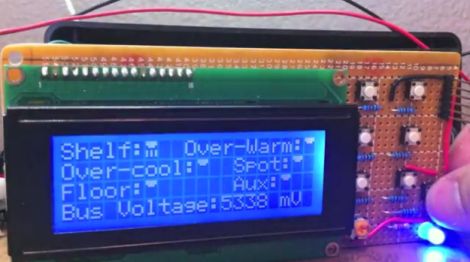
Everything is controlled by an ATMega 328 that he shoved into a project box, allowing him to tweak the lighting to suit his needs using a few simple buttons and a small LCD panel.

[Jeremy] says that the entire thing is “overkill” and that it is decidedly the messiest wiring job he has ever done. For something that was put together hastily in an afternoon, we think it’s just fine. The only thing we’re left wanting is some schematics and source code.

As far as the overkill comment goes, say it with me: There. Can. Never. Be. Too. Many. LEDs!

Stick around to watch [Jeremy] give a demonstration of how the system operates.

[via Adafruit blog]

Continue reading “Workshop Lights So Bright, They Will Give You Sunburn”

Here’s A Button, Call Someone Who Cares…

call_someone_who_cares_button

[Les] had thousands of dollars of expensive IP Telephone infrastructure at his fingertips, so he figured he might as well play around a bit – after all, what good is all that equipment if you can’t have a little fun?

Inspired by the “Awesome Button” featured on Make, he started thinking about what sort of feature he would like to have available at the push of a button. He must have had Travis Tritt on the brain the day he started building his creation, since he named it the “The Call Someone Who Cares Button”.

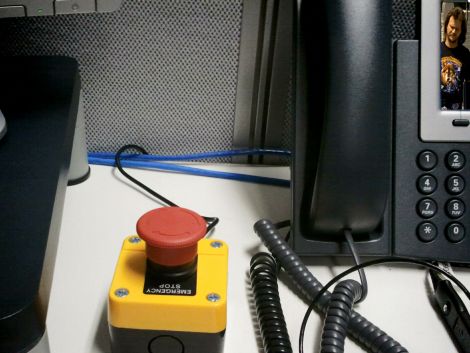
[Les] picked up an “emergency stop” button from eBay, wiring it to a TeensyUSB, just as it was done in the Make article. He mapped the button to the pause/break key, then whipped up a bit of C#code that listens for that key to be pressed. When toggled, the button sets forth a series of events that gets his boss on the line ASAP.

It’s a fun little project, and while I might have built a button that introduces fake static and echo into the line before dumping the call, I think it’s pretty cool all the same.

Since it seems that just about everyone has built some derivation of the Awesome Button, share yours with us in the comments, and be sure to stick around to see a quick video demo of the CSWC button in action.

Continue reading “Here’s A Button, Call Someone Who Cares…”

Commodore 64 USB Controller Adapter For Your PC

commodore_64_controller_usb_interface

[Frank], like many people, has a soft spot in his heart for the Commodore 64. He prefers to play his C64 games on his computer nowadays, but likes using his old school Competition Pro rather than some modern controller with remapped buttons. The only problem with using the controller is that his new computer doesn’t have any ports that accommodate its 9-pin D-sub connector.

The VICE emulator maps keyboard inputs to controller actions, so he decided to build himself a D-sub to USB adapter that implements a virtual USB keyboard. He wrote a firmware package for the Freescale MC9S08JS16L microcontroller that allows him to send keypresses to his emulator whenever he performs an action with his Competition Pro joystick.

The circuit looks easier to duplicate than some other C64 interfaces we have seen before, and as you can see in the video below, it works quite well. We imagine that this setup can be used to connect all sorts of old input devices to modern PCs with little to no tweaking.

Continue reading “Commodore 64 USB Controller Adapter For Your PC”

R/C Hexababy Is Guaranteed To Give You Nightmares

hexapod_baby

For this week’s hack, [Dino] was working on a mechanical cat toy, but the project fell apart towards the end for some reason or another. With time running out, he had to come up with something on pretty short notice, using whatever he happened to have on hand. Luckily he picks up some seriously weird stuff at the local thrift store and had a disembodied doll’s head kicking around for this last minute project.

Taking a cue from Toy Story’s [Sid Phillips], [Dino’s] doll’s head hexapod is as creepy as it is simple. He had a remote controlled hexapod from RadioShack sitting around, and thought it would be fun to combine it with the doll’s head. He replaced the dolls eyes with a handful of LEDs, which are green as the hexapod retreats, but glow a bright red as it advances towards you. The only way it could be any creepier is if [Dino] added a voice box that plaintively called for “mommy” as the doll crawls around!

It’s a relatively goofy project, but it gave us a good chuckle. The most disturbing highlight of the build is when [Dino] removes the doll’s eyes using a wood drill bit around the 6:00 mark.

If you’re looking to kill a few minutes, be sure to check it out – [Dino’s] work is entertaining as always.

Continue reading “R/C Hexababy Is Guaranteed To Give You Nightmares”

USB Reddit Upvote/Downvote Button

reddit_upvote_downvote_button

[Chris] has recently become a self-declared Reddit addict and wanted to build something that would streamline the process of voting on posts. Inspired by the Awesome Button hack featured on Make a little while back, he thought that a physical upvote/downvote button would be the ideal peripheral for all of his Reddit needs.

He was a big fan of using the Reddit Enhancement Suite, which allows you to submit votes with a single keystroke. He combined this browser extension with a Teensy development board, and had his voting button prototyped in no time. Once he fine-tuned the Arduino sketch that he used to emulate the required keypresses, he got busy building a case for his creation.

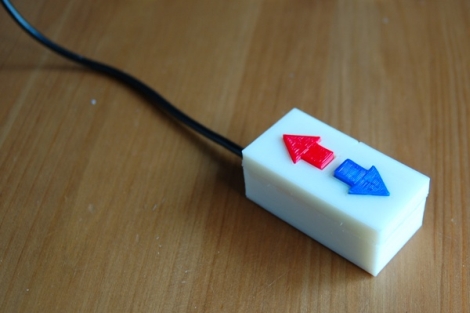
He busted out his 3D printer and had a custom working project box in about 30 minutes. He printed arrows for the upvote and downvote buttons, snapped everything together, and then gave his quick vote box a spin. Everything worked perfectly, and he’s quite happy with his creation.

We imagine that our resident Reddit addict in chief is pretty jealous right about now…

Stick around if you’d like to see a time lapse video of the button’s creation.

Continue reading “USB Reddit Upvote/Downvote Button”

RGB LED Spectrum Analyzer Coffee Table

rgb_led_spectrum_analyzer_coffee_table

This year, students working for Texas Instruments as part of their Co-op program were challenged to construct a project around the company’s MSP430 microcontroller. A team of three students, [Max Thrun, Mark Labbato, Ian Cathey] decided to build something that would fit perfectly in any college student’s dorm room – an RGB LED coffee table.

We’ve covered RGB LED tables in the past, but as far as we can tell this is the first MSP430 based unit we’ve seen. Microcontroller aside, the table features a lot of items that are considered “standard equipment” when it comes to these sorts of living room LED installations. The trio installed 128 RGB LEDs into their table, isolating each one using a wooden grid, and used some frosted glass to diffuse the display a bit.

What really makes this table stand out is the software. The team wrote an application that creates a Fast Fourier Transform of whatever music is being played, in order to find beats and generate real-time visualizations for their table. The result is a pleasing display that’s sure to be a hit at parties.

Check out the video below to see their creation in action.

Continue reading “RGB LED Spectrum Analyzer Coffee Table”