Desktop Email Notification Bell

email_notification_bell

Instructables user [meseta] wanted an audible notification whenever he received an email, but must have thought that his computer’s built-in sounds were lacking in some regard. To get the perfect sound that he desired, he built himself a USB-powered notification bell.

Using an off the shelf “front desk bell” and a hand made electromagnet, he constructed a bell that could be triggered whenever a message showed up in his desktop email client. The electromagnet can be triggered by a quick pulse from a microcontroller, and in [meseta’s] case, he used a Forebrain dev board. He created a filter in his email client that runs an executable each time a message is received. This executable in turn sends a message to his microcontroller via USB, triggering the bell.

While we think that the notifier could have been put together using a far less powerful microcontroller, it’s a neat idea regardless. People seem to love alternative notification systems, so we’re pretty sure this bell will appeal to many in that crowd.

Keep reading to see a short video demonstration of his email notifier in action.

Continue reading “Desktop Email Notification Bell”

Apple Laptop Batteries Vulnerable To Firmware Hack

dead_and_busted_macbook_batteries

When you think about hacking laptops, it’s highly unlikely that you would ever consider the battery as a viable attack vector. Security researcher [Charlie Miller] however, has been hard at work showing just how big a vulnerability they can be.

As we have been discussing recently, the care and feeding of many batteries, big and small, is handled by some sort of microcontroller. [Charlie] found that a 2009 update issued by Apple to fix some lingering MacBook power issues used one of two passwords to write data to the battery controllers. From what he has seen, it seems these same passwords have been used on all batteries manufactured since that time as well. Using this data, he was subsequently able to gain access to the chips, allowing him to remotely brick the batteries, falsify data sent to the OS, and completely replace the stock firmware with that of his own.

He says that it would be possible for an attacker to inject malware into the battery itself, which would covertly re-infect the machine, despite all traditional removal attempts. Of course, replacing the battery would rectify the issue in these situations, but he says that it would likely be the last thing anyone would suspect as the source of infection. While using the battery to proliferate malware or cause irreversible damage to the computer would take quite a bit of work, [Charlie] claims that either scenario is completely plausible.

He plans on presenting his research at this year’s Black Hat security conference in August, but in the meantime he has created a utility that generates a completely random password for your Mac’s battery. He says that he has already contacted Apple to in order to help them construct a permanent fix for the issue, so an official patch may be available in the near future.

[Thanks, Sergio]

Beefy Rover Looks Like Tons Of Fun

mantis_six_wheeled_remote_control_robot

[Eric] and the crew over at The Tech Junkies, just put the finishing touches on a pretty powerful robot that they call “Mantis”.

The six wheel, chain-driven robot is pretty impressive at first glance. The robot is centered around a Netduino, which controls four 60 amp speed controllers. The speed controllers are tasked with driving four beefy CIM motors, which propel the robot along at a pretty decent tick.

For the project, the team designed their own controller application called IPGamepad, which allows the robot to be controlled by any Android device. The interface is pretty simple as you can see in the video below, making it quite easy to control the bot.

While the Mantis was not a cheap production by any means, it does look like a ton of fun to drive. The crew will be taking this robot along with 2 others out to Maker Faire Detroit, so be sure to swing by and say hello if you’re in the area.

Continue reading “Beefy Rover Looks Like Tons Of Fun”

Roll Your Own Toner Transfer Dice

diy_toner_transfer_dice

If you happen to be in the market for some designer dice or need a set of custom dice for a game you have created, you could pay a ton of money to have them made, or you can do it yourself.

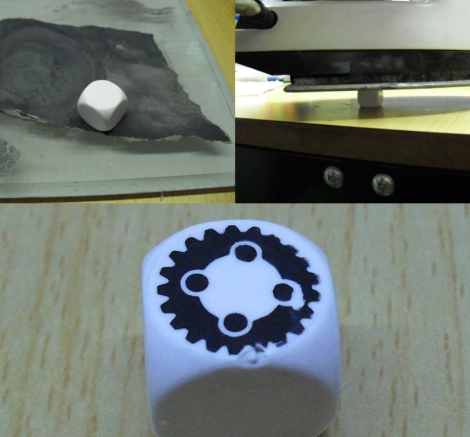
[Dicecreator] runs a blog dedicated to the ins and outs of creating DIY game and collector’s dice. This subject is not something that we would normally be interested in, but one particular item caught our interest – DIY toner transfer dice. Very similar to the process of creating a toner transfer PCB, he walks through the steps required for making your own dice with very little overhead.

The steps are likely quite familiar to those who have fabricated your own PCBs at home. He starts out with blank dice, sanding the sides down with increasingly fine sandpaper until they are ready for the transfer process. An image is printed on glossy inkjet photo paper, which is then applied to each die with a standard clothes iron. After a bit of soaking in water to remove the excess paper, the die is ready to go.

Sure it’s not exactly rocket science, but it is a cool little trick that would work quite well if you are trying to replace a lost die or if you simply want to make a fun gift for a friend.

Power Tool Battery Charger Repair

drill_battery_charger_repair

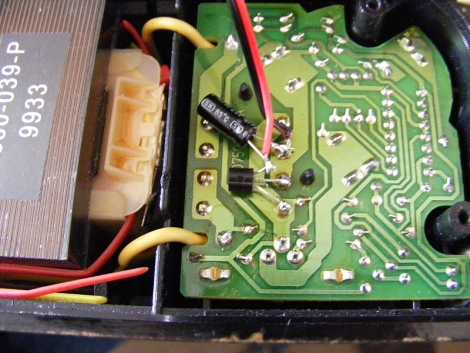
[Webby] inherited a cordless drill from his dad and when he finally got around to using it, found that the charger was dead in the water. He disassembled it and narrowed the issue down to the charger’s primary transformer, but didn’t know where to go from there. A friend suggested that the coil’s thermal fuse might have blown, and upon further investigation, [Webby] discovered that his friend was right.

He removed the dead fuse and soldered in a piece of wire just for testing – not surprisingly the charger sprang to life. He picked up a new thermal fuse to replace the old one, but he wasn’t quite satisfied with the fix just yet. If the fuse burned out once already, there’s little to stop it from happening again, so he decided that installing a small cooling fan would be a good idea. He mounted the fan on the outside of the case after cutting some vent holes, leeching power from the charger itself.

While simply adding a fan to the charger might not be everyone’s idea of a perfect solution, it has worked out quite well for [Webby] in the past, so if it isn’t broken…

[via HackedGadgets]

Bypassing Manufacturer-imposed Battery Lockouts

sony_battery_cell_swapping

When [Barret] went to use his camera the other day it kept shutting down on him, and upon inspecting the battery, he found that it was a bit swollen. Knowing that he needed a replacement, he turned to an aftermarket battery he had sitting around, but grew pretty annoyed when his Sony Cybershot camera would not accept it.

Apparently a recent firmware update causes his camera to reject non-Sony batteries, a situation he describes as “battery DRM”. There was no way he was going to pony up another $50 to Sony instead of using the perfectly good $10 battery he already had, so he decided to rectify the issue himself.

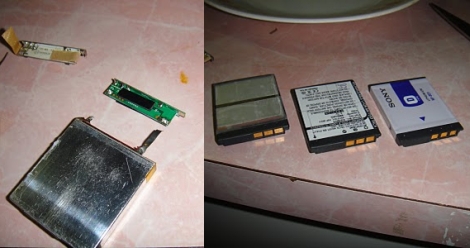
He stripped both batteries of their plastic coatings, revealing the lithium cells and their charging circuits. He desoldered the PCB from his Sony battery, transplanting it to his aftermarket battery after a little bit of trimming. He wrapped everything up with some tape and gave his franken-battery a spin. It worked a treat, and he was so satisfied with it that he did a similar swap in his aging Logitech mouse.

As more and more companies lock competitors out of the user-replaceable consumables market, these sorts of hacks are certain to become more and more prevalent.

Using A Router As A Linux-based PID Controller

espresso_machine_pid

[Nathan] had an small router kicking around and thought that he might as well put it to good use. He had always been interested in getting a better handle on his espresso machine, and figured that the router would be a perfect Linux-based PID controller.

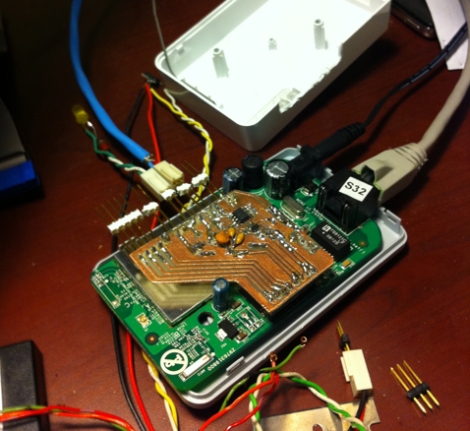
He installed OpenWRT on the router, then disassembled it in order to get access to the router’s GPIO pins. He built a small PCB that allows him to get temperature info from the machine to the router using i2c. [Nathan] put together a PID package for OpenWRT, allowing him to control the machine over SSH, though he may build in a user-friendly web interface sometime in the future.

He says that most espresso machine PID controllers he has seen come in the form of big ugly boxes slapped on the side of the machine’s case, though we have to disagree with him on that point. Opinions aside, he is going for a minimalist design, and while he says that he is only about half way through the project, we think things are looking promising so far.

When everything is said and done, we hope to get a much closer look at all of his code, schematics, and more information on the router he used as well.