Watch Life Tick Away, One LED Segment At A Time

In the grand scheme of things, a single human lifetime is a drop in the bucket. Even if we don’t like to acknowledge it, we all know the meter is running so to speak. Yet you’re still squandering your precious time on this Earth by reading Hackaday instead of doing something constructive. Of course nobody is burning up more time on this site than those of us who are writing it all, so don’t feel too bad.

To remind us that life is fleeting, [Dries Depoorter] has designed the Shortlife: a device that counts down until your expected departure date. Before you get too excited, it can’t predict the future. The gadget is programmed with the vital statistics for the individual user, and data provided by the World Health Organization is used to calculate how much of your estimated life expectancy has already elapsed. Some would find this information depressing, while others will no doubt look at it as a source of inspiration. Us? We just think its a slick piece of gear.

The Shortlife is made up of a custom PCB mounted to a marbled block of recycled plastic. On the board there’s an ATmega328 microcontroller, a MAX7219 LED driver, and of course the red LED segment displays. Three of them are the classic seven count, while the rightmost display sports fourteen segments for a bit of added accuracy. All the user has to do if they want to watch their remaining time slip away is plug the device into a USB power source and set the current time.

We’ve seen similar mortal countdown clocks in the past, but the Shortlife certainly brings a certain level of elegance to the idea. Plus we also like the fact that you’re just a line of code or two away from having the display tick down to some other date in the future when that whole existential crisis kicks in

Solar Pi Zero E-Paper Photo Frame Waits For The Right Moment

One of the biggest advantages of electronic paper is that it doesn’t require a constant power source to display a static image. Depending on the application, this can lead to a massive energy savings compared to more traditional display technologies. Of course, the electronics that actually drive the display are another story entirely. You need to reduce the energy requirements of the whole system if you really want to stretch your battery life.

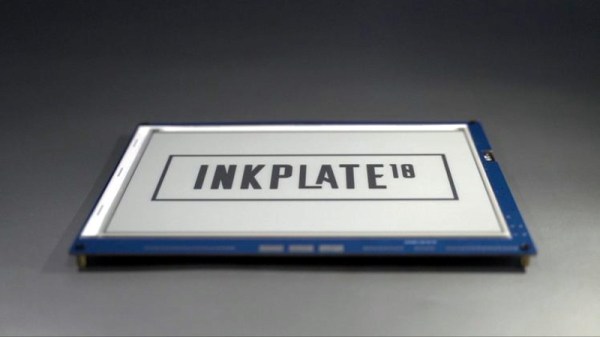
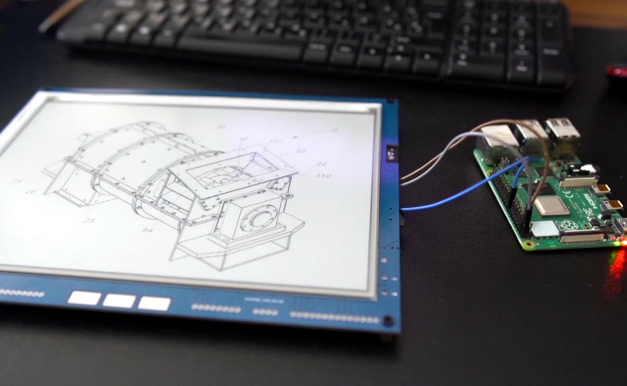
So when [Giacomo Miceli] wanted to put together this solar powered e-paper photo frame, he had to come up with some creative ways to curb the energy consumption of the Raspberry Pi Zero that runs the show. While the 10.3 inch 1872 × 1404 panel would only require the occasional burst of power to flick over to a new image, the Pi would be a constant drain on the internal battery pack. Considering he wanted the frame to recharge from ambient light with an array of small solar panels, that simply wouldn’t do.

The solution came in the form of a PiJuice HAT and some scripts that decide how often the Pi is to be powered on based on the current battery level. If there’s enough power, it might be every hour or so. But the lower the charge, the longer the delay. When the energy situation is particularly dire, the Pi might only be turned on every couple of days. With the Pi off and the e-paper not drawing any power, all of the energy produced by the solar panels can be devoted to recharging the frame’s 1,000 mAh battery.

When the Pi does get booted up, it quickly connects to a server to download a new image and update the display. After that, it ascertains the current battery level and determines how long the PiJuice should wait before turning it back on. After these tasks are complete, it will turn itself off until the next scheduled event. All told, [Giacomo] says the Pi is only up and running for about a minute each time the image is refreshed on the e-paper. He says the system has been running for six weeks now, with the battery level occasionally dipping down to 40% or so before it climbs back up.

Admittedly the energy consumption of the frame could be cut drastically by replacing the Raspberry Pi with a simple microcontroller, but we appreciate the creativity. Besides, the power and flexibility afforded by the Pi means this frame could be taught quite a few new tricks with some updated software.

Hackaday Podcast 098: China’s Moon Rocks, Antikythera Revelations, Creality Vs Octoprint, And RC Starship

Hackaday editors Elliot Williams and Tom Nardi contemplate a few of the most interesting stories that made their way through the tubes this week. We’ll learn how old VHS tapes can be turned into a unique filament for your 3D printer, and realize that the best way to learn about a 2,000 year old computer is to break out the hand drill and make one yourself. Hobby grade RC gear and a some foam board stand in for SpaceX’s next-generation Mars spacecraft, and a manufacturer of cheap 3D printers attempts to undercut a popular open source project with hilarious results. Finally, we’ll take a close look at some hidden aluminum boogers and discuss how China’s history making trek to the Moon might be a prelude to the country making a giant leap of their own.

Take a look at the links below if you want to follow along, and as always, tell us what you think about this episode in the comments!

Direct download (60 MB)

Places to follow Hackaday podcasts:

Continue reading “Hackaday Podcast 098: China’s Moon Rocks, Antikythera Revelations, Creality Vs Octoprint, And RC Starship”

China’s Moon Mission Was About More Than Rocks

If everything goes according to plan, China will soon become the third country behind the United States and the Soviet Union to successfully return a sample of lunar material. Their Chang’e 5 mission, which was designed to collect 2 kilograms (4.4 pounds) of soil and rock from the Moon’s surface, has so far gone off without a hitch. Assuming the returning spacecraft successfully renters the Earth’s atmosphere and lands safely on December 16th, China will officially be inducted into a very exclusive club of Moon explorers.

Of course, spaceflight is exceedingly difficult and atmospheric reentry is particularly challenging. Anything could happen in the next few days, so it would be premature to celebrate the Chang’e 5 mission as a complete success. But even if ground controllers lose contact with the vehicle on its return to Earth, or it burns up in the atmosphere, China will come away from this mission with a wealth of valuable experience that will guide its lunar program for years to come.

In fact, one could argue that was always the real goal of the mission. While there’s plenty of scientific knowledge and not an inconsequential amount of national pride to be gained from bringing a few pounds of Moon rocks back to Earth, it’s no secret that China has greater aspirations when it comes to our nearest celestial neighbor. Starting with the launch of the Chang’e 1 in 2007, the Chinese Lunar Exploration Program has progressed through several operational phases, each more technically challenging than the last. Chang’e 5 represents the third phase of the plan, with only the establishment of robotic research station to go before the country says they’ll proceed with a crewed landing in the 2030s.

Which helps explain why, even for a sample return from the Moon, Chang’e 5 is such an extremely complex mission. A close look at the hardware and techniques involved shows a mission profile considerably more difficult than was strictly necessary. The logical conclusion is that China intentionally took the long way around so they could use it as a dry run for the more challenging missions that still lay ahead.

Continue reading “China’s Moon Mission Was About More Than Rocks”

RC Starship Perfects Its Skydiving Routine

There’s a good chance you already saw SpaceX’s towering Starship prototype make its impressive twelve kilometer test flight. While the attempt ended with a spectacular fireball, it was still a phenomenal success as it demonstrated a number of concepts that to this point had never been attempted in the real world. Most importantly, the “Belly Flop” maneuver which sees the 50 meter (160 foot) long rocket transition from vertical flight to a horizontal semi-glide using electrically actuated flight surfaces.

Finding himself inspired by this futuristic spacecraft, [Nicholas Rehm] has designed his own radio controlled Starship that’s capable of all the same aerobatic tricks as the real-thing. It swaps the rocket engines for a pair of electric brushless motors, but otherwise, it’s a fairly accurate recreation of SpaceX’s current test program vehicle. As you can see in the video after the break, it’s even able to stick the landing. Well, sometimes anyway.

Just like the real Starship, vectored thrust is used to both stabilize the vehicle during vertical ascent and help transition it into and out of horizontal flight. Of course, there are no rocket nozzles to slew around, so [Nicholas] is using servo-controlled vanes in the bottom of the rocket to divert the airflow from the motors. Servos are also used to control the external control surfaces, which provide stability and a bit of control authority as the vehicle is falling.

As an interesting aside, Internet sleuths looking through pictures of the Starship’s wreckage have noted that SpaceX appears to be actuating the flaps with gearboxes driven by Tesla motors. The vehicle is reportedly using Tesla battery packs as well. So while moving the control surfaces on model aircraft with battery-powered servos might historically have been a compromise to minimize internal complexity, here it’s actually quite close to the real thing.

Unfortunately, the RC Starship made a hard landing of its own on a recent test flight, so [Nicholas] currently has to rebuild the craft before he can continue with further development. We’re confident he’ll get it back in the air, though it will be interesting to see whether or not he’s flying before SpaceX fires off their next prototype.

Continue reading “RC Starship Perfects Its Skydiving Routine”

IRC Over LoRa, For When Things Really Go South

As a society, we’ve become accustomed to always-on high-speed data connections, whether we’re at home on the computer or out and about with a mobile device. But what happens if a natural disaster knocks out the local infrastructure? Sure some people will be able to fire up their radio if they need to reach out and touch someone, but even among hackers, hams are a minority. What we really need is a backup Internet.

The team behind the CellSol project hopes to show that building a volunteer-operated distributed communications network is not only within the capabilities of the hacker community but probably much easier and cheaper to do than you might think. Each node in the network, known as a Pylon in CellSol parlance, can shuttle data between the LoRa backbone and WiFi-enabled devices like smartphones and computers. Once the network is up and running, users don’t need any special hardware or software to use it.

Now to be clear, nobody is talking about surfing the web here. When a user connects to one of the ESP32 Pylons, they’ll be able to access a simplistic chat system through their browser. If the Pylon has an active Internet connection the chat can be bridged to an IRC channel. Without Internet connectivity, the pylon will simply give users on the CellSol network a means to communicate among each other. To keep things simple there’s no user names, private messages, or encryption. This is bare-bones, end-of-the-world style communication.

Want to join the CellSol revolution? All you really need is an ESP32, a LoRa radio, and the open-source firmware. If you get something like the Heltec LoRa 32 development board, you don’t even need to solder anything together. Just flash the board and go. Once you have a few Pylons going, you can also put together a cheap repeater node using a LoRa equipped Arduino. Both devices are small and energy efficient enough that they could easily be battery or solar powered. As you can see in the video after the break, the team even envisions a future where they could be dropped off in public areas via drone.

This isn’t the first time we’ve seen the ESP32 used to establish an off-grid LoRa communications network, and like those previous attempts, it’s usefulness will largely depend on how many people you can convince to set up their own nodes and repeaters. But if you’ve got some open minded friends who live relatively close by, this could be a great way to have a little chat.

Continue reading “IRC Over LoRa, For When Things Really Go South”

Putting The Finishing Touches On A 60W Laser

At this point if you’re even remotely interested in home laser cutters, you know about the K40. These imported machines are very impressive considering they only cost around $400 USD, but naturally, quite a few corners had to be cut to get the price down. If you’re looking for something with a bit more punch and much higher build quality, a new breed of 60 watt lasers have started popping up on the usual import sites for around $2,000 USD.

While these more expensive machines are certainly much higher quality than the K40, [Jeremy Cook] found there was still plenty of room for improvement. For example, the machine didn’t have any switch cut off the laser when somebody opens the lid. While we don’t doubt some readers will consider this more of a feature than a bug, it’s hard to believe that a tool that costs this much wouldn’t at least offer such a thing as an option.

Drilling a hole for the ammeter.

[Jeremy] also decided to add his own ammeter so he could see how much power the laser is drawing. While not strictly required for day to day operation, it turns out that the controller in many of these machines has a tendency to push the laser tubes beyond their design limits on the higher power settings. With the spec sheet for your tube and a permanent in-line ammeter, you can verify you aren’t unwittingly shortening the life of your new cutter.

Even if you ignore the modifications [Jeremy] makes in his video, it’s still a very illuminating look at what it takes to get one of these lasers ready for operation. Not only do you have to get the thing out of its shipping crate safely, but you need to come up with some way to deal with the fumes produced and get the water cooling system hooked up. It’s a decent amount of work, but the end results certainly look impressive.

While the K40 is still probably the better bet for new players, it’s good to see that there are some viable upgrades for anyone who’s outgrown their entry level machine but isn’t in a position to spend the money on an Epilog.

Continue reading “Putting The Finishing Touches On A 60W Laser”