Commodore Tape Drive Emulator On A Raspberry Pi

We imagine most of the people reading Hackaday have an old Raspberry Pi or two laying around. It’s somewhat less likely you’ve still got an 8-bit Commodore in working condition, but we’d wager there’s more than a few in the audience that can count themselves among both groups. So why not introduce them?

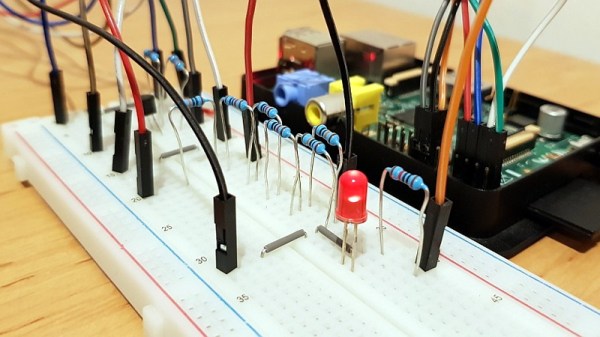
[RhinoDevel] writes in to tell us about CBM Tape Pi , an open source Commodore tape drive emulator for Raspberry Pi that needs only a handful of passive components to get wired up. Even better, the project targets the older Pis that are more likely to be languishing around in the parts bin. In the video after the break, a Commodore PET can be seen happily loading content from the original Raspberry Pi with its quaint little composite video connector.

Without any special software on the Commodore itself, the project allows the user to load and save PRGs on the Pi’s SD card, as well as traverse directories. Don’t expect stellar I/O, as [RhinoDevel] notes that no fast loader is currently implemented. Of course if you’re enough of a devotee to still be poking around a VIC-20 or C64 this far into 21st century, then we imagine you’ve got enough patience to get by.

Continue reading “Commodore Tape Drive Emulator On A Raspberry Pi”

Prusa Dares You To Break Their Latest Printer

Two months after its surprise reveal at the 2019 East Coast RepRap Festival, the Prusa Mini has started shipping out to the first wave of early adopters. True to form, with the hardware now officially released to the public, the company has begun the process of releasing the design as open source. In their GitHub repository, owners can already find the KiCad files for the new “Buddy” control board and STLs for the machine’s printable parts.

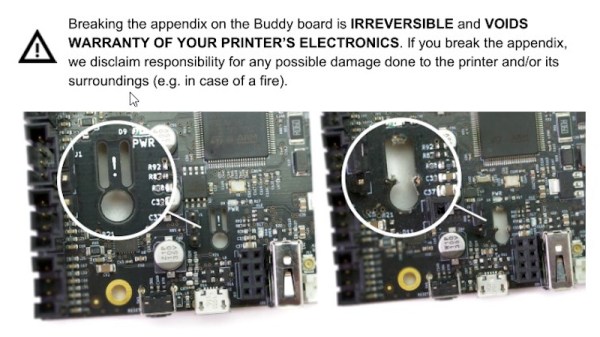
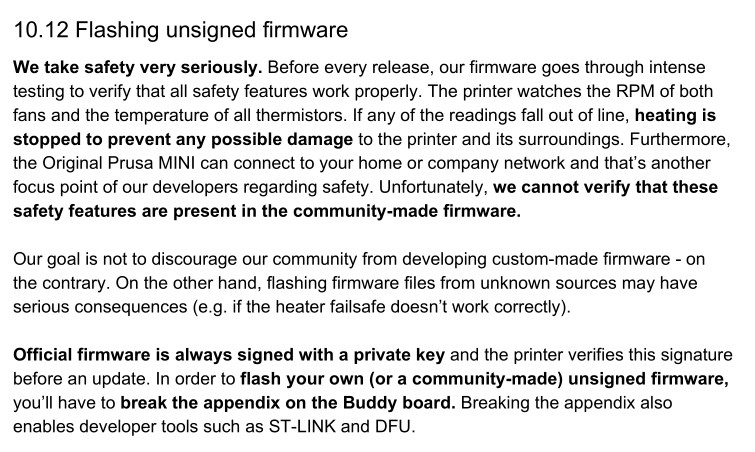
But even so, not everyone feels that Prusa Research has made the Mini as “open” as its predecessors. Some concerned owners have pointed out that according to the documentation for the Buddy board, they’ll need to physically snap off a section of the PCB so they can flash custom firmware images via Device Firmware Upgrade (DFU) mode. Once this piece of the board has been broken off, which the documentation refers to as the Appendix, Prusa Research will no longer honor any warranty claims for the electronic components of the printer.
For the hardcore tinkerers out there, this news may come as something of a shock. Previous Prusa printers have enjoyed a fairly active firmware development community, and indeed, features that started out as user-developed modifications eventually made their way into the official upstream firmware. What’s more, certain hardware modifications require firmware tweaks to complete.

Prusa Research explains their stance by saying that there’s no way the company can verify the safety of community developed firmware builds. If thermal runaway protections have been disabled or otherwise compromised, the results could be disastrous. We’ve already seen it happen with other printers, so it’s hard to fault them for being cautious here. The company is also quick to point out that the installation of an unofficial firmware has always invalidated the printer’s warranty; physically breaking the board on the Mini is simply meant as a way to ensure the user understands they’re about to leave the beaten path.

How much support is a manufacturer obligated to provide to a user who’s modified their hardware? It’s of course an issue we’ve covered many times before. But here the situation is rather unique, as the user is being told they have to literally break a piece off of their device to unlock certain advanced functionality. If Prusa wanted to prevent users from running alternate firmware entirely they could have done so (or at least tried to), but instead they’ve created a scenario that forces the prospective tinkerer to either back down or fully commit.

So how did Prusa integrate this unusual feature into their brand new 32-bit control board? Perhaps more importantly, how is this going to impact those who want to hack their printers? Let’s find out.

Continue reading “Prusa Dares You To Break Their Latest Printer”

Nintendo Switch Doubles As Network Switch

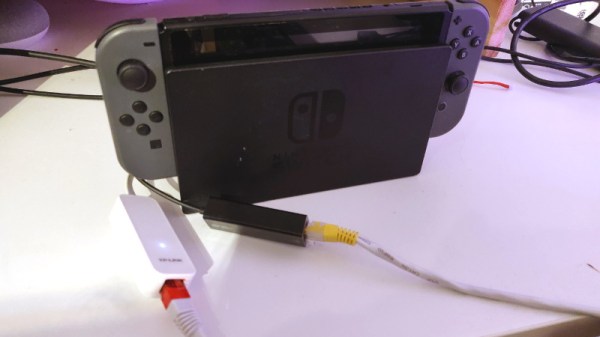
Coming straight to you from the “Department of Redundant Redundancies” comes this clever hack that turns a Switch into a switch. More specifically, a network switch. Not even a half bad one either, judging by the speed tests [Cynthia Revström] performed after setting it all up. We wouldn’t advise you dump your existing network gear in favor of a repurposed game system, but perhaps in a pinch…

Despite what you might be thinking, there’s no hardware modifications at work here. This is a fully functional Nintendo Switch that’s just had two USB to Ethernet adapters plugged into it. The secret ingredient is the addition of some Penguin Power, up and running on Nintendo’s latest and greatest thanks to a project called switchroot.

With Linux running on the system, all [Cynthia] had to do was make sure that the USB to Ethernet adapters were supported, and fiddle around with the brctl and ip commands to configure a bridge between the interfaces to get the packets moving. Putting the Switch between the main network and a test computer showed it had a throughput of just over 90 Mbps, which is about all that could be expected from the USB-connected network interfaces.

From here it wouldn’t have taken much more effort to get the system working as a wireless router and providing services like DHCP and NAT to clients. But since Nintendo didn’t see fit to call it the Router, that would’ve offered minimal meme value. There’s always next generation.

Seeing the Nintendo Switch do a surprisingly good job running as an Ethernet switch is even more surprising given the fact that it struggles to function with accessories that are actually intended for it. Though to be fair, the migration to USB-C has been a little rockier than most of us would have hoped.

3D Print Your Way To A Glass Cockpit Simulator

Today’s commercial aircraft are packed to the elevators with sensors, computers, and miles and miles of wiring. Inside the cockpit you’re more than likely to see banks of LCDs and push buttons than analog gauges. So what’s that mean for the intrepid home simulator builder? Modern problems require modern solutions, and this 3D printed simulator is about as modern as it gets.

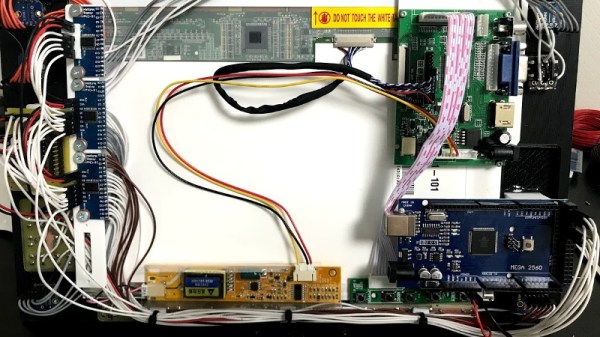
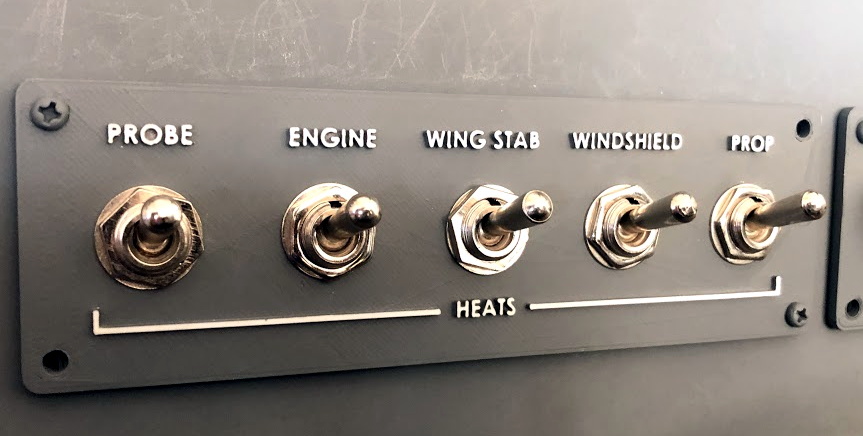
Published to Thingiverse by the aptly named [FlightSimMaker], this project consists of a dizzying number of 3D-printed components that combine into a full-featured desktop simulator for the Garmin G1000 avionics system. Everything from the parking brake lever to the push buttons in the display bezels was designed and printed: over 200 individual parts in all. Everything in this X-Plane 11 compatible simulator is controlled by an Arduino Mega 2560 with the SimVim firmware.

To help with connecting dozens of buttons, toggle switches, and rotary encoders to the Arduino, [FlightSimMaker] uses five CD74HC4067 16-channel multiplexers. The display is a 12.1 inch 1024 x 768 LCD panel with integrated driver, and comes in at the second most expensive part of the build behind the rotary encoders. All told, the estimated cost per display is around $250 USD.

Even if you aren’t looking to build yourself a high-tech flight simulator, there’s plenty of ideas and tips here that could be useful for building front panels. We particularly like the technique used for doing 3D-printed lettering: the part is printed in white, spray painted a darker color, and then the paint is sanded off the faces of the letters to reveal the plastic. Even with a standard 0.4 mm nozzle, this results in clean high-contrast labels on the panel with minimal fuss.

Of course, while impressive, these panels are just the beginning. There’s still plenty more work to do if you want to build an immersive simulation experience. Including, in the most extreme cases, buying a Boeing 737 cockpit.

A Modular System For Building Heavy Duty 18650 Battery Packs

With 18650 cells as cheap and plentiful as they are, you’d think building your own custom battery packs would be simple. Unfortunately, soldering the cells is tricky, and not everyone is willing to invest in a spot welding setup just to put the tabs on them. Of course that’s only half the battle, you’ll still want some battery protection and management onboard to protect the cells.

The lack of a good open source system for pulling all this together is why [Timothy Economu] created DKblock. Developed over the last three years, his open source system allows users to assemble large 18650 battery packs for electric vehicles or home energy storage, complete with integrated intelligent management and protection systems. Perhaps best of all there’s no welding required, the packs simply get bolted together.

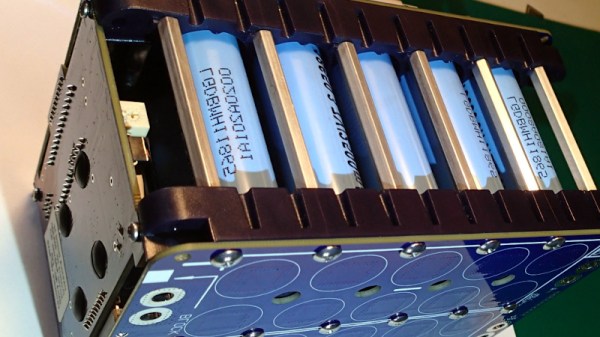
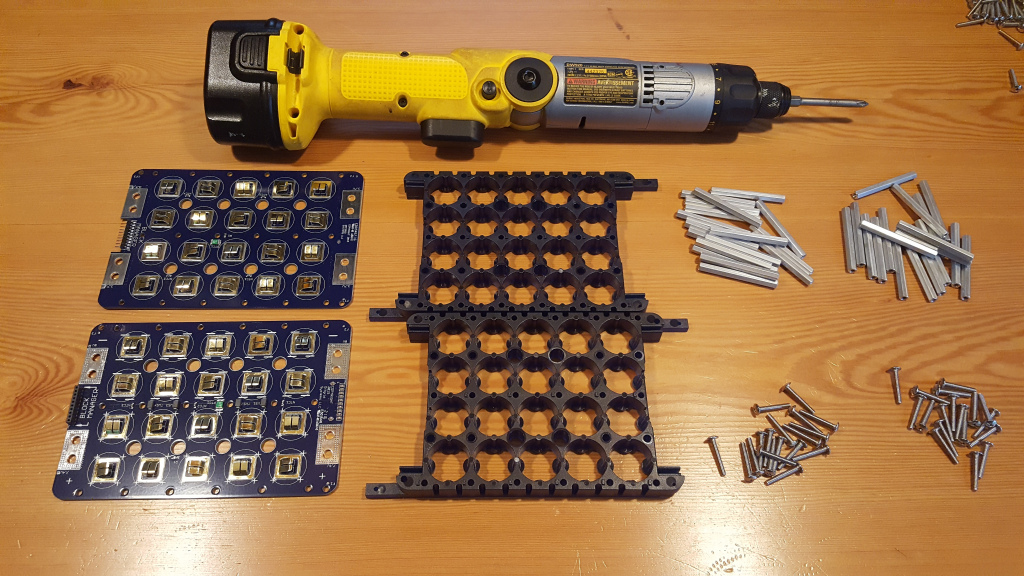
Each block of batteries is assembled using screws and standoffs in conjunction with ABS plastic cell holders. A PCB is placed on each side of the stack, and with tabs not unlike what you’d see in a traditional battery compartment, all the cells get connected without having to solder or weld anything to them. This allows for the rapid assembly of battery packs from 7.2 VDC all the way up to 150 VDC , and means individual cells can easily be checked and replaced in the future should the need arise.

For monitoring the cells, a “Block Manager” board is installed on each block, which communicates wirelessly to a “Pack Supervisor” board that monitors the overall health of the system. Obviously, such a robust system is probably a bit overkill if you’re just looking to build a pack for your quadcopter, but if you’re looking to build a DIY Powerwall or juice up a custom electric vehicle, this could be the battery management system you’ve been looking for.

3D Printed Metro Charger Ready For The Wasteland

In the video game Metro 2033 and its subsequent sequels, players fight their way through a post-apocalyptic version of Russia using improvised weapons and tools cobbled together from the sort of bits and bobs the survivors of a nuclear war might be able to scavenge from the rubble. One of the most useful devices in the game is known as the “Universal Charger”: a hand-operated dynamo that the player must use periodically recharge their electrical devices.

The in-game Universal Charger

Being a fan of the series, [Nikola Petrov] wanted to build his own version of the Metro 2033 charger; but rather than going for an exact screen replica, he decided to explore the mechanism itself and see if he could 3D print a functional device.

As demonstrated in the video after the break, his charger manages to produce enough energy to light an LED on each squeeze of the trigger. Though if we were packing our gear to go fight mutated beasties in alternate-future Moscow, we might look for something with a bit more kick.

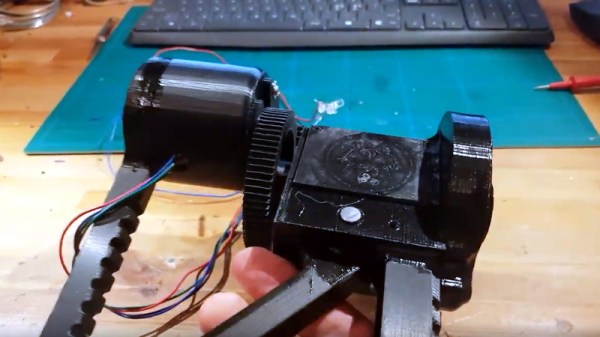
Beyond the 3D printed parts, the charger uses a couple short pieces of 8 mm rod, a NEMA 17 stepper motor, and a one-way bearing that’s usually used for pull starting small gasolene engines.

Interestingly, [Nikola Petrov] is no stranger to 3D printed electrical generation. If you’re interested in getting some real power out of a NEMA 17 stepper, his fantastic printed wind turbine is a must-see.

Continue reading “3D Printed Metro Charger Ready For The Wasteland”

Catch The Old School BASIC Bug With This Computer Kit

Does the complexity of modern computing ever get you down? Do you find yourself longing for the old days, where you could actually understand what your desktop machine’s hardware and software was doing at any given moment? You aren’t alone, but unfortunately running a 40+ year old computer as your daily driver isn’t really a viable option.

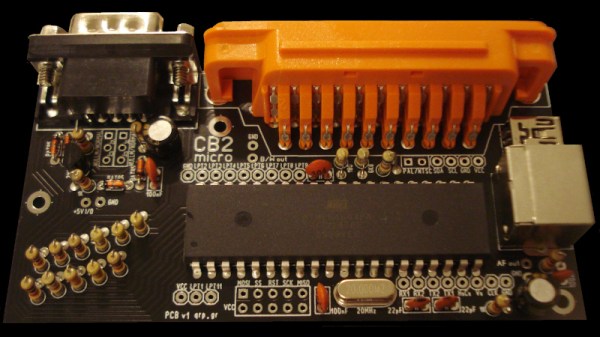
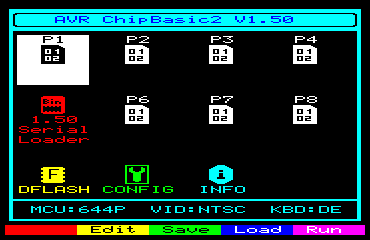
But that doesn’t mean you don’t have options. [Kostas] writes in to tell us about the “CB2 micro”: a diminutive open source retrocomputer kit that can be built in as little as 30 minutes thanks to its through-hole construction and exceptionally low parts count. When completed the miniature computer is an all-in-one BASIC development platform; just connect up a display and a PS/2 keyboard, and you’ve got everything you need to write you own programs or run games and applications developed by the community. You don’t even need a floppy, as the ATmega644P powered board has enough internal flash to store eight programs for easy access through its graphical menu system.

Main menu of the CB2 micro

For many in the audience, a cheap little board that you can assemble yourself and use as a stand-alone BASIC experimentation platform is appealing enough. But thanks to a collection of hardware add-on boards, the CB2 micro can be augmented with some interesting capabilities.

Some are fairly obvious such as adding additional flash storage or RAM, but you can also run the computer on AA or AAA batteries, or add an S-Video port. [Kostas] even explains how to assemble a special serial cable that allows you to network multiple boards together. If you take the plunge and start building your own hardware modules, the sky’s the limit.

Of course, purists may balk because the CB2 micro isn’t using a “real” computer processor. Fair enough. For those that want a more authentic retro experience, you could always pick up a kit like the RC2014, or go all out and cram a Z80 into an Altoids tin so you can carry it around with you.