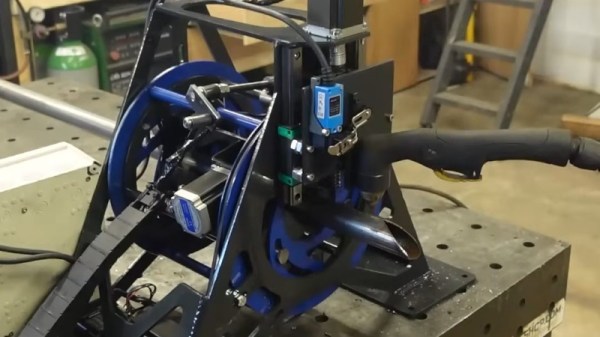
Back in the day, one of the few reasons to prefer compact cassette tape to vinyl was the fact you could record it at home in very good fidelity. Sure, if you had the scratch, you could go out and get a small batch of records made from that tape, but the machinery to do it was expensive and not always easy to come by, depending where you lived. That goes double today, but we’re in the middle of a vinyl renaissance! [ronald] wanted to make records, but was unable to find a lathe, so decided to take matters into his own hands, and build his own vinyl record cutting lathe.
[ronald’s] record cutting lathe looks quite professional.It seems like it should be a simple problem, at least in concept: wiggle an engraving needle to scratch grooves in plastic. Of course for a stereo record, the wiggling needs to be two-axis, and for stereo HiFi you need that wiggling to be very precise over a very large range of frequencies (7 Hz to 50 kHz, to match the pros). Then of course there’s the question of how you’re controlling the wiggling of this engraving needle. (In this case, it’s through a DAC, so technically this is a CNC hack.) As often happens, once you get down to brass tacks (or diamond styluses, as the case may be) the “simple” problem becomes a major project. Continue reading “DIY Record Cutting Lathe Is Really Groovy”→
The last parts of the central solenoid assembly have finally made their way to France from the United States, making both a milestone in the slow development of the world’s largest tokamak, and a reminder that despite the current international turmoil, we really can work together, even if we can’t agree on the units to do it in.
The central solenoid is in the “doughnut hole” of the tokamak in this cutaway diagram. Image: US ITER.
The central solenoid is 4.13 m across (that’s 13′ 7″ for burger enthusiasts) sits at the hole of the “doughnut” of the toroidal reactor. It is made up of six modules, each weighing 110 t (the weight of 44 Ford F-150 pickup trucks), stacked to a total height of 59 ft (that’s 18 m, if you prefer). Four of the six modules have been installed on-site, and the other two will be in place by the end of this year.
Each module was produced ITER by US, using superconducting material produced by ITER Japan, before being shipped for installation at the main ITER site in France — all to build a reactor based on a design from the Soviet Union. It doesn’t get much more international than this!
This magnet is, well, central to the functioning of a tokamak. Indeed, the presence of a central solenoid is one of the defining features of this type, compared to other toroidal rectors (like the earlier stellarator or spheromak). The central solenoid provides a strong magnetic field (in ITER, 13.1 T) that is key to confining and stabilizing the plasma in a tokamak, and inducing the 15 MA current that keeps the plasma going.
When it is eventually finished (now scheduled for initial operations in 2035) ITER aims to produce 500 MW of thermal power from 50 MW of input heating power via a deuterium-tritium fusion reaction. You can follow all news about the project here.
At Hackaday, it is always clock time, and clock time is a great time to check in with [shiura], whose 3D Printed Perpetual Calendar Clock is now at Version 2. A 3D printed calendar clock, well, no big deal, right? Grab a few steppers, slap in an ESP32 to connect to a time server, and you’re good. That’s where most of us would probably go, but most of us aren’t [shiura], who has some real mechanical chops.
There’s also a 24-hour dial, because why not?
This clock isn’t all mechanical. It probably could be, but at its core it uses a commercial quartz movement — you know, the cheap ones that take a single double-A battery. The only restriction is that the length of the hour axis must be twelve millimeters or more. Aside from that, a few self-tapping screws and an M8 nut, everything else is fully 3D printed.
From that simple quartz movement, [shiura]’s clock tracks not only the day of the week, the month and date — even in Febuary, and even compensating for leap years. Except for the inevitable drift (and battery changes) you should not have to adjust this clock until March 2100, assuming both you and the 3D printed mechanism live that long. Version one actually did all this, too, but somehow we missed it; version two has some improvements to aesthetics and usability. Take a tour of the mechanism in the video after the break.
S4 slicer uses the path from any point (here, Benchy’s prow) as its basis…
This non-planar slicer is built into a Jupyter notebook, which follows a relatively simple algorithm to automatically generate non-planar toolpaths for any model. It does this by first generating a tetrahedral mesh of the model and then calculating the shortest possible path through the model from any given tetrahedron to the print bed. Even with non-planar printing, you need to print from the print-bed up (or out).
Quite a lot of math is done to use these paths to calculate a deformation mesh, and we’ll leave that to [Joshua] to explain in his video below. After applying the deformation, he slices the resulting mesh in Cura, before the G-code goes back to Jupyter to be re-transformed, restoring the shape of the original mesh.
… to generate deformed models for slicing, like this.
So yes, it is G-code bending as others have demonstrated before, but in a reproducible, streamlined, and straightforward workflow. Indeed, [Josh] credits much of the work to earlier work on the S^3-Slicer, which inspired much of the logic and the name behind his S4 slicer. (Not S4 as in “more than S^3” but S4 as a contraction of “Simplified S^3”). Once again, open source allows for incremental innovation.
It is admittedly a computationally intensive process, and [Joshua] uses a simplified model of Benchy for this demo. This seems exactly the sort of thing we’d like to burn compute power on, though.
Will a 486 run Crysis? No, of course not. Will it run a large language model (LLM)? Given the huge buildout of compute power to do just that, many people would scoff at the very notion. But [Yeo Kheng Meng] is not many people.
He has set up various DOS computers to run a stripped down version of the Llama 2 LLM, originally from Meta. More specifically, [Yeo Kheng Meng] is implementing [Andreq Karpathy]’s Llama2.c library, which we have seen here before, running on Windows 98.
Llama2.c is a wonderful bit of programming that lets one inference a trained Llama2 model in only seven hundred lines of C. It it is seven hundred lines of modern C, however, so porting to DOS 6.22 and the outdated i386 architecture took some doing. [Yeo Kheng Meng] documents that work, and benchmarks a few retrocomputers. As painful as it may be to say — yes, a 486 or a Pentium 1 can now be counted as “retro”.
The models are not large, of course, with TinyStories-trained 260 kB model churning out a blistering 2.08 tokens per second on a generic 486 box. Newer machines can run larger models faster, of course. Ironically a Pentium M Thinkpad T24 (was that really 21 years ago?) is able to run a larger 110 Mb model faster than [Yeo Kheng Meng]’s modern Ryzen 5 desktop. Not because the Pentium M is going blazing fast, mind you, but because a memory allocation error prevented that model from running on the modern CPU. Slow and steady finishes the race, it seems.
This port will run on any 32-bit i386 hardware, which leaves the 16-bit regime as the next challenge. If one of you can get an Llama 2 hosted locally on an 286 or a 68000-based machine, then we may have to stop asking “Does it run DOOM?” and start asking “Will it run an LLM?”
How far can you stretch a measuring tape before it buckles? The answer probably depends more on the tape than the user, but it does show how sturdy the coiled spring steel rulers can be. [Gengzhi He et. al.] may have been playing that game in the lab at UC San Diego when they hit upon the idea for a new kind of low-cost robotic gripper.
Four motors, four strips of measuring tape (doubled up)– one robot hand.
With the lovely backronym “GRIP-tape” — standing for Grasping and Rolling in Plane — you get a sense for what this effector can do. Its two “fingers” are each made of loops of doubled-up measuring tape bound together with what looks suspiciously like duck tape. With four motors total, the fingers can be lengthened or shortened by spooling the tape, allowing a reaching motion, pivot closer or further apart for grasping, and move-in-place like conveyor belts, rotating the object in their grasp.
The combination means it can reach out, grab a light bulb, and screw it into a socket. Or open and decant a jar of spices. Another video shows the gripper reaching out to pick a lemon, and gently twist it off the tree. It’s quite a performance for a device with such modest components.
At the moment, the gripper is controlled via remote; the researchers plan on adding sensors and AI autonomous control. Read all the details in the preprint, or check below the fold to watch the robot in action.
As you might remember from chemistry class, crystals are made up of blocks of atoms (usually called ‘unit cells’) that fit together in perfect repetition — baring dislocations, cracks, impurities, or anything else that might throw off a theoretically perfect crystal structure. There are only so many ways to tessellate atoms in 3D space; 230 of them, to be precise. A quasicrystal isn’t any of them. Rather than repeat endlessly in 3D space, a quasicrystal never repeats perfectly, like a 3D dimensional Penrose tile. The discovery of quasicrystals dates back to the 1980s, and was awarded a noble prize in 2011.
Penrose tiling– the pattern never repeats perfectly. Quasicrystals do this in 3D. (Image by Inductiveload, Public Domain)
Quasicrystals aren’t exactly common in nature, so how does 3D printing come into this? Well, it turns out that, quite accidentally, a particular Aluminum-Zirconium alloy was forming small zones of quasicrystals (the black spots in the image above) when used in powder bed fusion printing. Other high strength-alloys tended to be very prone to cracking, to the point of unusability, and this Al-Zr alloy, discovered in 2017, was the first of its class.
You might imagine that the non-regular structure of a quasicrystal wouldn’t propagate cracks as easily as a regular crystal structure, and you would be right! The NIST researchers obviously wanted to investigate why the printable alloy had the properties it does. When their crystallographic analysis showed not only five-fold, but also three-fold and two-fold rotational symmetry when examined from different angles, the researchers realized they had a quasicrystal on their hands. The unit cell is in the form of a 20-sided icosahedron, providing the penrose-style tiling that keeps the alloy from cracking.
You might say the original team that developed the alloy rolled a nat-20 on their crafting skill. Now that we understand why it works, this research opens up the doors for other metallic quasi-crystals to be developed on purpose, in aluminum and perhaps other alloys.