Reflow Hotplate Teardown Uncovers The Bare Minimum

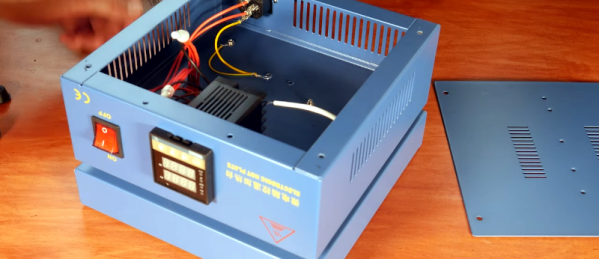
[EEforEveryone] is trying to find a good hot plate for reflow soldering. After trying one cheap unit, he got another one. He was a bit underwhelmed. The grounding was suspect and the bed wasn’t totally flat. He tore it apart and was surprised that there was very little inside. While the construction wasn’t perfect, it was better than the previous unit. You can see a video of the teardown and review below.

Before powering it up, the first order of business was to rewire the ground system. After that, it was time to try it. However, by confusing Fahrenheit and Centigrade, he set the temperature much higher than necessary which creating a little smoke. Fixing the temperature helped, but there was still a bit of a smoky smell that eventually subsided.

The verdict? The hot plate worked well enough, but you probably do want to check the ground wiring before using it. That’s often a good idea where cheap equipment is concerned, anyway. But the real takeaway is that it looks like you could homebrew something equivalent without much trouble. The controller is an off-the-shelf module. A switch and a plug aren’t hard to figure out. The heating element could be a silicone heater or PCB heater meant for a 3D printer.

Of course, there are other options. You could use a wok. Or why not a waffle iron? You can also make a custom PCB.

Continue reading “Reflow Hotplate Teardown Uncovers The Bare Minimum”
WebGPU… Better Than WebGL?

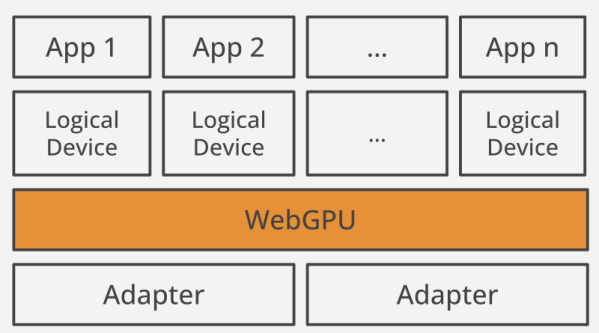
As the browser becomes more like an operating system, we are seeing more deep features being built into them. For example, you can now do a form of assembly language for the browser. Sophisticated graphics have been around using WebGL since around 2011, but some people find it hard to use. [Surma] was one of those people and tried a new method that is just surfacing to do the same thing: WebGPU.

[Surma] liked it better and shares a lot of information in the post and — oddly — the post doesn’t use WebGPU for graphics very much. Instead, the post focuses on using GPU cores for fast computation, something else you can do with WebGPU. If your goal is to draw on the screen, though, you need to know the basics and the post links to a site with examples of doing this.

Continue reading “WebGPU… Better Than WebGL?”

Class A Amplifiers, Virtually

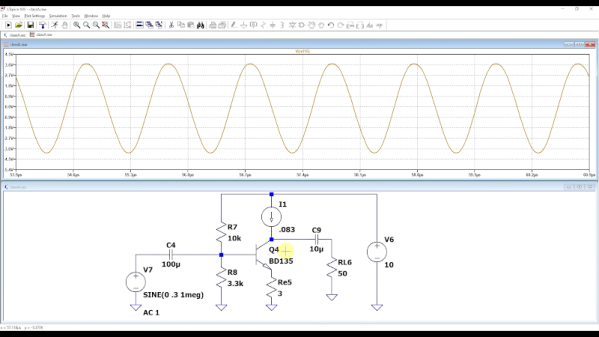
If you didn’t know better, you might think the phrase “class A amplifier” was a marketing term to help sell amplifiers. But it is, of course, actually a technical description of an amplifier that doesn’t distort the input waveform because it doesn’t depend on multiple elements to handle different areas of the input waveform. Want to know more? [FesZ] has a new video covering the basics of class A amplifiers including some great simulations. You can see the video below.

A class A amplifier uses a transistor that is always biased on. It never saturates or switches off. This is good for linearity, but not always the best for efficiency so there are other classes of amplifiers, too. However, for many applications, class A is the most common configuration.

There are a number of trade-offs involved with each type of amplifier and [FesZ] covers them in detail. But the real interesting part is the simulations in Spice. Sure, you can build the circuits and look at everything with a meter or scope, but using Spice is much handier.

There is a second video upcoming. We hope he covers other amplifier types too, as you really do want to understand the differences when you need to design something. If you want more Spice stuff, check out some of our previous posts. If for some reason, you don’t like LTSpice, there’s always Micro-Cap 12.

Continue reading “Class A Amplifiers, Virtually”

Modern CPUs Are Smarter Than You Might Realize

When it comes to programming, most of us write code at a level of abstraction that could be for a computer from the 1960s. Input comes in, you process it, and you produce output. Sure, a call to strcpy might work better on a modern CPU than on an older one, but your basic algorithms are the same. But what if there were ways to define your programs that would work better on modern hardware? That’s what a pre-print book from [Sergey Slotin] answers.

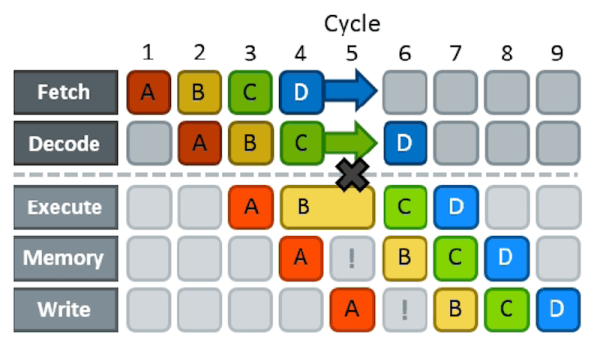
As a simple example, consider the effects of branching on pipelining. Nearly all modern computers pipeline. That is, one instruction is fetching data while an older instruction is computing something, while an even older instruction is storing its results. The problem arises when you already have an instruction partially executed when you realize that an earlier instruction caused a branch to another part of your code. Now the pipeline has to be backed out and performance suffers while the pipeline refills. Anything that had an effect has to reverse and everything else needs to be discarded.

That’s bad for performance. Because of this, some CPUs try to predict if a branch is likely to occur or not and then speculatively fill the pipeline for the predicted case. However, you can structure your code, for example, so that it is more obvious how branching will occur or even, for some compilers, explicitly inform the compiler if the branch is likely or not.

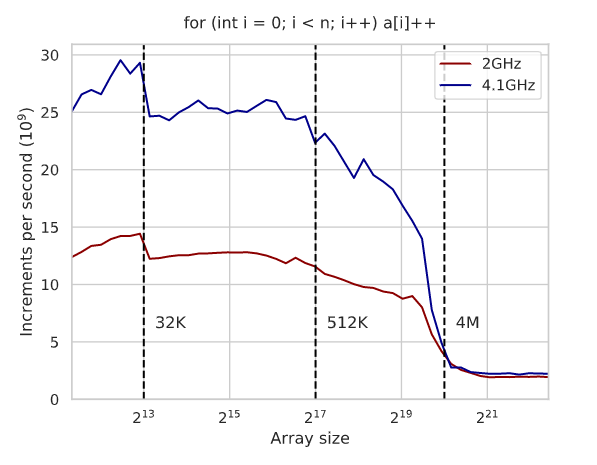
As you might expect, techniques like this depend on your CPU and you’ll need to benchmark to show what’s really going on. The text is full of graphs of execution times and an analysis of the generated assembly code for x86 to explain the results. Even something you think is a pretty good algorithm — like binary search, for example, suffers on modern architectures and you can improve its performance with some tricks. Actually, it is interesting that the tricks work on GCC, but don’t make a difference on Clang. Again, you have to measure these things.

Probably 90% of us will never need to use any of the kind of optimization you’ll find in this book. But it is a marvelous book if you enjoy solving puzzles and analyzing complex details. Of course, if you need to squeeze those extra microseconds out of a loop or you are writing a library where performance is important, this might be just the book you are looking for. Although it doesn’t cover many different CPUs, the ideas and techniques will apply to many modern CPU architectures. You’ll just have to do the work to figure out how if you use a different CPU.

We’ve looked at pieces of this sort of thing before. Pipelining, for example. Sometimes, though, optimizing your algorithm isn’t as effective as just changing it for a better one.

Hack Your Recipes

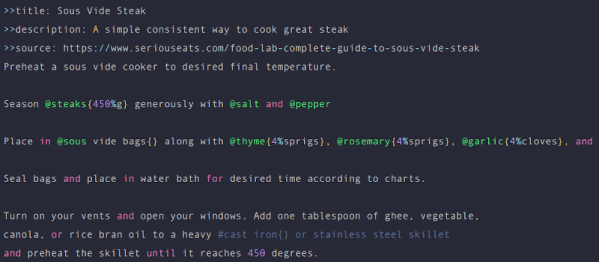
If there is one thing Hackaday readers have in common, they like to make things. Of course, we don’t all make the same things and that’s great. But, unsurprisingly, a lot of people who like to create things include the kitchen as their workspaces. Why not? We all have to eat and there’s something very nice about cooking a meal for your loved ones or even just yourself. Cooklang is a markdown-style language from [Brian Sunte] specifically for capturing recipes. It not only formats the recipe, but it provides an easy way for software to parse the key elements while still being human-readable. This allows you to manipulate recipes just like software, including using Git for version control, for example.

There was a time that cooking meant having big cookbooks, but now you are more likely to search the Internet. There’s only one problem. For some reason, nearly every recipe site follows the same format. Thousands of words about how much the cook’s family loves the dish, how they pick out only the most succulent tomatoes to ensure the dish will have a vibrant scarlet hue, and how much their poor granny would have loved the dish, if only she had survived the 1928 flood which is described in great detail. After 20 minutes you find out that you put the tomatoes in the blender, add a cup of water, and that’s it. Cooklang is a sort of antidote for that. You can easily write something that parses the recipe and generates, say, a shopping list or compares it to your household inventory and places an order for the remaining things from the local grocery delivery.

Continue reading “Hack Your Recipes”

Glassblowing For The Lab

There was a time when ordering some glassware from a distributor meant making a sizable minimum order, sending a check in the mail and waiting weeks for a box full of — hopefully intact — glassware to arrive. In those days, blowing your own glassware from glass tubes was fairly common and [Wheeler Scientific] has been doing a series on just how to do that. Even if you aren’t interested in building a chemistry lab, you might find the latest episode on making a gas discharge tube worth a watch. There are several videos and you can see a few of them below.

Of course, blowing glass is literally playing with fire, so be careful. Most important rule? Don’t inhale. Then again, for a lot of things, blowing glass doesn’t involve you actually blowing, but it is more like bending and shaping and — technically — what he shows is lampwork, not actual glassblowing, but that’s a technicality.

Continue reading “Glassblowing For The Lab”

Automated Chess Board Plays You

If you’ve ever played chess or even checkers, you’ve probably thought about making a board that lets a computer play you without having to enter your moves and look at the board on a screen. [Greg06] not only thought about it, but he built it.

The board looks great and uses foamboard which makes it easy to reproduce. Each piece has a small magnet within and an electromagnet on an XY motion system can selectively pick up and move pieces. In addition, a reed switch under each square can tell if a square is occupied or not.

Continue reading “Automated Chess Board Plays You”