Injection Molds From Your 3D Printer

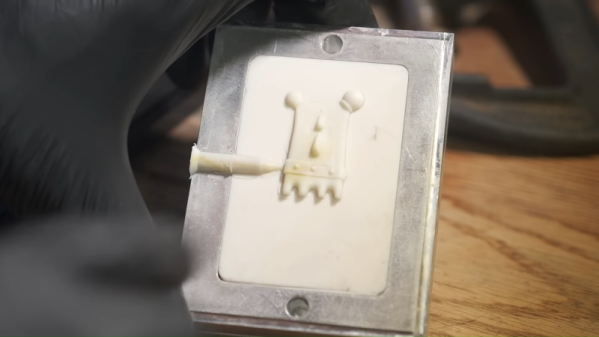
Last time we checked in with [CrafsMan] he had bought a benchtop injection molding machine. This time, he shows off how to 3D print molds. If you have ever had to spend to make tooling for injection molding, you’ll appreciate being able to make molds relatively inexpensively.

To test his workflow, [CrafsMan] created a little 3D figurine and brought it into TinkerCad. From there he created a mold and used Lychee Slicer to print it using resin.

Continue reading “Injection Molds From Your 3D Printer”

AppCAD Does Transmission Lines

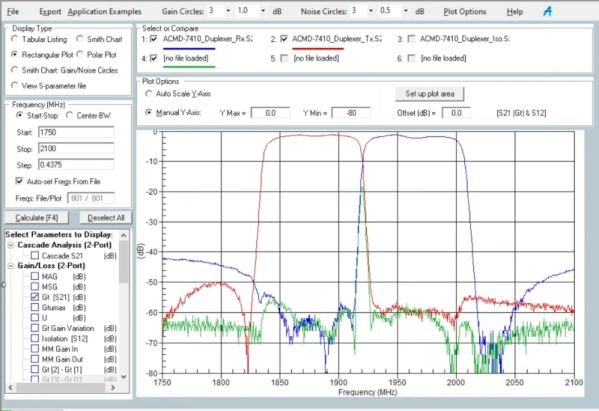
Broadcom and Agilent are perhaps not household words in every household, but among those who work with RF, they are common enough names. An Agilent developer wrote AppCAD to help with common RF design computations and now works for Avago who bought Broadcom. But whoever’s branding is on it, you can download the tool from Broadcom or check out the latest beta version. Then watch [IMASI Guy’s] video below on how to use part of it.

What can it do? According to the website:

  • S-Parameter Analysis and Plotting
  • Active Circuit Bias Design
  • Cascade Noise and IP3 Analysis
  • Transmission Line Analysis
  • Signals and Systems
  • Complex Math Engineering Calculator

Continue reading “AppCAD Does Transmission Lines”

The Story Behind Ohm’s Law

Do you ever wonder how much of what we do you could figure out from scratch? Tying your shoe might seem simple now, but kids have trouble mastering the skill, and dreaming it up for the first time is even harder. The same holds true for a lot of technology we use every day. Would you think up the computer mouse or even the computer if they didn’t already exist? Surely, though, one of the simplest and most useful math equations that is fundamental to electronics — Ohm’s law — would be easy to figure out, right? It is often the first thing you learn about electronics, but figuring it out that first time turned out to be quite difficult.

The fellow who discovered the relationship was Georg Ohm, a high school math and physics teacher from Köln. What you might not know is that the first time he published it, he got it wrong. But, lucky for us, he figured out his mistake and was able to correct it.

Continue reading “The Story Behind Ohm’s Law”

Software Defined… CPU?

Everything is better when you can program it, right? We have software-defined radios, software-defined networks, and software-defined storage. Now a company called Ascenium wants to create a software-defined CPU. They’ve raised millions of dollars to bring the product to market.

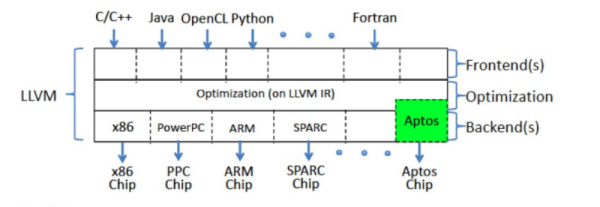
The materials are a bit hazy, but it sounds as though the idea is to have CPU resources available and let the compiler manage and schedule those resources without using a full instruction set. A system called Aptos lets the compiler orchestrate those resources.

Continue reading “Software Defined… CPU?”

3D Print In The Air With A Little Software Support

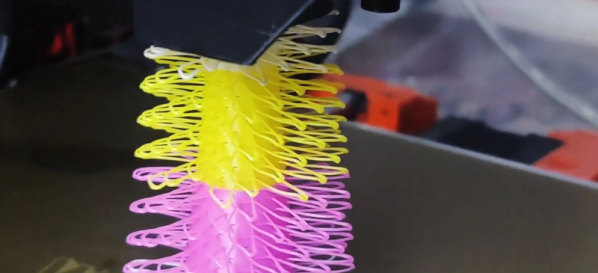
We all love 3D printing, but printing anything that has an overhang requires support, right? Maybe not. [Create Inc] has a video showing some 3D prints that seem to hang impossibly in the air — not bridges, but loops just floating in the air. You can see the effect in the video below.

The first part of the post covers gcode basics. Around the 5:30 mark, [Create] talks about his inspiration: FullControl Gcode Designer. You can do a lot with this tool and it inspired [Create’s] similar web-based version.

The point of these tools is to make it easier to create gcode directly instead of using a slicer. You can think of it as assembly language for 3D printing — you can do almost everything in the high-level language — 3D models — but if you want ultimate control you use assembly language, or, in this case, gcode.

The original tool uses Excel which didn’t visualize the output directly and could not provide proper error checking. The new tool solves those problems and is much easier to use.

If you know gcode, you can do a lot of interesting things. You can even put a spring in your step.

Continue reading “3D Print In The Air With A Little Software Support”

Improving Cheap SDR Antennas

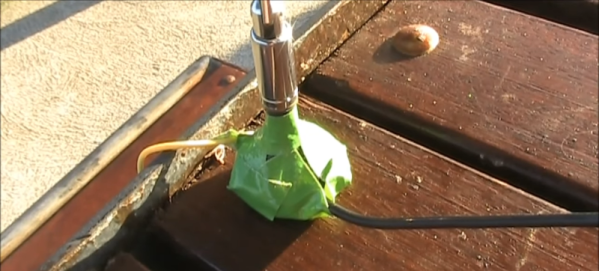
[VK3YE] knows there are at least two things wrong with the cheap antennas you get with most SDR dongles. First, they are too short. You’d like to have enough to pull out a quarter wavelength on the longest frequency you want to operate. The second problem is there’s no real ground. He fixed both of these problems, as you can see in the video below.

The result might be called an ugly duckling rather than a rubber ducky. But it does seem to work. You could probably come up with something nicer to reseal the base, but the tape does work. A nice 3D printed housing would work, too, and might improve the appearance. We also thought about the goop you use on tool handles.

We actually have simply cut these antennas off and reused the cable and connector to hook up a better antenna. You might get more mileage out of that approach. On the other hand, the magnetic base and reasonably small form factor is pretty attractive.

If you want to do before and after testing, we’d suggest using Python. Or, just bite the bullet and build something that looks like it belongs in a movie.

Continue reading “Improving Cheap SDR Antennas”

DeWalt Literal Hack Upgrades Battery

There are several important decisions you make in your life: Coke or Pepsi; vi or emacs; PC or Mac. But, lately, you need to pick a battery ecosystem for your tools. DeWalt? Black & Decker? Or just cheapies from Harbor Freight? But what happens when your vendor of choice changes their batteries? That’s the situation [jleslie48] found when a DeWalt 14.4V battery died. All the new tools require 18V batteries, so buying an old battery for one tool didn’t make sense. Time to literally hack the old tool to accept the new battery.

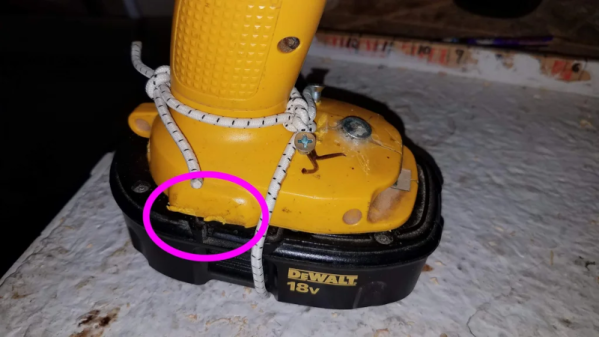
Presumably, nothing in the drill will mind the higher voltage. It is all a matter of mechanics and nothing a Dremel tool won’t fix. Since the tool was old and the 18V batteries relatively new, [jleslie48] decided to limit modifications to the tool only leaving the batteries intact for use with the newer tools.

The only problem once you remove the pins and clips that interfere with the battery fit, it won’t actually stay on the drill. We might have turned to duct tape or zip ties, but bungee cord works, too, as you can see in the finished product.

Honestly, though, the bungee is good because you can stretch it to remove the battery for charging. We might have just cannibalized the drill for its motor, but next time you have a tool with no battery, it might be worth looking to see if you could modify the tool.

Bungees are great for robots, too. Or, you can lay siege on your neighbors.