The Sound Of Silence: Speed Up Your Video Consumption

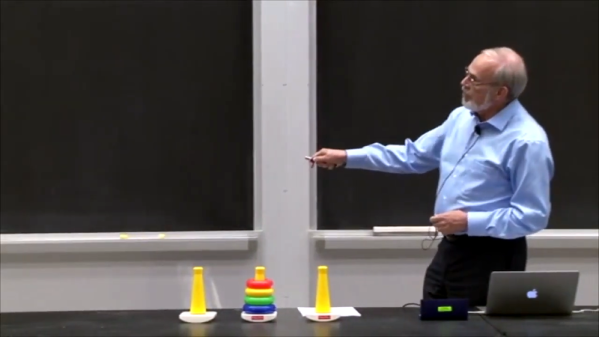
There’s a lot of interesting content produced on video these days. Invariably, though, when we post something some comments will appear lamenting that a video isn’t the most efficient way to disseminate technical information. We have mixed feelings. Some things benefit from being able to see, for example, a screencast. Some people like the human connection of seeing an instructor interact with a class instead of just reading. But we will admit that sometimes a video takes longer to watch, especially if it is full of pauses. Unsilence is a tool from [labmoellertim] that can fix that. The command line tool takes a video and strips out the parts that are silent. You can also use it as a Python library if you want to build your own tools using the technique.

If you’ve ever taken a class online, it isn’t uncommon to speed up a video so you can get through class faster. This works to a point, but removing or speeding up silent gaps means you don’t have to “listen faster.” Of course, you could still speed up the video, too.

Continue reading “The Sound Of Silence: Speed Up Your Video Consumption”
Soon… Inkjet Your Circuit Boards

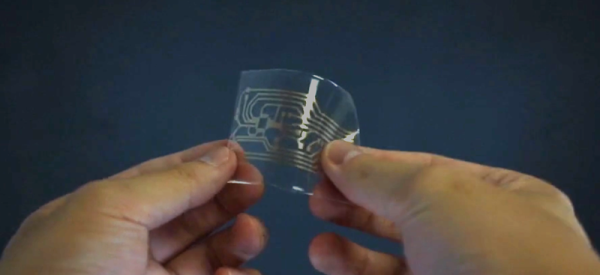
Printed circuit board fabrication — especially in basements and garages — have been transformed by the computer revolution. Before that, people would use a permanent marker or little decals to layout circuit boards prior to etching. Sometimes, they’d do it on film and use a photo process, but they did make decals that you applied directly to the board to resist the etch. Now a team from Georgia Tech, University of Tokyo, Carnegie Mellon, and the University of Nebraska has brought things full circle. Their process inkjet prints silver traces on a substrate that they can then transfer to a circuit board — no etching required.

They start with a standard Epson inkjet with cartridges that have silver-bearing ink. The patterns print on a transfer paper that ensures the particles fuse so there’s no sintering step required to make sure the traces are all conductive. A sticky backing is applied and peels the pattern off the transfer paper. You can see more in the video below.

Continue reading “Soon… Inkjet Your Circuit Boards”

Testing Hardware With ASCII Waveforms

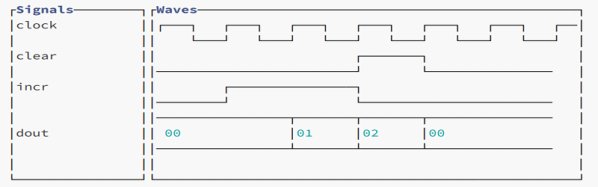
Testing software is — sometimes — easier than testing hardware. After all, you can always create test files and even fake user input before monitoring outputs using common tools. Hardware though, is a bit different. Sometimes it is hard to visualize exactly what’s happening. [Andrew Ray’s] answer? Produce simulated waveforms using ASCII text.

The process uses some custom tools written in OCaml, but the code is available for you on GitHub. The tool, called Hardcaml, allows you to write test benches for hardware — not a new idea for FPGA developers. The output, however, is an ASCII text waveform and common software development tools can check that waveform against the expected output.

Continue reading “Testing Hardware With ASCII Waveforms”

New Microscope Directly Images Protein Atoms

There’s an old joke that you can’t trust atoms — they make up everything. But until fairly recently, there was no real way to see individual atoms. You could infer things about them using X-ray crystallography or measure their pull on tiny probes using atomic force microscopes, but not take a direct image. Until now. Two laboratories recently used cryo-electron microscopy to directly image atoms in a protein molecule with a resolution of about 1.2 x 10⁻⁷ millimeters or 1.2 ångströms. The previous record was 1.54 ångströms.

Recent improvements in electron beam technology helped, as did a device that ensures electrons that strike the sample travel at nearly the same speeds. The latter technique resulted in images so clear, researchers could identify individual hydrogen atoms in the apoferritin molecule and the water surrounding it.

Continue reading “New Microscope Directly Images Protein Atoms”

Ancient History Of The Phone Jack

While watching a video about old radios from the 1920s, a phone jack popped up. The host mentioned that phone jacks are super old and he wondered what was their origin. I always assumed they had something to do with the telephone system, and that’s right, but I had no idea how old they really are and how they’ve evolved. Turns out the venerable plug goes back to at least 1878.

Keep in mind, I’m talking about the good old fashioned 1/4″ phone jack with two wires. Over time, the jack and plug have spawned different versions with more wires and — particularly — smaller dimensions. The headphone jack that many smartphone makers are dropping is a direct descendant of that old phone jack. But a mono cable like you would see connecting an electric guitar or another mono source would be right at home connected to a 1900s switchboard. Let’s take a look at the origins of a design that’s almost 150 years old and still in use.

Continue reading “Ancient History Of The Phone Jack”

Linux Fu: Raspberry Pi Desktop Headless

It seems to me there are two camps when it comes to the Raspberry Pi. Some people use them as little PCs or even laptops with a keyboard and screen connected. But many of us use them as cheap Linux servers. I’m in the latter camp. I have probably had an HDMI plug in a Pi only two or three times if you don’t count my media streaming boxes. You can even set them up headless as long as you have an Ethernet cable or are willing to edit the SD card before you boot the machine for the first time.

However, with the Raspberry Pi 4, I wanted to get to a desktop without fishing up a spare monitor. I’ll show you two ways to get a full graphical KDE desktop running with nothing more than a network connection.

The same principle applies to most other desktop environments, but I am using KDE and Ubuntu on the Pi, even though something lighter would probably perform better. But before we get there, let’s talk about how X11 has had a big identity crisis over the years.

The Plan

There are many ways to remotely access X programs, many of which are rarely used today. However, for this purpose, we are going to use SSH tunneling along with some special tricks to get the entire desktop running. It is easy to just run a single X program over SSH, and you’ve probably done that often. If so, you can skip to the next section.

Continue reading “Linux Fu: Raspberry Pi Desktop Headless”

A Tasty Output Device

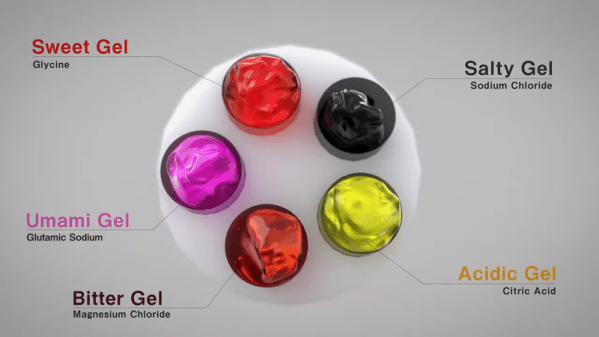
We have headphones for your ears, and monitors for your eyes. Some computers even have tactile feedback. Now researchers have an output device for taste. The decidedly odd device uses five gels, one for each of the tastes humans can sense. If we understand the paper, the trick is that ionizing the gels inhibits the taste of that gel. By controlling the ionization level of each gel, you can synthesize any taste, just like you can make colors with three LEDs.

The five gels are made from agar and glycine (sweet), magnesium chloride (bitter), citric acid (acidic), salt (salty), and glutamic sodium (umami). If you didn’t learn about umami in school, that’s a savory taste likened to the taste of a broth or meat and often associated with monosodium glutamate.

The shape of the device is made like a sushi roll so that while the gels contact the tongue, a copper foil cathode can connect also. Using this will make you look even stranger than someone wearing Google Glass, but that’s the price of being on the cutting edge of technology, we suppose. There doesn’t seem to be any reason you couldn’t duplicate something like this, although we wonder about the hygiene of passing it around at parties. Maybe your next home movie could show a meal and let the viewer taste it too.

If you are wondering about smell, that’s another set of researchers. You would think this is the first taste output device we have seen, but no… surprisingly, it isn’t.

Continue reading “A Tasty Output Device”