New Transistor Uses Metal And Air Instead Of Semiconductors

The more things change, the more things stay the same. Early electronic devices used a spark gap. These have been almost completely replaced with tubes and then semiconductor devices such as transistors. However, transistors will soon reach a theoretical limit on how small they can be which is causing researchers to find the next thing. If the  Royal Melbourne Institute of Technology has its way, we’ll go back to something that has more in common with a spark gap than a conventional transistor. You can find the source paper on the Nano Papers website although the text is behind a paywall.

The transistor uses metal, but instead of a semiconductor channel — which is packed with atoms that cause collisions as electrons flow through the channel — the new device uses an air gap. You might well think that if fewer atoms in the channel are better, why not use a vacuum?

Continue reading “New Transistor Uses Metal And Air Instead Of Semiconductors”

Etch-a-Sketch 3D Printed With Cell Phone

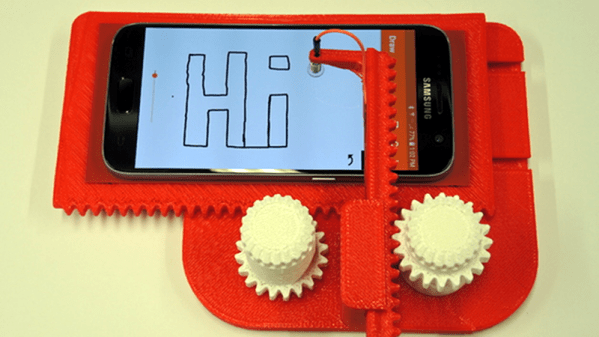
Most of us have fond memories of the Etch-a-Sketch from childhood. [Potent Printables] wanted to update the designs so he 3D printed an XY carriage for a stylus that works with a cell phone drawing program. You can see the video below and the 3D model details on Thingiverse.

The design is fun all by itself, but it also gave us a few ideas. For one thing, if you motorized it you could make some pretty clever drawing toys. But there could be a more practical use, too.

Continue reading “Etch-a-Sketch 3D Printed With Cell Phone”

3D Printed Brushed Motor Is Easy To Visualize

A motor — or a generator — requires some normal magnets and some electromagnets. The usual arrangement is to have a brushed commutator that both powers the electromagnets and switches their polarity as the motor spins. Permanent magnets don’t rotate and attract or repel the electromagnets as they swing by. That can be a little hard to visualize, but if you 3D Print [Miller’s Planet’s] working model — or just watch the video below — you can see how it all works.

We imagine the hardest part of this is winding the large electromagnets. Getting the axle — a nail — centered is hard too, but from the video, it looks like it isn’t that critical. There was a problem with the link to the 3D model files, but it looks like this one works.

Continue reading “3D Printed Brushed Motor Is Easy To Visualize”

Retrotechtacular: Before The Internet: MUDPIE

It is easy to forget how disconnected computers used to be. There was a time when sites with similar computers would do a tape rotation where a tape (or whatever media) would arrive in the mail. You’d spend some time looking at what was on it and then add anything interesting that you had to the end of it before sending it on to the next person. Eventually, the tape would come back to you, presumably loaded with more things. Late in 1967, Dr. James Peters started a newsletter called MUDPIE — Museum and University Data Program and Information Exchange. The newsletter would wind up with 26 issues over five years and while it started out with as few as 25 members, it would grow to over 250.

The newsletter was a real hardcopy newsletter, because as Dr. Peters put it:

MUDPIE represents an attempt to keep everyone up to date on the development of time-shared computing in museums and universities engaged in systematic research. Several individuals receiving this first copy had written asking the same questions, and this is a quick way of answering them. There was a tremendous temptation to set it up so that it could be received only through the teletype and computer — but that proved to be a little too advanced for the present!

Continue reading “Retrotechtacular: Before The Internet: MUDPIE”

The Arduino Hits The Rails

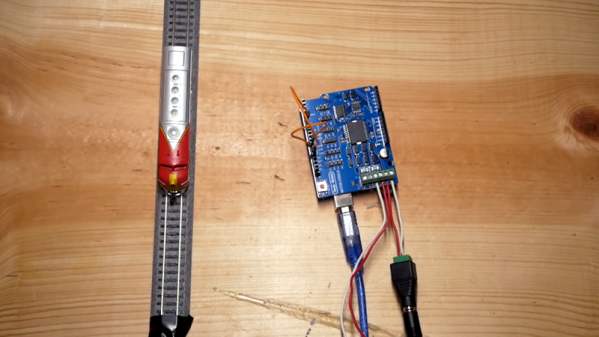
Certain hobbies come in clusters. It isn’t uncommon to see, for example, ham radio operators that are private pilots. Programmers who are musicians. Electronics people who build model trains. This last seems like a great fit since you can do lots of interesting things with simple electronics and small-scale trains. [Jimmy] at the aptly-named DIY and Digital Railroad channel has several videos on integrating railroad setups with Arduino. These range from building a DCC system for about $45 (see below) to a crossing signal.

There are actually quite a few basic Arduino videos on the channel, although most of them are aimed at beginners. However, the DCC — Digital Command and Control — might be new to you if you are a train neophyte. DCC is a standard defined by the National Model Railroad Association.

Continue reading “The Arduino Hits The Rails”

1,000 Watt Power Supply Tear Down And Repair

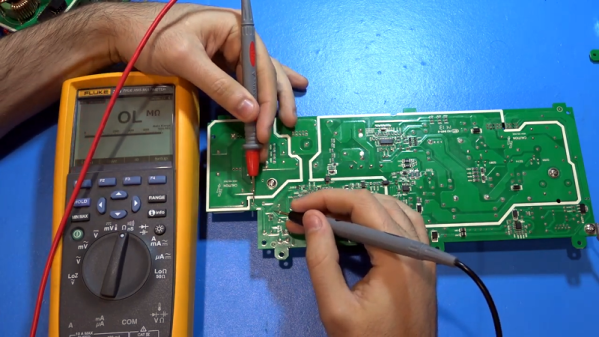
[TheSignalPath] wanted to repair a broken Instek PSW80-40.5 because it has a lot of output for a programmable power supply — 1,080 watts, to be exact. This isn’t a cheap supply — it looks like it costs about $2,200 new. The unit wasn’t working and when he took it apart, he found a nasty surprise. There is a base PCB and three identical power supply modules, and virtually no access without disconnecting the boards. He continued the teardown, and you can see the results in the video below.

Each of the power supply modules are two separate PCBs and the design has to account for the high currents required. The power supply is a switching design with some filtering on the motherboard. One of the boards of the power supply module rectifies the incoming line voltage to a high DC voltage (about 400 volts). The second board then does DC to DC conversion to the desired output.

Continue reading “1,000 Watt Power Supply Tear Down And Repair”

Packing Decimal Numbers Easily

While desktop computers have tons of computing power and storage, some small CPUs don’t have a lot of space to store things. What’s more is some CPUs don’t do multiplication and division very well. Same can be said for FPGAs. So suppose we are going to grab a bunch of three-digit decimal numbers from, say, a serial port. We want to store as many as we can, and we don’t want to do a lot of math because we can’t, it is slow, or perhaps it keeps our processor awake longer and we want to sleep to conserve power. We want a way to pack the numbers as close to the theoretical maximum as we can but with little or no math.

The simple approach is to store the numbers as ASCII. Great for processing since they are probably in ASCII already. If they aren’t, you just add 30 hex to each digit and you are done. That’s awful for storage space, though, since we can store 999 in 10 bits if it were binary and now we are using 24 bits! Storing in binary isn’t a good option, if you play by our rules, by the way. You need to multiply by 10 and 100 (or 10 twice) to get the encoding. Granted, you can change that to two shifts and an add (8x+2x=10x) but there’s no easy way to do the division you’ll have to do for the decode.

Of course, there’s no reason we can’t just store decimal digits. That’s call binary coded decimal or BCD and that has some advantages, too. It is pretty easy to do math on BCD numbers and you don’t get rounding problems. Some CPUs even have specific instructions for BCD manipulation. However, three digits will require 12 bits. That’s better than 24, we agree. But it isn’t as good as that theoretical maximum. After all, if you think about it, you could store 16 distinct codes in 4 bits, and we are storing only 10, so that 6 positions lost. Multiply that by 3 and you are wasting 18 codes.

But there is a way to hit that ten-bit target without doing any math. Its called DPD or densely packed decimal. You can convert three decimal digits into ten bits and then back again with no real math at all. You could implement it with a small lookup table or just do some very simple multiplexer-style logic which means it is cheap and easy to implement in software or onboard an FPGA.

Continue reading “Packing Decimal Numbers Easily”