Packing Decimal Numbers Easily

While desktop computers have tons of computing power and storage, some small CPUs don’t have a lot of space to store things. What’s more is some CPUs don’t do multiplication and division very well. Same can be said for FPGAs. So suppose we are going to grab a bunch of three-digit decimal numbers from, say, a serial port. We want to store as many as we can, and we don’t want to do a lot of math because we can’t, it is slow, or perhaps it keeps our processor awake longer and we want to sleep to conserve power. We want a way to pack the numbers as close to the theoretical maximum as we can but with little or no math.

The simple approach is to store the numbers as ASCII. Great for processing since they are probably in ASCII already. If they aren’t, you just add 30 hex to each digit and you are done. That’s awful for storage space, though, since we can store 999 in 10 bits if it were binary and now we are using 24 bits! Storing in binary isn’t a good option, if you play by our rules, by the way. You need to multiply by 10 and 100 (or 10 twice) to get the encoding. Granted, you can change that to two shifts and an add (8x+2x=10x) but there’s no easy way to do the division you’ll have to do for the decode.

Of course, there’s no reason we can’t just store decimal digits. That’s call binary coded decimal or BCD and that has some advantages, too. It is pretty easy to do math on BCD numbers and you don’t get rounding problems. Some CPUs even have specific instructions for BCD manipulation. However, three digits will require 12 bits. That’s better than 24, we agree. But it isn’t as good as that theoretical maximum. After all, if you think about it, you could store 16 distinct codes in 4 bits, and we are storing only 10, so that 6 positions lost. Multiply that by 3 and you are wasting 18 codes.

But there is a way to hit that ten-bit target without doing any math. Its called DPD or densely packed decimal. You can convert three decimal digits into ten bits and then back again with no real math at all. You could implement it with a small lookup table or just do some very simple multiplexer-style logic which means it is cheap and easy to implement in software or onboard an FPGA.

Continue reading “Packing Decimal Numbers Easily”

MIPI CSI-2 Implementation In FPGAs

[Adam Taylor] always has interesting FPGA posts and his latest is no exception. He wanted to use a Zynq for image processing. Makes sense. You can do the high-speed parallel parts in the FPGA fabric and do higher-level processing on the built-in CPU. The problem is, of course, you need to get the video data into the system. [Adam] elected to use the Mobile Industry Processor Interface (MIPI) Camera Serial Interface Issue 2 (CSI-2).

This high-speed serial interface is optimized for data flowing in one direction. The camera, or the master, sends a number of bits (at least one) serially with one clock. To increase speed, data transfers on both rising and falling clock edges. The slave also has a pretty standard I2C master to send commands to the camera which, for the purposes of I2C, is the slave.

Continue reading “MIPI CSI-2 Implementation In FPGAs”

Linux Fu: Controlling The Terminal

A Linux terminal has a lot more features than the TeleType of yore. On a TeleType, text spews out and scrolls up and is gone forever. A real terminal can use escape characters to do navigate around and emulate most of what you like about GUIs. However, doing this at the lowest level is a chore and limits portability. Luckily, all the hard work has already been done.

First, there’s a large database of terminal capabilities available for you to use: terminfo.  And in addition, there’s a high-level library called curses or ncurses that simplifies writing programs to control the terminal display. Digging deep into every nook and cranny of ncurses could take years. Instead, I’m going to talk about using a program that comes with ncurses to control the terminal, called tput. Using these two commands, you can figure out what kind of terminal you’re dealing with, and then manipulate it nearly to your heart’s content. Let’s get started!

Continue reading “Linux Fu: Controlling The Terminal”

Blimpduino Hits Version 2

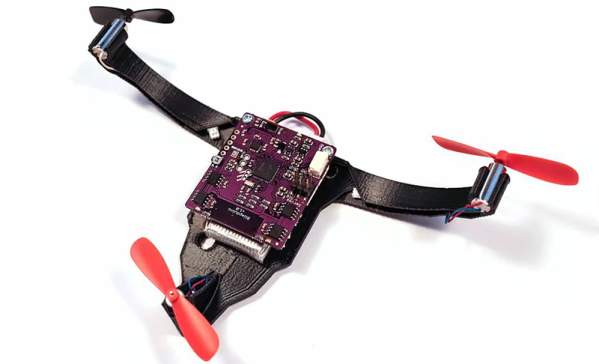
We always think that crossing the Atlantic in a blimp would be very serene — at least once they put heaters on board. The Hindenburg, the R-101, and the Shenandoah put an end to the age of the airship, at least for commercial passenger travel. But you can still fly your own with a helium balloon and some electronics. One notable project — the Blimpduino — has evolved into the Blimpduino 2. The open-source software is on GitHub. We couldn’t find the PCB layout, so we aren’t sure if it is or will be open. The 3D printed parts are available, though.

The PCB is the heart of the matter, a four-layer board with an ARM M0 processor, an ESP8266 WiFi module, four motor outputs, two servo motor outputs, a 9-axis inertial navigation system, an altimeter, and a forward object detection system. There’s also a battery charger onboard.

Continue reading “Blimpduino Hits Version 2”

The Electronics Of Cold War Nightmares

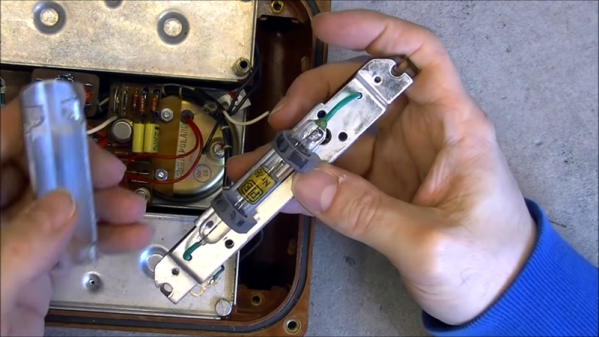
It is a good bet that if you look around you, you’ll be able to find at least one smoke detector in sight. If not, there’s probably one not too far away. Why not? Fires happen and you’d like to know about a fire even if you are sleeping or alert others if you are away. During the cold war, there were other things that people didn’t want to sleep through. [Msylvain59] tears down two examples: a Soviet GSP-11 nerve agent detector and a Polish RS-70 radiation alarm. You can see both videos, below.

In all fairness, the GSP-11 is clearly not meant for consumer use. It actually uses a test strip that changes colors and monitors the color change. Presumably, the people operating it were wearing breathing gear because the machine could take quite a while to provide a positive output. Inside reminded us of a film processing machine, which isn’t too far off.

The radiation monitor looks more like a miniature version of an old floor-standing radio. The case design, the thick-traced, single-sided, hand-drawn printed wiring board, and the –by today’s standards — huge parts within all contribute to making this look like a piece of radio gear from the 1970s or even earlier.

Continue reading “The Electronics Of Cold War Nightmares”

Video Details Construction Of Transparent Wood

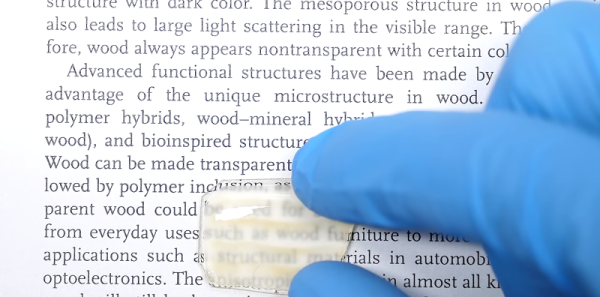
We’ve talked about transparent wood before. However, the process can be difficult to get just right. [NileRed] recently posted a video with very detailed instructions on how he’s doing it. Aside from the dangerous way he uses a table saw — something he realized after he watched the video — it is some great information.

This isn’t some hand-waving explanation. For nearly 36 minutes, you get an actual demonstration of the steps along with some explanations about why it works and why certain steps are done in a particular way.

Continue reading “Video Details Construction Of Transparent Wood”

FCC Gets Complaint: Proposed Ham Radio Rules Hurt National Security

On November 10th, [Theodore Rappaport] sent the FCC an ex parte filing regarding a proposed rule change that would remove the limit on baud rate of high frequency (HF) digital transmissions. According to [Rappaport] there are already encoded messages that can’t be read on the ham radio airwaves and this would make the problem worse.

[Rappaport] is a professor at NYU and the founding director of NYU Wireless. His concern seems to relate mostly to SCS who have some proprietary schemes for compressing PACTOR as part of Winlink — used in some cases to send e-mail from onboard ships.

Continue reading “FCC Gets Complaint: Proposed Ham Radio Rules Hurt National Security”