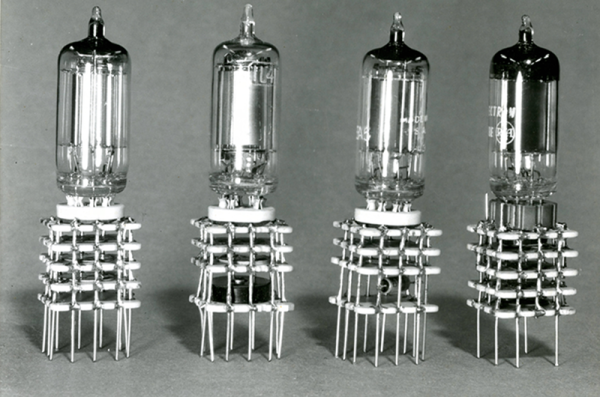
Retrotechtacular: Tinkertoy And Cordwood In The Pre-IC Era

It is widely accepted that Gutenberg’s printing press revolutionized thought in Europe and transformed the Western world. Prior to the printing press, books were rare and expensive and not generally accessible. Printing made all types of written material inexpensive and plentiful. You may not think about it, but printing–or, at least, printing-like processes–revolutionized electronics just as much.

In particular, the way electronics are built and the components we use have changed a lot since the early 1900s when the vacuum tube made amplification possible. Of course, the components themselves are different. Outside of some specialty and enthusiast items, we don’t use many tubes anymore. But even more dramatic has been how we build and package devices. Just like books, the key to lowering cost and raising availability is mass production. But mass producing electronic devices wasn’t always as easy as it is today.

Continue reading “Retrotechtacular: Tinkertoy And Cordwood In The Pre-IC Era”

Pi Zero W Impersonates IPhone, Becomes Terminal

There’s something to be said for economies of scale and few things sell more than cell phones. Maybe that’s why [NODE] took inspiration from an iPhone slide out keyboard case to create this Pi Zero W-based portable terminal. This is actually his third iteration, and in the video below he explains why he has built the new version.

By housing the custom bits in a 3D-printed frame that is size compatible with the iPhone, [NODE] manages to leverage the slick slide out keyboard cases available for the phone. The iPhone in question is an older iPhone 5, so the cases are inexpensive, compared to the latest generation. On the other hand, the iPhone 5 is recent enough that it shouldn’t be hard to find a compatible case.

The circuitry itself is pretty straightforward: a battery, a charge controller, and an LCD display. The only complaint we could see was the lack of a control key on the keyboard.

Continue reading “Pi Zero W Impersonates IPhone, Becomes Terminal”

Shut The Backdoor! More IoT Cybersecurity Problems

We all know that what we mean by hacker around here and what the world at large thinks of as a hacker are often two different things. But as our systems get more and more connected to each other and the public Internet, you can’t afford to ignore the other hackers — the black-hats and the criminals. Even if you think your data isn’t valuable, sometimes your computing resources are, as evidenced by the recent attack launched from unprotected cameras connected to the Internet.

As [Elliot Williams] reported earlier, Trustwave (a cybersecurity company) recently announced they had found a backdoor in some Chinese voice over IP gateways. Apparently, they left themselves an undocumented root password on the device and — to make things worse — they use a proprietary challenge/response system for passwords that is insufficiently secure. Our point isn’t really about this particular device, but if you are interested in the details of the algorithm, there is a tool on GitHub, created by [JacobMisirian] using the Trustwave data. Our interest is in the practice of leaving intentional backdoors in products. A backdoor like this — once discovered — could be used by anyone else, not just the company that put it there.

Continue reading “Shut The Backdoor! More IoT Cybersecurity Problems”

Configure ESP8266 Wifi With WiFiManager

There’s no doubt that the ESP8266 has made creating little WiFi widgets pretty easy. However, a lot of projects hard code the access point details into the device. There’s a better way to do it: use the WiFiManager library. [Witnessmenow] has a good tutorial and a two-minute video (which you can see below).

Hard coding is fine if you are just tinkering around. However, if you are going to send your device away (or even take it with you somewhere) you probably don’t want to reprogram it every time you change access points. This problem is even worse if you plan on a commercial product. WiFiManager does what a lot of commercial devices do. It initially looks like an access point. You can connect to it using a phone or other WiFi device. Then you can configure it to join your network by setting the network ID, password, etc.

Continue reading “Configure ESP8266 Wifi With WiFiManager”

Retrotechtacular: How Old Is The Remote?

A few weeks ago we covered a (probably) bogus post about controlling a TV with the IR from a flame. That got us thinking about what the real origin of the remote control was. We knew a story about the 38 kHz frequency commonly used to modulate the IR. We’ve heard that it was from sonar crystals used in earlier sonic versions of remotes. Was that true? Or just an urban myth? We set out to find out.

Surprise! Remotes are Old!

If you are a younger reader, you might assume TVs have always had remotes. But for many of us, remotes seem like a new invention. If you grew up in the middle part of the last century it is a good bet you were your dad’s idea of a remote control: “Get up and turn the channel!” Turns out remotes have been around for a long time, though. They just weren’t common for a long time.

If you really want to stretch back, [Oliver Lodge] used a radio to move a beam of light in 1894. In 1896, [Marconi] and some others made a bell ring by remote control. [Tesla] famously showed a radio-controlled boat in 1898. But none of these were really remote controls like we think of for a television.

mysteryOf course, TV wouldn’t be around for a while, but by the 1930’s many radio manufacturers had wired remotes for radios. People didn’t like the wires, so Philco introduced the Mystery Control in 1939. This used digital pulse coding and a radio transmitter. That’s a fancy way of saying it had a dial like an old telephone. As far as we can tell, this was the first wireless remote for a piece of consumer equipment.

Continue reading “Retrotechtacular: How Old Is The Remote?”

Mechanical Music Maker Throws Stones

When we think of a xylophone we envision hitting the keys from above with mallets. But this robot instrument launches stones from below to play a tune. [Niel] calls the device a Pinger and it is part of a Rock Band — all instruments using rocks.

Although the original post has “xylophone” in it, this musical instrument is technically a glockenspiel because it uses metal keys instead of wood. Either way, it’s a work of art; the instrument’s creator ([Neil Mendoza]) was participating in Adobe’s Autodesk’s Pier 9 artist-in-residence program when he built it.

The keys were cut using a water jet, a process not easily in reach for most of us. But you could make do with a different process in a pinch. On the face of it, fabrication seems simple, but there’s software to calculate the right size for the keys depending on the material. The cuts need to be precise to yield an in-tune instrument.

The circular part is laser-cut acrylic, acting as a base for each key. Below the plate there is a cylinder positioned in the middle of the bar which keeps the stone from getting away. When the solenoid fires, the stone flies up and strikes the key, creating a ringing tone but also adding to the body of sound with a rattle when it falls back down to the base. The entire thing is driven by MIDI, so it can play a lot of tunes besides the biographical “Here Comes the Sun” (since, apparently, the pebbles are out in the sun). Check that out in the video below.

This couldn’t help but remind us of another solenoid-driven xylophone — whose keys were machined out of aluminum stock. There’s also the multixylophoniomnibus.

Continue reading “Mechanical Music Maker Throws Stones”

Google Machine Learning Made Simple(r)

If you’ve looked at machine learning, you may have noticed that a lot of the examples are interesting but hard to follow. That’s why [Jostmey] created Naked Tensor, a bare-minimum example of using TensorFlow. The example is simple, just doing some straight line fits on some data points. One example shows how it is done in series, one in parallel, and another for an 8-million point dataset. All the code is in Python.

If you haven’t run into it yet, TensorFlow is an open source library from Google. To quote from its website:

TensorFlow is an open source software library for numerical computation using data flow graphs. Nodes in the graph represent mathematical operations, while the graph edges represent the multidimensional data arrays (tensors) communicated between them. The flexible architecture allows you to deploy computation to one or more CPUs or GPUs in a desktop, server, or mobile device with a single API. TensorFlow was originally developed by researchers and engineers working on the Google Brain Team within Google’s Machine Intelligence research organization for the purposes of conducting machine learning and deep neural networks research, but the system is general enough to be applicable in a wide variety of other domains as well.

Continue reading “Google Machine Learning Made Simple(r)”