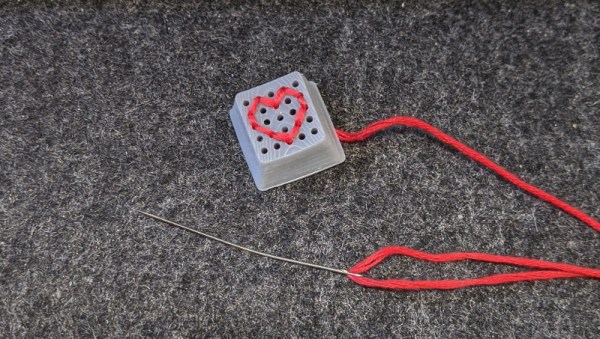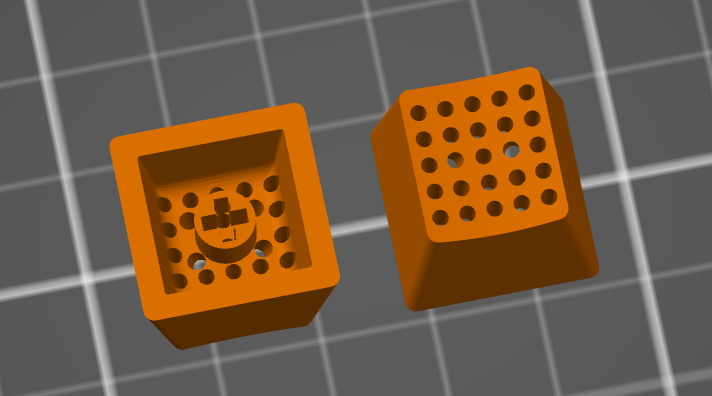
Keycap Customizer Brings All Your Caps To The Board

With bright colors and often intricate designs, after the physical shape of a keyboard the most conspicuous elements are surely the keycaps. Historically dictated by the stem of the key switch it attaches to, keycaps come in a variety of sizes, colors, profiles, and designs. As they necessarily include small features with tight tolerances to fit the stem of their key switch, injection molding is the classic manufacturing technique for a keycap. But as hobbyist 3D printing matures and resin printers become more accessible, home keycap manufacturing is increasingly good option. Instead of designing each cap by hand, consider trying [rsheldiii]’s KeyV2 OpenSCAD script to create custom caps with ease.

To cover the basics, KeyV2 can generate full keycap sets with Cherry or Alps stems, in the SA, DSA, DCS profiles (and more!) for any typically sized keyboard. Generating a particular cap of arbitrary profile, position, and size is just a short chain of function calls away. But standard keycap sets aren’t the highlight of this toolset.

If you’re not an OpenSCAD aficionado yet, visit [Brian Benchoffs] great getting-started guide or our other coverage to get a feel for what the tool can do. Part of OpenSCAD’s attraction is that it is the the paragon of parametric modeling. It’s declarative part files ensure that no parameter goes undefined, which is a perfect fit for KeyV2.

The root file upon which all caps are based on has about 150 keycap parameters which can be tweaked, and that’s before more elaborate customization. Making simple “artisan” caps is a snap, as the magic of OpenSCAD means the user can perform any Boolean operations they need on top of the fully parameterized keycap. Combining an arbitrary model with a keycap is one union() away. See the README for examples.

For the prospective user of KeyV2 worried about complexity; don’t be, the documentation is a treat. Basic use to generate standard keycaps is simple, and there are plenty of commented source files and examples to make more complex usage easy. Thinking about a new keyboard? Check out our recent spike in clacky coverage.

Hammer Seeks Nail

People sometimes say “when you have a hammer, everything looks like a nail” as if that were a bad thing. Hitting up Wikipedia, they’re calling it the Law of the Instrument or Maslow’s Hammer and calling it a cognitive bias. But I like hammers…

I’m working on a new tool, a four-axis hot-wire foam cutter based roughly on this design, but built out of stuff in my basement so far. I want it primarily to turn out wings for RC airplanes so that I can play around with airfoils and construction methods and so on. But halfway through building this new “hammer”, I’m already getting funny ideas of other projects that could be built with it. Classic nail-seeking behavior.

And some of these thoughts are making me reconsider the design of my hammer. I originally wanted to build it low, because it’s not likely that I’ll ever want to cut wing sections taller than 50 mm or so. But as soon as cutting out giant letters to decorate my son’s room, or maybe parts for a boat hull enter my mind, that means a significantly taller cutter, with ensuing complications.

So here I am suffering simultaneously from Maslow’s Hammer and scope creep, but I’m not sad about either of these “ills”. Playing with a couple manual prototypes for the CNC hot-wire cutter has expanded my design vocabulary; I’ve thought of a couple cool projects that I simply wouldn’t have had the mental map for before. Having tools expands the possible ways you can build, cognitive bias or not.

One person’s scope creep is another’s “fully realizing the potential of a project”. I’m pretty sure that I’ll build a version two of this machine anyway, so maybe it’s not a big deal if the first draft were height-limited, but the process of thinking through the height problem has actually lead me to a better design even for the short cutter. (Tension provided by an external bow instead of born by the vertical CNC towers. I’ll write the project up when I’m done. But that’s not the point.)

Maybe instead of lamenting Maslow’s cognitive bias, we should be celebrating the other side of the same coin: that nails are tremendously useful, and that the simple fact of having a hammer can lead you to fully appreciate them, and in turn expand what you’re capable of. As for scope creep? As long as I get the project done over my vacation next week, all’s well, right?

Wireless Sax Mic Done On The Cheap

Sometimes, economies of scale don’t work in our favor. While guitarists and singers will find themselves well catered to by the accessories market, players of fancier, less popular instruments will often have to dig deeper in their pockets to get what they need. [Henry Goh] found himself in need of a saxophone mic. However, off-the-shelf solutions were a touch expensive, and thus he decided he could probably whip something up himself.  (Video, embedded below.)

Parts of a saxophone, for the uninitiated. The microphone should be placed a good distance from the center of the bell to pick up the best sound.

It’s a simple solution, one that we could imagine any maker quickly whipping up with junkbox parts. Not one to skimp on quality, [Henry] picked a Rode Wireless Go paired with a lavalier mic for a quality wireless microphone solution. The real problem would be mounting the device, intended to be worn on a shirt, to the right position in front of the saxophone’s bell.

To achieve this, most dedicated sax mics used a bendable arm to allow the position to be readily changed. Instead, [Henry] whipped up some mounts on the 3D printer that would allow him to mount the Rode wireless mic hardware on an bendy Energizer LED torch. The torch even comes with a clamp allowing it to be easily attached to the instrument, making fitment a cinch.

[Henry] estimates the solution saved him up to $800 SGD. The final result is cost effective, and gives quality easily good enough for amateur and community performances. As a bonus, the hack is non-destructive, meaning you can repurpose the lavalier mic for other work as needed.

We love a good hack on the cheap, and it’s something we see all the time in the music scene. This guitar build is a great example of the form.

Continue reading “Wireless Sax Mic Done On The Cheap”

Four Steppers Make A Four-Voice MIDI Instrument

Any owner of a budget 3D printer will tell you that they can be pretty noisy devices, due to their combinations of stepper motors and drives chosen for cost rather than quiet. But what if the noise were an asset, could the annoying stepper sound be used as a musical instrument? It’s a question [David Scholten] has answered with the Stepper Synth, a device that takes an Arduino Uno and four stepper motors to create a four-voice MIDI synthesiser.

Hardware-wise it’s as simple as you’d expect, a box with four stepper motors each with a red 3D-printed flag on its shaft to show rotation. Underneath there is the Arduino, plus a robot control shield and a set of stepper driver boards. On the software side it uses MIDI-over-serial, so as a Windows user his instructions for the host are for that operating system only. The Arduino makes use of the Arduino MIDI library, and he shares tips on disabling the unused motors to stop overheating.

You can hear it in action in the video below the break, and we’re surprised to say it doesn’t sound too bad. There’s something almost reminiscent of a church organ in there somewhere, it would be interesting to refine it with an acoustic enclosure of some kind.

This isn’t the first such instrument we’ve brought you, for a particularly impressive example take a look at the Floppotron.

Continue reading “Four Steppers Make A Four-Voice MIDI Instrument”

Quick 3D-Printed Airfoils With These OpenSCAD Helpers

You know how it is. You’re working on a project that needs to move air or water, or move through air or water, but your 3D design chops and/or your aerodynamics knowledge hold you back from doing the right thing? If you use OpenSCAD, you have no excuse for creating unnecessary turbulence: just click on your favorite foil and paste it right in. [Benjamin]’s web-based utility has scraped the fantastic UIUC airfoil database and does the hard work for you.

While he originally wrote the utility to make the blades for a blower for a foundry, he’s also got plans to try out some 3D printed wind turbines, and naturally has a nice collection of turbine airfoils as well.

If your needs aren’t very fancy, and you just want something with less drag, you might also consider [ErroneousBosch]’s very simple airfoil generator, also for OpenSCAD. Making a NACA-profile wing that’s 120 mm wide and 250 mm long is as simple as airfoil_simple_wing([120, 0030], wing_length=250);

If you have more elaborate needs, or want to design the foil yourself, you can always plot out the points, convert it to a DXF and extrude. Indeed, this is what we’d do if we weren’t modelling in OpenSCAD anyway. But who wants to do all that manual labor?

Between open-source simulators, modelling tools, and 3D printable parts, there’s no excuse for sub-par aerodynamics these days. If you’re going to make a wind turbine, do it right! (And sound off on your favorite aerodynamics design tools in the comments. We’re in the market.)

Single Piece 3D-Printed PCB Vise

Making full use of the capabilities and advantages of 3D printing requires a very different way of thinking compared to more traditional manufacturing methods. Often we see designs that do not really take these advantages into account, so we’re always on the lookout for interesting designs that embrace the nature of 3D-printed parts in interesting ways. [joopjoop]’s spring-loaded PCB vise is one such ingenious design that incorporates the spring action into the print itself.

This vise is designed to be printed as a single piece, with very little post-processing required if your printer is dialed in. There is a small gap between the base plate and the springs and clamping surfaces that need to be separated with a painters knife or putty knife. Two “handles” have contours for your fingers to operate the clamping surfaces. It opens quickly for inserting your latest custom PCB.

PLA can be surprisingly flexible if the right geometry is used, and these springs are an excellent example of this. In the video below [Chuck Hellebuyck] does a test and review of the design, and it looks like it works well for hand soldering (though it probably won’t hold up well with a hot air station). Last month our own [Tom Nardi] recently reviewed a similar concept that used spiral springs designed into the printed part. While these both get the job done, [Tom’s] overall verdict is that a design like this rubber-band actuated PCB vise is a better long-term option.

It takes some creativity to get right, but printing complete assemblies as a single part, is a very useful feature of 3D printing. Just be careful of trying to make it the solution for every mechanical problem.

Tech At Home Winners Who Made The Best Of Their Quarantine

Back in April we challenged hackers to make the best of a tough situation by spending their time in isolation building with what they had laying around the shop. The pandemic might have forced us to stay in our homes and brought global shipping to a near standstill, but judging by the nearly 300 projects that were ultimately entered into the Making Tech At Home Contest, it certainly didn’t stifle the creativity of the incredible Hackaday community.

While it’s never easy selecting the winners, we think you’ll agree that the Inverse Thermal Camera is really something special. Combining a surplus thermal printer, STM32F103 Blue Pill, and OV7670 camera module inside an enclosure made from scraps of copper clad PCB, the gadget prints out the captured images on a roll of receipt paper like some kind of post-apocalyptic lo-fi Polaroid.

The HexMatrix Clock also exemplified the theme of working with what you have, as the electronics were nothing more exotic than a string of WS2811 LEDs and either an Arduino or ESP8266 to drive them. With the LEDs mounted into a 3D printed frame and diffuser, this unique display has an almost alien beauty about it. If you like that concept and have a few more RGB LEDs laying around, then you’ll love the Hive Lamp which took a very similar idea and stretched it out into the third dimension to create a standing technicolor light source that wouldn’t be out of place on a starship.

Each of these three top projects will receive a collection of parts and tools courtesy of Digi-Key valued at $500.

Runners Up

Out friends at Digi-Key were also kind enough to provide smaller grab bags of electronic goodies to the creators of the following 30 projects to help them keep hacking in these trying times:

The Making Tech At Home Contest might be over, but unfortunately, it looks like COVID-19 will be hanging around for a bit. Hopefully some of these incredible projects will inspire you to make the most out of your longer than expected downtime.