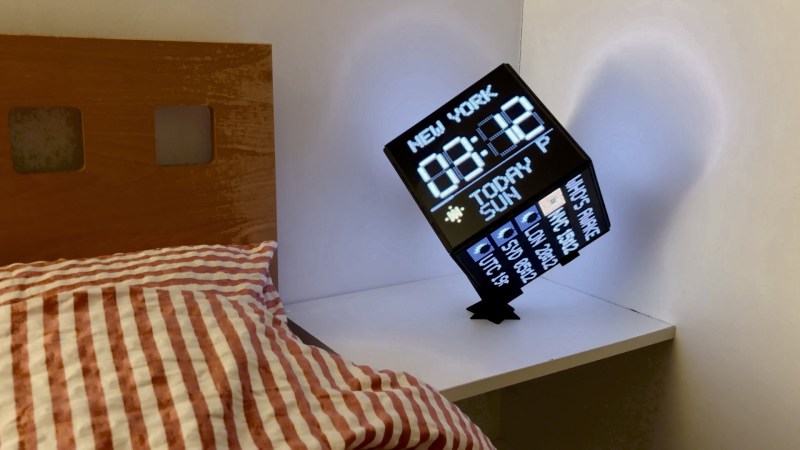
A Big Ol’ LED Matrix Cube

You could have a featureless cube in your house, but that would be boring, and we wouldn’t write a Hackaday article about it. Alternatively, you could whip up a cube that is positively covered in LEDs that play all sorts of animations, like [Ross Harvey] did.

The cube that [Ross] built has six faces covered in HUB75 LED panels, each consisting of 64 x 64 LEDs in a 2.5 mm pitch measuring 160 mm square. That’s a total of 24,576 individually addressable LEDs, if you’re counting along at home. Each face has a cell-cast acrylic diffuser sheet, which gives the LEDs a much smoother, more pleasant appearance when lit. Inside the cube lives a Raspberry Pi Compute Module 4 paired with a custom HUB75 driver board, as well as a power/boost board that draws from a 2-cell lithium-ion pack. There are also two speakers and a microphone hooked up, which provides for both audio feedback and audio reactivity. The cube can display all kinds of things, from various games to music visualizers and even a rather tasteful world clock setup.

You can build the cube yourself if you really want six sides of glowing glory on your desk. However, if you’re strapped for time, [Ross] later developed an off-the-shelf version for all your cubey needs. If you prefer more complicated solids, it’s hard to go past [Greg Davill’s] classic glowing D20 build. Video after the break.
Continue reading “A Big Ol’ LED Matrix Cube” →

Digital Badge Gets Reverse Engineered

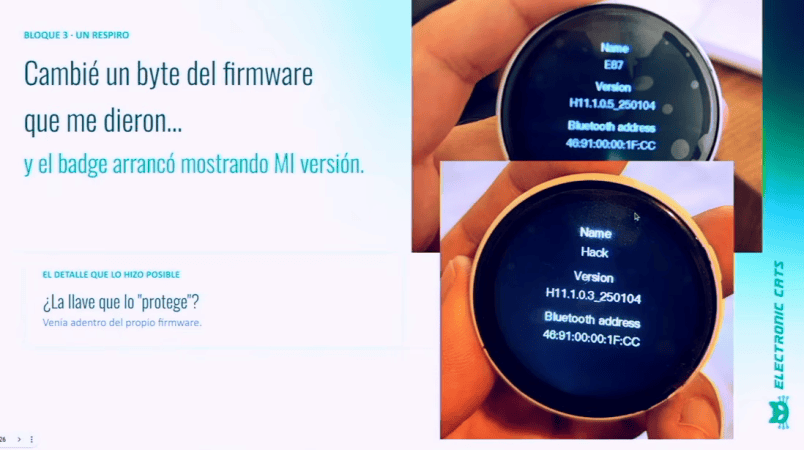
The JieLi AC707N is a cheap $10 digital badge that actually packs in a fair bit of interesting hardware. [Sabas] reverse-engineered the product and figured out how to flash custom firmware onto sealed OEM-fresh units.

The AC707N badge, of the BR35 family, comes well equipped out of the box. It has a 360×360 pixel round display, driven over QSPI. It comes equipped with a AXS5106L capacitive touch controller for interacting with the screen. There are also two buttons, 4MB of flash, and Bluetooth Low Energy capability on board. Plenty to play with, right there!

[Sabas] gave a talk about how the device was first physically torn down, before the APK was decompiled in Ghidra. From there, it was possible to download the firmware without authentication and then develop an open SDK for working with the cheap device. There’s a custom firmware available on Github that was developed a a result of these efforts, and it can do all kinds of neat things. You can use it as a Bluetooth Mouse, or a Bluetooth scanner, for example. Or, if so desired, you could build on this work and develop your own firmware for the device to suit your own use cases.

We see stuff like this repurposed all the time. The GeekMagic SmallTV is a great example of a cheap device given greater functionality through custom firmware. Video after the break.

Continue reading “Digital Badge Gets Reverse Engineered” →

Monitors That Throttle Downloads

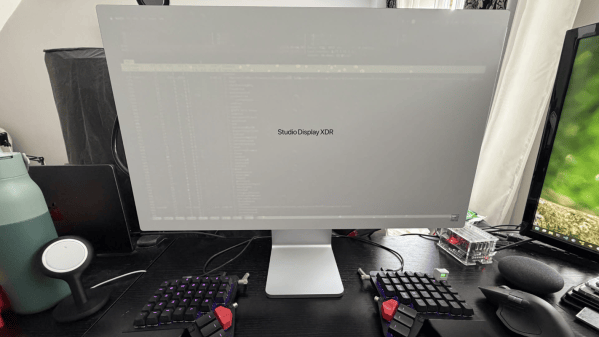
Displays in general are a lot more complicated now than they used to be, but even still, you’d be forgiven for not expecting a monitor to slow down your internet connection. Yet that’s exactly what [Oscar] ran into recently, and fortunately for us, he was good enough to document how he figured out what was going on.

This bug might not have been discovered at all except for the fact that [Oscar] enjoys a 2.5 Gbps symmetric internet connection. When running a speed test he found he was getting the advertised speed for upload, but download was somehow limited to 600 Mbps. This was only with the USB-C to 2.5G Ethernet adapter he uses plugged into the monitor, which is acting as a hub. When it was plugged directly into the computer there were no dropped packets and he was able to get full speed. But the curious thing was the operating system was not noticing the dropped packets, so something was going on before the monitor was getting involved.

A driver update brought the speed to around 1.1 Gbps which was an improvement, but there was still a problem. Then [Oscar] tried using Ethernet flow control, which asks the sender of the packets to pause briefly if the receiver is dropping frames, rather than losing those frames completely. This also improved things, but still not completely. And it had the feeling of a workaround as well. What he’s settled on having been the problem in a nutshell is that the buffer on the 2.5 Gbps card would fill before the data would transfer through the hub to the computer, and if it overflows it will drop packets.

The solution was to upgrade to a 5 Gbps card with a larger buffer, and after that there were no more dropped frames. We might consider upgrading to fiber for faster speeds though.

How Apple’s HomeView Actively Resists Repairs

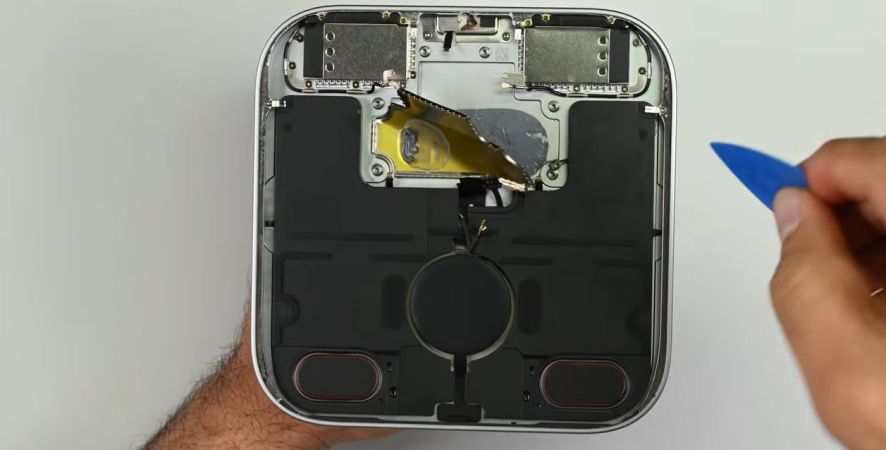
Over the past years there have been hopeful noises about Apple devices becoming easier to service and repair, but as [iFixit] found with their teardown of the new HomeView devices, such optimism may be premature. In this teardown they found that extremely strong adhesive is used for the display, as well as to keep the speakers in place.

Even worse is that the mainboard’s back metal can is effectively glued in place with thermal compound, and the speaker connectors on the mainboard pretty much disintegrate if you try to unplug them, even after trying to scrape off the glue on them.

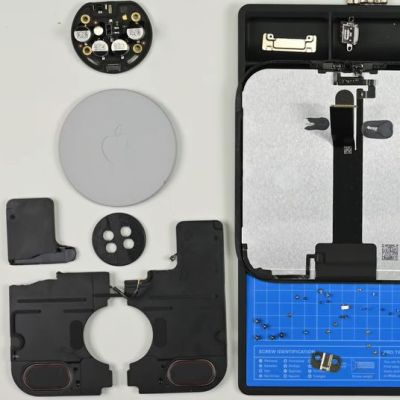
All of this leads to a pretty miserable teardown experience, with the display removal probably being the easiest part. Even plentiful IPA application and careful prying cannot save one of the big speaker modules, with both their connectors mauled as well.

The rear metal can of the mainboard is left in place, probably requiring liberal dousing in IPA or stronger solvents to loosen up first, as well as borderline inaccessible screws, and the subwoofer in the base is basically impossible to plug back into place after disassembly. Looking at the wall-mounted version of the HomeView, things do not get much better, but it omits the subwoofer and screw issues of the base version.

Overall this seems like the kind of device that’s somewhat repairable if you go in armed with all this knowledge that [iFixit] sacrificed a HomeView for, but it’s disappointing to see such a repair nightmare in 2026. Interestingly, this device is not available in the EU, purportedly due to the privacy nightmare that is the Siri AI feature, but it may run afoul of some right-to-repair regulations too, or at the very least get assigned a very low score.

Continue reading “How Apple’s HomeView Actively Resists Repairs” →

Mesh2Cad Automates Re-Modelling

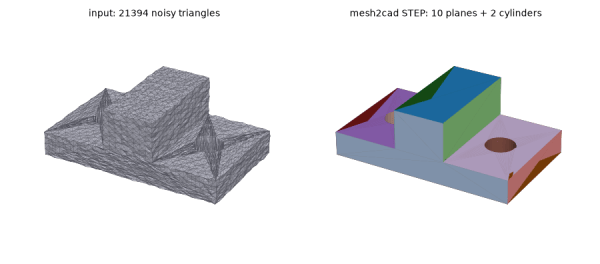
It’s happened to all of us, we find an STL that would just about solve our problems, but the mesh isn’t quite right. Sometimes mesh-editing is good enough, other times you need to rebuild the mesh in a proper CAD environment to get what you need. In that latter case, [Emir Mrkaljevic]’s Mesh2Cad program could save you a whole lot of work, because it does exactly what it says on the tin: turns a mesh to a CAD file.

Even better, [Emir] doesn’t pick the CAD format for you. Sure, it does STEP, but you can also go straight to FreeCAD, CadQuerry or OpenSCAD with these handy scripts. Well, technically the FreeCAD version generates a macro to make the object rather than a .FCSTD, but that’s still pretty handy. Scripts is the right word for mesh2cad, because the whole thing is python and just a pip install mesh2cad away from living on your machine. Of course you don’t need to use pip since the whole thing is on GitHub and available for your eyeballs to audit. Speaking of audit, the scripts apparently check their own work and only give you CAD if they can approximate the mesh within tolerance.

Now there are limits here, if you think it sounds too good to be true. You’re limited to things that can be made of the sort of primitive manipulation OpenSCAD usually deals in — no organic shapes, free-flowing curves, or the like. If it’s a box or a bracket with holes, fillets and chamfers, though, this tool might save you a couple minutes recreating it.

If you prefer to do it yourself or have one of those annoyingly-organic meshes this tool won’t touch, we have a guide for what to do when an STL needs some tweaking.

Sega Dreamcast Plays Nintendo 64 Cartridges

In many ways, the Sega Dreamcast was the most forward-thinking console ever produced. It included a built-in Internet connection in a time when the Internet was just becoming widely accessible, VGA output when most people connected their consoles to their televisions with composite video or RF adapters, and even supported a custom version of Windows. Its advanced features were partially a cause of its commercial failure, though, although the system is still beloved by a niche community today. Partially because it is a great platform for modding in bizarre and novels ways like this build which adds Nintendo 64 cartridge compatibility.

The controllers were unique and fairly advanced as well. They used a proprietary serial interface called Maple which is a protocol that could handle data transmission at a rate of around 2 megabits per second, which is not too shabby for technology from the late 90s, let alone for the controller on a gaming console. Using that capability to read data from a Nintendo 64 cartridge ought to be fairly straightforward then. To get the peripheral up and running, [Throaty Mumbo] took a cartridge port from a N64 and wired it to an adapter which lets the Dreamcast read the data on the cartridge through the controller port. There’s an N64 emulator available for Dreamcast, although the system is not quite fast enough for this to make games playable. The way around this was to use assets and save data from the cartridge but run games that were recompiled for the Dreamcast instead.

[Throaty Mumbo] finishes out the build with a custom PCB and case which turns it into a usable cartridge reader that easily slots into a controller port. Then, using the same premise, he built cartridge readers for other systems’ games like the SNES and Genesis, making the Dreamcast somewhat backwards-compatible. Although the Dreamcast was technically advanced it didn’t have a DVD capability, but [Throaty Mumbo] covered that in a previous build using a similar controller-based peripheral approach.

Continue reading “Sega Dreamcast Plays Nintendo 64 Cartridges” →

How Hough Transforms Enable Computers To See

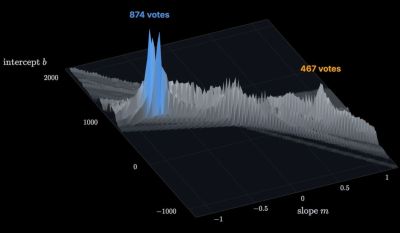
Although identifying what we can see with our eyes feels like the most natural thing in the world, the responsible cognitive processes running on our brain’s wetware are quite a marvel. Even when pushed beyond their evolutionary design by e.g. driving a car at high speeds does our vision system mostly manage to keep up. Emulating these cognitive processes with artificial cognition (AC) systems like computer vision required the development of feature extraction algorithms, such as the Hough Transform that’s the topic of this video by [The Synthetic Mind].

The Hough Transform was developed originally by [Paul Hough] in the 1960s for machine analysis of patterns in bubble chamber photographs. From there the basic algorithm has evolved beyond merely detecting the straight lines of particles zipping through said bubble chambers.

Key however remains determining the points in a scene which potentially make up the lines, which requires edge detection. Yet unlike in basic examples, real-life use of these algorithms is made hard by how complex a real-life scene is. Naively checking all possible lines as in the original algorithm would take far too long, which led to the development of optimizations that take considerably less time and deal better with pixel noise.

Of course, after finding all potential lines and borders of objects in a scene the next step for a computer vision is to identify what has been spotted, what it means for the current task and determine an appropriate action. Here getting additional scene information other sensors like radar or Lidar can be incredibly helpful, especially when you’re the system in control of something like a car.

Examples like these definitely promote an appreciation of how hard it is to create AC algorithms that can emulate what we animals can seem to do almost effortlessly. Even before considering the intelligence subset of cognition, one cannot help but marvel at the sheer effort it takes for us humans to not constantly bump into things.

Continue reading “How Hough Transforms Enable Computers To See” →