For some, the idea of several hours of painting and designing intricate models with minute details and features sounds like a delightful afternoon spent. Some of us would much rather just have it come already painted with motors so that it can move. [Cory Collins] sought to combine these two hobbies by building a highly detailed motorized tank dubbed Tankbot 2.3. (Video, embedded below.)
It’s based on a simple hexapod kit ordered online that includes a built-in Arduino compatible board (it’s based on the Arduino 2560 Mega). The legs were redesigned to match the aesthetic that [Cory] was going for. The redesign allows for an extra pivot in the leg mechanism. The turret section was designed and built on top of the base with support for a servo to turn it (though the firmware isn’t quite there yet). After all the parts were 3d printed, the laborious process of painting began. With some delicate airbrushing and some quick stencils cut for the decals, it was complete.
We are amazed by the types of kits and parts that you can find online and the fact that they’re usually inexpensive to boot. We’ve come a long way since 2013 when we covered a much simpler Arduino based tank.
Code obfuscation has been around for a long time. The obfuscated C contest first ran way back in 1984, but there are examples of natural language obfuscation from way earlier in history. Namely Cockney rhyming slang, like saying “Lady from Bristol” instead of “pistol” or “lump of lead” instead of “head”. It’s speculated that Cockney was originally used to allow the criminal class to have conversations without tipping off police.
Code obfuscation in malware serves a similar purpose — hiding from security devices and applications. There are known code snippets and blacklisted IP addresses that anti-malware software scans for. If that known bad code can be successfully obfuscated, it can avoid detection. This is a bit of a constant game of cat-and-mouse, as the deobfuscation code itself eventually makes the blacklist. This leads to new obfuscation techniques, sometimes quite off the wall. Well this week, I found a humdinger of an oddball approach. Morse Code.
Yep, dots and dashes. The whole attack goes like this. You receive an email, claiming to be an invoice. It’s a .xlsx.hTML file. If you don’t notice the odd file extension, and actually let it open, you’re treated to a web page. The source of that page is a very minimal JS script that consists of a morse code decoder, and a payload encoded in Morse. In this case, the payload is simply a pair of external scripts that ask for an Office 365 login. The novel aspect of this is definitely the Morse Code. Yes, our own [Danie] covered this earlier this week, but it was too good not to mention here. Continue reading “This Week In Security: Morse Code Malware, Literal And Figurative Watering Holes, And More”→
When we first saw the Raspberry Pi Pico and its RP2040 microcontroller last month it was obvious that to be more than just yet another ARM chip it needed something special, and that appeared to be present in the form of its onboard PIO peripherals. We were eagerly awaiting how the community might use them to push the RP2040 capabilities beyond their advertised limits. Now [Luke Wren] provides us with an example, as he pushes an RP2040 to produce a DVI signal suitable to drive an HDMI monitor.
It shouldn’t be a surprise that the chip can be overclocked, however it’s impressive to find that it can reach the 252 MHz necessary to generate the DVI timing. With appropriate terminations it proved possible for the GPIO lines to mimic the differential signalling required by the spec. A PCB with the RP2040 and an HDMI socket was created, also providing a couple of PMOD connectors for expansion. All code and software can be found in a GitHub repository.
The result is a usable DVI output which though it is a relatively low resolution 640×480 pixels at 60 Hz is still a major advance over the usual composite video provided by microcontroller projects. With composite support on monitors becoming a legacy item it’s a welcome sight to see an accessible path to an HDMI or DVI output without using an FPGA.
If you’ve ever pushed the needle a bit on your Raspberry Pi, there’s a good chance you’ve been visited by the dreaded lightning bolt icon. When it pops up on the corner of the screen, it’s a warning that the input voltage is dipping into the danger zone. If you see this symbol often, the usual recommendation is to get a higher capacity power supply. But experienced Pi wranglers will know that the board can still be skittish.
Sick of seeing this icon during his MAME sessions, [Majenko] decided to attack the problem directly by taking a close look at the power supply circuitry of the Pi 4. While the official schematics for everyone’s favorite single-board computer are unfortunately incomplete, he was still able to identify a few components that struck him as a bit odd. While we wouldn’t necessarily recommend you rush out and make these same modifications to your own board, the early results are certainly promising.
The first potential culprit [Majenko] found was a 10 ohm resistor on the 5 V line. He figured this part alone would have a greater impact on the system voltage than a dodgy USB cable would. The components aren’t labeled on the Pi’s PCB, but with a little poking of the multimeter he was able to track down the 0402 component and replace it with a tiny piece of wire. He powered up the Pi and ran a few games to test the fix, and while he definitely got fewer low-voltage warnings, there was still the occasional brownout.
Do we really need this part?
Going back to the schematic, he noticed there was a 10 uF capacitor on the same line as the resistor. What if he bumped that up a bit? The USB specifications say that’s the maximum capacitive load for a downstream device, but he reasoned that’s really only a problem for people trying to power the Pi from their computer’s USB port.
Tacking a 470 uF electrolytic capacitor to the existing SMD part might look a little funny, but after the installation, [Majenko] reports there hasn’t been a single low-voltage warning. He wonders if the addition of the larger capacitor might make removing the resistor unnecessary, but since he doesn’t want to mess with a good thing, that determination will be left as an exercise for the reader.
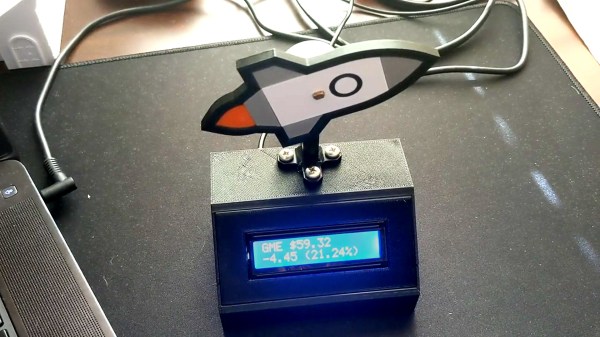
If you’ve been on the internet lately, you’ve been bombarded by stories about retail traders attempting to beat Wall Street at their own game by trying to force a short squeeze on GameStop stock. It’s inspired memes, songs, and all manner of political discourse, along with this cute stock-tracking device built by [dickdemodickmarcinko].
The device is based on the typical exhortation that a given stock or cryptocurrency is going “to the moon”, i.e. skyrocketing upwards to great heights. IT consists of an ESP8266 in a 3D printed housing, with a HD44780 alphanumeric LCD displaying the GME stock price and percentage change over time. The microcontroller also controls a stepper motor, which rotates a 3D-printed rocketship up or down relative to the stock’s price changes. If it’s pointing straight up, prospects are good for those holding the stock!
Whether or not the GME squeeze happens, the build is a fun way to learn about electronics and the stock market at the same time, and could be readily repurposed to track other markets in future. We’ve featured other price trackers before, like this traffic light keeping an eye on Bitcoin. Video after the break.
What’s just a bit thicker than a human hair and has ten times the capability of a human muscle? Polymer-coated carbon nanotube yarn. Researchers at the University of Texas at Dallas created this yarn using carbon nanotubes coated with a polymer and coiled with a diameter of about 140 microns.
Passing a voltage through the fiber causes the muscle yarn to expand or contract. Previous similar fibers have to do both actions. That is, they expand and then contract in a bipolar movement. The polymer coating allows for unipolar fibers, critical to using the fibers as artificial muscles.
We never insist that a hack be practical. [Tech Ingredients] is living proof as they modded a computer case to use a window air conditioner for overclocking a computer. They think they haven’t hit the ceiling yet, and got their AMD Ryzen 8-core processor up to 4.58 GHz.
An advantage of forcing air from an air conditioner is that the air forced into the system is quite dry and clean. The trick is to create a simple duct to attach to a 5,000 BTU air conditioner. It doesn’t actually interface with the CPU cooling block, instead it just forces cool air into the case and this tends to cool everything inside. Admittedly, it isn’t any worse than plunging your computer in liquid nitrogen, and we’ll admit that air conditioning units are made to keep large areas cold and work at high duty cycles. With the air conditioning running, they disconnected at least some of the stock fans. The temperatures stayed cool even at high speeds.