C64 Finally Gets The SRAM Corporate Wouldn’t Pay For

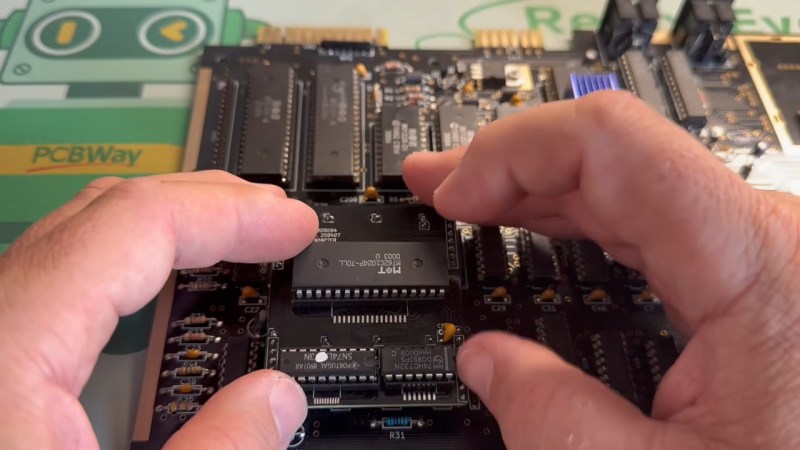
If you think RAM is expensive now, try putting yourselves in the shoes of a Commodore engineer, circa 1981. RAM was eye-wateringly expensive by modern standards, and Jack Tramiel wanted 64K of the stuff for the next computer — hence the name, Commodore 64 — but he didn’t want to pay for it. The solution was to use cheaper dynamic RAM over the more expensive static RAM that later took over the market in the kilobyte range. That’s a small problem for retrocomputer hobbyists, because while we’re complaining about the price of gigabytes of the stuff, you can’t buy new DRAM chips that fit a Commodore at any price. That’s why [Fabio Battaglia] aka [hkzlab] came up with an adapter board to fit easily-available SRAM chips onto aging C64s. 

Nothing lasts forever: not cold September rain, and not DRAM chips. Heat damage? Internal corrosion? There are probably multiple failure modes, but someday the old stock of chips will run out and the retrocomputer community is going to be ready for it. [Keith Olson] sent us a tip on a video by [The Retro Shack] about this very problem that serves as a good demo of what you get when you put SRAM into a C64. (Thanks [Keith]!) That said, the adapter board on offer is only good for C64s with the 250407 motherboard. If yours is different, you may have to modify the board. But hey, it’s open source, so go ye and do that thing. Let us know via the tips line if you do.

Continue reading “C64 Finally Gets The SRAM Corporate Wouldn’t Pay For”
IBM Home Director: Home Automation In 1996

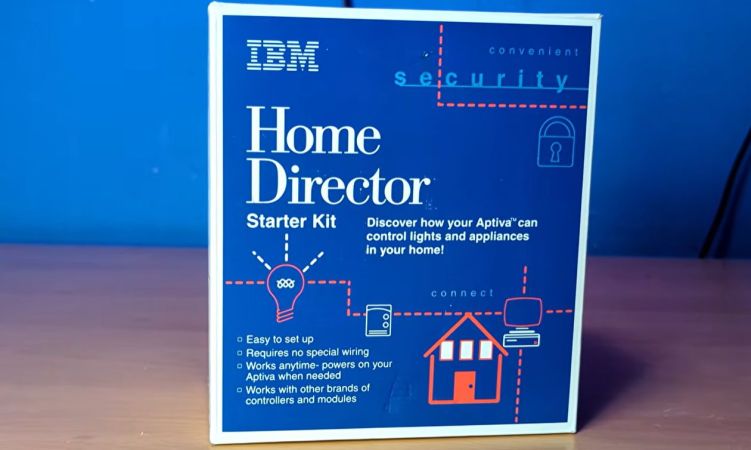
Back in the 1990s IBM had a pretty sizeable presence in the PC market, including its rather spiffy Aptiva series of PCs. Naturally their PCs had to feature heavily in another consumer-related thing that was popular in the 1990s, being smart home automation in the form of IBM Home Director. Recently [Ionic1k] took a look at this blast from the past, starting with one of the original IBM commercials.

At its core it used the same X10 protocol that similar solutions from RadioShack and others used, with many modules and packages you could get to use with it. You could also get a more bespoke installation performed at your home to move beyond mere X10, which some people are still finding when they’re buying a house.

Since this uses powerline communication, it required no wires to be run, just the requisite modules to be plugged into a power outlet, with the video demonstrating the basic setup and installation. The PC itself is plugged into the control module via the serial port, from which the Home Director control software can be used to create a configuration and control the state of connected modules.

Although X10 has the same issues as any kind of powerline communication, overall it seems like a very nice system, with a wide range of modules and absolutely easy to set up even for a casual Windows user.

Continue reading “IBM Home Director: Home Automation In 1996”

An Analog Synth For The Modern World

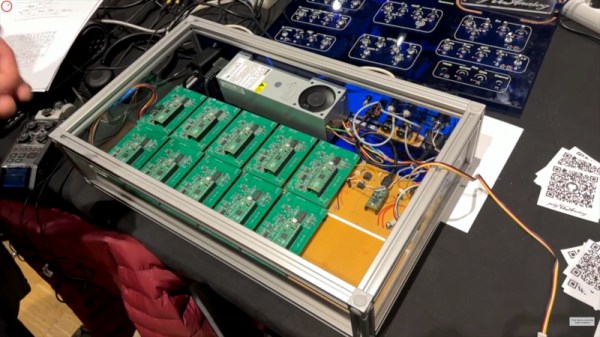
We cover so many projects here at Hackaday that lead the author down a rabbit hole of technological investigation that distracts us from the task of bringing them to you. Such a project is polyUAnalog, a very modern take on an analogue synthesizer. If you are imagining a synth of old with modules and patch cables, think again. The modern way to do this is it seems to use an individual synthesizer chip for each voice, resulting in a very versatile instrument indeed.

The integrated circuit in question is the AS3397, which when coupled on a PCB with a Raspberry Pi Pico makes for a self-contained single-voice analog synth. It’s controlled via I2C from a conductor board for which frustratingly the README doesn’t give a processor, but we think may be powered by another Pi Pico. This board does the job of taking MIDI and other controls, and farming them out tot he individual voices. The prototype has ten, but it can support many more.

It’s the work of a pair of researchers from the University of Angers in France, and we’re told it’s a side project from their work in the field of spectroscopy. There’s a video about it which we’ve placed below the break, and they’ve also written a paper about it.

Continue reading “An Analog Synth For The Modern World”

Pi 5 Becomes ALSA-Compatible TOSLINK Sound Card

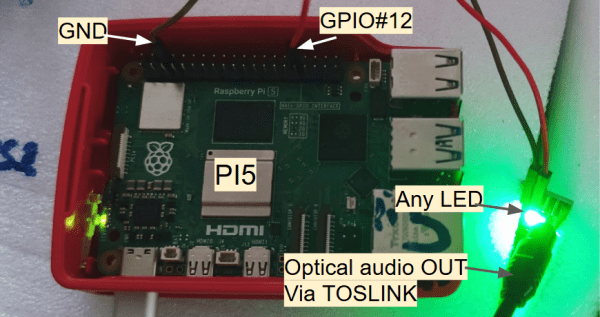
This is one of those hacks that makes you stop in your tracks and say, “wait, you can do that!?” — before realizing, oh, yes, of course you can do that. With enough computational power, you can do a lot of things, and the Raspberry Pi 5 is a far cry from the single-board computer’s humble beginnings. In this case, the “you can do that!?” is both that [Oliver] was able to get the digital audio TOSLINK working via an LED tied to one GPIO pin on the Pi, but also the larger project that is embedded in: using the Pi as a full featured 8-channel USB sound card called Camilla DSP.

For the first one: the old TOSLink standard is very simple, and all you need to do is blink an LED quickly enough. Considering the clock frequency of the Pi 5 is in the GHz range and the TOSLINK is the same 3.1 Mbit/s S/PDIF signal you could pull off your CD-ROM drive to your Sound Blaster, there’s no problem there. Except, wouldn’t the operating system get in the way? Well, not when you have enough clock cycles to throw at the problem. Using a Pi 5 doesn’t hurt: the RP1 I/O chip included on the board is keeping things smooth with its included PIO while Linux mucks about in the background. There’s a reason we called it the most important product Raspberry Pi ever made.

As for making a USB sound card from an SBC — well, we’re not sure why that got the “you can do that” reaction. The Raspberry Pi family had ‘gadget mode’ for over a decade now, allowing you to present the computer as a USB device, so why not a sound card? That’s a valid class of USB device.

Hacking Amazon Echo Show 8 3rd Gen Via UART And EMMC

Even with Amazon’s Echo Show devices running Linux in the form of the Android-derived FireOS, using them for non-Amazon approved purposes can be a chore at best. In the case of the Echo Show 8 even simple workarounds using ADB and the bootloader have been locked-down, requiring more drastic measures. Here [Vowed] over at the XDA forums shows off one such hack, involving directly tapping into the device’s eMMC.

Suffice it to say that this is not a hack for the faint of heart, with even the iFixit teardown guide for this device being rather daunting. Even after you get access to the mainboard, you still have to remove or cut open the metal can that covers the eMMC, so that you can unleash an eMMC programmer on it. It’s best to make sure to make a backup image of the original contents too, just in case you have to restore things.

With the shield out of the way you can solder fine wires to pads that connect to the eMMC to program it. You also have to solder wires to pads for the UART, though if you’re fancy you can also create a custom pogo pin adapter. With a serial connection established to the original firmware you can then enable features like ADB, and courtesy of the connected eMMC adapter it’s possible to directly alter system files to make rooting as easy as possible.

In addition to rooting the system you can also do a straight replacement of the eMMC contents, such as the demonstrated Debian installation. Even if not the most easy of mods, it’s good to see that it’s possible to repurpose these devices.

(Top image: Amazon Echo Show 8 3rd generation mainboard. Credit: iFixit, CC BY-NC-SA 3.0.)

Linux Fu: The Local Phonebook

I’ll admit it: I miss the simplicity of /etc/hosts. There was something elegant about it. You wanted laserprinter to mean 192.168.1.40, so you opened a text file and wrote:

192.168.1.40 laserprinter

Done. No cloud account, no discovery daemon, no dashboard with material-themed icons. Just a name and an address. The trouble, of course, is that /etc/hosts is only simple when you have one machine. The moment you have a desktop, a laptop, a Raspberry Pi, a NAS, a test box, and a phone or two, every little network change becomes a tiny distributed-database problem. Which copy of /etc/hosts is authoritative? Did you update the laptop? What about the machine you only boot once a month?

One Solution

Modern LANs solved this with mDNS, using Avahi on Linux. It resolves addresses that end in .local. Instead of asking a central DNS server “who is thing.local?”, a machine sends a multicast query on the local network: “who has thing.local?” The device that owns the name answers. This is why your Linux box named spock and usually be reached as spock.local on your LAN.

There are limits. mDNS is link-local; it is meant for the local LAN, not the whole Internet and shouldn’t route across subnets. Each device is supposed to publish its own name. That works fine when the device cooperates. But what about devices that do not publish mDNS? Or little embedded things that barely even have an IP address?

That is where I wanted the best of both worlds: keep a small authoritative /etc/hosts file on one Linux box, but publish selected entries onto the LAN using mDNS.

Continue reading “Linux Fu: The Local Phonebook”