Could Orion Ride Falcon Heavy To The Moon?

Things aren’t looking good for NASA’s Space Launch System (SLS). Occasionally referred to as the “Senate Launch System”, or even less graciously, the “Rocket to Nowhere”, the super heavy-lift booster has long been a bone of contention for those in the industry. Designed as an evolution of core Space Shuttle technology, the SLS promised to reuse existing infrastructure to deliver higher payload capacities and lower operating costs than its infamous winged predecessor. But in the face of increased competition from commercial launch providers and proposed budget cuts targeting future upgrades and expansions of the core booster, the significantly over budget and behind schedule program is in a very precarious position.

Which is not to say the SLS doesn’t look impressive, at least on paper. In its initial configuration it would easily take the title as the world’s most powerful rocket, capable of lifting nearly 105 tons into low Earth orbit (LEO), compared to 70 tons for SpaceX’s Falcon Heavy. It would still fall short of the mighty Saturn V’s 155 tons to LEO, but the proposed “Block 2” upgrades would increase SLS payload capability to within striking distance of the iconic Apollo-era booster at 145 tons. Since the retirement of the Space Shuttle in 2011, NASA has been adamant that the might of SLS was the only way the agency could accomplish bigger and more ambitious missions to the Moon, Mars, and beyond.

Or at least, they were. On March 13th, NASA Administrator Jim Bridenstine testified to Congress that in an effort to avoid further delays, the agency is exploring the possibility of sending their Orion spacecraft to the Moon with a commercial launcher. The statement came as a shock to many in the aerospace community, as it would seem to call into question the future of the entire SLS program. If commercial rockets can do the job of SLS, at least in some cases, why does the agency need it?

NASA is currently preparing a report which investigates what physical and logistical modifications would need to be made to missions originally slated to fly on SLS; a document which is sure to be scrutinized by SLS supporters and critics alike. Until the report is released, we can speculate about what this hypothetical flight to the Moon might look like.

Continue reading “Could Orion Ride Falcon Heavy To The Moon?”

How The Gigatron TTL Microcomputer Works

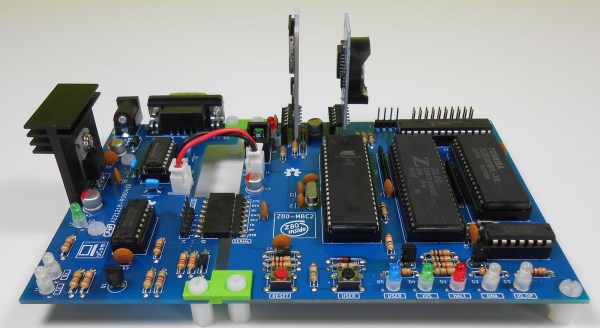
About a year ago when Hackaday and Tindie were at Maker Faire UK in Newcastle, we were shown an interesting retrocomputer by a member of York Hackspace. The Gigatron is a fully functional home computer of the type you might have owned in the early 1980s, but its special trick is that it does not contain a microprocessor. Instead of a 6502, Z80, or other integrated CPU it only has simple TTL chips, it doesn’t even contain the 74181 ALU-in-a-chip. You might thus expect it to have a PCB the size of a football pitch studded with countless chips, but it only occupies a modest footprint with 36 TTL chips, a RAM, and a ROM. Its RISC architecture provides the explanation, and its originator [Marcel van Kervinck] was recently good enough to point us to a video explaining its operation.

It was recorded at last year’s Hacker Hotel hacker camp in the Netherlands, and is delivered by the other half of the Gigatron team [Walter Belgers]. In it he provides a fascinating rundown of how a RISC computer works, and whether or not you have any interest in the Gigatron it is still worth a watch just for that. We hear about the design philosophy and the choice of a Harvard architecture, explained the difference between CISC and RISC, and we then settle down for a piece-by-piece disassembly of how the machine works. The format of an instruction is explained, then the detail of their 10-chip ALU.

The display differs from a typical home computer of the 1980s in that it has a full-color VGA output rather than the more usual NTSC or PAL. The hardware is simple enough as a set of 2-bit resistor DACs, but the tricks to leave enough processing time to run programs while also running the display are straight from the era. The sync interval is used to drive another DAC for audio, for example.

The result is one of those what-might-have-been moments, a glimpse into a world in which RISC architectures arrived at the consumer level years earlier than [Sophie Wilson]’s first ARM design for an Acorn Archimedes. There’s no reason that a machine like this one could not have been built in the late 1970s, but as we know the industry took an entirely different turn. It remains then the machine we wish we’d had in the early 1980s, but of course that doesn’t stop any of us having one now. You can buy a Gigatron of your very own, and once you’ve soldered all those through-hole chips you can run the example games or get to grips with some of the barest bare-metal RISC programming we’ve seen. We have to admit, we’re tempted!

Continue reading “How The Gigatron TTL Microcomputer Works”

Magnetic Bearings Might Keep This Motor Spinning For Millennia

We see our share of pitches for perpetual motion machines in the Hackaday tips line, and we generally ignore them and move along. And while this magnetic levitation motor does not break the laws of thermodynamics, it can be considered a perpetual motion machine, at least for certain values of perpetuity.

The motor that [lasersaber] presents in the video below is unconventional, to say the least. It’s not a motor that can do any useful work, spinning at a stately pace beneath its bell-jar enclosure as it does. The design is an extension of [lasersaber]’s “EZ-Spin” motor, which we’ve featured before, and has the same basic layout – a ring of coils wired in series forms the stator, while a disc bearing permanent magnets forms the rotor. The coils, scavenged from those dancing flowerpot solar ornaments, are briefly energized by the rotor passing over a reed switch, giving the rotor a little boost.

The difference here is that rather than low-friction sapphire bearings, this motor uses zero-friction magnetic levitation using pyrolyzed graphite discs. The diamagnetic material hovers above a rare-earth ring magnet, supporting a slender vertical shaft that holds the rotor and another magnetic bearing at the top. It’s fussy to adjust, but once it’s stable, the only friction in the system should be the drag caused by air in the bell jar. [lasersaber]’s current measurements of the motor running at slow speed are hard to believe – 150 nanoamps – leading to an equally jaw-dropping calculated run-time on a single AA battery of 89 millennia.

[lasersaber] is the first to admit that he’s not confident with his measurements, but it seems clear that his motor will likely outlive any chemical battery used to power it. Whatever the numbers are, we like the styling of the thing, and the magnetic bearings are cool too.

Continue reading “Magnetic Bearings Might Keep This Motor Spinning For Millennia”

MIDI To CV The DIY Way

MIDI has been a remarkably popular interface since its inception way back in 1983. Based on existing serial interfaces, and with a broad enough set of features, it remains the defacto standard for communication between musical gear. However, older gear and many modular synths simply don’t grok digital data, instead using analog control voltages to get the job done. Never fear, though – you can convert from one to the other with the goMIDI2CV.

It’s a simple device, hewn from an ATTINY microcontroller. MIDI signals are received at TTL voltage levels, and converted to output voltages by the ATTINY via use of the PWM hardware. A lowpass filter is added to remove the high-frequency content from the output signal.  A 6N138 optocoupler completes the project, to comply with the MIDI standard and ensure the device is not subject to any dangerous voltages from the hardware plugged in.

It’s a simple way to control older non-MIDI compliant hardware, and might make an old modular rig just that much more useful in the studio of today. We’ve seen similar builds before, like this combined CV and Gate converter. 

A Z80 Homebrew Console, With A Bit Of Modern Help

We see a lot of retrocomputing projects here at Hackaday that take devices from the 8-bit era and re-create them in the 21st century. Sometimes they remain period-accurate and stick to all contemporary devices, but in other cases they take full advantage of four decades of advancing technology. [Pkiller]’s Z80 console is one of this later category, creating peripherals for the classic CPU using microcontrollers in the place of the banks of 74 logic or ULA chips that might have graced a 1980s machine.

The video generation hardware produces a PAL signal using an interesting technique involving two RAM buffers. An ATmega644 microcontroller composites a single frame into one of the buffers while another ATmega644 is generating the previous frame of video from the other buffer. On each change of frame the buffers are switched between the two microcontrollers, requiring some extra 74 logic chips. Another AtMega chip provides the Z80 with I/O interfacing, and the sound comes via another dual-buffer microcontroller setup and a quick return to classic hardware with a YM3438 FM synthesis chip. The result can be seen in the video below, and would have not looked out of place in a late-’80s or even early-’90s living room.

Some people might ask why so much trouble should be gone to in the pursuit of a project like this one, but to do so is to miss the point. Sure, a Sega Master System can be had from the usual sources, but in creating  project such as this one the builder has to truly understand the technologies such as PAL generation or the internals of a Z80 in great detail. The result while it is undeniably impressive is almost secondary to the process of reaching it.

Continue reading “A Z80 Homebrew Console, With A Bit Of Modern Help”

Hackaday Links Column Banner

Hackaday Links: March 24, 2019

It has come to my attention that a few of you don’t know about Crystalfontz, an online store where you can find displays of all types, from USB LCD displays to I2C OLEDs, to ePaper displays. Thanks to [arthurptj] for that tip. Yes, Crystalfontz is cool, but have you ever heard of Panelook? Oh boy are there some displays at Panelook. Here’s a 1024 by 768 resolution display that’s less than half an inch across.

The comments section of Hackaday has been pretty tame as of late, so here’s why Apple is the king of design. It’s a question of fillets. There are a few ways to add a fillet to the corner of an icon or a MacBook. The first is to draw two perpendicular lines, then add a fixed radius corner. The Apple way is to make everything a squircle. The ‘squircle’ way of design is that there are no sudden jumps in curvature, and yes, you can do this in Fusion360 or any other design tool. This is also one of those things you can’t unsee once you know about it, like the arrow in the FedEx logo.

The ESP8266 simply appeared one day, and it changed everything. The ESP32, likewise, also just arrived on the Internet one day, and right now it’s the best solution for a microcontroller, with WiFi, that also does things really fast. Someone over at Espressif is dropping hints of a new microcontroller, with a possible release on April 1st (the same date that Apple released their competitor to the Raspberry Pi). Is it RISC-V? Is it 5V tolerant? Who knows! (Editor’s note: it’s not RISC-V. Though they’re saying that’s in the pipeline.)

The Verge got their hands on an original iPhone engineering validation unit. It’s a breakout board for an iPhone.

San Dimas High School Football Rules

There’s a screwdriver in your toolbox that has a cast clear handle, a blue ferrule surrounding the shaft, and red and white lettering on the side. Go check, it’s there. It’s a Craftsman screwdriver. It’s an iconic piece of design that’s so ubiquitous that it’s unnoticeable. It’s just what a screwdriver is. It’s a prototypical screwdriver. Thanks to the rise of resin and turning craftsmanship, there’s now a gigantic version of this screwdriver.

[The 8-Bit Guy] posted the following message on his Facebook on March 19th: “Just FYI – somebody hacked and totally erased my website. So, it’s going to be down for a while.” At the time of this writing, everything looks okay, which brings up the larger question of why Facebook is still a thing. We’re on a gradient of coolness here, and the sooner you delete your Facebook, the cooler you are. I, for example, deleted my Facebook during the Bush administration, and we all know how cool I am. I’ll never get to the singularity of coolness of kids who never had a Facebook in the first place, but the point remains: delete your Facebook old man.

[SirEdmar] wants to bring Fusion 360 to Linux users. Autodesk wants the same, and they tried a web-based version of Fusion 360, but… it’s a web version of Fusion 360. Right now the best solution is Wine, and thanks to [SirEdamr] 360 works in Wine.

Bing translate does Klingon! How well does it work? Not bad, it could use some work, mostly with non-standard vocabulary:

Here’s The First Person To Put A Pi In The Raspberry Pi Keyboard

Last week, the Raspberry Pi foundation released the first official Raspberry Pi-branded keyboard and mouse. As a keyboard, it’s probably pretty great; it’s clad in a raspberry and white color scheme, the meta key is the Pi logo, there are function keys. Sure, the Ctrl and Caps Lock keys are in their usual, modern, incorrect positions (each day we stray further from God’s light) but there’s also a built-in USB hub. Everything balances out, I guess.

The Pi keyboard started shipping this week, and it took two days for someone to put a Pi zero inside. Here’s how you do it, and here’s how you turn a Pi keyboard into a home computer, like a speccy or C64.

The parts required for this build include the official Pi keyboard, a Pi Zero W, an Adafruit Powerboost, which is basically the circuitry inside a USB power bank, and a LiPo battery. The project starts by disassembling the keyboard with a spudger, screwdriver, or other small wedge-type tool, disconnecting the keyboard’s ribbon cables, and carefully shaving down the injection molded webbing that adds strength to the keyboard’s enclosure. The project is wrapped up by drilling holes for a power LED, a button to turn the Pi on and off, and the holes for the USB and HDMI ports.

One shortcoming of this build is the use of a male-to-male USB cable to connect the keyboard half of the circuitry to the Pi. This can be worked around by simply soldering a few pieces of magnet wire from the USB port on the Pi to the USB input on the USB hub. But hey, doing it this way gives the Official Pi keyboard a convenient carrying handle, and when one of the ports breaks you’ll be able to do it the right way the second time. Great work.