Most people who are serious about designing, building, or improving 3D printers see the Midwest Reprap Festival as the place where the latest and greatest is on show for all to see. But if you live on the other side of the world as I do, chances are slim that you’ll be able to attend.
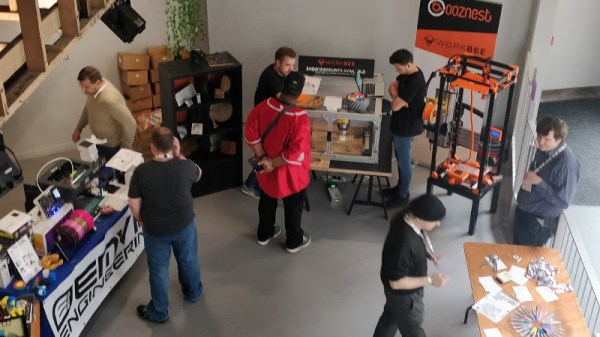
I live in the UK, and there haven’t traditionally been any events quite like MRRF, but that may be changing. The 3D Meetup UK in Birmingham is a community-organised event bringing together the 3D printing maker and hacker community for a couple of days of talks, demonstrations, and tours. I went along this year to see what was going on, and to take the temperature of the British side of this community.
Mike Szczys and Elliot Williams talk news and great hacks from the past seven days. Sad word this week as Maker Media, the company behind Make Magazine and Maker Faire, have closed their doors. There seems to be a lot of news about broken hardware and software to discuss, with ADS-B problems grounding hundreds of flights in the US, Hackaday itself having a site outage, the Raspberry Pi 3 B+ can be bricked with a really easy mistake, and Lewin wrote a great overview of the Takata airbag debacle. Don’t worry there are still plenty of hacks as we look at old computers that sing, microcontrollers that chiptune, beat boxes that are actually boxes, and some very neat cartridge hacks for NES and Arduboy.
Take a look at the links below if you want to follow along, and as always tell us what you think about this episode in the comments!
Take a look at the links below if you want to follow along, and as always, tell us what you think about this episode in the comments!
We’ve seen our fair share of interesting knitting hacks here at Hackaday. There has been a lot of creative space explored while mashing computers into knitting machines and vice versa, but for the most part the resulting knit goods all tend to be a bit… two-dimensional. The mechanical reality of knitting and hobbyist-level knitting machines just tends to lend itself to working with a simple grid of pixels in a flat plane.
However, a team at the [Carnegie Mellon Textiles Lab] have been taking the world of computer-controlled knitting from two dimensions to three, with software that can create knitting patterns for most any 3D model you feed it. Think of it like your standard 3D printing slicer software, except instead of simple layers of thermoplastics it generates complex multi-dimensional chains of knits and purls with yarn and 100% stuffing infill.
The details are discussed and very well illustrated in their paper entitled Automatic Machine Knitting of 3D Meshesand a video (unfortunately not embeddable) shows the software interface in action, along with some of the stuffing process and the final adorable (ok they’re a little creepy too) stuffed shapes.
Since the publication of their paper, [the Textiles Lab] has also released an open-source version of their autoknit software on GitHub. Although the compilation and installation steps look non-trivial, the actual interface seems approachable by a dedicated hobbyist. Anyone comfortable with 3D slicer software should be able to load a model, define the two seams necessary to close the shape, which will need to be manually sewn after stuffing, and output the knitting machine code.
It looks like Al was right, we should all be using Emacs. On the 4th of June, [Armin Razmjou] announced a flaw in Vim that allowed a malicious text file to trigger arbitrary code execution. It’s not every day we come across a malicious text file, and the proof of concept makes use of a clever technique — escape sequences hide the actual payload. Printing the file with cat returns “Nothing here.” Cat has a “-v” flag, and that flag spills the secrets of our malicious text file. For simplicity, we’ll look at the PoC that doesn’t include the control characters. The vulnerability is Vim’s modeline function. This is the ability to include editor options in a text file. If a text file only works with 80 character columns, a modeline might set “textwidth=80”. Modeline already makes use of a sandbox to prevent the most obvious exploits, but [Armin] realized that the “:source!” command could run the contents of a file outside that sandbox. “:source! %” runs the contents of the current file — the malicious text file.
Taking this apart one element at a time, the “:!” is the normal mode command to run something in the shell, so the rest of the line is what gets run. “uname -a” is the arbitrary command, benign in this case. Up next is the OR operator, “||” which fully evaluates the first term first, and only evaluates what comes after the operator if the first term returns false. In this case, it’s a simple way to get the payload to run even though the rest of the line is garbage, as far as bash is concerned. “vi:” informs Vim that we have a modeline string. “:fen” enables folding, and “:fdm=expr” sets the folding method to use an expression. This feature is usually used to automatically hide lines matching a regular expression. “:fde=” is the command to set the folding expression. Here’s the exploit, the folding expression can be a function like “execute()” or “assert_fails()”, which allows calling the :source! command. This pops execution out of the sandbox, and begins executing the text file inside vim, just as if a user were typing it in from the keyboard. Continue reading “This Week In Security: Use Emacs, Crash A Windows Server, And A Cryptocurrency Heist”→
There are many people who find being around insects uncomfortable. This is understandable, and only likely to get worse as technology gives these multi-legged critters augmented bodies to roam around with. [tech_support], for one, welcomes our new arthropod overlords, and has even built them a sweet new ride to get around in.
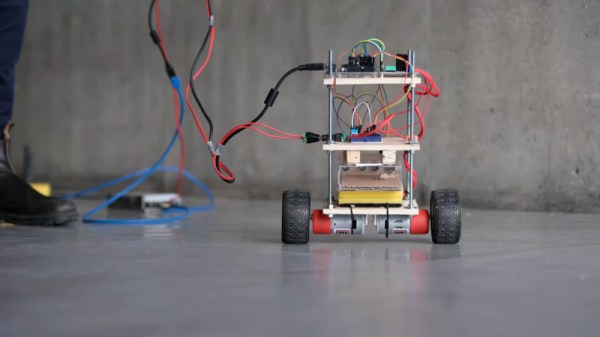
The build follows the usual hallmarks of a self-balancing bot, with a couple of interesting twists. There’s twin brushed motors for drive, an an Arduino Uno running the show. Instead of the more usual pedestrian IMUs however, this rig employs the Bosch BNO055 Absolute Orientation Sensor. This combines a magnetometer, gyroscope, and accelerometer all on a single die, and handles all the complicated sensor fusion maths onboard. This allows it to output simpler and more readily usable orientation data.
The real party piece is even more interesting, however. Rather than radio control or a line following algorithm, this self-balancer instead gets its very own insect pilot. The insect is placed in a small chamber with ultrasonic sensors used to determine its position. The insect may then control the movement of the bot by moving around this chamber itself. The team have even developed a variety of codes to dial in the sensor system for different types of insect.
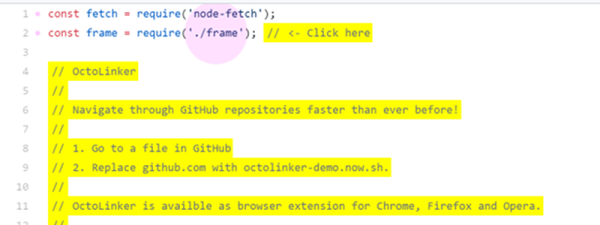
If you are browsing GitHub it is very tempting to open up the source code to some project and peek at how it works. The code view is easy to read, but the viewer lacks one important feature: the ability to click on an included file and find it. The Octolinker extension fixes that oversight.
If you want to try it without installing the extension, there is a mock-up demo available. Even though the demo wants you to click on specific things, if you don’t play by the rules it will still do the right thing and take you to either the code on GitHub or an appropriate page. You can even substitute the demo URL for github.com and try it out on any GitHub page without the extension.
Back in the day, all of your music was on a shelf (or in milk crates) and the act of choosing what to listen to was a tangible one. [Michael Teeuw] appreciates the power of having music on demand, but misses that physical aspect when it comes time to “put something on”. His solution is a hardware controller that he calls MusicCubes.
Music cube makes selection using RFID, and touching to the right raises the volume level
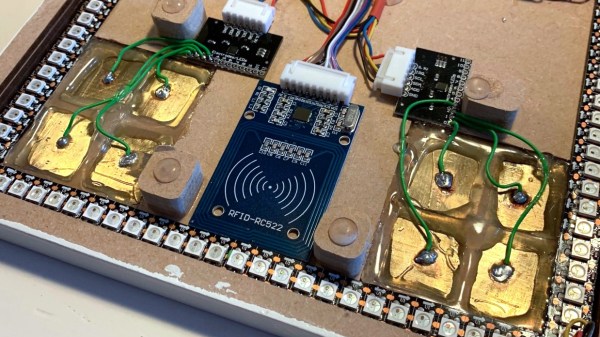
This is a multi-part project, but the most recent rework is what catches our eye. The system uses cubes with RFID tags in them for each album. This part of the controller works like a charm, just set the cube in a recessed part of the controller — like Superman’s crystals in his fortress of solitude — and the system knows you’ve made your decision. But the touch controls for volume didn’t work as well. Occasionally they would read a false touch, which ends up muting the system after an hour or so. His investigations led to the discovery that the capacitive touch plates themselves needed to be smaller.
Before resorting to a hardware fix, [Michael] tried to filter out the false positives in software. This was only somewhat successful so his next attempt was to cut the large touch pads into four plates, and only react when two plates register a press at one time.
He’s using an MPR121 capacitive touch sensor which has inputs for up to 12-keys so it was no problem to make this change work with the existing hardware. Surprisingly, once he had four pads for each sensor the false-positives completely stopped. The system is now rock-solid without the need to filter for two of this sub-pads being activated at once. Has anyone else experienced problems with large plates as the touch sensors? Can this be filtered easily or is [Michael’s] solution the common way to proceed? Share your own capacitive touch sensor tips in the comments below!
Want to get a look at the entire project? Start with step one, which includes a table of contents for the other build logs.