Putting The Magic Smoke Back Into A Dodgy Spectrum Analyzer

The trouble with fixing electronics is that most devices are just black boxes — literally. Tear it down, look inside, but it usually doesn’t matter — all you see are black epoxy blobs, taunting you with the fact that one or more of them are dead with no external indication of the culprit.

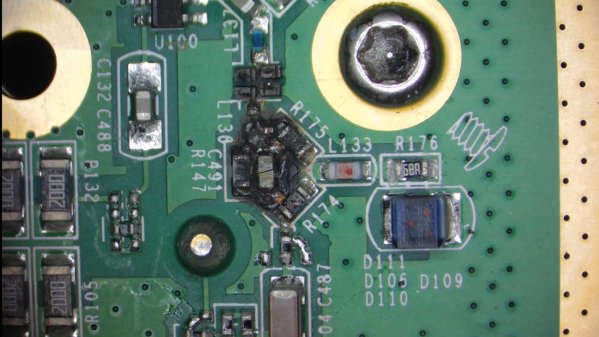
Sometimes, though, you get lucky, as [FeedbackLoop] did with this Rigol spectrum analyzer fix. The instrument powered up and sort of worked, but the noise floor was unacceptably high. Even before opening it up, there was clearly a problem; in general, spectrum analyzers shouldn’t rattle. Upon teardown, it was clear that someone had been inside before and got reassembly wrong, with a loose fastener and some obviously shorted components to show for it. But while the scorched remains of components made a great place to start diagnosis, it doesn’t mean the fix was going to be easy.

Figuring out the values of the nuked components required a little detective work. The blast zone seemed to once hold a couple of resistors, a capacitor, a set of PIN diodes, and a couple of tiny inductors. Also nearby were a pair of chips, sadly with the markings lasered off. With some online snooping and a little bit of common sense, [FeedbackLoop] was able to come up with plausible values for most of these — even the chips, which turned out to be HMC221 RF switches.

Cleaning up the board was a bit of a chore — the shorted components left quite a crater in the board, which was filled with CA glue, and a bunch of missing pads. This called for some SMD soldering heroics, which sadly didn’t fix the noise problem. Replacing the two RF switches and the PIN diodes seemed to fix the problem, albeit at the cost of some loss. Sometimes, good enough is good enough.

This isn’t the first time [FeedbackLoop] has gotten lucky with choice test equipment in need of repairs — this memory module transplant on a scopemeter comes to mind.

Continue reading “Putting The Magic Smoke Back Into A Dodgy Spectrum Analyzer”
Retro Gadgets: The 1974 Breadboard Project

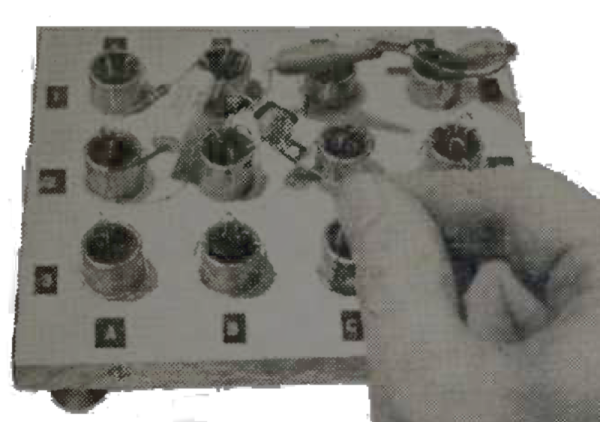
It is hard to imagine experimenting with electronics without the ubiquitous solderless breadboard. We are sure you have a few within arm’s reach. The little plastic wonders make it easy to throw together a circuit, try it, and then tear it down again. But, surprisingly, breadboards of that type haven’t always been around, and — for a while — they were also an expensive item. Maybe that’s what motivated [R. G. Cooper] to build Slip-n-Clip — his system for quickly building circuits that he published in a 1974 edition of the magazine Elementary Electronics.

The system isn’t really what you would think of as a breadboard today, but it was effective and certainly cheap to build. The biggest problem? It wasn’t something you’d use with DIP ICs. But in the early 1970s, you might not be building very much with ICs, and the ones you used might be in oddball transistor-like packages. Things were strange in the 70s!

A Brief History of Breadboards

In the very old days, people built radios and such on wooden substrates that were actually bread-cutting boards. That’s where the name came from. It was common to draw a diagram with the physical layout you had in mind, glue it to the board, and use it as a guide for building and troubleshooting. Wood was easy to drill and cut. A nail or a thumbtack would make dandy terminals. Probably the last time we saw that done was about a dozen years ago in Make Magazine. Even then, it was only a novelty — few people still build circuits like this, but you can see how [Colin] did it in the video below.

Continue reading “Retro Gadgets: The 1974 Breadboard Project”

Nail, Meet KiCad

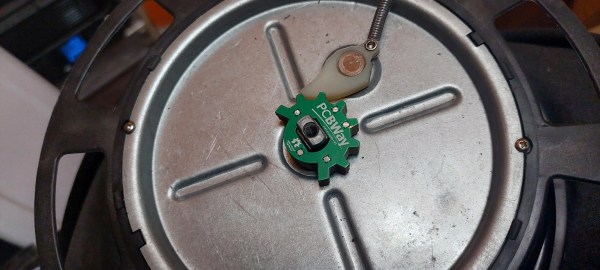
You know the old saying. When all you have open is KiCad, everything looks like a PCB. That was certainly true for [Evan], who needed to replace a small part recently and turned to PCBs to get the job done.

The part in question was a sheered apart detent cam from a retractable cord reel. Glue and epoxy might have worked, and [Evan] was worried about how a 3D printed PLA part would have held up. The part is an extruded 2D shape, making PCBs a non-traditional but viable choice. Using the old scanner trick, he traced the outline in KiCad 7 (which adds image references). Then with the five boards stacked up, solid core wire, solder, and a propane torch worth of heat fused it. Ultimately, this machine’s tolerances are generous, so it worked wonderfully.

Was it the “right” tool for the job? Right or wrong, it is hard to argue that in terms of durability and ease per dollar, this doesn’t come out on top. PCB files are on GitHub if you have a 5020TF-4c retractable cord reel that needs a new cam. PCBs have a fun way of adopting different use cases like enclosures, but perhaps the idea of PCBs as a mechanical part could be applied elsewhere.

Replacing A Clock IC’s Battery

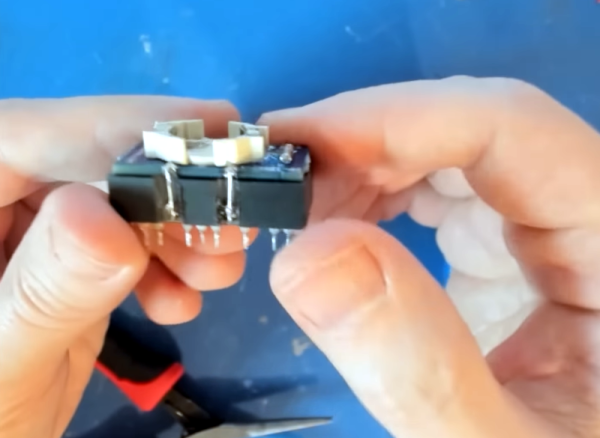
You can find a lot of strange things inside IC packages. For example, the Dallas DS12885 and DS12887 real time clock “chips” were available in a large package with an internal battery. The problem, of course, is that batteries die. [New Old Computer Show] wanted to restore a machine that used one of these devices and was able to repair the device. You can see two videos below. In the first video, he replaces both the battery and adds an external oscillator which would be necessary for the DS12885. However, he actually had the DS12887, which has an internal oscillator, something the second video explains.

The repair used a PCB he ordered from Tindie. However, the board is only part of the problem. You also need to disconnect the dead battery which requires a Dremel and a steady hand.

Continue reading “Replacing A Clock IC’s Battery”

Old Ham Wisdom Leads To Better Aluminum Painting

When [bdk6] tried painting aluminum for electronic projects, he found it didn’t tend to stay painted. It would easily scratch off or, eventually, even flake off. The problem is the paint doesn’t want to adhere to the aluminum oxide coating around the metal. Research ensued, and he found an article in an old ham radio magazine about a technique that he could adapt to get good results painting aluminum.

Actually, paint apparently adheres poorly, even to non-oxidized aluminum. So the plan is to clean and remove as much aluminum oxide as possible. Then the process will convert the aluminum surface to something the paint sticks to better. Of course, you also need the right kind of paint.

The key ingredients are phosphoric acid and zinc phosphate. Phosphoric acid is found in soft drinks, but is also sold as a concrete and metal prep for painting. The zinc phosphate is part of a special paint known as a self-etching primer.

Cleaning takes soap, elbow grease, and sandpaper. The next step is a long soak in the phosphoric acid. Then you apply a few coats of self-etching primer and sand. Once it is all set, you can paint with your normal paint. That’s usually epoxy-based paint for [bdk6].

Of course, you can also dye aluminum while anodizing it. Soldering aluminum also has its challenges.

3D Printed ROV Is The Result Of Many Lessons Learned

Building an underwater remotely operated vehicle (ROV) is always a challenge, and making it waterproof is often a major hurdle. [Filip BuĊ‚awa] and [Piotr Domanowski] have spent four years and 14 prototypes iterating to create the CPS 5, a 3D printed ROV that can potentially reach a depth of 85 m.

FDM 3D prints are notoriously difficult to waterproof, thanks to all the microscopic holes between the layers. There are ways to mitigate this, but they all have limits. Instead of trying to make the printed exterior of the CPS 5 waterproof, the electronics and camera are housed in a pair of sealed acrylic tubes. The end caps are still 3D printed, but are effectively just thin-walled containers filled with epoxy resin. Passages for wiring are also sealed with epoxy, but [Filip] and [Piotr] learned the hard way that insulated wire can also act as a tube for water to ingress. They solved the problem by adding an open solder joint for each wire in the epoxy-filled passages.

For propulsion, attitude, and depth control, the CPS 5 has five brushless drone motors with 3D printed propellers, which are inherently unaffected by water as long as you seal the connectors. The control electronics consist of a PixHawk flight controller and a Raspberry Pi 4 for handling communication and the video stream to a laptop. An IMU and water pressure sensor also enable auto-leveling and depth hold underwater. Like most ROVs, it uses a tether for communication, which in this case is an Ethernet cable with waterproof connectors.

Acrylic tubing is a popular electronics container for ROVs, as we’ve seen with an RC Subnautica sub, LEGO submarine, and the Hackaday Prize-winning Underwater Glider.

Continue reading “3D Printed ROV Is The Result Of Many Lessons Learned”

The Best Threaded Holes For Resin Parts

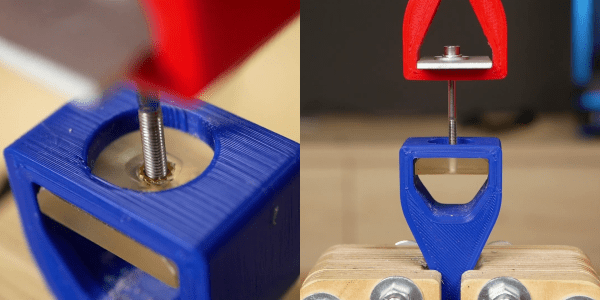
Threaded inserts are great for melting into FDM prints with a soldering iron. The process isn’t so simple for resin prints, since they don’t generally soften with heat. Off course, you can also print the threads directly, screw a bolt into an un-threaded hole, or tap a hole. Following his usual rigorous testing process, [Stefan] from CNC Kitchen investigated various ways of adding threaded holes to resin prints.

After establishing a pull-out force on PLA using threaded inserts (205 kg) and tapped holes (163 kg), [Stefan] tested parts printed with Prusament Tough Anthracite resin. Un-threaded and tapped holes failed at 44 kg and 55 kg respectively, while printed threads were almost twice as strong, reaching 106 kg before breaking. Stephan also tried gluing inserts into the parts using resin and CA glue. The resin didn’t cure properly in the opaque parts (6 kg) while CA was comparable to plastic threads, failing at 52 kg.

Chart of results
TLDR: Print your threads for best results

[Stefan] also tested regular ELEGOO Translucent resin. The higher hardness of the cured resin allowed the parts to hold on to around 100 kg for un-threaded and tapped holes, while printed threads reached 120 kg. Threaded insert glued with resin did better on the transparent parts thanks to improved UV penetration, but were very inconsistent. Inserts glued with CA performed about the same as on the Prusament parts, failing at 56 kg.

In an attempt to improve the performance of the inserts [Stefan] printed some parts with stepped holes to match the geometry of the inserts, which had the advantage of preventing the insert from falling through during gluing. It only made a marginal difference on the Prusament parts but boosted the strength of CA-glued inserts on the ELEGOO resin to 82 kg. Two-part epoxy was also tried, which matched the un-threaded holes in strength.

So for resin parts you’ll probably be best served by just modeling the threads in CAD and printing them directly. If you need to be able to repeatedly screw and unscrew fasteners in a hole without stripping, threaded holes with CA or epoxy might be a better solution.

Continue reading “The Best Threaded Holes For Resin Parts”