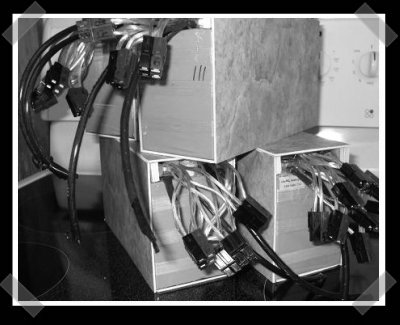
With fuel prices rising, EVs are becoming more an more stylish. This bit of floor tile wrapped hardware is actually a 12 channel battery management system designed to handle Lithium Iron battery packs. It’s designed to take power from a standard lead acid charger and supply the batteries with their maximum charge current. The cost and complexity of the BMS has been a major stumbling block in the past, so it’s interesting to see these come around. If you need more than 12 cells, multiple boards can be used.
LED Battery Level Indicator
[Kc7fys] came up with a this simple battery level indicator. It uses a single LED to display a battery’s voltage; if the voltage exceeds 12V, it glows green. If it is below 11V, the LED glows red. Anything in between generates an orange glow. The meter is built around an LM358 chip per this schematic, but his actual build looks pretty sloppy because of the dead-bug assembly (check out NASA’s pretty version). Nonetheless, it works, so clean it up and build one if you want to put it (or your batteries) to the test.
Recon 2008 Recap

[Tiller Beauchamp] gave a presentation on applied reverse engineering in OS X at this year’s REcon, but he also attended many of the other talks and gives his take on the highlights of REcon 2008 in a guest post on the ZDNet blog, Zero Day.
One of the highlights for him was Neohapsis’s [Chris Smith] discussing virtual machines implementing code obfuscation. The method uses custom instructions and runtime interpreter, which can help make the task of reverse engineering markedly more difficult if implemented properly.
On the opposite end of the spectrum, [Beauchamp] noted [Gerardo Richarte]’s software reverse engineering tools that decompile and recompile software in iterative portions. This allows the recompiled software to be tested piece by piece. Be sure to read his post and see what you missed.
Tea Cup Theremin
Hardware modding can take you to some strange places: sometimes, you think of really useful improvements to your most practical devices. Other times, you turn a cup of tea into a theremin. This is true at least for [Kyle McDonald], who immersed the L/R leads of an 1/8″ cable in a cup of tea, and connected it to a computer running Max/MSP with a special patch. The result is a working, miniature theremin you can drink after you’re done playing. This process should work with any liquid, so feel free to use beer, cola, water, or anything you think will taste better after you’ve run a small charge through it.
[via Matrixsynth]
Monome Keyboard

If you asked [David Phipps] whether he prefers Monomes or traditional keyboards, he might ask you “why not have both?” We don’t presume to speak for him, but that’s what we think he’d say based on his Monome-keyboard combination, which puts a Monome right in the keyboard’s console, giving the user the best of both worlds.
[Phipps] calls his device The Peaceblaster (also the name of his album), and it is constructed from a 5-octave Fatar keybed, MKE electronic components, and a Doepfer PKE for the faders and knobs. Everything is available via USB and MIDI out. The project is as yet unfinished, and he hopes to fit a mac mini into the works. If he succeeds, this will be one of the most elegant, powerful and fun keyboards we’ve seen in quite some time.
Domestic Spying Brought To You By A Snuggly Bear

Mark Fiore’s Snuggly the Security Bear’s latest cartoon explains the wonders of constitutional compromise and how it helps prevent terrorism through domestic spying.
Related: Judge: FISA trumps state secrets, binds executive branch
[via EFF]
Reusing PCB Components
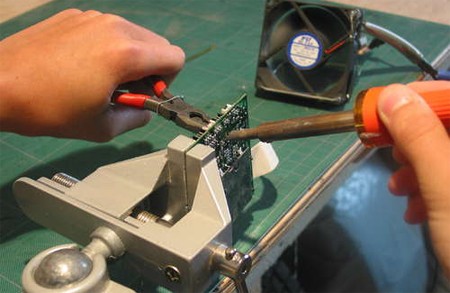
If you’re anything like us, you have a closet full of old electronics, some broken, some obsolete. You can stop using those as paperweights with the help of this guide that shows you how to recycle and reuse PCB components.
The first step of the process is finding electronics you don’t mind taking apart. Next place the PCB you’ll be stripping in a vice, with the components facing away from you and the solder side facing towards you. Grip the component you want with a pair of pliers, and apply a hot soldering iron to the solder that is holding the component. The solder will melt and allow you to safely and cleanly remove the component.
This process can be applied to virtually any component on an PCB, and the author of the guide, [Patented], got a lot of components this way, including resistors, capacitors, switches, audio jacks, and much more. Don’t forget to toss any free-floating metal or plastic parts in the recycle bin when you’re done. You can feel good about the fact that nothing was wasted, you found parts for your next project, and you cleared out some space.