CES2017: Monoprice Unveils Expanded Line Of 3D Printers

At CES last year, Monoprice introduced a $200 3D printer. Initial expectations of this printer were middling. My curiosity got the best of me, and last summer I picked up one of these printers for a review. The Monoprice MP Select Mini is actually phenomenal, and not just ‘phenomenal for the price’. This machine showed the world how good one of the cheapest printers can be. The future is looking awesome.

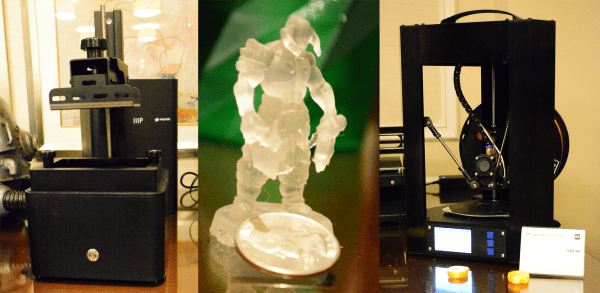
You might think Monoprice wouldn’t be able to top the success of this great little machine. You would be wrong. This week, Monoprice announced a bevy of new and upgraded printers. Some are resin. Some are huge. One will sell for $150 USD.

Continue reading “CES2017: Monoprice Unveils Expanded Line Of 3D Printers”

Ditch OpenSCAD For C++

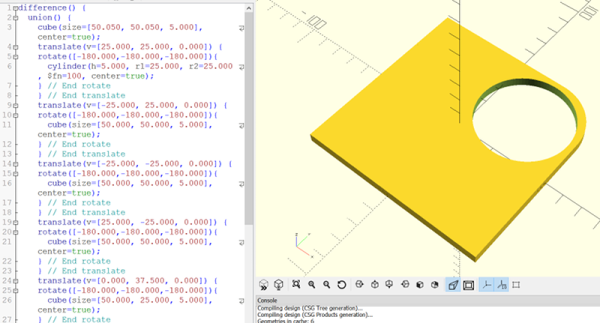
There’s an old saying that a picture is worth a thousand words. If you’ve ever tried to build furniture or a toy with one of those instructions sheets that contains nothing but pictures, you might disagree. 3D design is much the same for a lot of people. You think you want to draw things graphically, but once you start doing complex things and making changes, parametric modeling is the way to go. Some CAD tools let you do both, but many 3D printer users wind up using OpenSCAD which is fully parametric.

If you’ve used OpenSCAD you know that it is like a simple programming language, but with some significant differences from what you normally use. It is a good bet that most Hackaday readers can program in at least one language. So why learn something new? A real programming language is likely to have features you won’t find readily in OpenSCAD that, in theory, ought to help with reuse and managing complex designs.

I considered OpenJSCAD. It is more or less OpenSCAD for JavaScript. However, JavaScript is a bit of a scripting language itself. Sure, it has objects and some other features, but I’m more comfortable with C++. I thought about using the OpenCSG library that OpenSCAD uses, but that exposes a lot of detail.

Instead, I turned to a project that uses C++ code to generate OpenSCAD output, OOML (the Object Oriented Mechanics Language)). OpenSCAD does the rendering, exporting, and other functions. Unfortunately, the project seems to have stalled a few years back and the primary web-based documentation for it seems to be absent. However, it is very usable and if you know how to find it, there is plenty of documentation available.

Why not OpenSCAD?

Continue reading “Ditch OpenSCAD For C++”

Liar’s 3D Printing: Multiple Colors With One Extruder

Good 3D printers now have multiple hot ends. You ought to be able to print in different colors or print support material. However, a lot of us don’t have multiple hot ends. Turns out, you don’t have to have multiple hot ends to print in multiple colors. To accomplish that you need a lot of patience and the willingness to tell bald-faced lies. Don’t worry, though, you’ll only be lying to some computer hardware and software, so that doesn’t count.

You may have seen people talk about putting a pause between layers to switch from one color to another. That works, but it limits your options. For example, if you want to put some colored text on a different colored background, you have to either have the text poke out, or it has to be “under” the background. It can’t be flush if you only have a single extruder and hot end. My method is a lot more trouble, but it can generate good results.

Keep in mind, with hobby-grade printers, multiple color printing has a lot of problems even if you do have multiple extruders. This isn’t a panacea. But you can get results on par with a similar printer that has multiple heads.

Bottom Line Up Front

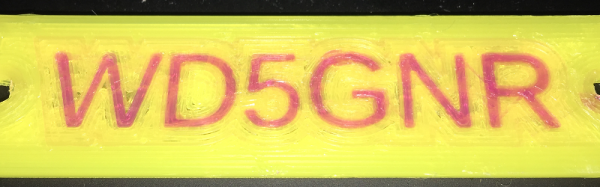
Here are a few pictures of test prints that use this technique. A Monoprice Mini printer with the stock extruder and hot end created them using different PLA filament. On the left is a test cube, with a color spot in the middle of the layers (as well as some spots on the top surface you can’t see). To the right is a plate with my call sign in a contrasting color. It is hard to tell in the picture, of course, but there is one surface. The text is at the same height as the yellow surface.

I didn’t spend a lot of time making these prints since I was more focused on perfecting the methodology. The layer heights aren’t very fine, the infill is sparse, and the print speed was fast. However, you could invest time into making better-looking prints. You can also use the usual techniques that you use with a “real” multi-extrusion printer (such as priming towers, ooze shields, etc.).

Continue reading “Liar’s 3D Printing: Multiple Colors With One Extruder”

Open-Source Parametric CAD In Your Browser

Until recently, computer-aided design (CAD) software was really only used by engineering companies who could afford to pay thousands of dollars a year per license. The available software, while very powerful, had a very high learning curve and took a lot of training and experience to master. But, with the rise of hobbyist 3D printing, a number of much more simple CAD programs became available.

While these programs certainly helped makers get into 3D modeling, most had serious limitations. Only a few have been truly open-source, and even fewer have been both open-source and parametric. Parametric CAD allows you to create 3D models based on a series of parameters, such as defining a cube by its origin and dimensions. This is in contrast to sculpting style 3D modeling software, which is controlled much more visually. The benefit of parametric modeling is that parameters can be changed later, and the model can be updated on the fly. Features can also be defined mathematically, so that they change in relation to each other.

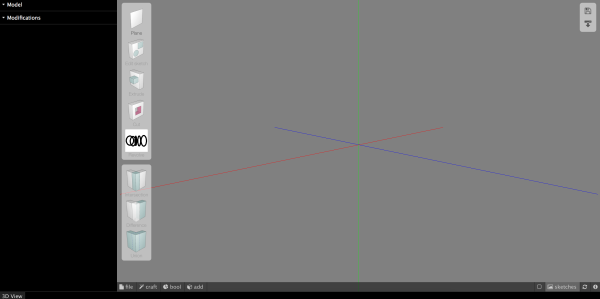
While still in its infancy, JS.Sketcher is seeking to fill that niche. It is 100% open-source, runs in your browser using only JavaScript, and is fully parametric (with both constraints and editable dimensions). At this time, available features are still pretty limited and simple. You can: extrude/cut, revolve, shell, and do boolean operations with solids. More advanced features aren’t available yet, but hopefully will be added in the future.

Continue reading “Open-Source Parametric CAD In Your Browser”

So Where’s My Low Voltage DC Wall Socket?

What are the evocative sounds and smells of your childhood? The sensations that you didn’t notice at the time but which take you back immediately? For me one of them is the slight smell of phenolic resin from an older piece of consumer electronics that has warmed up; it immediately has me sitting cross-legged on our living room carpet, circa 1975.

"Get ready for a life that smells of hot plastic, son!" John Atherton [CC BY-SA 2.0], via Wikimedia Commons.
“Get ready for a life that smells of hot plastic, son!” John Atherton [CC BY-SA 2.0], via Wikimedia Commons.
That phenolic smell has gone from our modern electronics, not only because modern enclosures are made from ABS and other more modern plastics, but because the electronics they contain no longer get so hot. Our LCD TV for instance nowadays uses only 50 watts, while its 1970s CRT predecessor would have used several hundred. Before the 1970s you would not find many household appliances that used less than 100 watts, but if you take stock of modern electrical appliances, few use more than that. Outside the white goods in your kitchen and any electric heaters or hair dryers you may own, your appliances today are low-powered. Even your lighting is rapidly being taken over by LEDs, which are at their heart low-voltage devices.

There are many small technological advancements that have contributed to this change over the decades. Switch-mode power supplies, LCD displays, large-scale integration, class D audio and of course the demise of the thermionic tube, to name but a few. The result is often that the appliance itself runs from a low voltage. Where once you would have had a pile of mains plugs competing for your sockets, now you will have an equivalent pile of wall-wart power supplies. Even those appliances with a mains cord will probably still contain a switch-mode power supply inside.

Continue reading “So Where’s My Low Voltage DC Wall Socket?”

A How-To In Homebrew Design, Fab, And Assembly With Structural Framing Systems

At this point, the internet is crawling with butt-kicking homebrew 3D printers made with extruded profiles, but it’s easy to underestimate the difficulty in getting there. Sure, most vendors sell a suite of interlocking connectors, but how well do these structural framing systems actually fare when put to the task of handling a build with sub-millimeter tolerances?

I’ve been playing around with these parts for about two years. What I’ve found is that, yes, precise and accurate results are possible. Nevertheless, those results came to me after I failed and–dry, rinse, repeat–failed again! Only after I understood the limits of both the materials and assembly processes was I able to deliver square, dimensionally accurate gantries that could carry a laser beam around a half-square-meter workbed. That said, I wrote a quick guide to taming these beasts. Who are they? What flavors do they come in? How do we achieve those precision results? Dear reader, read on.

Continue reading “A How-To In Homebrew Design, Fab, And Assembly With Structural Framing Systems”

Compiling A $22 Logic Analyzer

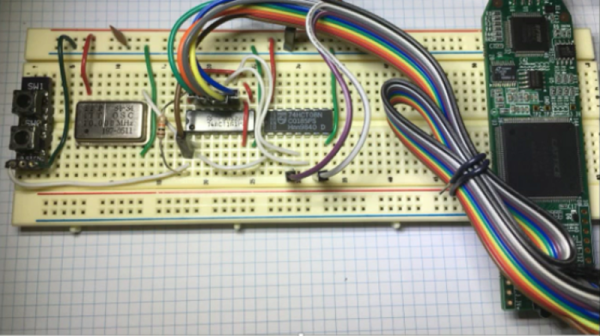
On my way to this year’s Hackaday SuperConference I saw an article on EE Times about someone taking the $22 Lattice iCEstick and turning it into a logic analyzer complete with a Python app to display the waveforms. This jumped out as pretty cool to me given that there really isn’t a ton of RAM on the stick, basically none that isn’t contained in the FPGA itself.

[Jenny List] has also written about the this application as created by [Kevin Hubbard] of Black Mesa Labs and [Al Williams] has a great set of posts about using this same $22 evaluation board doing ground up Verilog design using open source tools. Even if you don’t end up using the stick as a logic analyzer over the long haul, it’ll be very easy to find many other projects where you can recompile to invent a new purpose for it.

Continue reading “Compiling A $22 Logic Analyzer”