The ‘biofriendly’ nature of poly(lactic acid) (PLA) filament often gets touted as one of its main advantages over alternatives like PETG, but even a modicum of research ought to inform a person that the biodegrading feature of PLA is only true for pure PLA without additives and at temperatures at or above its glass transition temperature (Tg). Thus the results of a year-long experiment by [I built a thing] shouldn’t be too surprising.
After burying said PLA in the garden like any self-respecting person does who tries to dispose of some evidence, the PLA suffered through a European winter and very hot, dry summer, before being dug up again recently for inspection and testing. Although not the first time that someone has tested this, it’s a good reminder considering just how much PLA filament is used each year.
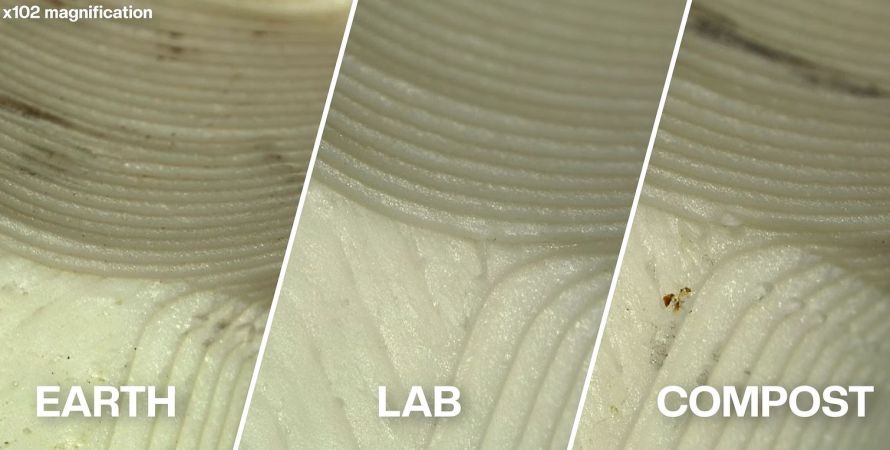
In total three sample sets were used, one being the control, the other two buried in soil and compost respectively. A visual inspection showed no major difference, and a tensile strength test also showed no statistically significant change among all three sample sets. The experiment could have been concluded here, but instead calorimetry was used in a laboratory setting to see whether exposure to microbes as commonly found in soil does anything significant.
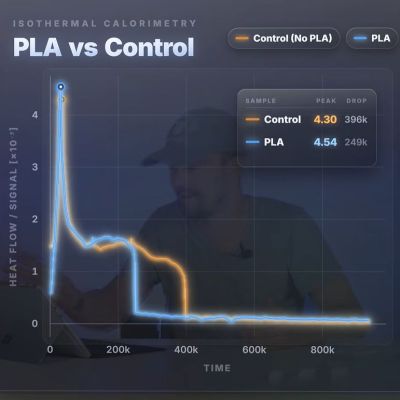
This isothermal microcalorimetry test was performed at the University of Basel, effectively to answer the question whether there’s anything in the PLA samples that can feed said microbes. As it turns out, the answer is a resounding ‘no’, with microbial activity within the presence of PLA dropping off even quicker presumably due to there being less volume available for nutrients.
When [I built a thing] contacted a large number of commercial biodegrading facilities in Switzerland, Germany and the USA, many would happily take PLA, but none of them would accepted 3D-printed PLA parts, which says a lot. The primary reason for this appears to be that even under industrial composting conditions it simply takes too long for these facilities to consider these to be economical to compost.
With PLA primarily degrading via hydrolysis, it needs to be exposed to the right conditions for this process to not take an eternity. You can of course use something like PHA instead, which doesn’t require this hydrolysis step to be biodegradable. Overall PLA is quite a crummy material, with it also suffering from embrittlement due to crystallization that will happily turn a spool of PLA into lots of sad fragments. This makes PETG into a very common and very attractive alternative to PLA.
Continue reading “Disposing Of PLA And Why Composting Is Not An Option”
 The video starts with an interesting demonstration of how to fold an origami crane that has a smaller crane on its back. This is documented in
 Although the premise is solid, with