A self-service checkout computer game

Practice Your Shopping Skills With This Self-Service Checkout Game

Self-service checkouts have become a common feature in supermarkets the world over, a trend accelerated by the coronavirus pandemic. While some may lament the loss of human contact, others relish the opportunity to do their own scanning: with a bit of practice, self-service can provide for a very fast checkout experience. Assuming, of course, that the machine recognizes each product, the built-in weight sensor works correctly, and you don’t get selected for a random check.

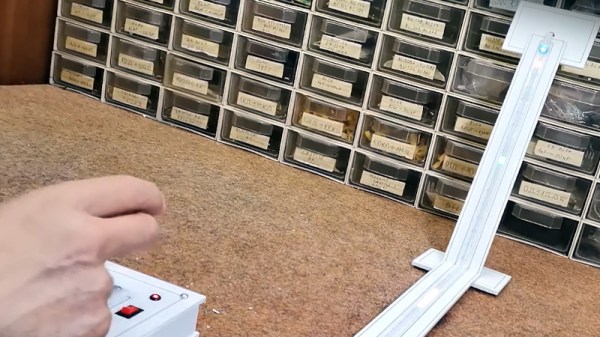
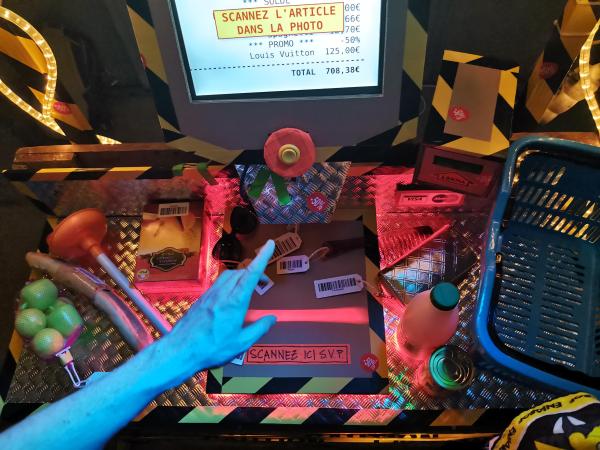
If you want to practice your checkout game without spending loads of money, you might want to have a look at [Niklas Roy] and [Kati Hyyppä]’s latest project: Bonprix is a game where the goal is to scan as many items as possible within a 90-second time limit. Installed at the Eniarof DIY festival, it’s designed to resemble a typical supermarket checkout with a display, a barcode scanner and a shopping basket filled with random items. The screen indicates which item should be scanned next; if you’re too slow, the checkout will begin to offer discounts, which you obviously don’t want. When the 90 seconds are over, the machine spits out a receipt indicating your total score.

The checkout desk is made from wooden pallets and cardboard; inside is a laptop running Linux, with a handheld barcode scanner attached via USB. An LED strip provides a beam of bright red light to indicate the scanning area, and turns green when a barcode is successfully scanned. Arduinos control the LEDs and the big red-and-yellow “start” button, while a thermal printer from an ATM prints the receipts at the end of each game.

Apart from a bit of fun, the Bonprix project tries to address questions relating to consumer culture and self-checkouts: is it fair to let customers do their own work? Should they be paid for it? Is it even ethical to encourage people to spend as much as possible?

While this is the first time we’ve seen a self-service checkout computer game, we’ve done a few deep dives into the fascinating technology of barcodes that makes it all possible. Check this out!

Continue reading “Practice Your Shopping Skills With This Self-Service Checkout Game”
Book Teaches Gaming Math

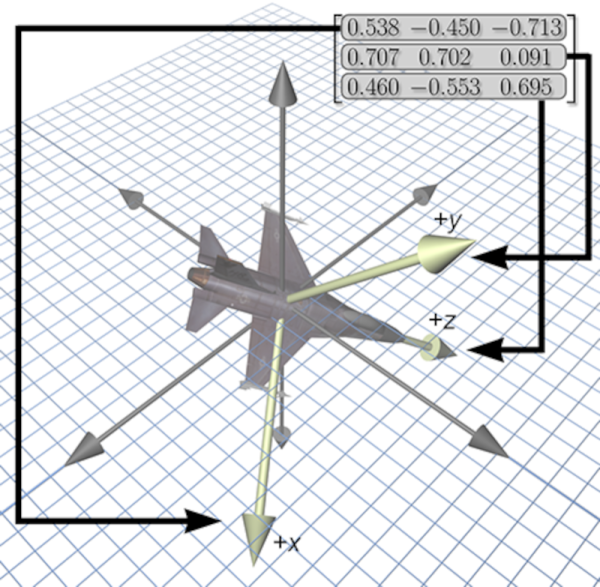
If we knew how much math goes into writing a video game, we might have paid more attention in math class. If you need a refresher, [Fletcher Dunn] and [Ian Parbery] have their book “3D Math Primer for Graphics and Game Development” available free online. The book was originally a paper book from 2011 with a 2002 first edition but those are out of print now. However, math is math, so regardless of the age of the book, it is worth a look. For now, the online version is a bunch of web pages, but we hear a PDF or E-reader version is forthcoming.

There’s quite a bit of discussion about vectors, matrices, linear transformations, and 3D graphics. The last part of the book covers calculus, kinematics, and parametric curves. Some of these topics will be of interest even if you don’t care about graphics but do want to learn some math with practical examples.

Continue reading “Book Teaches Gaming Math”

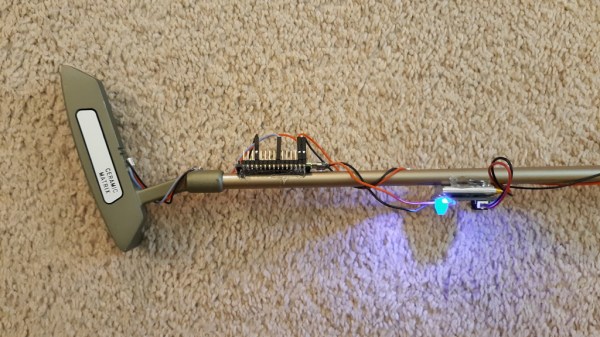
A putter with an Arduino attached to its shaft

This Golf Club Uses Machine Learning To Perfect Your Swing

Golf can be a frustrating game to learn: it takes countless hours of practice to get anywhere near the perfect swing. While some might be lucky enough to have a pro handy every time they’re on the driving range or putting green, most of us will have to get by with watching the ball’s motion and using that to figure out what we’re doing wrong.

Luckily, technology is here to help: [Nick Bild]’s Golf Ace is a putter that uses machine learning to analyze your swing. An accelerometer mounted on the shaft senses the exact motion of the club and uses a machine learning algorithm to see how closely it matches a professional’s swing. An LED mounted on the club’s head turns green if your stroke was good, and red if it wasn’t. All of this is driven by an Arduino Nano 33 IoT and powered by a lithium-ion battery.

The Golf Ace doesn’t tell you what part of your swing to improve, so you’d still need some external instruction to help you get closer to the ideal form; [Nick]’s suggestion is to bundle an instructor’s swing data with a book or video that explains the important points. That certainly looks like a reasonable approach to us, and we can also imagine a similar setup to be used on woods and irons, although that would require a more robust mounting system.

In any case, the Golf Ace could very well be a useful addition to the many gadgets that try to improve your game. But in case you still end up frustrated, you might want to try this automated robotic golf club.

Continue reading “This Golf Club Uses Machine Learning To Perfect Your Swing”

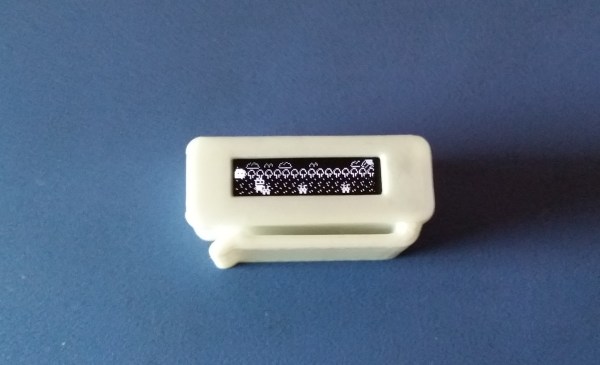
A small plastic case with an OLED screen showing a side-scrolling game

Game & Light Brings Video Games To Your Keychain

If you’re old enough to remember the 1990s, you might recall the sheer variety of portable gaming platforms that were around in those days. There was of course the ubiquitous hand-held Game Boy, and if you preferred something larger you could buy a Sega Game Gear or an Atari Lynx. But you could also go smaller with tiny LCD games like Nintendo’s Game and Watch series, with some versions literally the size of a wristwatch.

With all of these having gone the way of the dodo, we’re happy to see that [grossofabian] kept the tiny game world alive by designing the Game & Light: a tiny hand-held games platform with an OLED screen. It’s small enough to attach to your keychain and comes with an LED to act as a mini flashlight. But of course the main feature is the included video game: currently it comes with LEDboy Adventures, a side-scrolling platformer similar to Google’s T-Rex Game. A USB port can be used to recharge the device as well as to upload new games.

The Game & Light is housed in a 3D printed case and powered by a lithium-ion capacitor that can store enough charge for around 40 minutes of play time. The CPU is an ATtiny402 eight-pin microcontroller with 4 kB of flash, which is just enough to store the entire LEDboy game. Although currently only one game is available, the system is fully programmable and open sourced, so anyone who feels up to the task can help develop new games for the platform.

If you like keychain-sized games, you’re in luck: we recently featured the solar-powered but otherwise similar RunTinyRun. A bit longer ago, creative hackers even managed to squeeze entire Game Boys into tiny packages.

Continue reading Game & Light Brings Video Games To Your Keychain”

TWANG32 Brings LED Strip Gaming To The ESP32

Under the Hackaday TV is a modern game console, it’s a well-known model that many of you also probably have, and its main feature is a 3D accelerator which allows it to create the beautifully rendered worlds we’ve all come to know and love. [Mircemk] eschews such fripperies with the Twang project, because it’s a game that’s not 3D, nor 2D, but 1D. The display, indeed the entire gaming surface, is a single strip of addressable LEDs which can be seen int he video below the break.

Behind it all is an ESP32, and a unique one-dimensional joystick using an accelerometer. There’s an audio channel with a little piezoelectric speaker too, and the LED strip is a particularly high-density one from DFRobot. Because this is an ESP32-driven device it has WiFi, upon which is exposed an access point for a network over which is served the game stats as a web page. It may not displace that modern console, but it’s certainly inventive.

Long-time Hackaday readers will be aware that this is only the latest of a long line of one-dimensional games, including a 1D take on the famous PONG.

Continue reading TWANG32 Brings LED Strip Gaming To The ESP32″

Bringing Zelda Classic To The Browser

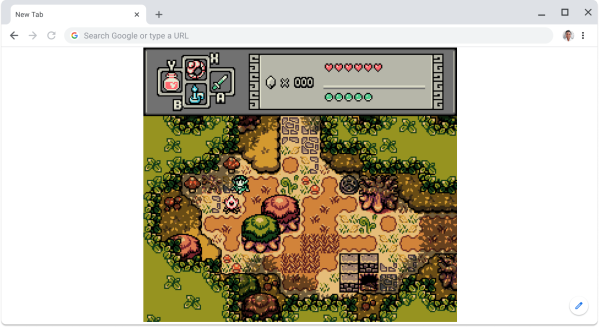
Finding a device or app that isn’t a web browser doesn’t seem easy. These days, it is either connected to the web (looking at you ESP32) or is just a web browser pretending to be something else (a la electron, PWAs, or React Native). So, of course, it is on us to create more and more exciting things to browse. [Connor Clark] is one of those people, and he brought Zelda Classic to the browser.

Zelda Classic (ZC) isn’t an official Zelda game. Instead, it’s an old engine designed to run the world in the OG Legend of Zelda and be easily modified to support hundreds of different games. To date, there are over 600 games submitted by a large community. ZC is an Allegro-based Windows-only game, so the first step was to bust out Emscripten to start tweaking the C++ code to support a web environment. Rather than completely port the huge codebase over from Allegro, [Connor] made the jump from Allegro 4 to 5. Allegro 5 has SDL as a backend and adds support for Emscripten.

Unfortunately, the 4 to 5 wasn’t as simple as changing the dependency. The API was wholly re-written, and there is a handy adapter known as Allegro Legacy to help transition a project from one to another. After squashing a multitude of bugs, it was a relatively painless procedure. After a quick detour getting music and level data working, [Connor] faced his next challenge: multi-threading. Efforts to move the main loop off of the browser thread and into a web worker ran into issues with having to yield in loops, deadlocks, and recursive mutexes. Finally, he added music and gamepad support after fixing several bugs in SDL and Allegro.

It’s an incredible journey with many tips and tricks for debugging seemingly intractable bugs. The code is up on GitHub, or jump in and start playing if you’re interested. Why not check out this browser-based OpenSCAD as well?

Aimbot Does It In Hardware

Anyone who has played an online shooter game in the past two or three decades has almost certainly come across a person or machine that cheats at the game by auto-aiming. For newer games with anti-cheat, this is less of a problem, but older games like Team Fortress have been effectively ruined by these aimbots. These types of cheats are usually done in software, though, and [Kamal] wondered if he would be able to build an aim bot that works directly on the hardware instead.

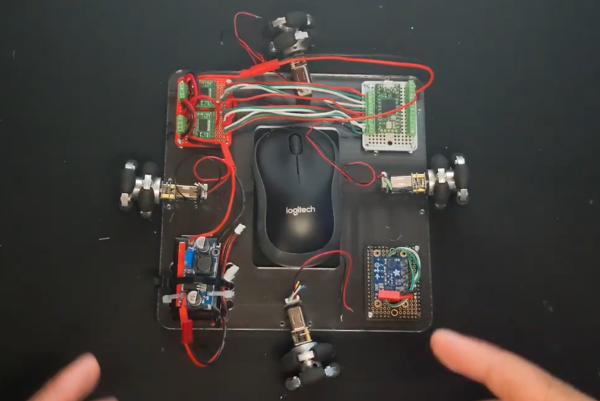
First, we’ll remind everyone frustrated with the state of games like TF2 that this is a proof-of-concept robot that is unlikely to make any aimbots worse or more common in any games. This is mostly because [Kamal] is training his machine to work in Aim Lab, a first-person shooter training simulation, and not in a real multiplayer videogame. The robot works by taking a screenshot of his computer in Python and passing the information through a computer vision algorithm which recognizes high-contrast targets. From there a PID controller is used to tell a series of omniwheels attached to the mouse where to point, and when the cursor is in the hitbox a mouse click is triggered.

While it might seem straightforward, building the robot and then, more importantly, tuning the PID controller took [Kamal] over two months before he was able to rival pro-FPS shooters at the aim trainer. It’s an impressive build though, and if one of his omniwheel motors hadn’t burned out it may have exceeded the top human scores on the platform. If you would like a bot that makes you worse at a game instead of better, though, head over to this build which plays Valorant by using two computers to pass game information between.

Continue reading “Aimbot Does It In Hardware”