Flash Programmer Shows Some Nifty Tricks

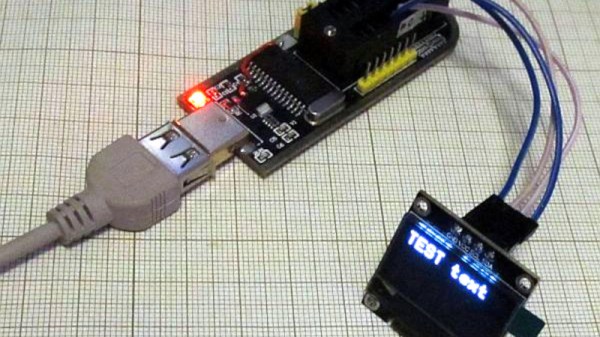
A handy tool to have on the bench is a Flash chip programmer, and the ones based around the CH341A USB bus converter chip are readily available. But the chip is capable of so much more than simply programming nonvolatile memory, so [Tomasz Ostrowski] has created a utility program that expands its capabilities. The software provides easy access to a range of common i2c peripherals. He’s got it talking to smart batteries, GPIOs, environmental sensors, an OLED display, and even an FM radio module. The code can all be found in a GitHub repository. The software is Windows-only so no fun and games for Linux users yet — but since it’s open source, new features are just a pull request away.

The CH341A is much more than an i2C controller, it also supports a surprising range of other interfaces including SPI, UARTs, and even a bidirectional parallel printer port. Maybe this software will serve to fire the imagination of a few others, and who knows, we could see more extended use of this versatile chip. Oddly we’ve featured these programmer boards before, though in a tricky flashing job.
Custom Aluminum Monitor Stand For The Home Office

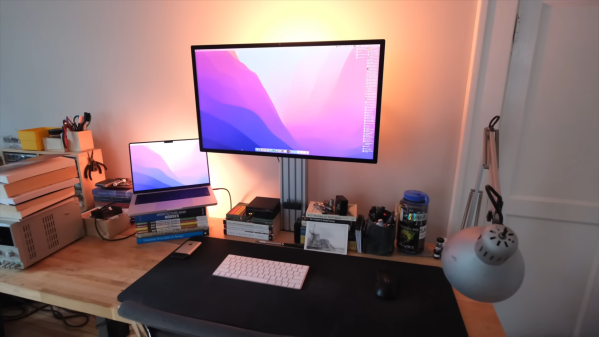
Monitor stands vary wildly in price, from a few cents for a pile of books from a thrift store to hundreds of dollars. One trendy style, as [Steven Bennett] puts it, is the “General Grievous,” with adjustable arms splayed around a central pole. While effective, it is not particularly aesthetically pleasing. [Steven] set out to make his monitor stand out of extruded aluminum.

[Steven] started with a cantilever design with a VESA adapter and a c-clamp. With some 3D-printed adapter brackets, he could attach them directly to the tracks in the aluminum. Of course, the 3D printed parts, while great for prototyping, might not be the best choice for the loads he was planning on. He sent it off to a fab to get some powder-coated steel parts. After using it for a few months, he revisited the drawing board. Moving away from the cantilever with an offset center post, he switched to a single 1×4 piece of aluminum. This allowed him to create 3D-printed attachments to hold his headphones, flash drives, and cables. A build guide is available online, as well as printable add-ons.

While it doesn’t have a built-in computer like this glorious wooden stand, we can’t deny the utility or the aesthetic of the aluminum version.

Video after the break.

Continue reading “Custom Aluminum Monitor Stand For The Home Office”

A Network Adapter Thinks It’s A CD-ROM. Restore Its True Calling!

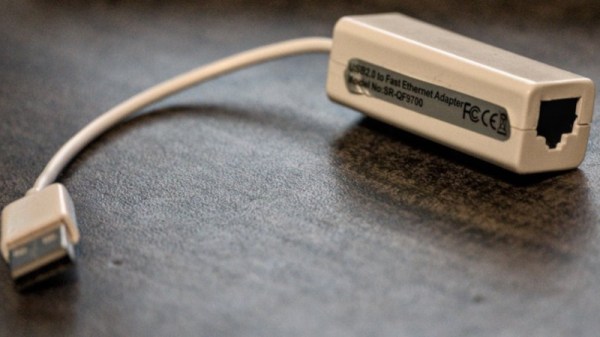
A mildly annoying trend over recent years has been for USB hardware devices to expose a CD-ROM drive containing their drivers for Windows users. Of course there’s no real CD in there, instead the software lives on a piece of flash memory. It’s usually not a problem as they also appear on the USB bus as their true calling, but not always.

[Martijn Braam] found himself the lucky owner of a USB network adapter which seemed to see its only purpose in life to be such a drive, and since he  wasn’t anxious to make another piece of e-waste, he broke it open to see if the fake CD drive could be disabled.

Inside the flimsy case he found a CoreChips SR9700 Ethernet controller, a chip for which there seems to be very little data in the wild. On the underside of the PCB was a flash chip, and as expected disabling this caused the CD drive to disappear to be replaced by the expected network card.

It’s a simple but useful hack, but there’s a little bonus for those unaware in the write-up. There’s a piece of software called USB_modeswitch that can perform this task on many cards, which is worth storing away in the event that it’s needed.

Toy Gaming Controller Makes The Big Leagues

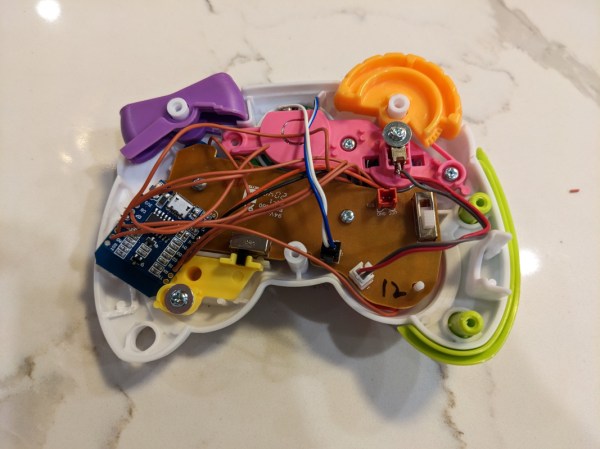
Some of the off-brand video game consoles and even accessories for the major brands can leave a lot to be desired. Whether it’s poor build quality or a general lack of support or updates, there are quite a few things on the market not worth anyone’s time or money. [Jonathan] was recently handed just such a peripheral, a toy game controller originally meant for a small child, but upon further inspection it turned into a surprisingly hackable platform, capable of plenty of IoT-type tasks.

The controller itself was easily disassembled, and the functional buttons within were wired to a Wemos D1 Mini instead of the originally-planned ESP32 because of some wiring irregularities and the fact that the Wemos D1 Mini having the required amount of I/O. It’s still small enough to be sealed back inside the controller as well, powered by the batteries that would have powered the original controller.

For the software, [Jonathan] is using MQTT to register button presses with everything easily accessible over Wi-Fi, also making it possible to update the software wirelessly. He was able to use it to do a few things as proof-of-concept, including playing a game in PyGame and controlling a Sonos speaker, but for now he’s using it to control an LED sculpture. With something this easily modified, though, it would be pretty straightforward to use it instead for a home automation remote control, especially since it is already set up to use MQTT.

Continue reading “Toy Gaming Controller Makes The Big Leagues”

This OSHW Trackball Is Ready To Be Customized

Oh sure, Amazon can deliver any number of Logitech peripherals to your door in 48 hours, but where’s the fun in that? With open source hardware (OSHW) input devices like the Ploopy Adept Trackball, you not only get to say you built the thing yourself, but there’s also an opportunity to tune the gadget to your exacting specifications — even if that just means packing it full of RGB LEDs.

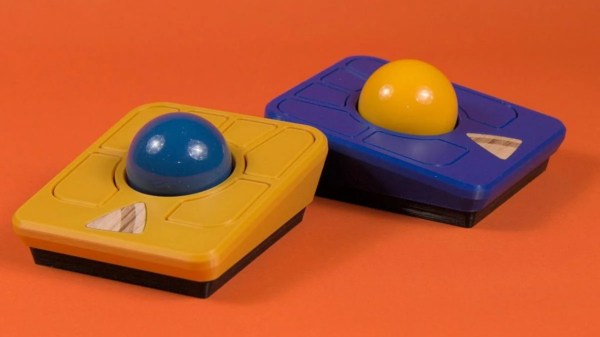
The trackball is powered by the Raspberry Pi Pico running QMK, features a high-accuracy PMW3360 sensor that can be found in commercial gaming mice, and uses a snooker ball for the business end. All the hardware is wrapped up in a 3D printed enclosure, and thanks to the VIA project, configuring the device can be done right in the browser through a web app.

Like the other devices in the (somewhat unfortunately named) Ploopy family, all of the design files for the Adept Trackball are released under the CERN license, which combined with the project’s fantastic documentation means you’ve got everything you need to build it from scratch. There are official parts kits if you don’t want to source or print all the components yourself, but as of this writing, the Ploopy Shop will only let you preorder them.

Only One Hacker At The Keyboard? Amateurs!

We imagine many of you have seen the ridiculous scene from the TV series NCIS in which a network intrusion is combated by two people working at the same keyboard at once. It’s become a meme in our community, and it’s certainly quite funny.  But could there be a little truth behind the unintentional joke? [Tedu] presents some possibilities, and they’re not all either far-fetched or without application.

The first is called Duelmon, and it’s a split-screen process and network monitor worthy of two players, while the second is Mirrorkeys, a keyboard splitter which uses the Windows keys as modifiers to supply the missing half. As they say, the ability to use both at once would be the mark of the truly 1337.

Meanwhile here at Hackaday we’re evidently closer to 1336.5, as our pieces are written by single writers alone at the keyboard. We would be fascinated to see whether readers could name any other potential weapons in the dual-hacker arsenal though, and we’d like to remind you that as always, the comments are open below.

The intense hacking scene from NCIS can be found below the break. Be warned though, it contains the trauma of seeing a computer unplugged without shutting down first.

Continue reading “Only One Hacker At The Keyboard? Amateurs!”

Dot Matrix Printer Gets An Epson Ribbon Transplant

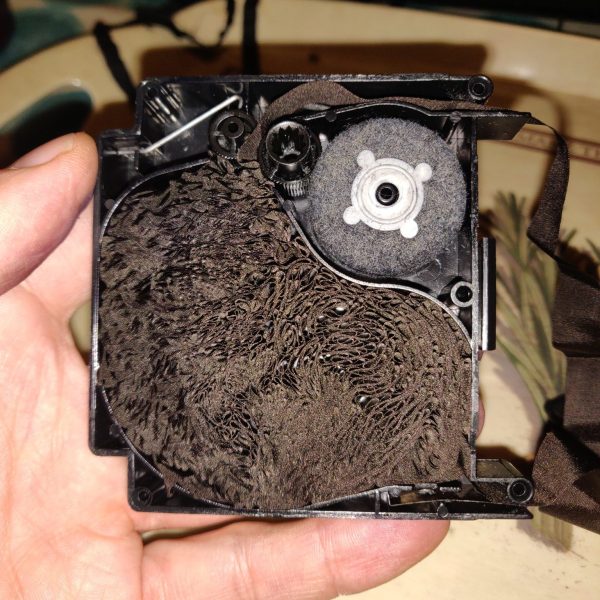
What do you do when your dot matrix printer’s ribbon is torn to shreds after decades of use, and no new cartridges are available? You might like to attempt a ribbon transplant from another printer’s cartridge, and that’s just what [Chris Jones] did.

[Chris] was hoping to find a new ribbon for his Canon PW-1080A after the 33-year-old ribbon had been hammered to bits. With replacements unavailable, he instead turned to the more popular Epson FX80, for which new ribbons can still be found. Thankfully, the FX80’s ribbon is the same width as the one used in the Canon printer, even if the cartridge is of a completely different design.

The first step was to crack open the Canon cartridge to dump out the old ribbon. With that done, the Epson ribbon could be looped into the Canon cartridge and wound in using the built-in winder. With this done, [Chris] attempted a test print, but found results to be poor. The ribbon wasn’t advancing properly and there was a rather horrible noise.

The problem was that the Epson ribbon was significantly longer than the Canon part, and thus was getting jammed inside the cartridge housing. [Chris] was able to fix this by cutting out a slice of the Epson ribbon and sticking the two ends back together with superglue. With that done, the printer was happily up and running once more.

If you’ve got a dot matrix printer ribbon that’s dried up but not yet falling apart, you can always try reinking it. Video after the break.

Continue reading “Dot Matrix Printer Gets An Epson Ribbon Transplant”