Cisco Router Repair Revives Piece Of Internet History

It would be fair to say that the Internet as we know it runs on Cisco hardware. While you might never see the devices first-hand, there’s an excellent chance that every web-bound packet leaving your computer or smartphone will spend at least a few milliseconds of its life traveling through hardware built by the San Jose, California based company. But of course, even a telecommunications giant like Cisco had to start somewhere.

Cisco’s first commercial router, the Advanced Gateway Server (AGS), was released in 1986 and helped put the company (and the Internet) on the path towards unfathomable success. [Andreas Semmelmann] had wanted to add one of these microwave-sized machines to his collection for some time, so when an AGS+ popped up in the local classifieds he didn’t hesitate to make the hour drive to go pick it up. But like many pieces of vintage computing equipment, it needed a little help getting back on its feet.
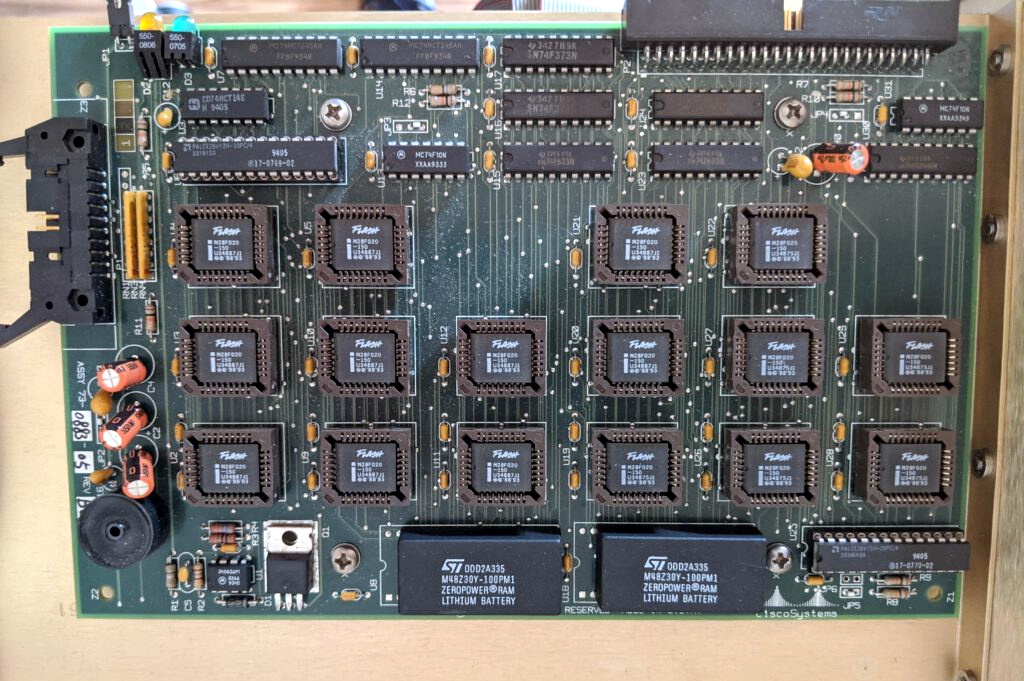
What 4 MB of flash looked like in the late 1980s.

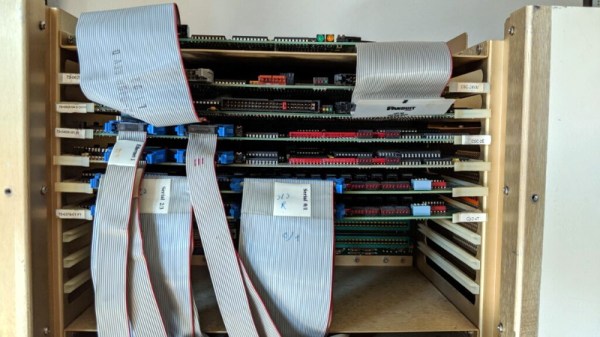
Since he had to take the router apart anyway to diagnose what ailed it, [Andreas] decided to take photographs along the way and document this piece of Internet history. He walks the reader through the massive processor, Ethernet, and serial cards that are housed in the unit’s rack-like enclosure. We appreciate him taking the scenic route, as it gives us a great look inside what would have been state-of-the-art telecommunications gear when this version of the AGS hit the market in 1989.

The walk-through is full of interesting details that make us appreciate just how far things have come in the last 32 years. Imagine yanking the EPROMs out of the board and firing up the UV eraser each time you needed to update your router’s firmware. Or needing a special adapter to convert the AUI-15 connectors on the back panel to the now ubiquitous RJ45 jack.

After this stroll down memory lane, [Andreas] gets to the actual repair work. It likely won’t surprise the regular Hackaday reader to find that the power supply wasn’t operating to spec, and that some aged capacitors and a shorted rectifier diode needed to be replaced to put it back on an even keel. But even with the PSU repaired, the router failed to start. The console output indicated the software was crashing, but hardware diagnostics showed no obvious faults.
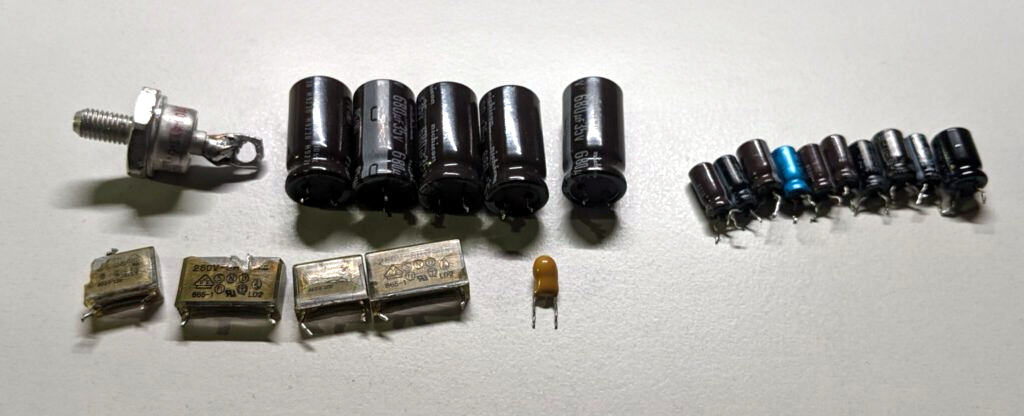
Replacing these failed PSU components was just the beginning.

With some part swapping, firmware flashing, and even a bit of assistance from Cisco luminary [Phillip Remaker], the issue was eventually identified as a faulty environmental monitoring (ENVM) card installed in the AGS+. As luck would have it the ENVM capability isn’t required to boot the router, so [Andreas] was able to just disconnect the card and continue on with his exploration of the hardware that helped build the Internet as we know it.

Considering its age, this piece of 1980s Cisco gear ended up being in relatively good shape. But that’s not always the case. Over the years we’ve found ourselves in awe of the incredible amount of time, effort, and skill, it takes to restore some of these classic machines. We have great respect for the dedicated individuals who are willing to take on the challenge of keeping these pieces of history up and running for future generations to marvel at.

[Thanks to Bob for the tip.]
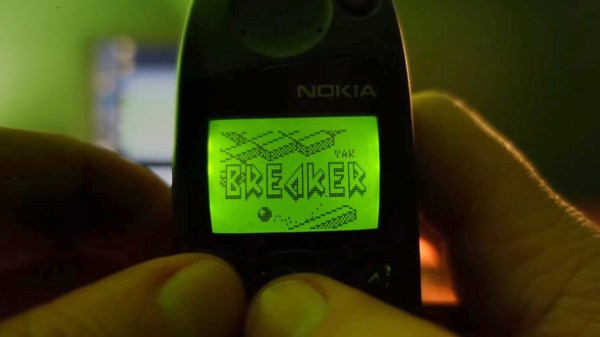
A Nokia 5110 playing a game

Firmware Modding Your Vintage Nokia Handset

These days we’re spoiled for choice when it comes to smartphone software, especially games. Official repositories for the leading handsets feature hundreds of thousands of games, and sideloading adds infinite possibilities. If you were lucky enough to be sporting a Nokia handset in the late 1990s, you probably had all of three games to choose from (and only one that was actually fun). [Janus Cycle] explores the steps needed to firmware mod your vintage Nokia phone, and how to expand on that paltry games library.

Enthusiasts have been modding their Nokia handsets since the 2000s, and the tools required now are the same as they were then. The Nokia 5110 and 6110 (as featured in the video below) use a proprietary cable and connector for communicating with PCs and other devices. Nokia’s official serial cable already opens up many possibilities for handset tinkering, including access to RAM and toggling Monitor Mode. This cable interfaces solely with the phone’s fast FBUS protocol, however firmware flashing takes place using the slower MBUS protocol over a single wire bi-directional pin.

The handset expects both serial ports to be available during firmware flashing. [Janus Cycle] demonstrates how to build a custom harness that connects both serial ports to a PC parallel port. At this point the flashing process is relatively straightforward, especially if you have an appropriately vintage computer to run the old flashing software.

Nokia owners may fondly remember changing the network name on the home screen to all sorts of inappropriate graphics, yet far more was possible with the right technology and know-how. It’s interesting to think about what may have been if softmodding was more widespread during the reign of the Nokia 5110 and its peers.

Continue reading “Firmware Modding Your Vintage Nokia Handset”

Hey, MiSTer Emulator, Gimme Almost Any Classic Platform!

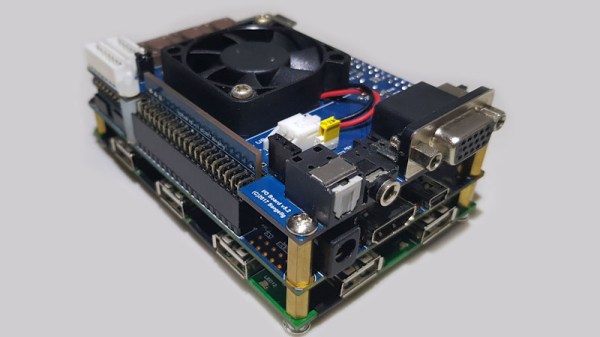
I’m back with another of the talks from Hackerspace Gent’s NewLine conference, fresh from my weekend of indulgence quaffing fine Belgian food and beers while mixing with that country’s hacker community. This time it’s an overview from [Michael Smith] of the MiSTer project, a multi-emulator using an FPGA to swap out implementations of everything from an early PDP minicomputer to an 80486SX PC.

At its heart is a dev board containing an Intel Cyclone SoC/FPGA, to which a USB hub must be added, and then a memory upgrade to run all but the simplest of cores. Once the hardware has been taken care of it almost seems as though there are no classic platforms for which there isn’t a core, as a quick browse of the MiSTer forum attests. We are treated to seamless switching between SNES and NED platforms, and even switching different SID chip versions during a running Commodore 64 demo.

There are many different routes to a decent emulator set-up be they using hardware, software, or a combination of both. It’s unlikely that there are any as versatile as this one though, and we’re guessing that as it further evolves it will become a fixture below the monitor or TV of any gamer.  It’s a step up from single-platform FPGA emulators, that’s for certain!

Continue reading “Hey, MiSTer Emulator, Gimme Almost Any Classic Platform!”

Two circuit boards with bright seven segment displays

Retro Stereo SID Synth Looks And Sounds Sensational

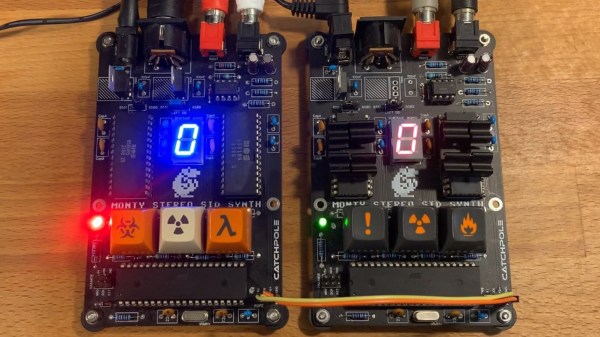
Over the years, plenty of work has gone into emulating the Commodore 64 6581 SID chip, but as [SlipperySeal] puts it, nothing beats the real thing. His take on the MIDI SID-based synth not only sounds fantastic, but looks the business.

The 6581 SID arguably blessed the Commodore 64 with some of the best sound capabilities of any home computer in the 8-bit era (make sure to ‘sound off’ in the comments if you disagree). The 6581 was a three-voice analog synth with a dizzying array of settings. This was at a time when most home computers could just about manage a ‘beep’ of varying lengths and frequencies.

When you mix MIDI with the capabilities of the SID, you get something like [SlipperySeal]’s awesome looking synth, known as ‘Monty’. While the road to this point unfortunately resulted in several blown-up SID chips, the sacrifice seems to have paid off.

Realizing the limitations of having ‘just’ three voices, Monty is designed to use two SID chips in parallel, for a total of six voices in pleasing stereo sound. MIDI commands are transferred to the dual SIDs by way of an ATmega1284p microcontroller. The SID is well understood by this point, and [SlipperySeal] goes into great detail explaining the fundamentals of SID programming over on GitHub.

This isn’t the first MIDI synth that is based around the C64 SID chip, but [SlipperySeal] made sure that his stood out from the crowd. The seven-segment display centered on the board makes for a delightfully simple visualizer, an effect that looks even better when running two Monty boards at once, each responding to alternate MIDI channels (check out the video below). Naturally, we’re also fans of projects that include ominous, cryptic keyswitches.

Continue reading “Retro Stereo SID Synth Looks And Sounds Sensational”

Books You Should Read: Bil Herd’s Back Into The Storm

It’s a morning ritual that we guess most of you share with us; before whatever work a new day will bring to sit down with a coffee and catch up with the tech news of the moment on Hackaday and other sites. Most of us don’t do many exciting things in our everyday lives, so reading about the coolest projects and the most fascinating new developments provides us with interest and motivation. Imagine just for a moment then that by a twist of fate you found yourself taking a job at the epicentre of the tech that is changing the world,  producing the objects of desire and pushing the boundaries, the place you’d give anything to work at.

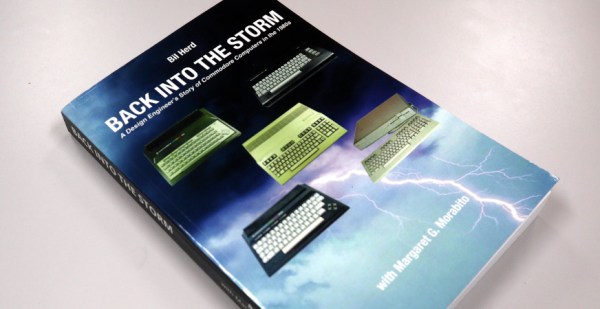
This is the premise behind our Hackaday colleague Bil Herd’s autobiographical chronicle of time in the mid 1980s during which he worked at Commodore, maker of some of the most iconic home computers of the day. We follow him through the three years from 1983 to 1986 as hardware lead on the “TED” series of computers including the Commodore 16 and Plus/4, and then the Commodore 128, a dual-processor powerhouse which was arguably the last of the big-selling 8-bit home computers.

It’s an intertwined set of narratives peppered with personal anecdotes; of the slightly crazy high-pressure world of consumer videogames and computing, the fine details of designing a range of 8-bit machines, and a fascinating insight into how the culture at Commodore changed in the period following the departure of its founder Jack Tramiel.

Continue reading “Books You Should Read: Bil Herd’s Back Into The Storm”

Original Commodore 64 ad

Love Letter To Commodore 64 Ads Takes Us Down Memory Lane

If you shop, you can get a pretty nice laptop for around $595. Maybe not the top of the line, but still pretty nice with multiple cores, a large hard drive, and a big color screen. But in the 1980s, the Commodore 64 bragged that for $595, they’d give you more than anyone else at twice the price. After all, 64K of RAM! Graphics with 16 whole colors! [Lunduke] dug up a bunch of these ads and has some thoughts on them and we really enjoyed the trip down memory lane.

If you look at other contemporary computers, they did cost more although sometimes it wasn’t a fair comparison. The TRS80 III, for example, cost $999 with 16K of RAM but it also had its own monitor — not color, though.

It is amazing to think that we’ve gone from where 16K was a reasonable amount of RAM in a personal computer to where it isn’t even worth having a flash drive with that capacity. We also can’t help but note that while computing power per dollar is through the roof now, computers aren’t actually that much more fun. We enjoyed interfacing a teletype to our 1802 ELF and working out a 300 baud modem for our TRS-80. Sure, we didn’t have Skyrim or HD movies, but we still have fun.

If you want to relive these exciting days, it is easy enough to build your own C64 with varying degrees of fidelity. It is trivial to emulate the thing on any kind of modern hardware, too.

Pi Pico Emulates ROM For Speedy Retro Hacking

If you’ve ever worked on a system that loads its software from a ROM or EPROM, you know how much of a hassle it can be to make frequent changes to the code. Pulling the chip, flashing it, and sticking it back into the socket each time you change a line isn’t anyone’s idea of a good time. Which is why [Nick Bild] has come up with the PicoROM, a way to emulate a ROM chip using the Raspberry Pi Pico.

With the Pi Pico standing in for the original ROM, updating firmware takes a fraction of the time and doesn’t require you to actually disconnect any of the hardware. [Nick] had done something similar with FPGAs in the past, but the far cheaper and easier to work with Pi Pico makes this version particularly appealing. The secret to getting it to work is the overclocking potential of the Pico, which he says has been pushed to 400 MHz for this particular application.

PicoROM on a breadboard.

The downside is that you can’t access the Pico’s onboard flash when the chip is running that fast. To get around that limitation, all of the code is loaded into the microcontroller’s RAM. With a healthy 264 KB of memory this isn’t really a problem when emulating 32 KB chips, but [Nick] says his method would quickly fall apart for larger ROMs.

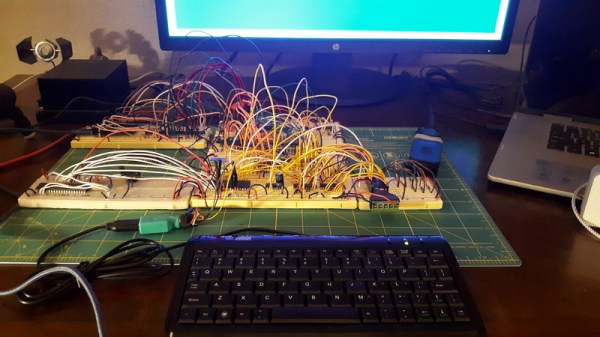
Beyond the Pi Pico itself, [Nick] is using a trio of 74LVC245AN 8-bit logic level shifters so the chip can talk to the 5 V logic of his homebrew 6502 computer. With everything wired up on a simple breadboard, PicoROM has no trouble serving up the operating system as it hums along at 2 MHz.

Of course, a modern high-performance microcontroller isn’t strictly necessary. In the past we’ve covered devices that could emulate an EPROM using 1990s era silicon.