The Origin Of QWERTY

There are very few things that are surrounded with as much hearsay and rumor as the origins of the QWERTY layout of typewriters and keyboards. The reason behind the QWERTY layout isn’t as simple as ‘so the bars for each letter don’t collide with each other.’ That’s nonsense – it would make far more sense to improve the mechanism before changing the arrangement of the keyboard around.

That’s not the only fallacious argument for the creation of QWERTY. It’s also been called a marketing ploy; Stephen Jay Gould popularized the idea of the QWERTY keyboard being as it is so a salesman could peck out TYPE WRITER on the top row [1]. This also makes little sense. Why would the top row and not the home row be so privileged as to contain all the letters the make up the name of the machine. For that matter, wouldn’t a sales pitch be more impressive if TYPE WRITER were typed with one hand?

This doesn’t mean there’s not a method behind the madness of QWERTY – it’s just not as simple as jammed typewriter mechanisms or appeasing the wishes of salesmen in the 1870s. QWERTY didn’t come out of thin air, though, but folk tale history of this keyboard layout is sadly deficient.

Continue reading “The Origin Of QWERTY”

How Low Can You Go? The World Of QRP Operation

Newly minted hams like me generally find themselves asking, “What now?” after getting their tickets. Amateur radio has a lot of different sub-disciplines, ranging from volunteering for public service gigs to contesting, the closest thing the hobby has to a full-contact sport. But as I explore my options in the world of ham radio, I keep coming back to the one discipline that seems like the purest technical expression of the art and science of radio communication – low-power operation, or what’s known to hams as QRP. With QRP you can literally talk with someone across the planet on less power than it takes to run a night-light using a radio you built in an Altoids tin. Now that’s a challenge I can sink my teeth into.

Continue reading “How Low Can You Go? The World Of QRP Operation”

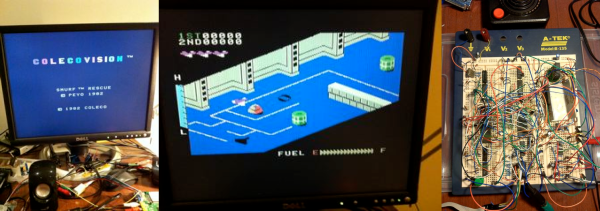
Breadboard Colecovision

The Colecovision was a state-of-the-art game console back in 1983. Based around the Z-80, it was almost a personal computer (and, with the Adam add-on, it could serve that function, complete with a daisy wheel printer for output). [Kernelcrash] set out to recreate the Colecovision on a breadboard and kept notes of the process.

His earlier project was building a Funvision (a rebranded VTech Creativision) on a breadboard, so he started with the parts he had from that project. He did make some design changes (for example, generating separate clocks instead of using the original design’s method for producing the different frequencies needed).

Continue reading “Breadboard Colecovision”

An Internet Radio In A Classic Cathedral Case

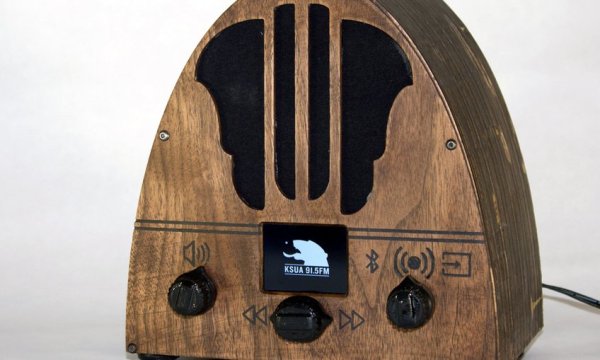
If you’re looking for a hot collectible item and a great restoration project, cathedral-style radios from the 1930s are a solid choice. But they’re getting harder to find as the years roll by, so if your heart’s content is to listen to modern broadcasts through a radio with a classic look, you may need to roll your own cathedral case for an internet radio.

The cathedral-style case was a hugely successful form-factor for radios back in the day, with variations on the arch-top theme ranging from Gothic to Art Deco. For this build, [nick.r.brewer] decided on a more parabolic arch. His build log has SVG files for the individual ribs that were cut from plywood with an X-Carve. A Raspberry Pi and TFT display were mounted inside the finished case, along with a Bluetooth module and a 20W amplifier and speaker. A big 3-pole rotary switch with custom knob selects the audio source and evokes that 1930s feel. It ended up looking pretty good, and the video after the break shows that it sounds nice, too.

We featured a fair number of internet-radio-in-a-classic-case builds before, but we’re surprised to see no cathedral-style radios have been modded. Maybe it’s time to hit the flea market and estate sales and see what turns up.

Continue reading “An Internet Radio In A Classic Cathedral Case”

Upgrading And Desoldering A Fake CPU

[quarterturn] had an old Apple Powerbook 520c sitting around in his junk bin. For the time, it was a great computer but in a more modern light, it could use an upgrade. It can’t run BSD, either: you need an FPU for that, and the 520 used the low-cost, FPU-less version of the 68040 as its main processor. You can buy versions of the 68040 with FPUs direct from China, which means turning this old Powerbook into a BSD powerhouse is just a matter of desoldering and upgrading the CPU. That’s exactly what [quarterturn] did, with an unexpected but not surprising setback.

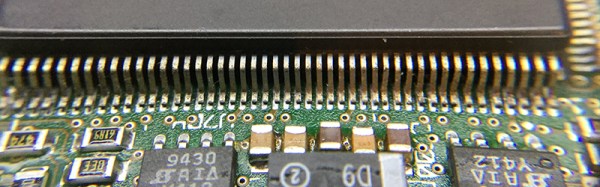
The motherboard for the Powerbook 500 series was cleverly designed, with daughter cards for the CPU itself and RAM upgrades. After pulling the CPU daughter card from his laptop, [quarterturn] faced his nemesis: a 180-pin QFP 68LC040. Removing the CPU was handled relatively easily by liberal application of ChipQuik. A few quick hits with solder braid and some flux cleaned everything up, and the daughter card was ready for a new CPU.

The new FPU-equipped CPU arrived from China, and after some very careful inspection, soldering, and testing, [quarterturn] had a new CPU for his Powerbook. Once the Powerbook was back up and running, there was a slight problem. The chip was fake. Even though the new CPU was labeled as a 68040, it didn’t have an FPU. People will counterfeit anything, including processors from the early 90s. This means no FPU, no BSD, and [quarterturn] is effectively back to square one.

That doesn’t mean this exercise was a complete loss. [quarterturn] did learn a few things from this experience. You can, in fact, desolder a dense QFP with ChipQuik, and you can solder the same chip with a regular soldering iron. Networking across 20 years of the Macintosh operating system is a mess, and caveat emptor doesn’t translate into Mandarin.

Breathing New Life Into An Old Key

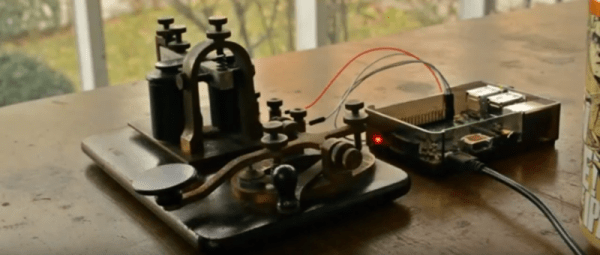
For most of us who have experimented with Morse code, the oldest key we are likely to have used will have been a piece of military surplus kit from the Second World War era. [Kyle Gabriel] however is a lucky man. His grandfather left him his key-on-board telegraph practice set, a vintage key and telegraph sounder arrangement used to learn Morse code in the days when the telegraph was king. Rather than keep the set merely as an heirloom, [Kyle] set about bringing it up to date by interfacing it to a Raspberry Pi and writing a Morse reader program.

Along the way [Kyle] had to contend with debouncing the switching signal from the key, considering an RC network before settling on a software debounce timer. He provides a brief synopsis of the mechanics of Morse decoding software, and a demonstration of the code in action which you can see in the video below the break.

[Kyle’s] decoding software, beatbybeat, is on GitHub. We can see it will be a useful tool for anyone interested in Morse, or who is writing their own Morse software.

Morse code has featured on these pages more than a few times over the years. Of relevance to this piece are an Arduino decoding Morse code, a more up-to-date practice oscillator with a home-made key, and a couple of other vintage telegraphs reading RSS feeds and reading emails.

Continue reading “Breathing New Life Into An Old Key”

Sony VTR with replacement foam brushes

Resurrecting A 1960’s VTR With Foam

Nearly fifty years back, Sony launched the DVC-2400, their first consumer grade video camera. This unit weighed in at 10 pounds, and recorded only 20 minutes of footage per reel. It left something to be desired for $1250, or nearly $9000 in today’s dollars.

[NeXT] got his hands on one of these camera kits, and began bringing it back to life. While all the pieces were included, the Video Tape Recorder (VTR), which is used to play back the footage, didn’t power up. A little poking found a dead transistor. After determining a modern replacement part, the voltages checked out. However, the drum still wasn’t spinning.

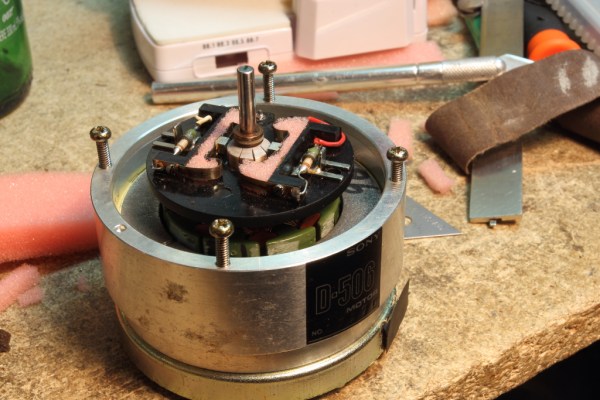
Further disassembly found that the drum’s DC motor was made on the cheap, using a foam instead of springs to apply pressure on the brushes. This foam had worn out and lost its springy qualities, so no electrical contact was made. New foam was cut out as a replacement. Once reassembled, the drum spun successfully. After some adjustment, the VTR was running at the correct speed once again.

With this working, the VTR should be ready to go. However, camera still isn’t working, so we’re awaiting a part 2.