A Smaller, Homebrew Amstrad

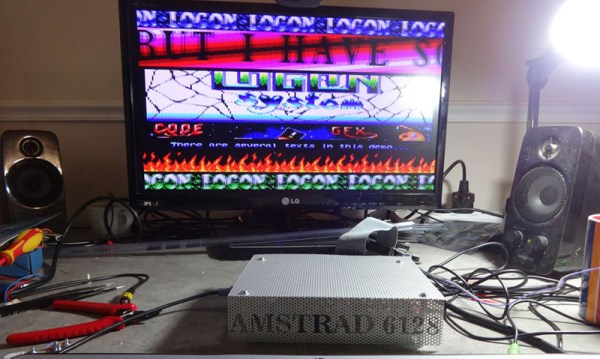
Although they weren’t very popular in America, the Amstrad CPC 464 and CPC 6128 were extremely well-received in Europe. [Zaxon] loved his ‘464, and for a bit of a learning experience – and the fact that an Amstrad takes up an exceptional amount of desk space – decided to make a clone of his favorite computer (.pl, Google translatrix).

The clone began as a simple schematic of the original Amstrad CPC 464, but the parts used in the original required some modern equivalents. Still, most of the old chips remained in the clone; the original Hitachi HD46505 CRT controller remains, as do the original DRAM chips and the vintage Z80 CPU.

A few modern amenities were added, including an interface for a PS/2 keyboard and a disk that’s much improved over the original cassette drive or weird 3.5″ disks: a Disk On Module, or basically a CompactFlash card in a strange form factor that plugs straight into a motherboard’s IDE socket. They’re mostly seen when tearing apart old thin clients, but using them in retrocomputing project is a great idea.

Thanks [rasz_pl] for the tip. Video below.

Continue reading “A Smaller, Homebrew Amstrad”

Pre-Web Hardware Connects To The Web

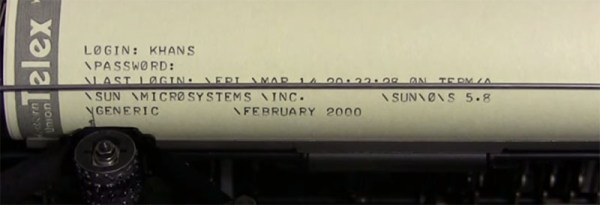
We’re not quite to the 25th anniversary of the world wide web, but that doesn’t mean the greatest innovation in information distribution since [Gutenberg]’s press can’t be celebrated a bit early, does it? [Suhayl] is throwing some of his hardware into the ring, and loading up the first web page with a modem from the mid 1960s and a teletype from the mid 70s. No, no sane person would have ever done this 25 years ago, but it’s neat to watch in any event.

The hardware [Suhayl] is using includes a Livermore Data Systems modem. It’s a finely crafted wooden box with an acoustic coupler on top, and a DB-25 connector on a side that connects to a terminal or computer via RS-232. If that Livermore Data Systems acoustic coupler modem looks familiar, you might be right. This modem was demoed back in 2009 by [phreakmonkey]. It’s an impressive little box that can connect to a remote system at up to 300 baud.

The I/O is handled by an ASR-33 teletype. This was the standard way to connect to computers and mainframes before we were all blessed with video terminals and TV typewriters. The whole setup connects to a Unix system with a much more familiar Hayes modem, runs a text-only browser, and retrieves the first web page as it was served up at CERN some 25 years ago.

Spin Up An Old Hard Drive With A Solenoid Motor

Just about all of us have a few old hard drives in our junk box. There are a myriad of projects out there to put them to work in new and interesting ways. One of those ways is to turn your hard drive into a solenoid motor of sorts. (YouTube link) This isn’t a new hack, videos of it have been kicking around the internet for years. [black1985vette] gives a pretty good explanation of how he’s done it. He used a piece of brass as a connecting rod between the drive head and a pin mounted off-center to the platter hub. One of the platter mounting screws provides the perfect place to set the pin. A bent safety-pin rubs the center of the hub, which is partially insulated with tape. When the pin contacts the hub, the drive head is energized, pushing the whole assembly around. The mass of the platters acts as a flywheel, carrying the motor the rest of the way around.

[Pulverrostmannen] performed a similar mod, though he used a micro switch to time the drive head. Rather than a brass connecting rod, [Pulverrostmannen] used a spare head. With a simple transistor circuit acting as a speed control, his hard drive motor revved up to around 1560 RPM, which is pretty respectable for a bunch of junk parts.

So next time you’re stuck in on cold rainy weekend, pull out some of those old drives and get hacking! Click past the break to several of these projects in action.

Continue reading “Spin Up An Old Hard Drive With A Solenoid Motor”

Fixing Sega Cartridges With Old BIOS Chips

For one reason or another, [Dragao] has an old Sonic The Hedgehog cartridge that throws an illegal instruction somewhere in the Marble Zone stage. While the cause of this illegal instruction is probably cosmic rays, how to repair this cartridge isn’t quite as clear. It can be done, though, using BIOS chips from an old computer.

[Dragao] got the idea of repairing this cartridge from Game Boy flash carts. These cartridges use chips that are a simple parallel interface to the address and data lines of the Game Boy’s CPU, and Sega Genesis / Mega Drive flash cart would work the same way. The problem was finding old DIP flash chips that would work. He eventually found some 8-bit wide chips on the motherboard of an old computer, and by stacking the chips, he had a 16-bit wide Flash chip.

To program the chips, [Dragao] wired everything up to an Arduino Mega, put a ROM on the chip, and wired it up to the old Sega cartridge. Surprisingly or unsurprisingly, everything worked, and now [Dragao] has a fully functioning copy of Sonic The Hedgehog.

Hackaday Retro Edition: The Second Most Valuable Home Computer

This will come to no surprise to anyone who has ever talked to me for more than a few minutes, but one of my guilty Internet pleasures is heading over to eBay’s ‘vintage computing’ category, sorting by highest price, and grabbing a cup of coffee. It’s really just window shopping and after a while you start seeing the same things over and over again; Mac 512s with a starting bid far more than what they’re worth, a bunch of old PC-compatible laptops, and a shocking amount of old software. For the last week I’ve been watching this auction. It’s a Commodore 65 prototype – one of between 50 and 200 that still exist – that has over 60 bids, the highest for over $20,000 USD. It’s the most successful vintage computer auction in recent memory, beating out the usual high-profile auctions like Mac 128s and Altair 8800s. The most valuable home computer is the Apple I, but if you’re wondering what the second most valuable one is, here you go.

C65 serialThe C65 is not a contemporary of the C64, or even our own [Bil Herd]’s C128. This was the Amiga era, and the C65 was intended to be the last great 8-bit machine. From a page dedicated to the C65, it’s pretty much what you would expect: the CPU is based on a 6502, with the on-die addition of two 6526 CIA I/O controllers. The standard RAM is 128kB, expandable to 8MB by an Amiga 500-like belly port. Sound would be provided by two SIDs, and the video is based on the VIC-III, giving the C65 a pallette of up to 4096 colors and a resolution of up to 1280×400.

There’s still a little over five hours to go in the auction, but the current $21000 price should go even higher in the final hour; a C65 auction from a few years ago fetched $20100 for ‘a computer with missing parts’. This auction is for a complete, working system that has remained intact since it was discovered during the Commodore closing.

Update: Auction finished for $22,862.01 USD. For historical purposes, here’s a flickr album, a video, and another video.


vt100normal The Hackaday Retro Edition is our celebration of old computers doing something modern, in most cases loading the old, no CSS or Javascript version of our site.

If old and rare computers are your sort of thing, Hackaday will be at the VCF East this year.

If you have an old computer you’d like featured, just load up the retro site, snap some pictures, have them developed, and send them in.

An Adventure Into Android Makes The VIC-20 Speak

History and [Bil Herd] teaches us that Commodore begged, borrowed, or stole the engineers responsible for the Speak & Spell to add voice synthesis to a few of the computers that came after the C64. This didn’t quite work out in practice, but speech synthesis was something that was part of the Commodore scene for a long time. The Votrax Type ‘n Talk was a stand-alone speech synthesizer that plugged into the expansion port of the VIC-20. It was expensive, rare, but a few games supported it. [Jan] realized the state of speech synthesis has improved tremendously over the last 30 years, and decided to give his VIC a voice with the help of a cheap Android phone.

A few VIC-20 games, including [Scott Adams] adventure games, worked with the Votrax speech synthesizer by sending phonemes as text over the expansion port. From there, the Votrax would take care of assembling everything into something intelligible, requiring no overhead on the VIC-20. [Jan] realized since the VIC is just spitting out characters for each phoneme, he could redirect those words to a better, more modern voice synthesizer.

A small Bluetooth module was wired up to the user port on the VIC, and this module was paired with a cheap Android smartphone. The smartphone receives the serial stream from an adventure game, and speaks the descriptions of all the scenes in these classic adventure games.

It’s a unique experience judging from the video, but the same hardware and software can also be added to any program that will run on the VIC-20, C64, and C128. Video below.

Continue reading “An Adventure Into Android Makes The VIC-20 Speak”

A Raspberry Pi SID Player

Of all the vintage chiptune machines out there, the Commodore 64 is the most famous. Even 30 years later, there are still massive gatherings dedicated to eeking out the last cycle of processing power and graphics capability from the CPU and the infamous synth-on-a-chip, the SID. [Bob] wanted to build a SID jukebox. A C64 is capable of the job, but if you want to have every SID composition on an SD card and connect that to a network, a Raspberry Pi is the way to go.

The SID chip, in its 6581 or 8580 versions, is controlled directly by poking registers on the chip through the address and data busses. This means a lot of pins, too many for the original Raspi expansion header. That’s not a problem that can’t be solved with a few shift registers, though. The rest of the circuit is an LM386 audio amplifier, an LCD that displays the current song, and a can crystal oscillator for the SID.

Right now everything is wired up on a breadboard, but making this a Raspberry Pi hat would be a rather simple proposition. It’s only a matter of finding a SID with working filters, and if you can manage that, it’s a pretty easy build to replicate. Video below.

Continue reading “A Raspberry Pi SID Player”