Training Bats In The Random Forest With The Confusion Matrix

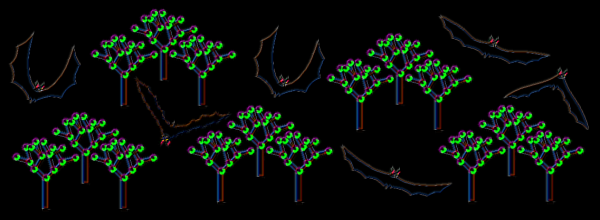
When exploring the realm of Machine Learning, it’s always nice to have some real and interesting data to work with. That’s where the bats come in – they’re fascinating animals that emit very particular ultrasonic calls that can be recorded and analysed with computer software to get a fairly good idea of what species they are. When analysed with an FFT spectogram, we can see the individual call shapes very clearly.

Creating an open source classifier for bats is also potentially useful for the world outside of Machine Learning as it could not only enable us to more easily monitor bats themselves, but also the knock on effects of modern farming methods on the natural environment. Bats feed on moths and other night flying insects which themselves have been decimated in numbers. Even in the depths of the countryside here in the UK these insects are a fraction of the population that they used to be 30 years ago, but nobody seems to have monitored this decline.

So getting back to our spectograms, it would be perfectly reasonable to throw these images at a convolutional neural network (CNN) and use an image feature-recognition strategy. But I wanted to explore the depths of the mysterious Random Forest. Continue reading “Training Bats In The Random Forest With The Confusion Matrix”

DSP Spreadsheet: IQ Diagrams

In previous installments of DSP Spreadsheet, we’ve looked at generating signals, mixing them, and filtering them. If you start trying to work with DSP, though, you’ll find a topic that always rears its head: IQ signals. It turns out, these aren’t as hard as they appear at first and, as usual, we’ll tackle them in a spreadsheet.

What does IQ stand for? The I stands for “in phase” and the Q stands for quadrature. By convention, the I signal is a cosine wave and the Q signal is a sine wave. Another way to say that is that the I and Q signals are 90 degrees out of phase. By manipulating the amplitude of I and Q, you can create complex modulation or, conversely, demodulate signals. We’ll see a spreadsheet that shows that completely next time.

Continue reading “DSP Spreadsheet: IQ Diagrams”

DSP Spreadsheet: Frequency Mixing

Circuit simulation and software workbooks like Matlab and Jupyter are great for being able to build things without a lot of overhead. But these all have some learning curve and often use clever tricks, abstractions, or library calls to obscure what’s really happening. Sometimes it is clearer to build math models in a spreadsheet.

You might think that spreadsheets aren’t built for doing frequency calculation and visualization but you’re wrong. That’s exactly what they’re made for — performing simple but repetative math and helping make sense of the results.

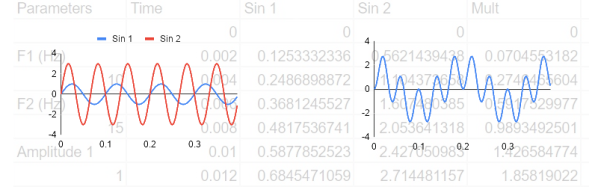
In this installment of the DSP Spreadsheet series, I’m going to talk about two simple yet fundamental things you’ll need to create mathematical models of signals: generating signals and mixing them. Since it is ubiquitous, I’ll use Google Sheets. Most of these examples will work on any spreadsheet, but at least everyone can share a Google Sheets document. Along the way, we’ll see a neat spreadsheet trick I should probably use more often.

Continue reading “DSP Spreadsheet: Frequency Mixing”

The Basics Of Persistence Of Vision Projects

Persistence of Vision (POV) is a curious part of the human visual system. It’s the effect by which the perception of an image lingers after light has stopped entering the eye. It’s why a spinning propeller appears as a disc, and why a burning sparkler appears to leave a trail in the air. It’s also commonly used as a display technology, where a series of flashing LEDs can be used to create messages that appear to float in the air. POV displays are a popular microcontroller project, and today, we’ll explore the basic techniques and skills required in such builds.

Continue reading “The Basics Of Persistence Of Vision Projects”

Grind Your Welds With Pride, If That’s The Way You Do It

To grind or not to grind? What a question! It all depends on what you’re really trying to show, and in the case of welded joints, I often want to prove the integrity of the weld.

My ground-back piece of welded tube. Eagle-eyed readers will spot that the grinding reveals a weld that isn't perfect.
My ground-back piece of welded tube. Eagle-eyed readers will spot that the grinding reveals a weld that isn’t perfect.

Recently, I wrote a piece in which I talked about my cheap inverter welder and others like it. As part of it I did a lower-current weld on a piece of thin tube and before snapping a picture of the weld I ground it back flat. It turns out that some people prefer to see a picture of the weld bead instead — the neatness of the external appearance of the weld — to allow judgment on its quality. Oddly I believe the exact opposite, that the quality of my weld can only be judged by a closer look inside it, and it’s this point I’d like to explore.

Continue reading “Grind Your Welds With Pride, If That’s The Way You Do It”

DSP Spreadsheet: FIR Filtering

There’s an old saying: Tell me and I forget, teach me and I may remember, involve me and I learn. I’m guilty of this in a big way — I was never much on classroom learning. But if I build something or write some code, I’m more likely to understand how it works and why.

Circuit simulation and software workbooks like Matlab and Jupyter are great for being able to build things without a lot of overhead. But these all have some learning curve and often use clever tricks, abstractions, or library calls to obscure what’s really happening. Sometimes it is easier to build something in a spreadsheet. In fact, I often do little circuit design spreadsheets or even digital design because it forces me to create a mathematical model which, in turn, helps me understand what’s really going on.

In this article I’m going to use Google Sheets — although you could do the same tricks in just about any spreadsheet — to generate some data and apply a finite impulse response (FIR) filter to it. Of course, if you had a spreadsheet of data from an instrument, this same technique would work, too.

Continue reading “DSP Spreadsheet: FIR Filtering”

Fried Desk Lamp Reborn: How To Use ESP8266 To Build Connected Devices

Some hacks are born of genius or necessity, and others from our sheer ham-fisted incompetence. This is not a story about the first kind. But it did give me an excuse to show how easy it is to design WiFi-connected devices that work the way you want them to, rather than the way the manufacturer had in mind.

It started out as a sensible idea – consumer electronics in Vietnam have many different electric plug types for mains AC power: A, C, G, F, and I are fairly present, with A and C being most common. For a quick review of what all those look like, this website sums it up nicely. There are universal power adapters available of course, but they tend to fit my most common type (C) poorly, resulting in intermittent power loss whenever you sneeze. So I figured I should replace all the plugs on my devices to be A-type (common to those of you in North America), as it holds well in all the power bar types I have, mainly leftover server PDUs.

This was very straightforward until I got to my desk lamp. Being a fancy Xiaomi smart lamp, they had opted to hide a transformer in the plug with such small dimensions that I failed to notice it. So instead of receiving a balmy 12 volts DC, it received 220 volts AC. With a bright flash and bang, it illuminated my desk one final time.

Continue reading “Fried Desk Lamp Reborn: How To Use ESP8266 To Build Connected Devices”