Hack Your Gmail: A Quick Start For Google App Scripting

For many people, Gmail is synonymous with e-mail. Some people like having cloud access to everything and some people hate having any personal data in the cloud. However you feel about it, one thing that was nice about having desktop software is that you could hack it relatively easily. If you didn’t like how your desktop mail client worked, you had a lot of options: use a different program, write your own, hack the executable of your current program, or in the case of open source just fork it and make any changes you are smart enough to make.

Google provides a lot of features with all of its products, but however you slice it, all the code runs on their servers out of your reach. Sort of. If you know JavaScript, you can use Google Apps Script to add features to many Google products including Gmail. If you’ve used Office scripting, the idea is the same, although obviously the implementation is very different.

With scripting you can make sophisticated filters that would be very hard to do otherwise. For example,  monitor for suspicious messages like those with more than 4 attachments, or that appear to come from a contact between the hours of 2AM and 5AM.

For our example today, I’m going to show you something that is easy but also highly useful.

Continue reading “Hack Your Gmail: A Quick Start For Google App Scripting”

The Linux Throwie: A Non-Spacefaring Satellite

Throwies occupy a special place in hardware culture — a coin cell battery, LED, and a magnet that can be thrown into an inaccessible place and stick there as a little beacon of colored light. Many of us will fondly remember this as a first project. Alas, time marches inevitably on, and launching cheerful lights no longer teaches me new skills. With a nod to those simpler times, I’ve been working on the unusual idea of building a fully functional server that can be left in remote places and remain functional, like a throwie (please don’t actually throw it). It’s a little kooky, yet should still deliver a few years of occasional remote access if you leave it somewhere with sunlight.
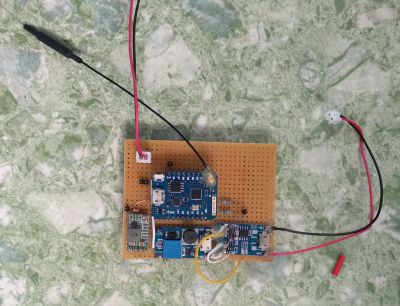
A short while ago, I described the power stages for this solar-powered, cloud accessible Linux server. It only activates on demand, so a small solar cell and modest battery are sufficient to keep the whole show running.

Where we left off, I had a solar cell that could charge a battery, and provide regulated 12 V and 5 V output. For it to be a functional device, there are three high level problems to solve:

  1. It must be possible to set up the device without direct physical access
  2. You must be able to remotely turn it on and off as needed.
  3. It needs to be accessible from the Internet.

The funny thing is, this hardware reminds me of a satellite. Of course it’s not meant to go into space, but I do plan to put it somewhere not easy to get to again, it runs off of solar power, and there’s a special subsystem (ESP8266) to tend the power, check for remote activation, and turn the main computer (Raspberry Pi 3) on and off as necessary. This sounds a lot like space race tech, right?

As I have a bit more code than usual to share with you today, I’ll discuss the most interesting parts, and provide links to the full firmware files at the end of the article.

Continue reading “The Linux Throwie: A Non-Spacefaring Satellite”

Hack My House: Opening Raspberry Pi To The Internet, But Not The Whole World

If you’ve followed along with our series so far, you know we’ve set up a network of Raspberry Pis that PXE boot off a central server, and then used Zoneminder to run a network of IP cameras. Now that some useful services are running in our smart house, how do we access those services when away from home, and how do we keep the rest of the world from spying on our cameras?

Before we get to VPNs and port forwarding, there is a more fundamental issue: Do you trust your devices? What exactly is the firmware on those cheap cameras really doing? You could use Wireshark and a smart switch with port mirroring to audit the camera’s traffic. How much traffic would you need to inspect to feel confident the camera never sends your data off somewhere else?

Thankfully, there’s a better way. One of the major features of surveillance software like Zoneminder is that it aggregates the feeds from the cameras. This process also has the effect of proxying the video feeds: We don’t connect directly to the cameras in order to view them, we connect to the surveillance software. If you don’t completely trust those cameras, then don’t give them internet access. You can make the cameras a physically separate network, only connected to the surveillance machine, or just set their IP addresses manually, and don’t fill in the default route or DNS. Whichever way you set it up, the goal is the same: let your surveillance software talk to the cameras, but don’t let the cameras talk to the outside world.

Edit: As has been pointed out in the comments, leaving off a default route is significantly less effective than separate networks. A truly malicious peice of hardware could easily probe for the gateway.

This idea applies to more than cameras. Any device that doesn’t need internet access to function, can be isolated in this way. While this could be considered paranoia, I consider it simple good practice. Join me after the break to discuss port forwarding vs. VPNs.

Continue reading “Hack My House: Opening Raspberry Pi To The Internet, But Not The Whole World”

Warnings Are Your Friend – A Code Quality Primer

If there’s one thing C is known and (in)famous for, it’s the ease of shooting yourself in the foot with it. And there’s indeed no denying that the freedom C offers comes with the price of making it our own responsibility to tame and keep the language under control. On the bright side, since the language’s flaws are so well known, we have a wide selection of tools available that help us to eliminate the most common problems and blunders that could come back to bite us further down the road. The catch is, we have to really want it ourselves, and actively listen to what the tools have to say.

We often look at this from a security point of view and focus on exploitable vulnerabilities, which you may not see as valid threat or something you need to worry about in your project. And you are probably right with that, not every flaw in your code will lead to attackers taking over your network or burning down your house, the far more likely consequences are a lot more mundane and boring. But that doesn’t mean you shouldn’t care about them.

Buggy, unreliable software is the number one cause for violence against computers, and whether you like it or not, people will judge you by your code quality. Just because Linus Torvalds wants to get off Santa’s naughty list, doesn’t mean the technical field will suddenly become less critical or loses its hostility, and in a time where it’s never been easier to share your work with the world, reliable, high quality code will prevail and make you stand out from the masses.

Continue reading “Warnings Are Your Friend – A Code Quality Primer”

The Linux Throwie: Powering A Linux Server With A 0.3W Solar Panel

Have you ever had one of those moments, when you’re rummaging through your spare parts heap, and have a rather bizarre project idea that you can’t quite get out of your head? You know, the ones that have no clear use, but simply demand to be born, of glass and steel and silicon?

This time, the stubborn idea in question was sort of like a solar-rechargeable LED throwie, but instead of a blinking light, it has a fully cloud-accessible embedded Linux server in the form of a Raspberry Pi 3 Model B+. Your choice of embedded Linux board should work — I just happen to have a lot of these due to a shipping error.

There were two main challenges here: First, it would have to combine the smallest practical combination of solar panel, power supply, and Li-ion cell that could run the Raspberry Pi. Second, we’ll need to remotely activate and access the Pi regardless of where it is, as well as be able to connect it to WiFi without direct physical access. In this article we’ll be dealing with the first set of problems — stay tuned for the rest.

Continue reading “The Linux Throwie: Powering A Linux Server With A 0.3W Solar Panel”

The Machinists’ Mantra: Precision, Thy Name Is Rigidity

“Everything is a spring”. You’ve probably heard that expression before. How deep do you think your appreciation of that particular turn of phrase really is? You know who truly, viscerally groks this? Machinists.

As I’ve blathered on about at length previously, machine tools are all about precision. That’s easy to say, but where does precision really come from? In a word, rigidity. Machine tools do a seemingly magical thing. They remove quantities of steel (or other materials medieval humans would have killed for) with a slightly tougher piece of steel. The way they manage to do this is by applying the cutting tool to the material within a setup that is so rigid that the material has no choice but to yield. Furthermore, this cutting action is extremely precise because the tool moves as little as possible while doing so. It all comes down to rigidity. Let’s look at a basic turning setup.

Continue reading “The Machinists’ Mantra: Precision, Thy Name Is Rigidity”

Hack My House: Running Raspberry Pi Without An SD Card

Many of us have experienced the pain that is a Raspberry Pi with a corrupted SD card. I suspect the erase-on-write nature of flash memory is responsible for much of the problem. Regardless of the cause, one solution is to use PXE booting with the Raspberry Pi 3. That’s a fancy way to say we’ll be booting the Raspberry Pi over the network, instead of from an SD card.

What does this have to do with Hacking My House? As I discussed last time, I’m using Raspberry Pi as Infrastructure by building them into the walls of every room in my house. You don’t want to drag out a ladder and screwdriver to swap out a misbehaving SD card, so booting over the network is a really good solution. I know I promised we’d discuss cabling and cameras. Think of this as a parenthetical article — we’ll talk about Ethernet and ZoneMinder next time.

So let’s dive in and see what the Preboot Execution Environment (PXE) is all about and how to use PXE with Raspberry Pi.

Continue reading “Hack My House: Running Raspberry Pi Without An SD Card”