Data retention is a funny thing. Atmel will gladly tell you that the flash memory in an ATmega32A will retain its data for 100 years at room temperature. Microchip says its EEPROMs will retain data for over 200 years. And yet, humanity has barely had a good grasp on electricity for that long. Heck, the silicon chip itself was only invented in 1958. EEPROMs and flash storage are altogether younger themselves.
How can these manufacturers make such wild claims when there’s no way they could have tested their parts for such long periods of time? Are they just betting on the fact you won’t be around to chastise them in 2216 when your project suddenly fails due to bit rot.
Well, actually, there’s a very scientific answer. Enter the practice of accelerated wear testing.
Will Rogers once said that veterinarians are the best doctors because their patients can’t tell them where it hurts. I’ve often thought that electronic people have a similar problem. In many cases, what’s wrong with our circuits isn’t visible. Sure, you can visually identify a backward diode, a bad solder joint, or a blown fuse. But you can’t look at a battery and see that it is dead or that a clock signal isn’t reaching some voltage. There are lots of ways to look at what’s really going on, but there is no substitute for a scope. It used to be hard for the average person to own a scope, but these days, it doesn’t require much. If you aren’t shopping for the best tech or you are willing to use it with a PC, oscilloscopes are quite affordable. If you spend even a little, you can now get scopes that are surprisingly capable with features undreamed of in years past. For example, many modern scopes have a dizzying array of triggering options. Do you need them? What do they do? Let’s find out.
I’ll be using a relatively new Rigol DHO924S, but none of the triggering modes are unique to that instrument. Sometimes, they have different names, and, of course, their setup might look different than my pictures, but you should be able to figure it out.
What is Triggering?
In simple terms, an oscilloscope plots time across the X-axis and voltage vertically on the Y-axis. So you can look at two peaks, for example, and measure the distance between them to understand how far apart they are in time. If the signal you are measuring happens repeatedly — like a square or sine wave, for example — it hardly matters which set of peaks you look at. After all, they are all the same for practical purposes.
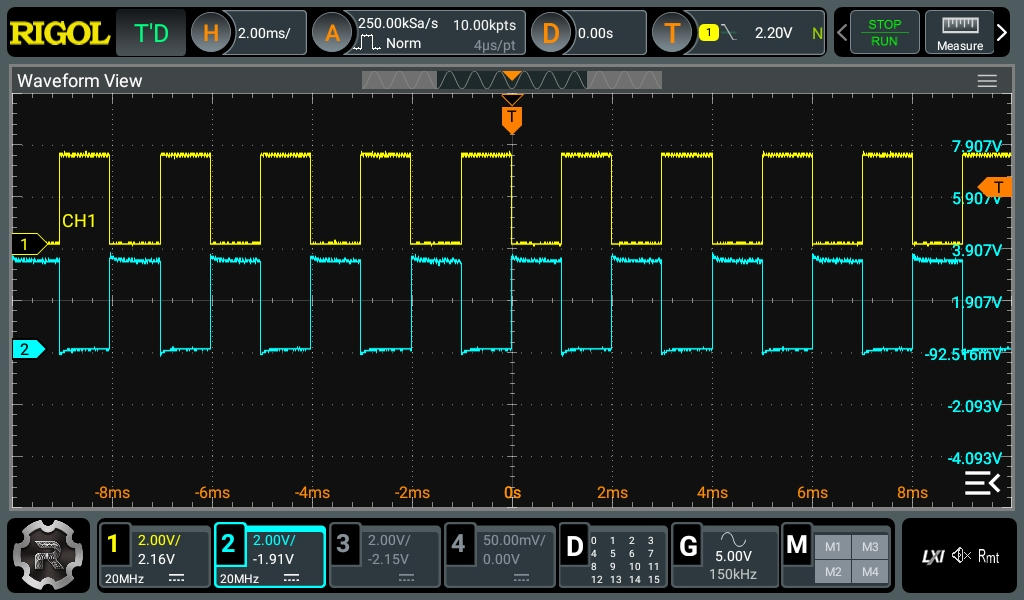
Pretty square waves all in a row. Channel 2 is 180 degrees out of phase (inverted). But is that all there is?
The problem occurs when you want to see something relative to a particular event. Basic scopes often have level triggering. They “start” when the input voltage goes above or below a certain value. Suppose you are looking at a square wave that goes from 0 V to 5 V. You could trigger at about 2.5 V, and the scope will never start in the middle of a cycle.
Digital scopes tend to capture data before and after the trigger, so the center of the screen will be right on an edge, and you’ll be able to see the square waves on either side. The picture shows two square waves on the screen with the trigger point marked with a T in the top center of the display. You can see the level in the top bar and also marked with a T on the right side of the screen.
What happens if there are no pulses on the trigger source channel? That depends. If you are in auto mode, the scope will eventually get impatient and trigger at random. This lets you see what’s going on, but there’s no reference. If you are in normal mode, though, the scope will either show nothing or show the last thing it displayed. Either way, the green text near the top left corner will read WAIT until the trigger event occurs. Then it will say T’D.
Perhaps the most-cited downside of renewable energy is that wind or sunlight might not always be available when the electrical grid demands it. As they say in the industry, it’s not “dispatchable”. A large enough grid can mitigate this somewhat by moving energy long distances or by using various existing storage methods like pumped storage, but for the time being some amount of dispatchable power generation like nuclear, fossil, or hydro power is often needed to backstop the fundamental nature of nature. As prices for wind and solar drop precipitously, though, the economics of finding other grid storage solutions get better. While the current focus is almost exclusively dedicated to batteries, another way of solving these problems may be using renewables to generate hydrogen both as a fuel and as a means of grid storage. Continue reading “Renewable Energy: Beyond Electricity”→
Although the concept of nuclear fission is a simple and straightforward one, the many choices for fuel types, fuel design, reactor configurations, coolant types, neutron moderator or reflector types, etc. make that nuclear fission reactors have blossomed into a wide range of reactor designs, each with their own advantages and disadvantages. The story of the pebble bed reactor (PBR) is among the most interesting here, with its development winding its way from the US Manhattan Project over the Atlantic to Germany’s nuclear power industry during the 1960s, before finding a welcoming home in China’s rapidly growing nuclear power industry.
As a reactor design, PBRs do not use fuel rods like most other nuclear reactors, but rather spherical fuel elements (‘pebbles’) that are inserted at the top of the reactor vessel and extracted at the bottom, allowing for continuous refueling, while helium acts as coolant. With a strong negative temperature coefficient, the design should be extremely safe, while providing high-temperature steam that can be used for applications that otherwise require a coal boiler or gas turbine.
With China recently having put its twin-PBR HTR-PM plant into commercial operation, why is it that it was not the US, Germany or South Africa to first commercialize PBRs, but relative newcomer China?
Of all the rabbit holes we technical types tend to fall down, perhaps the one with the most twists and turns is: time. Some of this is due to the curiously mysterious nature of time itself, but more has to do with the various ways we’ve decided to slice and dice time to suit our needs. Most of those methods are (wisely) based upon the rhythms of nature, but maddeningly, the divisions we decided upon when the most precise instrument we had was our eyes are just a little bit off. And for a true time junkie, “a little bit off” can be a big, big problem.
Luckily, even the most dedicated timekeepers — those of us who feel physically ill when the clock on the stove and the clock on the microwave don’t match — have a place to go that’s a haven of temporal correctness: radio station WWV. Along with sister stations WWVB and WWVH, these stations are the voice of the US National Institutes for Standards and Technology’s Time and Frequency Division, broadcasting the official time for the country over shortwave radio.
Some might say the programming coming from these stations is a bit on the dry side, and it’s true that you can only listen to the seconds slip by for so long before realizing that there are probably better things to do with your day. But the WWV signals pack a surprising amount of information into their signals, some of it only tangentially related to our reckoning of time. This makes these stations and the services they provide essential infrastructure for our technological society, which in turn makes it worth your time to look into just how they do it.
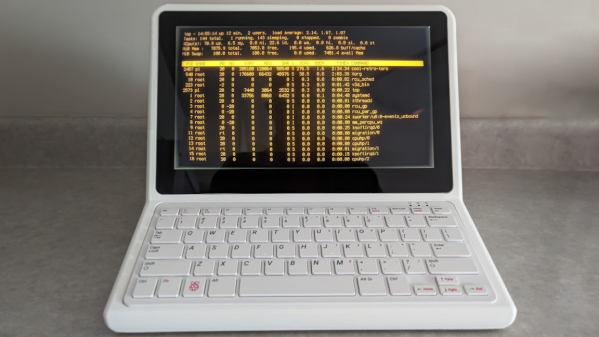
I recently had the opportunity to purchase an early version of a new display, and it happened to be just the thing I needed to make a project work. That display is the Elecrow 11.6″ CrowVision touchscreen slated for release in 2024. Preorders are being accepted on Crowd Supply.
I had an idea for a retro-inspired PC build that was just waiting for a screen like this. I’ll talk about the display and what’s good about it, then showcase the build for which it was the missing piece. If you’ve got a project waiting for something similar, maybe this part will provide what you need or at least turn on some new ideas.
What Is It?
The CrowVision 11.6″ 1366 x 768 touchscreen has an HDMI input, USB output for touch data, and accepts 12 V DC. It’s made to interface easily with a Raspberry Pi or other SBC (single-board computer).
Personally I consider a display like this to be the minimum comfortable size for using desktop type applications in a windowed environment. Most displays in this space are smaller. But aside from that, what helps make it useful for embedding into a custom enclosure is the physical layout and design.
Since I was looking for the largest display that could be flush-mounted in an enclosure without a lot of extra space around the display’s sides, it was just what I needed. The integrated touchscreen is a nice bonus.
As both beginning hackers and Silicon Valley investors alike keep discovering, there are a lot of differences between hardware and software. One important difference is cost of iterating over a design. In software, you can comfortably rerun your build process and push updates out near instantly to tons of users. In hardware, all of that costs money, and I do mean, it costs way more money than you’d want to spend.
When I see people order boards that could never work because of some fundamental design assertions, with mistakes entirely preventable, it hurts. Not in an “embarrassment” way – it’s knowing that, if they asked someone to take a look at the design, they could’ve received crucial feedback, pulled the traces on the board differently or added some components, and avoided spending a significant chunk of money and time expecting and assembling a board that has a fundamental mishap.
Every thing like this might set a beginner back on their hacker journeys, or just have them spend some of their valuable time, and we can do a ton to prevent that by simply having someone experienced take a look.