TI-99/4A KSP Controller Has A Handle On Vintage NASA Styling

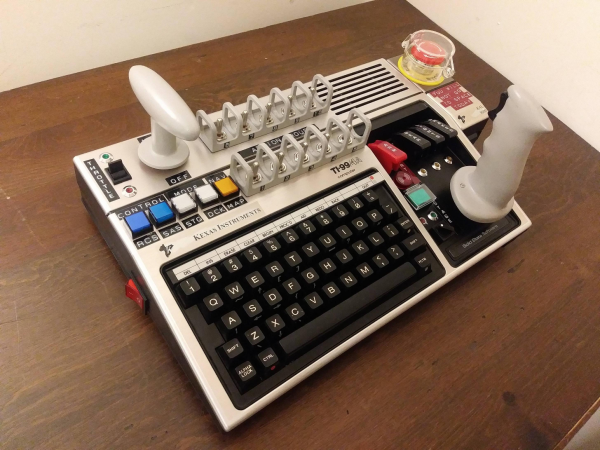
[MelkorsGreatestHits] had an extra USB MAME board burning a hole in his parts bin, so he turned it into fuel for this far-out Kerbal Space Program controller. Cool your jets — no fully-functioning TI-99/4As were harmed in the making of this baby. Besides, this is a KAL 9000 from Kexas Instruments. See the badges?

After donating the usable parts deemed unnecessary for space exploration, [MelkorsGreatestHits] had even more room inside the case for the throng of toggles that make this controller so touchable. We love the two tiers of toggles here — the important ones are separated with 3D-printed Space Shuttle-style switch guards, and the super-important toggles have flip-up covers to protect them from errant flicks of the hand. The vintage embosser labels are an impressive touch, and make us wish we had one that stamps vertically.

[MelkorsGreatestHits] modeled the combo throttle/roll handle and the joystick after the Apollo 11 command module controls. Unfortunately, the MAME board didn’t like his 3-axis analog joystick, so both are 2-axis and give WASD control. Good enough to get to the Mün!

We’ve seen more than a few KSP controllers around here, but none so overdone as this wonderful stand-up command station.

Via r/DIY

Pickaxe Controller Is Great For Minecraft, Just Aim Carefully

Minecraft started out as a lovable indie game, and became an unstoppable billion-dollar juggernaut in a remarkably quick fashion. Over time, it’s become a favorite among modders and those that seek to explore what’s possible with the game. [Eric] decided that the game could be more immersive, and built this awesome pickaxe controller.

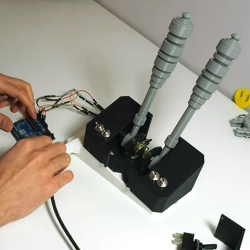
The controller is built around an off-the-shelf Minecraft pickaxe toy; a popular piece of merchandise given the tool’s importance in the game. [Eric] added an Arduino, an accelerometer, and buttons. This lets the controller act as a mouse, allowing the user to control the camera by moving the pickaxe. The buttons unlock further functionality, with the red button allowing the user to mine by swinging the axe. Reportedly this is a lot of fun, albeit tiring in long sessions. Other features are still controlled by the keyboard, such as movement and accessing inventory screens. We’d love to try it out; carving out a tunnel block by block would be quite satisfying after all the exertion!

[Eric] is actually giving the controller away to a lucky subscriber, so head over to the Youtube video if you’d like a shot to own the nifty pickaxe. We’ve seen other advanced Minecraft controllers before, too. Video after the break.

Continue reading “Pickaxe Controller Is Great For Minecraft, Just Aim Carefully” →

A Retro Gaming Console For The New Generation

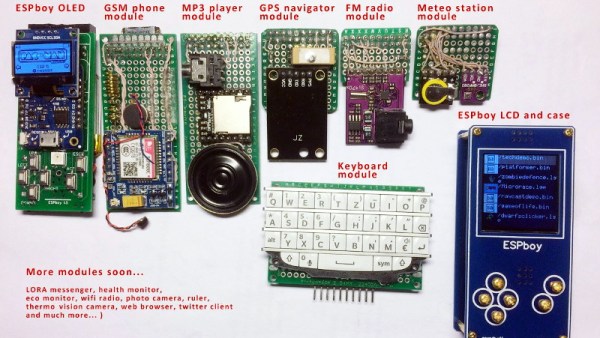
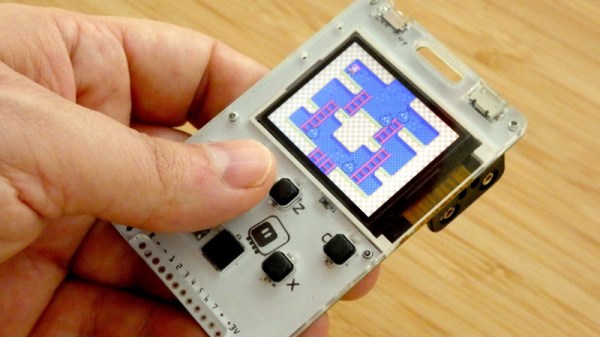
Ostensibly the ESPboy is an open-source hackable game engine built as an IoT platform for STEM education and play, but there’s no way [RomanS] could have been inspired by anything other than retro gaming consoles from the near past. For anyone who grew up playing with Tamagotchi pets or Palm Pilots, this project is going to be a major throwback.

The Saint Petersburg-based microcontroller hobbyist utilizes a ESP8266 microcontroller to build a series of modules for different game play modes, including a TFT display, GSM phone, MP3 player, GPS navigator, FM radio, and keyboard module. He has plans to build even more modules, including a LoRa messenger and thermal camera, to really expand the system’s capabilities.

Since the board has built-in WiFi, firmware can be uploaded to the device without a wired connection and compiler. The nature of the project makes the board compatible with the Arduino IDE and Micropython, which makes hacking the software even easier.

A TP4056 battery charging module charges the LiPo, although depending on the battery capacity, the charging current (set by the R3 resistor on the controller) does require some change. A MCP4725 I2C DAC is used for smooth driving the LCD’s backlight. In order to extend the battery life, the battery controller uses sleep mode to periodically wake up to measure and send data, which allows it to extend its battery life without external power. There’s also transistor driven buzzers that provide a little extra feedback to the user when playing games, complete with a variable resistor to adjust the sound volume.

A number of free pins run along the periphery for connecting to other modules, including pins for GPIO extension, sensor adapters, connectors to addressable LEDs, and an extension slot for actuators. For anyone interested in making their own version of the ESPboy, the PCB schematics are accessible online.

Projects like the Arduboy have shown that a small microcontroller-based game system can be equal parts fun and educational, so we’ve been excited to see more of these types of projects popping up during the course of the 2019 Hackaday Prize.

Continue reading “A Retro Gaming Console For The New Generation” →

Pie Face Game Rigged To Throw Pie At Anyone But You

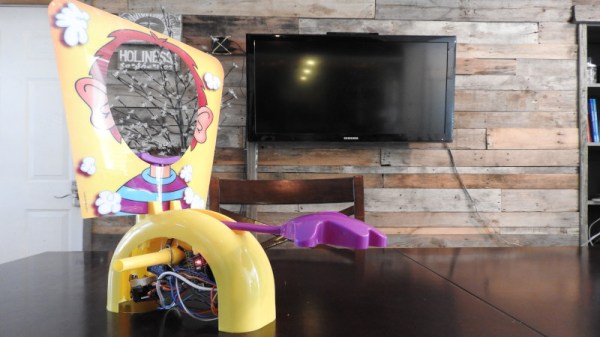
Pie Face is a game that does pretty much what you’d expect from the title. Players sit in front of a spring loaded arm, taking turns to twist a crank. Eventually, one unlucky player will release the arm and be splattered with whipped cream to the enjoyment of the group. [Harrison] wasn’t one to leave things to chance, however, so decided to rig the game.

Instead of allowing the spring-loaded arm to be released by the internal rotating drum, [Harrison] had a better idea. The drum was sanded smooth, to remove the teeth used by the release mechanism. Then, the release mechanism was replaced with a servo, controlled by an Arduino Nano fitted with a Bluetooth module. With just a tap on his smart phone, [Harrison] can trigger the game, guaranteeing his friends get the cream every time.

It’s a tidy build, and one that takes care to avoid detection with subtle design. Had he not released a Youtube video on the build, [Harrison]’s friends would likely be none the wiser. If your thirst for cheating is still unsated, consider loading your dice for a round of Settlers of Catan. Video after the break.

Continue reading “Pie Face Game Rigged To Throw Pie At Anyone But You” →

When Your Car Breaks Down, Simply Hack It Into A Simulator

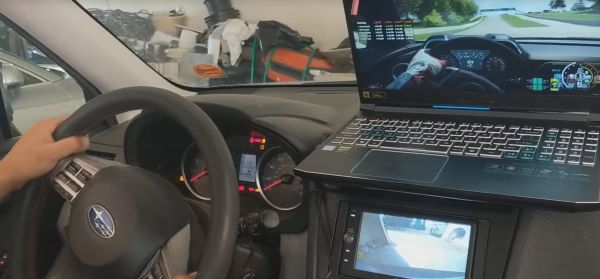
When [Nishanth]’s Subaru BRZ came to a sudden halt, he was saddened by the wait to get a new engine installed. Fortunately, he was able to cheer himself up by hacking it into a car simulator in the mean time. This would have the added benefit of not being limited to just driving on the Road Atlanta where the unfortunate mishap occurred, but any course available on Forza and similar racing games.

On paper it seemed fairly straight-forward: simply tap into the car’s CAN bus for the steering, throttle, braking and further signals, convert it into something a game console or PC can work with and you’re off to the races. Here the PC setup is definitely the cheapest and easiest, with a single part required: a Macchina M2 Under the Dash kit ($97.50). The XBox required over $200 worth of parts, including the aforementioned Macchina part, an XBox Adaptive Controller and a few other bits and pieces. And a car, naturally.

https://www.notion.so/image/https%3A%2F%2Fs3-us-west-2.amazonaws.com%2Fsecure.notion-static.com%2Fd49697c6-29ae-4b4d-a27b-e2da019d32de%2FUntitled.png?table=block&id=ed4e1bf2-91c6-4494-8e0f-f10964620869&width=5120&cache=v2

The Macchina M2 is the part that listens to the CAN traffic via the OBD2 port, converting it into something that resembles a USB HID gamepad. So that’s all a matter of plug’n’play, right? Not so fast. Every car uses their own CAN-based system, with different peripherals and addresses for them. This means that with the Macchina M2 acquired, [Nishanth]’s first task was to reverse-engineer the CAN signals for the car’s controls.

At this point the story is pretty much finished for the PC side of things, but the XBox One console is engineered to only accept official peripherals. The one loop-hole here is the Adaptive Controller, designed for people with disabilities, which allows the use of alternative inputs. This also enables using a car as an XBox One controller, which is an interesting side-effect.

Continue reading “When Your Car Breaks Down, Simply Hack It Into A Simulator” →

Tinker Pilot Project Cranks Cockpit Immersion To 11

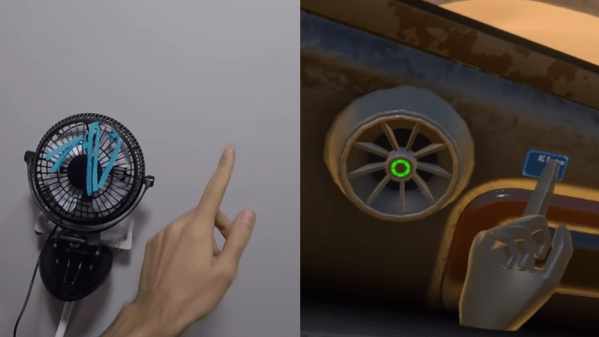
One of the more interesting ideas being experimented with in VR is 1:1 mapping of virtual and real-world objects, so that virtual representations can have physically interaction in a normal way. Tinker Pilot is a VR spaceship simulator project by [LLUÍS and JAVI] that takes this idea and runs with it, aiming for the ability to map a cockpit’s joysticks, switches, and other hardware to real-world representations. What does that mean? It means a virtual cockpit with flight sticks, levers, and switches that have working physical versions that actually exist exactly where they appear to be.

A few things about the project design caught our eye. One is the serial communications protocol intended to interface easily with microcontrollers, allowing for feedback between the program and any custom peripherals. (By the way, this is the same approach Kerbal Space Program took with KSPSerialIO, which enables custom mission control hardware at whatever level of complexity a user may wish to implement.)

The possibilities are demonstrated starting around 1:09 in the teaser trailer (embedded below) in which a custom controller is drawn up in CAD, then 3D-printed and attached to an Arduino, and finally the 3D model is imported into the cockpit as a 1:1 representation of the actual working unit, with visual positional feedback.

Unlike this chair experiment we saw which attached a Vive Tracker to a chair, there is no indication of needing positional trackers on individual controls in Tinker Pilot. In a cockpit layout, controls can be reasonably expected to remain in fixed positions relative to the cockpit, meaning that they can be set up as 1:1 representations of a physical layout and otherwise left alone. The kind of experimentation that is available today even to individual developers or small teams is remarkable, and it’s fascinating to see the ideas being given some experimentation.

Continue reading “Tinker Pilot Project Cranks Cockpit Immersion To 11” →

Pew Pew In The Palm Of Your Hand

It’s often said that “getting there is half the fun”, and we think that can be just as true when building hardware as it is during the roadtrip to your favorite hacker con. Many of us enjoy the process of planning, designing, and building a new gadget as much as playing with it when it’s done. We get the impression [Radomir Dopieralski] feels the same way, as he’s currently working on yet another iteration of his PewPew project.

For the uninitiated, [Radomir] has already created a number of devices in the PewPew line, which are designed to make programming games on “bare metal” easier and more approachable for newcomers by using CircuitPython.

The original version was a shield for the Adafruit Feather, which eventually evolved into a standalone device. The latest version, called the M4, includes many niceties such as a large TFT screen and an acrylic enclosure. It’s also switched over to the iconic Game Boy layout, to really drive home that classic gaming feel.

As [Radomir] explains, previous versions of the PewPew were designed to be as cheap and easy to manufacture as possible, since they were to be used in game programming workshops. But outside of that environment, they left a little something to be desired. With the M4, he’s created something that’s much closer to a traditional game system. In that respect it’s a bit like the Arduboy: you can still use it to learn game development, but it’s also appealing enough that you might just play other people’s games on it instead.