
Valve Reluctantly Shows How To Mod The Steam Deck

As the narrator in this official instructional video from Valve reminds the viewer several times, the gaming company would really rather you not open up your brand new Steam Deck and start poking around. They can’t guarantee that their software will function should you start changing the hardware, and since there’s no source for replacement parts yet anyway, there’s not much you can do in the way of repairs.

That said, Valve does believe you have the right to take apart your own device, and has produced the video below as an aid to those who are willing risk damaging their new system by opening it up. Specifically, the video goes over how to replace the most likely wear items on the handheld, namely the thumb sticks and the SSD. It seems inevitable that the stock thumb sticks will wear down after a couple years of hard use, so we’re glad to see they are easily removable modules. As for the SSD, it stands to reason that users would want to swap it out for faster and higher capacity models as they become available in the coming years.

Sooner or later, these are going to need to be replaced.

Now to be clear, we appreciate Valve making this video, and would love to see other manufacturers be so forthcoming. But we have to admit that some of its messaging does seem a bit heavy handed. The narrators admonition that users who open their Steam Deck are literally taking their lives into their own hands due to the danger of potentially rupturing the system’s lithium-ion battery is a bit hyperbolic for our tastes. The constant reminders of how badly you could bungle the job just comes off as overly preachy, though to be fair, we probably aren’t the intended audience.

Outside of its obvious gaming functions, we’re excited too see what the community can do with the Steam Deck. With official reference material like this, perhaps we’ll even start seeing some hardware modifications before too long. Though we wouldn’t blame you for hitting the Mute button halfway through.

Continue reading “Valve Reluctantly Shows How To Mod The Steam Deck”
DOOM Played By Tweet

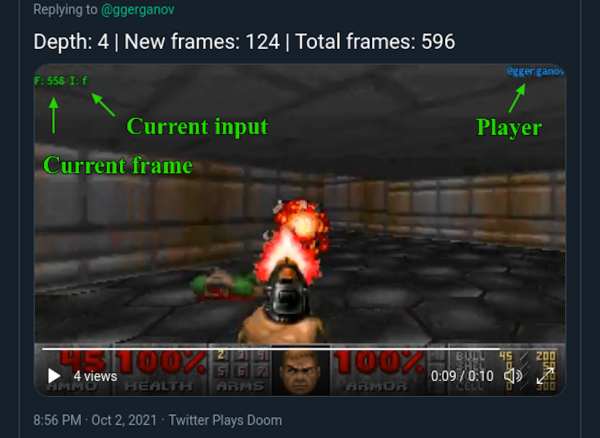
Getting DOOM to run on hardware it was never intended to run on is a tradition as old as time. Old cell phones, embedded systems, and ancient televisions have all been converted to play this classic first-person shooter. This style of playing games on old hardware might be passé now as the new trend seems to be the ability to play this game on more ethereal platforms instead. This project brings DOOM to Twitter.

The gameplay is a little nontraditional as well. To play the game, a tweet needs to be sent with specific instructions for the bot. The bot then plays the game according to its instructions and then tweets a video. By responding to this tweet with more instructions, the player can continue the game tweet-by-tweet. While slightly cumbersome, it does have the advantage of allowing a player to resume any game simply by responding to the tweet where they would like to start. Behind the scenes of the DOOM-playing Twitter bot is interesting as well and the code is available on the project’s GitHub page.

While we’ve seen plenty of DOOM instances on all kinds of hardware, it’s safe to say we’ve never really seen a gameplay experience quite like this one. It may stay as a curiosity, but DOOM porters are always looking for something else to run this classic game so it may eventually branch out or develop into something more user-friendly like this cloud-based Atari 2600.

The Ultimate BRRRT Simulator: Fully Featured A-10 Warthog Cockpit

The Fairchild Republic A-10 “Warthog” with its 30 mm rotary cannon has captured the imagination of friendly soldiers and military aviation enthusiasts on the ground for as long as it’s been flying. One such enthusiast created the Warthog Project, a fully functional A-10 cockpit for Digital Combat Simulator, that’s almost an exact copy of the real thing.

It started as a four monitor gaming cockpit, with a Thrustmaster Warthog H.O.T.A.S. The first physical instrument panels were fuel and electrical panels bought through eBay, and over time more and more panels were added and eventually moved to dedicated left and right side units. All the panels communicate with the main PC over USB, either using Arduinos or purpose-made gaming interface boards. The Arduinos take input from switches and control knobs, but also run 7-segment displays and analog dials driven by servos. The panels were all laser-cut using MDF or perspex and backlit using LEDs.

The main instrument panel is a normal monitor masked with laser-cut MDF and Thrustmaster multi-function display bezels. The cockpit is run by the open source Helios Cockpit Simulator for DCS. The main monitors were replaced by a large custom-built curved projection panel lit up by a pair of projectors. It seems this is one of those projects that is never quite finished, and small details like a compass get added from time to time. Everything is documented in detail, and all the design files are available for free if you want to build your own.

We’ve seen a few impressive simulator cockpit builds from hardcore enthusiasts over the years, including a Boeing 737, P-51 Mustang, and even a Mech cockpit for Steel Battalion. Continue reading “The Ultimate BRRRT Simulator: Fully Featured A-10 Warthog Cockpit”

A robot playing tic-tac-toe against a human

TICO Robot Plays Tic-Tac-Toe By Drawing On A Tiny Whiteboard

Tic-tac-toe (or “Noughts and Crosses”) is a game simple enough to implement in any computer system: indeed it’s often used in beginner’s programming courses. A more challenging project, and arguably more interesting and useful, is to make some kind of hardware that can play it in real life. [mircemk] built a simple yet elegant machine that can play tic-tac-toe against a human player in a way that looks quite similar to the way humans play against one another: by drawing.

The robot’s design and programming were developed at PlayRobotics, who named the project TICO. The mechanical parts are available as STL files, to be printed by any 3D printer, and a comprehensive manual explains how to assemble and program the whole thing. Since it’s all open source, anyone can build it from scratch and modify it to their liking. The pictures show the original design by PlayRobotics, while the video (embedded after the break) shows [mircemk]’s version, which includes a wooden frame that gives it a bit more presence.

Continue reading “TICO Robot Plays Tic-Tac-Toe By Drawing On A Tiny Whiteboard”

Bringing The Quake Flicker To Life With A Hacked Light

If you ever feel a pang of shame because you’ve been reusing the same snippets of code in your projects for years, don’t. Even the big names do it, as evidenced by the fact that code written to govern flickering lights back in 1996 for Quake is still being used in AAA titles like 2020’s Half-Life: Alyx. In honor of this iconic example of digital buck-passing, [Rodrigo Feliciano] thought he’d port the code in question over to the Arduino and recreate the effect in real-life.

Since the Quake engine has been released under the GPLv2, it’s easy to pull up the relevant section of the code to see how the lighting was configured. Interestingly, lighting patterns were implemented as strings, where the letters from a to z referenced how bright the light should appear. So for example, a strobe light that goes between minimum and maximum brightness would be written as “aaaaaaaazzzzzzzz”, while a flickering light could be represented with the string nmonqnmomnmomomno“.

An emergency light provided the LEDs and enclosure.

This ended up being very easy to implement on the Arduino in just a few lines, as [Rodrigo] simply had to assign each letter in the string a numerical value between 0 and 255 using map, and then use the resulting number to set the LED brightness with analogWrite.

With the code written, [Rodrigo] then had to put the hardware together. He stripped down a basic emergency light to get an array of white LEDs and a handy enclosure. He also wired up a simple transistor circuit on a scrap of perfboard so the Arduino Pro Mini could control all the LEDs from a single GPIO pin. Combined with a long USB cable to power it, and he’s got a perfect desk accessory for late-night gaming sessions.

In the video below you can see the final result, which [Rodrigo] has even synced up to footage from the classic 1996 shooter. The light makes for an interesting conversation piece, but we think the logical next step is to work this technique into an ambilight-like system to really make it feel like you’re wandering down those dimly lit corridors.

Continue reading “Bringing The Quake Flicker To Life With A Hacked Light”

Interactive Clips For Game Boy: Sit Back And Watch Or Take Control

How often does this happen to you? You find yourself describing something that happened in a game to someone, and they’re not sure they know what part of the map you’re talking about, or they’ve never gotten that far. Wouldn’t it be cool to make a bookmark in a video game so you can jump right to the beginning of the action and show your friend what you mean using the actual game?

That’s the idea behind [Joël Franusic] and [Adam Smith]’s fantastic Playable Quotes for Game Boy — clip-making that creates a 4-D nugget of gameplay that can either be viewed as a video, or played live within the bounds of the clip. The system is built on a modified version of the PyBoy emulator.

Game Boy game ROM -- complete and partial
Left: the full game ROM. Right: a bookmarked slice of the game ROM with the rest set to zero.

Basically, a Playable Quote is made up of a save state and all that entails, plus a slice of the game’s ROM that includes just enough game data to recreate an interactive clip. Everything is zipped up and steganographically encoded into a PNG file. Here’s a Tetris quote you can play (or watch) right now — you might recognize it from the post thumbnail. You’ll find the others on the games site, which allows people to create and share and build on each other’s work.

There’s so much more that can be done with this type of immersive and interactive tool outside the realm of games, and we’re excited to see where this leads and what people do with it.

Haven’t heard of PyBoy before? Let us introduce you.

Trigger assembly for PS5 controller in palm of hand

How The PS5’s Genuinely Clever Adaptive Triggers Work

Sony’s Playstation 5 console and its DualSense controllers aren’t exactly new, but the triggers of the controllers have a genuinely interesting design that is worth examining. The analog triggers on the PS5 controllers are generally described as having “variable resistance”, but it turns out that’s not the whole story. Not only is the trigger capable of variable resistance when being pressed, but it can also push back in variable ways and with varying amounts of force. How it works is pretty clever.

Trigger assembly being moved in palm of handThe feedback for the trigger assembly is handled by a lever, a geared wheel, and a worm gear on an electric motor. Under normal circumstances, nothing interferes with the trigger at all and it works like a normal analog trigger. But when the motor moves the lever into place, trigger movement now has to overcome the added interference with a mechanical disadvantage. The amount of resistance felt can be increased a surprising amount by having the motor actively apply additional force to counter the trigger’s movement.



That’s not all, either. The motor can also actively move the lever into (or out of) position, which means that pulling the trigger not only has the ability to feel smooth, mushy, or stiff in different places, but it can also actively push back. This feedback can be introduced (or removed) at any arbitrary point along the trigger’s range of motion. A trigger pull can therefore feel like it has a sharp breakpoint, a rough travel, a hard stop, an active recoil, or any combination of those at any time.

It’s a little hard to describe, but you can get a better idea of it all works in practice by watching part of this teardown by [TronicsFix] (video cued to about 9:17 where the trigger teardown begins.) It’s also embedded below, so give it a peek.

A small amount of force applied in the right place can produce outsized results, but a force feedback project doesn’t have to be subtle. One can always shake things up by mounting a whole bunch of solenoids onto a mouse.

Continue reading “How The PS5’s Genuinely Clever Adaptive Triggers Work”