This excellent content from the Hackaday writing crew highlights recurring topics and popular series like Linux-Fu, 3D-Printering, Hackaday Links, This Week in Security, Inputs of Interest, Profiles in Science, Retrotechtacular, Ask Hackaday, Teardowns, Reviews, and many more.
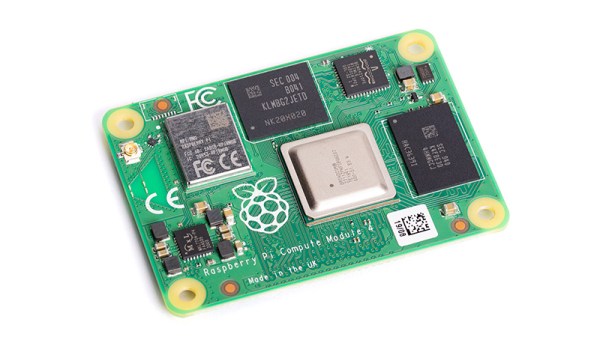
If we wanted to point to an epoch-making moment for our community, we’d take you back to February 29th, 2012. It was that day on which a small outfit in Cambridge put on the market the first batch of their new product. That outfit was what would become the Raspberry Pi Foundation, and the product was a run of 10,000 Chinese made versions of their very first single board computer, the Raspberry Pi Model B. With its BCM2835 SoC and 512 megabytes of memory it might not have been the first board that could run a Linux distribution from an SD card, but it was certainly the first that did so for pocket money prices. On that morning back in 2012 the unforseen demand for the new board brought down the websites of both the electronics distributors putting it on sale, and a now-legendary product was born. We’re now on version 4 of the Model B with specs upgraded in almost every sense, and something closer to the original can still be bought in the form of its svelte stablemate, the Pi Zero.
How Do You Evolve Without Casualties?
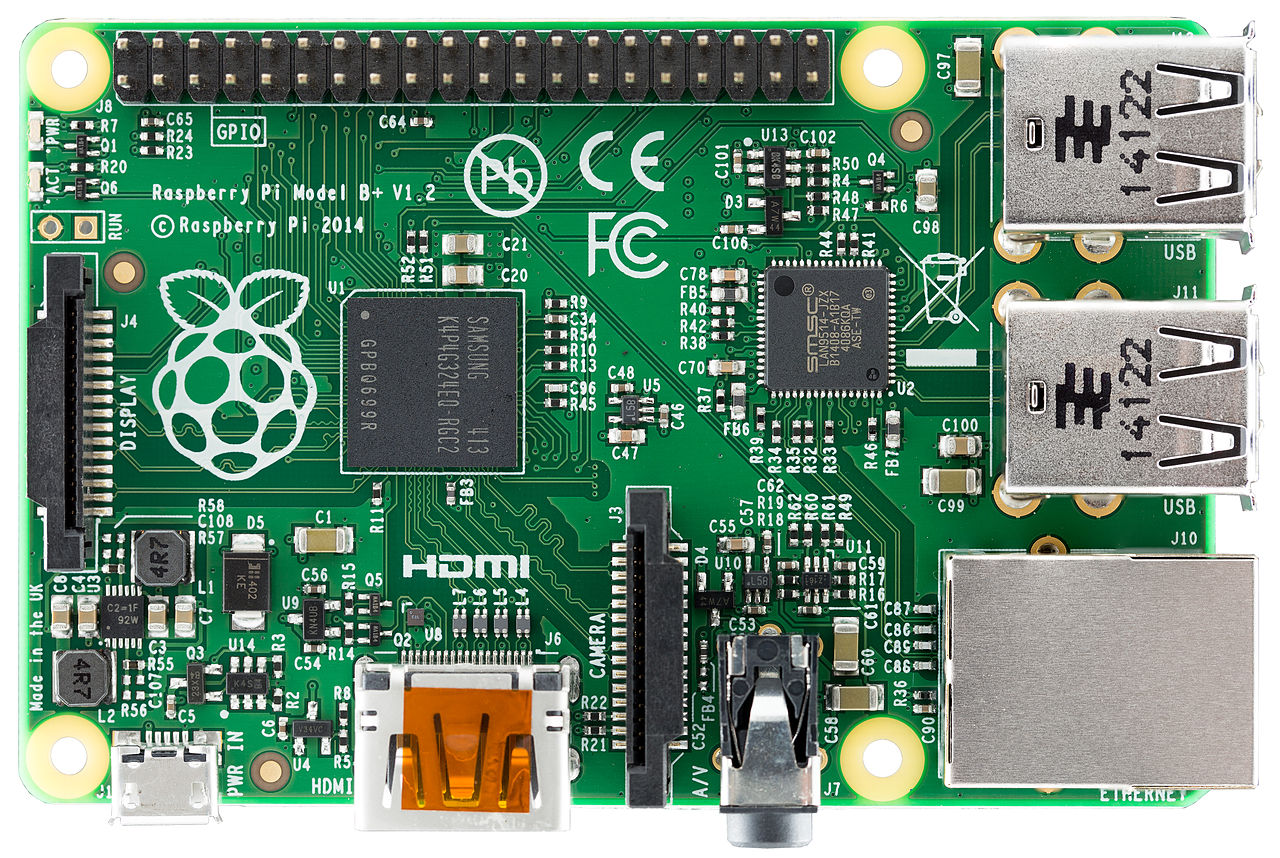
The original Pi Model B+ from 2014. The form factor has had a few minor changes, but hardware-wise the Pi 4 follows this pretty closely. Lucasbosch, CC BY-SA 3.0.
The problem with having spawned such a successful product line is this: with so many competitors and copies snapping at your heels, how do you improve upon it? It’s fair to say that sometimes its competitors have produced more capable hardware than the Pi of the moment, but they do so without the board from Cambridge’s ace in the hole: its uniquely well-supported Linux distribution, Raspberry Pi OS. It’s that combination of a powerful board and an operating system with the minimum of shocks and surprises that still makes the Pi the one to go for after all these years.
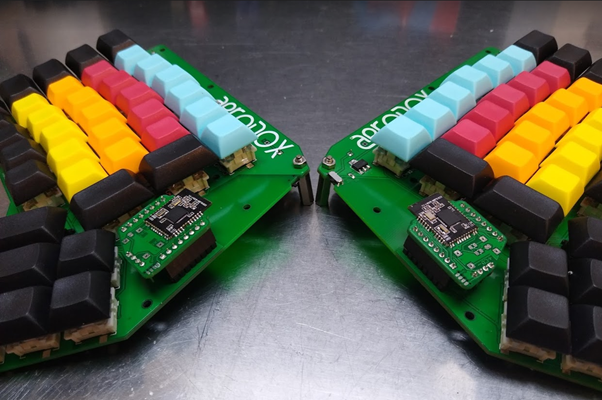
[Simon Merrett] didn’t know anything about keyboards when he started this project, but he didn’t let that stop him. [Simon] did what any of us would do — figure out what you like, learn enough to be dangerous, and then start fiddling around, taking all that inspiration and making a mashup of influences that suits your needs.
The Aerodox design became a cross between the ErgoDox‘s key layout and the logic and communication of the Redox Wireless, itself a reduced-size version of the ErgoDox. Interestingly, [Simon] chose the ErgoDox’s dimensions and spacing, and not those of the Redox. Like a lot of people out there, I found the ErgoDox to be too big for my hands, mostly in that the thumb cluster is too far away from the mainland. It’s nice to see that it suits some people, though.
[Simon] worked up a custom hot-swap footprint that makes the board reversible, much like the ErgoDox. Each half has an NRF51822 for a brain, and there’s a third one that acts as a receiver. This external NRF board is connected over UART to an Arduino Pro Micro, which acts as the USB HID and runs QMK. It’s an interesting journey for sure, so go dig into the logs.
It seems that few features of a consumer electronic product will generate as much rancour as a mobile phone charger socket. For those of us with Android phones, the world has slowly been moving over the last few years from micro-USB to USB-C, while iPhone users regard their Lightning connector as the ultimate in connectivity. Get a set of different phone owners together and this can become a full-on feud, as micro-USB owners complain that nobody has a handy charging cable any more, USB-C owners become smug bores, and Apple owners do what they’ve always done and pretend that Steve Jobs invented USB. Throwing a flaming torch into this incendiary mix is the European Union, which is proposing to mandate the use of USB-C on all phones sold in its 27 member nations with the aim of reducing considerably the quantity of e-waste generated.
Minor annoyances over having to carry an extra micro-USB cable for an oddball device aside, we can’t find any reason not to applaud this move, because USB-C is a connector born of several decades of USB evolution and brings with it not only the reversible plug but also the enhanced power delivery standards that enable fast charging no matter whose USB-PD charger you are using. Mandating USB-C will put an end to needlessly overpriced proprietary cables, and bring eventual unity to a fractured world. Continue reading “Showdown Time For Non-Standard Chargers In Europe”→
Join us on Wednesday, October 13 at noon Pacific for the Resin Printing Hack Chat with Andrew Sink!
At its heart, 3D printing is such a simple idea that it’s a wonder nobody thought of it sooner. Granted, fused deposition modeling does go back to the 80s, and the relatively recent explosion in cheap, mass-market FDM printers has more to do with cheap components than anything else. But really, at the end of the day, commodity 3D printers are really not much more than glorified hot-glue guns, and while they’re still a foundational technology of the maker movement, they’ve gotten a bit dull.
So it’s natural that we in this community would look for other ways to push the 3D printing envelope, and stereolithography has become the new hotness. And with good reason — messy though it may be, the ability to gradually pull a model from a tank of goo by selective photopolymerization looks magical, and the fine level of detail resin printers are capable of is just as enchanting. So too are the prices of resin printers, which are quickly becoming competitive with commodity FDM printers.
If there’s a resin printer in your future, then you’ll want to swing by the Hack Chat when Andrew Sink visits us. Andrew has been doing a lot of 3D printing stuff in general, and resin printing in particular, over on his YouTube channel lately. We’ve featured a couple of his tricks and hacks for getting the most from a resin printer, and he’ll be sharing some of what he has learned lately. Join us as we discuss the ins and outs of resin printing, what’s involved in taking the dive, and the pros and cons of SLA versus FDM.
We have to admit, it was hard not to be insufferably smug this week when Facebook temporarily went dark around the globe. Sick of being stalked by crazy aunts and cousins, I opted out of that little slice of cyber-hell at least a decade ago, so Monday’s outage was no skin off my teeth. But it was nice to see that the world didn’t stop turning. More interesting are the technical postmortems on the outage, particularly this great analysis by the good folks at the University of Nottingham. Dr. Steve Bagley does a great job explaining how Facebook likely pushed a configuration change to the Border Gateway Protocol (BGP) that propagated through the Internet and eventually erased all routes to Facebook’s servers from the DNS system. He also uses a graphical map of routes to show peer-to-peer connections to Facebook dropping one at a time, until their machines were totally isolated. He also offers speculation on why Facebook engineers were denied internal access, sometimes physically, to their own systems.
It may be a couple of decades overdue, but the US Federal Communications Commission finally decided to allow FM voice transmissions on Citizen’s Band radios. It seems odd to be messing around with a radio service whose heyday was in the 1970s, but Cobra, the CB radio manufacturer, petitioned for a rule change to allow frequency modulation in addition to the standard amplitude modulation that’s currently mandatory. It’s hard to say how this will improve the CB user experience, which last time we checked is a horrifying mix of shouting, screaming voices often with a weird echo effect, all put through powerful — and illegal — linear amps that distort the signal beyond intelligibility. We can’t see how a little less static is going to improve that.
Can you steal a car with a Game Boy? Probably not, but car thieves in the UK are using some sort of device hidden in a Game Boy case to boost expensive cars. A group of three men in Yorkshire used the device, which supposedly cost £20,000 ($27,000), to wirelessly defeat the security systems on cars in seconds. They stole cars for garages and driveways to the tune of £180,000 — not a bad return on their investment. It’s not clear how the device works, but we’d love to find out — for science, of course.
There have been tons of stories lately about all the things AI is good for, and all the magical promises it will deliver on given enough time. And it may well, but we’re still early enough in the AI hype curve to take everything we see with a grain of salt. However, one area that bears watching is the ability of AI to help fill in the gaps left when an artist is struck down before completing their work. And perhaps no artist left so much on the table as Ludwig von Beethoven, with his famous unfinished 10th Symphony. When the German composer died, he had left only a few notes on what he wanted to do with the four-movement symphony. But those notes, along with a rich body of other works and deep knowledge of the composer’s creative process, have allowed a team of musicologists and AI experts to complete the 10th Symphony. The article contains a lot of technical detail, both on the musical and the informatics sides. How will it sound? Here’s a preview:
And finally, Captain Kirk is finally getting to space. William Shatner, who played captain — and later admiral — James Tiberius Kirk from the 1960s to the 1990s, will head to space aboard Blue Origin’s New Shepard rocket on Tuesday. At 90 years old, Shatner will edge out Wally Funk, who recently set the record after her Blue Origin flight at the age of 82. It’s interesting that Shatner agreed to go, since he is said to have previously refused the offer of a ride upstairs with Virgin Galactic. Whatever the reason for the change of heart, here’s hoping the flight goes well.
The open source world and Chinese manufacturing have a long relationship. Some fifteen years ago, the big topic was how companies could open-source their hardware designs and not get driven bankrupt by competition from overseas. Companies like Sparkfun, Adafruit, Arduino, Maple Labs, Pololu, and many more demonstrated that this wasn’t impossible after all.
Maybe ten years ago, Chinese firms started picking up interesting hacker projects and producing them. This gave us hits like the AVR transistor tester and the NanoVNA. In the last few years, we’ve seen open-source hardware and software projects that have deliberately targeted Chinese manufacturers, and won. We do the design and coding, they do the manufacturing, sales, and distribution.
But this is something else: the Bangle.js watch takes an essentially mediocre Chinese smartwatch and reflashes the firmware, and sells them as open-source smartwatches to the general public. These pre-hacked watches are being sold on Kickstarter, and although the works stands on the shoulders of previous hacker’s reverse engineering work on the non-open watch hardware, it’s being sold by the prime mover behind the Espruino JavaScript-on-embedded language, which it runs on.
We have a cheap commodity smartwatch, being sold with frankly mediocre firmware, taken over by hackers, re-flashed, re-branded, and sold by the hackers on Kickstarter. As a result of it being (forcibly) opened, there’s a decently sized app store of contributed open-source applications that’ll run on the platform, making it significantly more useful and hacker friendly than it was before.
Will this boost sales? Will China notice the hackers’ work? Will this, and similar projects, end up in yet another new hacker/China relationship? We’re watching.
This article is part of the Hackaday.com newsletter, delivered every seven days for each of the last 200+ weeks. It also includes our favorite articles from the last seven days that you can see on the web version of the newsletter.
Want this type of article to hit your inbox every Friday morning? You should sign up!
Hackaday editors Tom Nardi and Elliot Williams bring you up to speed on the most interesting stories of the week. Hackaday’s Remoticon and Germany’s Chaos Communication Congress are virtual again this year, but the Vintage Computer Festival will be live. We’ll also talk about ocean-going drones, the recreation of an old-school light bulb with a potato peeler, cheap smart watches with hidden potential, and sanding down shady modules to figure out just how you’ve been scammed. Stick around for some thoughts on turning real-estate signs into a handy prototyping material, and to find out why some very impressive Soviet tech is getting the boot from America’s space program.
Take a look at the links below if you want to follow along, and as always, tell us what you think about this episode in the comments!